Twitter関連Twitter関連のMootoolsプラグイン

- MooTools TwitterGitter Plugin〔Mootoolsを使用して指定したユーザーのつぶやきを表示〕
- Unobtrusive Twitter and Delicious feeds using MooTools〔Mootoolsを使用して指定したユーザーのTwitterのつぶやきを表示する方法〕
MooTools TwitterGitter Plugin
Mootoolsを使用して指定したユーザーのつぶやきを表示
2009/7/1
MooTools TwitterGitter Plugin
mootools.js v1.2.1、jsonp.js
指定したユーザーのフィードを取得し、Webページに最近のつぶやきを5件フォーマットして埋め込むMootoolsプラグイン。 Twitterのユーザー名を入力し、【Git】ボタンをクリックすると、該当するユーザーのつぶやきが最新の5件だけ表示されます。
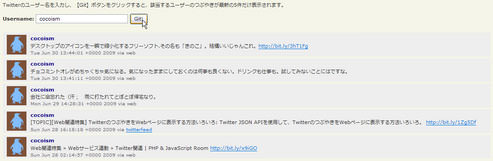
設置サンプルサンプルを見る
<!DOCTYPE html PUBLIC "-//W3C//DTD XHTML 1.0 Transitional//EN" "http://www.w3.org/TR/xhtml1/DTD/xhtml1-transitional.dtd">
<html xmlns="http://www.w3.org/1999/xhtml" xml:lang="ja" lang="ja">
    <head>
        <meta http-equiv="Content-Type" content="text/html; charset=utf-8" />
        <meta http-equiv="Content-Language" content="ja" />
        <meta http-equiv="Content-Script-Type" content="text/javascript" />
        <meta http-equiv="Content-Style-Type" content="text/css" />
        <meta http-equiv="imagetoolbar" content="no" />
        <title>MooTools TwitterGitter Plugin | 設置サンプル</title>
        <link rel="stylesheet" type="text/css" href="/content/lib/global.css" />
        <!-- JS -->
        <script type="text/javascript" src="http://ajax.googleapis.com/ajax/libs/mootools/1.2.1/mootools.js"></script>
        <script type="text/javascript" src="/content/lib/mootools/jsonp.js"></script>
        <script type="text/javascript">
            var TwitterGitter = new Class({
                //implements
                Implements: [Options,Events],
                //options
                options: {
                    count: 2,
                    sinceID: 1,
                    link: true,
                    onRequest: $empty,
                    onComplete: $empty
                },
                //initialization
                initialize: function(username,options) {
                    //set options
                    this.setOptions(options);
                    this.info = {};
                    this.username = username;
                },
                //get it!
                retrieve: function() {
                    new JsonP('http://twitter.com/statuses/user_timeline/' + this.username + '.json',{
                        data: {
                            count: this.options.count,
                            since_id: this.options.sinceID
                        },
                        onRequest: this.fireEvent('request'),
                        onComplete: function(data) {
                            //linkify?
                            if(this.options.link) {
                                data.each(function(tweet) { tweet.text = this.linkify(tweet.text); },this);
                            }
                            //complete!
                            this.fireEvent('complete',[data,data[0].user]);
                        }.bind(this)
                    }).request();
                    return this;
                },
                //format
                linkify: function(text) {
                    //courtesy of Jeremy Parrish (rrish.org)
                    return text.replace(/(https?:\/\/\S+)/gi,'<a href="$1">$1</a>').replace(/(^|\s)@(\w+)/g,'$1<a href="http://twitter.com/$2">@$2</a>').replace(/(^|\s)#(\w+)/g,'$1#<a href="http://search.twitter.com/search?q=%23$2">$2</a>');
                }
            });
            /* usage */
            window.addEvent('domready',function() {
                $('git').addEvent('click',function(e) {
                    e.stop();
                    $('tweets-here').set('html','');
                    //get information
                    var myTwitterGitter = new TwitterGitter($('username').value,{
                        count: 5,
                        onComplete: function(tweets,user) {
                            tweets.each(function(tweet,i) {
                                new Element('div',{
                                    html: '<img src="' + user.profile_image_url.replace("\\",'') + '" align="left" alt="' + user.name + '" /> <strong>' + user.name + '</strong><br>' + tweet.text + '<br><span>' + tweet.created_at + ' via ' + tweet.source.replace("\\",'') + '</span>',
                                    'class': 'tweet clear'
                                }).inject('tweets-here');
                            });
                        }
                    }).retrieve();
                });
            });
        </script>
        <!-- CSS -->
        <style type="text/css">
            #tweets-here    { margin:20px 0 0 0; }
            .tweet            { padding:5px 10px; height:48px; clear:both; margin:5px 0; background:#eee; }
            .tweet img        { margin-right:10px; }
            .tweet strong    { color:navy; }
            .tweet span        { font-size:11px; color:#666; }
        </style>
    </head>
    <body>
        <div id="wrap">
            <h1><a href='http://davidwalsh.name/mootools-twitter-plugin'>MooTools TwitterGitter Plugin</a> | 設置サンプル</h1>
            <p>    Twitterのユーザー名を入力し、【Git】ボタンをクリックすると、該当するユーザーのつぶやきが最新の5件だけ表示されます。</p>
<!-- CODE -->
            <form action="" method="get">
                <strong>Username:</strong>
                <input name="username" id="username" size="30" />
                <input type="submit" id="git" class="button" value="Git!" />
            </form>
            <div id="tweets-here"></div>
<!-- / CODE -->
        </div>
    </body>
</html>
Unobtrusive Twitter and Delicious feeds using MooTools
Mootoolsを使用して指定したユーザーのTwitterのつぶやきを表示する方法
2009/7/1
Unobtrusive Twitter and Delicious feeds using MooTools
mootools.js v1.2.2、mootools-1.2.2.2-more.more.log.jsonp.js
Mootoolsを使用して、指定したユーザーのTwitterとDeliciousのフィールドを取得して、Webページに埋め込む方法が掲載されています。 APIをたたくURLが間違っていたり、要素を取得する部分が間違っていたので一部修正しました。
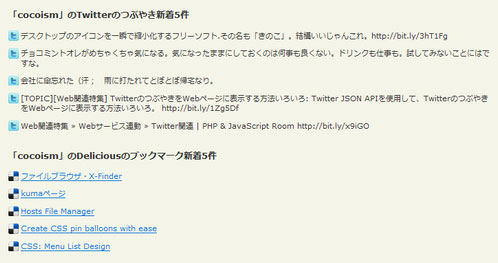
設置サンプルサンプルを見る
<!DOCTYPE html PUBLIC "-//W3C//DTD XHTML 1.0 Transitional//EN" "http://www.w3.org/TR/xhtml1/DTD/xhtml1-transitional.dtd">
<html xmlns="http://www.w3.org/1999/xhtml" xml:lang="ja" lang="ja">
    <head>
        <meta http-equiv="Content-Type" content="text/html; charset=utf-8" />
        <meta http-equiv="Content-Language" content="ja" />
        <meta http-equiv="Content-Script-Type" content="text/javascript" />
        <meta http-equiv="Content-Style-Type" content="text/css" />
        <meta http-equiv="imagetoolbar" content="no" />
        <title>Unobtrusive Twitter and Delicious feeds using MooTools | 設置サンプル</title>
        <link rel="stylesheet" type="text/css" href="/content/lib/global.css" />
        <!-- JS -->
        <script type="text/javascript" src="http://www.google.com/jsapi"></script>
        <script type="text/javascript">google.load("mootools", "1.2.2");</script>
        <script type="text/javascript" src="/content/lib/mootools/mootools-1.2.2.2-more.more.log.jsonp.js"></script>
        <script type="text/javascript">
            window.addEvent('domready', function() {
                // Twitter JSONP request
                var myTwitterRequest = new Request.JSONP({
                    url: 'http://twitter.com/status/user_timeline/cocoism.json',
                    data: {
                        count: '5'
                    },
                    noCache: true,
                    onComplete: function(myTweets) {
                        var el = $('twitter-post'); // 直した
                        el.empty();
                        myTweets.each(function(tweet) {
                            var myElement = new Element('li',{
                                html:  '<p>' + tweet.text + '</p>'
                            }).injectInside(el); // 直した
                        });
                    }
                }).send();

                // Delicious JSONP request
                var myDeliciousRequest = new Request.JSONP({
                    url: 'http://feeds.delicious.com/v2/json/cocoism',
                    data: {
                        count: '5'
                    },
                    noCache: true,
                    onComplete: function(myBookmarks) {
                        var el = $('delicious-links'); // 直した
                        el.empty();
                        myBookmarks.each(function(bookmark) {
                            var myElement = new Element('li',{
                                html:  '<a href="' + bookmark.u + '">' + bookmark.d + '</a><p>' + bookmark.n + '</p>'
                            }).injectInside(el); // 直した
                        });
                    }
                }).send();
            });
        </script>
        <style type="text/css">
            ul,li {
                margin:0 0 10px 0; padding:0;
                list-style:none;
            }
            #twitter-post li {
                background:transparent url(/content/img/sbm/twitter_16.png) no-repeat 0 0;
                padding-left:20px;
                line-height:16px;
            }
            #delicious-links li {
                background:transparent url(/content/img/sbm/delicious_16.png) no-repeat 0 0;
                padding-left:20px;
                line-height:16px;
            }
        </style>
    </head>
    <body>
        <div id="wrap">
            <h1><a href='http://www.alexgdesign.co.uk/articles/unobtrusive-twitter-delicious-mootools/index.html'>Unobtrusive Twitter and Delicious feeds using MooTools</a> | 設置サンプル</h1>
<!-- CODE -->
            <h2>「cocoism」のTwitterのつぶやき新着5件</h2>
            <ul id="twitter-post">
                <li><a href="http://twitter.com/cocoism">View my Twitter updates</a></li>
            </ul>

            <h2>「cocoism」のDeliciousのブックマーク新着5件</h2>
            <ul id="delicious-links">
                <li><a href="http://twitter.com/cocoism">View my Delicious bookmarks</a></li>
            </ul>
<!-- / CODE -->
        </div>
    </body>
</html>

