jQuery APIリファレンスDOM要素:基本フィルター

:first
最初の要素を選択
2009/2/27
戻り値:配列<要素>
親要素の最初の要素を選択します。
⇒各親要素ごとに最初の要素を選択する場合は、:first-childを使用してください。
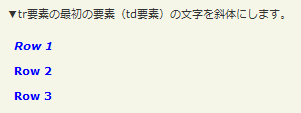
:firstの使用例サンプルを見る
<!DOCTYPE html PUBLIC "-//W3C//DTD XHTML 1.0 Transitional//EN" "http://www.w3.org/TR/xhtml1/DTD/xhtml1-transitional.dtd">
<html xmlns="http://www.w3.org/1999/xhtml" xml:lang="ja" lang="ja">
    <head>
        <meta http-equiv="Content-Type" content="text/html; charset=utf-8" />
        <meta http-equiv="Content-Language" content="ja" />
        <meta http-equiv="Content-Script-Type" content="text/javascript" />
        <meta http-equiv="Content-Style-Type" content="text/css" />
        <meta http-equiv="imagetoolbar" content="no" />
        <title>DOM要素:基本フィルター:「:first」の使用例 | jQuery</title>
        <link rel="stylesheet" type="text/css" href="/content/lib/global.css" />
        <!-- JS -->
        <script type="text/javascript" src="http://ajax.googleapis.com/ajax/libs/jquery/1.3.2/jquery.min.js"></script>
        <script type="text/javascript">
            $(function(){
                $("tr:first").css("font-style","italic");
            });
        </script>
        <style type="text/css">
            td { color:blue; font-weight:bold; }
         </style>
    </head>
    <body>
        <div id="wrap">
            <h1>DOM要素:基本フィルター:「:first」の使用例 | jQuery</h1>
            <p>▼tr要素の最初の要素(td要素)の文字を斜体にします。</p>
<!-- CODE -->
            <table>
                <tr><td>Row 1</td></tr>
                <tr><td>Row 2</td></tr>
                <tr><td>Row 3</td></tr>
            </table>
<!-- CODE / -->
        </div>
    </body>
</html>
リスト要素の装飾
参照:Sexy Ordered Lists with CSS
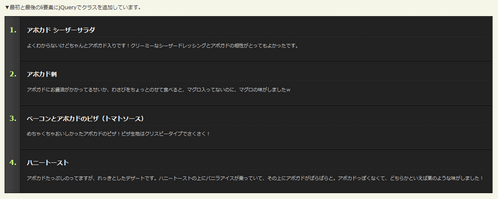
:firstの使用例サンプルを見る
<!DOCTYPE html PUBLIC "-//W3C//DTD XHTML 1.0 Transitional//EN" "http://www.w3.org/TR/xhtml1/DTD/xhtml1-transitional.dtd">
<html xmlns="http://www.w3.org/1999/xhtml" xml:lang="ja" lang="ja">
    <head>
        <meta http-equiv="Content-Type" content="text/html; charset=utf-8" />
        <meta http-equiv="Content-Language" content="ja" />
        <meta http-equiv="Content-Script-Type" content="text/javascript" />
        <meta http-equiv="Content-Style-Type" content="text/css" />
        <meta http-equiv="imagetoolbar" content="no" />
        <title>DOM要素:基本フィルター:「:first」の使用例 | jQuery</title>
        <link rel="stylesheet" type="text/css" href="/content/lib/global.css" />
        <!-- JS -->
        <script type="text/javascript" src="http://ajax.googleapis.com/ajax/libs/jquery/1.3.2/jquery.min.js"></script>
        <script type="text/javascript">
            $(function(){
                $("ol.steps li:first").addClass("first");
                $("ol.steps li:last").addClass("last");
            });
        </script>
        <style type="text/css">
            ol.steps {
                margin:0; padding:0 0 0 35px;
                background:#333;
                border:1px solid #111;
                background:url(/content/img/ajax/ul_bg_repeat.gif) repeat-y;
            }
            ol.steps li {
                margin:0; padding:15px;
                color:#cbff78;
                font-size:1.3em;
                font-weight:bold;
                border-top:1px solid #000;
                border-bottom:1px solid #353535;
                border-right:1px solid #333;
                border-left:1px solid #151515;
                background:#222;
            }
            ol.steps li h3 {
                font-size:0.9em;
                margin:0 0 10px 0; padding:5px 0;
                border-bottom:1px dashed #333;
                color:#fff;
            }
            ol.steps li p {
                color:#ccc;
                font-size:0.7em;
                font-weight:normal;
                line-height:1.6em;
            }
            ol.steps li.first { border-top:1px solid #333; }
            ol.steps li.last  { border-bottom:none; }
        </style>
    </head>
    <body>
        <div id="wrap">
            <h1>DOM要素:基本フィルター:「:first」の使用例 | jQuery</h1>
            <p>参照:<a href='http://www.sohtanaka.com/web-design/css-ordered-list-enhancement-tutorial/'>Sexy Ordered Lists with CSS</a></p>
            <p>▼最初と最後のli要素にjQueryでクラスを追加しています。</p>
<!-- CODE -->
            <ol class="steps">
                <li>
                    <h3>アボカド シーザーサラダ</h3>
                    <p>よくわからないけどちゃんとアボガド入りです!クリーミーなシーザードレッシングとアボガドの相性がとってもよかったです。</p>
                </li>
                <li>
                    <h3>アボカド刺</h3>
                    <p>アボガドにお醤油がかかってるせいか、わさびをちょっとのせて食べると、マグロ入ってないのに、マグロの味がしましたw</p>
                </li>
                <li>
                    <h3>ベーコンとアボカドのピザ(トマトソース)</h3>
                    <p>めちゃくちゃおいしかったアボカドのピザ!ピザ生地はクリスピータイプでさくさく!</p>
                </li>
                <li>
                    <h3>ハニートースト</h3>
                    <p>アボカドたっぷしのってますが、れっきとしたデザートです。ハニートーストの上にバニラアイスが乗っていて、その上にアボガドがぱらぱらと。アボカドっぽくなくて、どちらかといえば栗のような味がしました!</p>
                </li>
            </ol>
<!-- CODE / -->
        </div>
    </body>
</html>
:last
最後の要素を選択
2009/2/27
戻り値:配列<要素>
親要素の最後の要素を選択します。
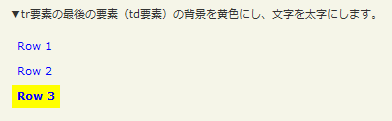
:lastの使用例サンプルを見る
<!DOCTYPE html PUBLIC "-//W3C//DTD XHTML 1.0 Transitional//EN" "http://www.w3.org/TR/xhtml1/DTD/xhtml1-transitional.dtd">
<html xmlns="http://www.w3.org/1999/xhtml" xml:lang="ja" lang="ja">
    <head>
        <meta http-equiv="Content-Type" content="text/html; charset=utf-8" />
        <meta http-equiv="Content-Language" content="ja" />
        <meta http-equiv="Content-Script-Type" content="text/javascript" />
        <meta http-equiv="Content-Style-Type" content="text/css" />
        <meta http-equiv="imagetoolbar" content="no" />
        <title>DOM要素:基本フィルター:「:last」の使用例 | jQuery</title>
        <link rel="stylesheet" type="text/css" href="/content/lib/global.css" />
        <!-- JS -->
        <script type="text/javascript" src="http://ajax.googleapis.com/ajax/libs/jquery/1.3.2/jquery.min.js"></script>
        <script type="text/javascript">
            $(function(){
                $("tr:last").css({
                    "background-color":"yellow",
                    "font-weight":"bold"
                });
            });
        </script>
        <style type="text/css">
            td { color:blue; }
         </style>
    </head>
    <body>
        <div id="wrap">
            <h1>DOM要素:基本フィルター:「:last」の使用例 | jQuery</h1>
            <p>▼tr要素の最後の要素(td要素)の背景を黄色にし、文字を太字にします。</p>
<!-- CODE -->
            <table>
                <tr><td>Row 1</td></tr>
                <tr><td>Row 2</td></tr>
                <tr><td>Row 3</td></tr>
            </table>
<!-- CODE / -->
        </div>
    </body>
</html>
:not
指定したセレクタ以外の要素を選択
2009/2/27
戻り値:配列<要素>
指定したセレクタ以外の要素を選択します。
jQuery v1.3からは、not(div,a)のようなコンマ区切りのセレクタや、not(div a)のような複合セレクタも指定可能です。
第1引数selectorには、取り除くセレクタを指定します。
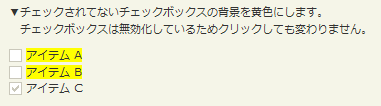
:not(selector)の使用例サンプルを見る
<!DOCTYPE html PUBLIC "-//W3C//DTD XHTML 1.0 Transitional//EN" "http://www.w3.org/TR/xhtml1/DTD/xhtml1-transitional.dtd">
<html xmlns="http://www.w3.org/1999/xhtml" xml:lang="ja" lang="ja">
    <head>
        <meta http-equiv="Content-Type" content="text/html; charset=utf-8" />
        <meta http-equiv="Content-Language" content="ja" />
        <meta http-equiv="Content-Script-Type" content="text/javascript" />
        <meta http-equiv="Content-Style-Type" content="text/css" />
        <meta http-equiv="imagetoolbar" content="no" />
        <title>DOM要素:基本フィルター:「:not」の使用例 | jQuery</title>
        <link rel="stylesheet" type="text/css" href="/content/lib/global.css" />
        <!-- JS -->
        <script type="text/javascript" src="http://ajax.googleapis.com/ajax/libs/jquery/1.3.2/jquery.min.js"></script>
        <script type="text/javascript">
            $(function(){
                /* チェックされていないinput要素のspan要素の背景色を黄色にする */
                $("input:not(:checked) + span").css("background-color","yellow");
                /* input要素を無効化する */
                $("input").attr("disabled","disabled");
            });
        </script>
    </head>
    <body>
        <div id="wrap">
            <h1>DOM要素:基本フィルター:「:not」の使用例 | jQuery</h1>
            <p>▼チェックされてないチェックボックスの背景を黄色にします。<br> チェックボックスは無効化しているためクリックしても変わりません。</p>
<!-- CODE -->
            <div>
                <input type="checkbox" name="a" />
                <span>アイテム A</span>
            </div>
            <div>
                <input type="checkbox" name="b" />
                <span>アイテム B</span>
            </div>
            <div>
                <input type="checkbox" name="c" checked="checked" />
                <span>アイテム C</span>
            </div>
<!-- CODE / -->
        </div>
    </body>
</html>
:even
インデックス番号が偶数の要素を選択
2009/2/27
戻り値:配列<要素>
要素のインデックス番号が、0、2、4など偶数である要素を選択します。
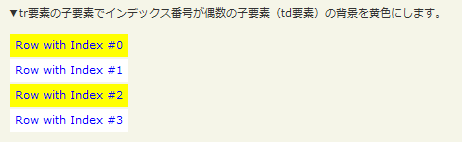
:evenの使用例サンプルを見る
<!DOCTYPE html PUBLIC "-//W3C//DTD XHTML 1.0 Transitional//EN" "http://www.w3.org/TR/xhtml1/DTD/xhtml1-transitional.dtd">
<html xmlns="http://www.w3.org/1999/xhtml" xml:lang="ja" lang="ja">
    <head>
        <meta http-equiv="Content-Type" content="text/html; charset=utf-8" />
        <meta http-equiv="Content-Language" content="ja" />
        <meta http-equiv="Content-Script-Type" content="text/javascript" />
        <meta http-equiv="Content-Style-Type" content="text/css" />
        <meta http-equiv="imagetoolbar" content="no" />
        <title>DOM要素:基本フィルター:「:even」の使用例 | jQuery</title>
        <link rel="stylesheet" type="text/css" href="/content/lib/global.css" />
        <!-- JS -->
        <script type="text/javascript" src="http://ajax.googleapis.com/ajax/libs/jquery/1.3.2/jquery.min.js"></script>
        <script type="text/javascript">
            $(function(){
                /* tr要素の子要素でインデックス番号が偶数の子要素(td要素)の背景を黄色にする */
                $("tr:even").css("background-color","yellow");
            });
        </script>
        <style type="text/css">
            tr { background-color:#fff; }
            td { color:blue; }
         </style>
    </head>
    <body>
        <div id="wrap">
            <h1>DOM要素:基本フィルター:「:even」の使用例 | jQuery</h1>
            <p>▼tr要素の子要素でインデックス番号が偶数の子要素(td要素)の背景を黄色にします。</p>
<!-- CODE -->
<table>
    <tr><td>Row with Index #0</td></tr>
    <tr><td>Row with Index #1</td></tr>
    <tr><td>Row with Index #2</td></tr>
    <tr><td>Row with Index #3</td></tr>
</table>
<!-- CODE / -->
        </div>
    </body>
</html>
:odd
インデックス番号が奇数の要素を選択
2009/2/27
戻り値:配列<要素>
要素のインデックス番号が、1、3、5など奇数である要素を選択します。
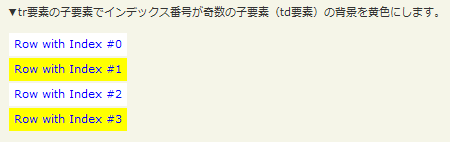
:oddの使用例サンプルを見る
<!DOCTYPE html PUBLIC "-//W3C//DTD XHTML 1.0 Transitional//EN" "http://www.w3.org/TR/xhtml1/DTD/xhtml1-transitional.dtd">
<html xmlns="http://www.w3.org/1999/xhtml" xml:lang="ja" lang="ja">
    <head>
        <meta http-equiv="Content-Type" content="text/html; charset=utf-8" />
        <meta http-equiv="Content-Language" content="ja" />
        <meta http-equiv="Content-Script-Type" content="text/javascript" />
        <meta http-equiv="Content-Style-Type" content="text/css" />
        <meta http-equiv="imagetoolbar" content="no" />
        <title>DOM要素:基本フィルター:「:odd」の使用例 | jQuery</title>
        <link rel="stylesheet" type="text/css" href="/content/lib/global.css" />
        <!-- JS -->
        <script type="text/javascript" src="http://ajax.googleapis.com/ajax/libs/jquery/1.3.2/jquery.min.js"></script>
        <script type="text/javascript">
            $(function(){
                /* tr要素の子要素でインデックス番号が奇数の子要素(td要素)の背景を黄色にする */
                $("tr:odd").css("background-color","yellow");
            });
        </script>
        <style type="text/css">
            tr { background-color:#fff; }
            td { color:blue; }
         </style>
    </head>
    <body>
        <div id="wrap">
            <h1>DOM要素:基本フィルター:「:odd」の使用例 | jQuery</h1>
            <p>▼tr要素の子要素でインデックス番号が奇数の子要素(td要素)の背景を黄色にします。</p>
<!-- CODE -->
<table>
    <tr><td>Row with Index #0</td></tr>
    <tr><td>Row with Index #1</td></tr>
    <tr><td>Row with Index #2</td></tr>
    <tr><td>Row with Index #3</td></tr>
</table>
<!-- CODE / -->
        </div>
    </body>
</html>
:eq
指定したインデックス番号の要素を選択
2009/2/27
戻り値:配列<要素>
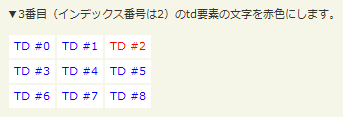
指定したインデックス番号の要素を選択します。
第1引数indexには、選択する要素のインデックス番号(0始まり)を指定します。
:eq(index)の使用例サンプルを見る
<!DOCTYPE html PUBLIC "-//W3C//DTD XHTML 1.0 Transitional//EN" "http://www.w3.org/TR/xhtml1/DTD/xhtml1-transitional.dtd">
<html xmlns="http://www.w3.org/1999/xhtml" xml:lang="ja" lang="ja">
    <head>
        <meta http-equiv="Content-Type" content="text/html; charset=utf-8" />
        <meta http-equiv="Content-Language" content="ja" />
        <meta http-equiv="Content-Script-Type" content="text/javascript" />
        <meta http-equiv="Content-Style-Type" content="text/css" />
        <meta http-equiv="imagetoolbar" content="no" />
        <title>DOM要素:基本フィルター:「:eq(index)」の使用例 | jQuery</title>
        <link rel="stylesheet" type="text/css" href="/content/lib/global.css" />
        <!-- JS -->
        <script type="text/javascript" src="http://ajax.googleapis.com/ajax/libs/jquery/1.3.2/jquery.min.js"></script>
        <script type="text/javascript">
            $(function(){
                /* 3つめのtd要素の文字を赤色にする */
                /* インデックス番号は0始まりなので「2」を指定 */
                $("td:eq(2)").css("color","red");
            });
        </script>
        <style type="text/css">
            tr { background-color:#fff; }
            td { color:blue; }
         </style>
    </head>
    <body>
        <div id="wrap">
            <h1>DOM要素:基本フィルター:「:eq(index)」の使用例 | jQuery</h1>
            <p>▼3番目(インデックス番号は2)のtd要素の文字を赤色にします。</p>
<!-- CODE -->
<table>
    <tr><td>TD #0</td><td>TD #1</td><td>TD #2</td></tr>
    <tr><td>TD #3</td><td>TD #4</td><td>TD #5</td></tr>
    <tr><td>TD #6</td><td>TD #7</td><td>TD #8</td></tr>
</table>
<!-- CODE / -->
        </div>
    </body>
</html>
:gt
指定したインデックス番号より大きいインデックス番号を持つ要素をすべて選択
2009/2/27
戻り値:配列<要素>
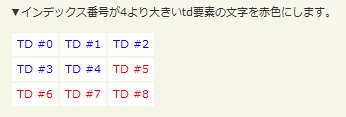
指定したインデックス番号より大きいインデックス番号の要素をすべて選択します。
第1引数indexには、選択する要素のインデックス番号(0始まり)を指定します。
:gt(index)の使用例サンプルを見る
<!DOCTYPE html PUBLIC "-//W3C//DTD XHTML 1.0 Transitional//EN" "http://www.w3.org/TR/xhtml1/DTD/xhtml1-transitional.dtd">
<html xmlns="http://www.w3.org/1999/xhtml" xml:lang="ja" lang="ja">
    <head>
        <meta http-equiv="Content-Type" content="text/html; charset=utf-8" />
        <meta http-equiv="Content-Language" content="ja" />
        <meta http-equiv="Content-Script-Type" content="text/javascript" />
        <meta http-equiv="Content-Style-Type" content="text/css" />
        <meta http-equiv="imagetoolbar" content="no" />
        <title>DOM要素:基本フィルター:「:gt(index)」の使用例 | jQuery</title>
        <link rel="stylesheet" type="text/css" href="/content/lib/global.css" />
        <!-- JS -->
        <script type="text/javascript" src="http://ajax.googleapis.com/ajax/libs/jquery/1.3.2/jquery.min.js"></script>
        <script type="text/javascript">
            $(function(){
                /* インデックス番号が4より大きいtd要素の文字を赤色にする */
                $("td:gt(4)").css("color","red");
            });
        </script>
        <style type="text/css">
            tr { background-color:#fff; }
            td { color:blue; }
         </style>
    </head>
    <body>
        <div id="wrap">
            <h1>DOM要素:基本フィルター:「:gt(index)」の使用例 | jQuery</h1>
            <p>▼インデックス番号が4より大きいtd要素の文字を赤色にします。</p>
<!-- CODE -->
<table>
    <tr><td>TD #0</td><td>TD #1</td><td>TD #2</td></tr>
    <tr><td>TD #3</td><td>TD #4</td><td>TD #5</td></tr>
    <tr><td>TD #6</td><td>TD #7</td><td>TD #8</td></tr>
</table>
<!-- CODE / -->
        </div>
    </body>
</html>
:lt
指定したインデックス番号より小さいインデックス番号を持つ要素をすべて選択
2009/2/27
戻り値:配列<要素>
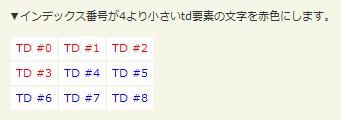
指定したインデックス番号より小さいインデックス番号の要素をすべて選択します。
第1引数indexには、選択する要素のインデックス番号(0始まり)を指定します。
:lt(index)の使用例サンプルを見る
<!DOCTYPE html PUBLIC "-//W3C//DTD XHTML 1.0 Transitional//EN" "http://www.w3.org/TR/xhtml1/DTD/xhtml1-transitional.dtd">
<html xmlns="http://www.w3.org/1999/xhtml" xml:lang="ja" lang="ja">
    <head>
        <meta http-equiv="Content-Type" content="text/html; charset=utf-8" />
        <meta http-equiv="Content-Language" content="ja" />
        <meta http-equiv="Content-Script-Type" content="text/javascript" />
        <meta http-equiv="Content-Style-Type" content="text/css" />
        <meta http-equiv="imagetoolbar" content="no" />
        <title>DOM要素:基本フィルター:「:lt(index)」の使用例 | jQuery</title>
        <link rel="stylesheet" type="text/css" href="/content/lib/global.css" />
        <!-- JS -->
        <script type="text/javascript" src="http://ajax.googleapis.com/ajax/libs/jquery/1.3.2/jquery.min.js"></script>
        <script type="text/javascript">
            $(function(){
                /* インデックス番号が4より小さいtd要素の文字を赤色にする */
                $("td:lt(4)").css("color","red");
            });
        </script>
        <style type="text/css">
            tr { background-color:#fff; }
            td { color:blue; }
         </style>
    </head>
    <body>
        <div id="wrap">
            <h1>DOM要素:基本フィルター:「:lt(index)」の使用例 | jQuery</h1>
            <p>▼インデックス番号が4より小さいtd要素の文字を赤色にします。</p>
<!-- CODE -->
<table>
    <tr><td>TD #0</td><td>TD #1</td><td>TD #2</td></tr>
    <tr><td>TD #3</td><td>TD #4</td><td>TD #5</td></tr>
    <tr><td>TD #6</td><td>TD #7</td><td>TD #8</td></tr>
</table>
<!-- CODE / -->
        </div>
    </body>
</html>
:header
h1,h2,h3などの見出し要素をすべて選択
2009/2/27
戻り値:配列<要素>
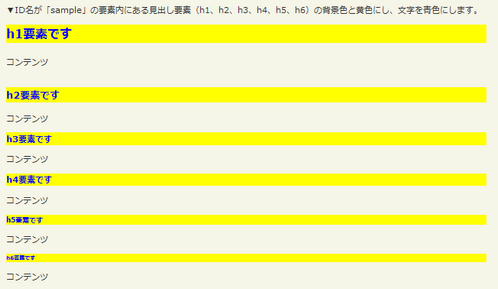
見出し要素(h1、h2、h3、h4、h6)をすべて選択します。
:headerの使用例サンプルを見る
<!DOCTYPE html PUBLIC "-//W3C//DTD XHTML 1.0 Transitional//EN" "http://www.w3.org/TR/xhtml1/DTD/xhtml1-transitional.dtd">
<html xmlns="http://www.w3.org/1999/xhtml" xml:lang="ja" lang="ja">
    <head>
        <meta http-equiv="Content-Type" content="text/html; charset=utf-8" />
        <meta http-equiv="Content-Language" content="ja" />
        <meta http-equiv="Content-Script-Type" content="text/javascript" />
        <meta http-equiv="Content-Style-Type" content="text/css" />
        <meta http-equiv="imagetoolbar" content="no" />
        <title>DOM要素:基本フィルター:「:header」の使用例 | jQuery</title>
        <link rel="stylesheet" type="text/css" href="/content/lib/global.css" />
        <!-- JS -->
        <script type="text/javascript" src="http://ajax.googleapis.com/ajax/libs/jquery/1.3.2/jquery.min.js"></script>
        <script type="text/javascript">
            $(function(){
                /* ID名が「sample」の要素内にある見出し要素の背景色と黄色にし、文字を青色にする */
                $("#sample :header").css({ background:'yellow', color:'blue' });
            });
        </script>
    </head>
    <body>
        <div id="wrap">
            <h1>DOM要素:基本フィルター:「:header」の使用例 | jQuery</h1>
            <p>▼ID名が「sample」の要素内にある見出し要素(h1、h2、h3、h4、h5、h6)の背景色と黄色にし、文字を青色にします。</p>
<!-- CODE -->
            <div id="sample">
                <h1>h1要素です</h1>
                <p>コンテンツ</p>
                <h2>h2要素です</h2>
                <p>コンテンツ</p>
                <h3>h3要素です</h3>
                <p>コンテンツ</p>
                <h4>h4要素です</h4>
                <p>コンテンツ</p>
                <h5>h5要素です</h5>
                <p>コンテンツ</p>
                <h6>h6要素です</h6>
                <p>コンテンツ</p>
            </div>
<!-- CODE / -->
        </div>
    </body>
</html>
:animated
現在アニメーション中の要素をすべて選択
2009/2/27
戻り値:配列<要素>
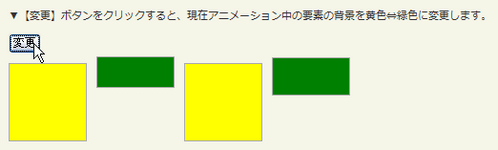
現在アニメーション中の要素をすべて選択します。
:animatedの使用例サンプルを見る
<!DOCTYPE html PUBLIC "-//W3C//DTD XHTML 1.0 Transitional//EN" "http://www.w3.org/TR/xhtml1/DTD/xhtml1-transitional.dtd">
<html xmlns="http://www.w3.org/1999/xhtml" xml:lang="ja" lang="ja">
    <head>
        <meta http-equiv="Content-Type" content="text/html; charset=utf-8" />
        <meta http-equiv="Content-Language" content="ja" />
        <meta http-equiv="Content-Script-Type" content="text/javascript" />
        <meta http-equiv="Content-Style-Type" content="text/css" />
        <meta http-equiv="imagetoolbar" content="no" />
        <title>DOM要素:基本フィルター:「:animated」の使用例 | jQuery</title>
        <link rel="stylesheet" type="text/css" href="/content/lib/global.css" />
        <!-- JS -->
        <script type="text/javascript" src="http://ajax.googleapis.com/ajax/libs/jquery/1.3.2/jquery.min.js"></script>
        <script type="text/javascript">
            $(function(){
                /* ボタンをクリックした時に、アニメーション中の要素のスタイルを切替 */
                $("button").click(function(){
                    $("#ani div:animated").toggleClass("colored");
                });
                /* 要素をゆっくりスライドアニメーション */
                function animateIt() {
                    $(".mover").slideToggle("slow", animateIt);
                }
                animateIt();
            });
        </script>
        <style type="text/css">
            #ani div { background:yellow; border:1px solid #AAA; width:80px; height:80px; margin:10px 10px 10px 0; float:left; }
            #ani div.colored { background:green; }
          </style>
    </head>
    <body>
        <div id="wrap">
            <h1>DOM要素:基本フィルター:「:animated」の使用例 | jQuery</h1>
            <p>▼【変更】ボタンをクリックすると、現在アニメーション中の要素の背景を黄色⇔緑色に変更します。</p>
<!-- CODE -->
            <div id="ani" class="cf">
                <button>変更</button>
                <div></div>
                <div class="mover"></div>
                <div></div>
                <div class="mover"></div>
            </div>
<!-- CODE / -->
        </div>
    </body>
</html>

