jQuery plugin要素の開閉(テキストの省略表示+readmore)

- jQuery Expander Plugin〔長いテキストを展開式で省略表示〕
- Jquery Plugin: readmore〔もっと読むリンクを付加〕
- Quick and Easy jQuery Read More Script Tutorial〔開閉式リンクのチュートリアル〕
jQuery Expander Plugin
長いテキストを展開式で省略表示
2011/6/19
jQuery Expander Plugin
テキストの一部を表示・フル表示に切り替え表示できるjQueryプラグイン。 要素内のテキストの内、指定した文字数だけ表示して末尾の「read more」リンクを自動的に付加します。 残りの部分は、リンククリックで開閉表示できます。開いた後タイマーで指定秒数後に自動的に閉じるように設定することも可能です。
パラメータで、表示する文字数、展開時のエフェクト、展開スピード、リンクテキストの文字列などをカスタマイズできます。
展開前、展開後、ユーザー操作で閉じられた時、タイマーで閉じられた時をコールバックで受け取れます。
下記のサンプルでは、jQueryでXMLをパースするプラグイン「jParse」を使用して、当サイトのRSSフィードから最新5件を表示し、description部分を省略表示しています。
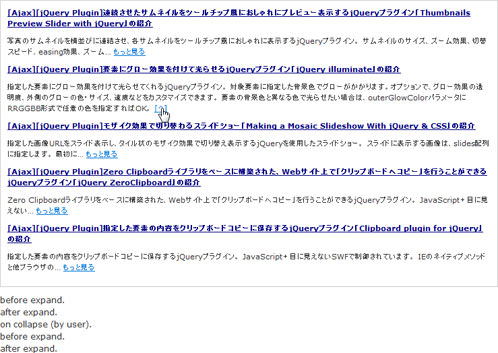 設置イメージ
<!DOCTYPE html PUBLIC "-//W3C//DTD XHTML 1.0 Transitional//EN" "http://www.w3.org/TR/xhtml1/DTD/xhtml1-transitional.dtd">
<html xmlns="http://www.w3.org/1999/xhtml" xml:lang="ja" lang="ja">
<head>
<meta http-equiv="Content-Type" content="text/html; charset=utf-8" />
<meta http-equiv="Content-Language" content="ja" />
<meta http-equiv="Content-Script-Type" content="text/javascript" />
<meta http-equiv="Content-Style-Type" content="text/css" />
<meta http-equiv="imagetoolbar" content="no" />
<title>設置サンプル</title>
<link rel="stylesheet" type="text/css" href="/content/lib/global.css" />
<!-- JS -->
<script src="https://ajax.googleapis.com/ajax/libs/jquery/1.3.2/jquery.min.js"></script>
<script type="text/javascript" src="/content/lib/jquery/jparse-0.3.3.js"></script>
<script type="text/javascript" src="/content/lib/jquery/jquery.expander.js"></script>
<script type="text/javascript">
function start(){
$('#jparse-meta').html('<img src="/content/img/loading.gif" />');
}
function finish(){
$('#jparse-meta').remove();
$('dl#expander dd').expander({
collapseTimer:5000, /* 5秒後に自動で閉じる */
slicePoint:90, /* 表示する文字数 */
expandText:"もっと見る", /* 省略リンクテキスト */
userCollapseText: "[^]", /* 要素を閉じるリンクテキスト */
widow:0,
/* 展開される前 */
beforeExpand: function($thisElement) {
$thisElement.parent().parent().append('<div class="success">before expand.</div>');
},
/* 展開された時 */
afterExpand: function($thisElement) {
$thisElement.parent().parent().append('<div class="success">after expand.</div>');
},
/* 要素が閉じられた時 */
onCollapse: function($thisElement, byUser) {
if (byUser === true) {
/* ユーザー操作で要素が閉じられた時 */
$thisElement.parent().parent().append('<div class="success">on collapse (by user).</div>');
} else {
/* タイマーで要素が閉じられた時 */
$thisElement.parent().parent().append('<div class="success">on collapse (by timer).</div>');
}
}
});
}
$(function(){
// RSS取得
$('dl#expander').jParse({
ajaxOpts: {url: 'index.xml'},
elementTag: ['title', 'link', 'description'],
output: '<dt><a href="jpet01">jpet00</a></dt><dd>jpet02</dd>',
precallback: start,
callback: finish,
limit:5
});
});
</script>
<!-- CSS -->
<style media="screen,projection" type="text/css">
dl { margin:10px 0; padding:10px; border:1px solid #ccc; }
dt { margin:0; padding:0; font-size:11px; }
dd { font-size:11px; margin:10px 0 10px 0; padding:0; }
dt a { color:navy; }
</style>
</head>
<body>
<div id="wrap">
<h1>設置サンプル</h1>
<p>参照:<a href='http://plugins.learningjquery.com/expander/index.html#getting-started'>jQuery Expander Plugin</a></p>
<p>jQueryでXMLをパースするプラグイン「<a href='http://jparse.kylerush.net/'>jParse</a>」を使用して、当サイトのRSSフィードから最新5件を表示し、description部分を省略表示しています。「もっと見る」をクリックした後は[^]リンクで閉じられます。また5秒後に自動的に閉じます。</p>
<!-- CODE -->
<div id="jparse-meta" style="text-align: center; margin: 15px 0 0 0;"></div>
<dl id="expander"></dl>
<!-- / CODE -->
</div>
</body>
</html>
Jquery Plugin: readmore
もっと読むリンクを付加
unknown
Jquery Plugin: readmore v1.1
テキストの一部を省略表示し、末尾に「Read More」リンクを付加するシンプルなjQueryプラグイン。 リンクをクリックすると残り部分が展開表示されます。
パラメータで、表示する文字数、readmoreリンク部分、省略テキストを変更できます。
/* リンクテキスト */
$.fn.readmore.defaults.more_link='<a class='more'>もっと読む</a>';
/* 文字数 */
$.fn.readmore.defaults.substr_len=90;
/* 省略テキスト */
$.fn.readmore.defaults.ellipses='........';
下記のサンプルでは、jQueryでXMLをパースするプラグイン「jParse」を使用して、当サイトのRSSフィードから最新5件を表示し、description部分を省略表示しています。
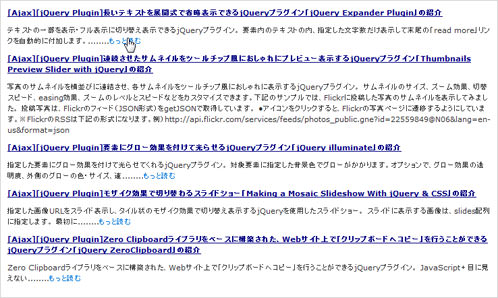 設置イメージ
<!DOCTYPE html PUBLIC "-//W3C//DTD XHTML 1.0 Transitional//EN" "http://www.w3.org/TR/xhtml1/DTD/xhtml1-transitional.dtd">
<html xmlns="http://www.w3.org/1999/xhtml" xml:lang="ja" lang="ja">
<head>
<meta http-equiv="Content-Type" content="text/html; charset=utf-8" />
<meta http-equiv="Content-Language" content="ja" />
<meta http-equiv="Content-Script-Type" content="text/javascript" />
<meta http-equiv="Content-Style-Type" content="text/css" />
<meta http-equiv="imagetoolbar" content="no" />
<title>設置サンプル</title>
<link rel="stylesheet" type="text/css" href="/content/lib/global.css" />
<!-- JS -->
<script src="https://ajax.googleapis.com/ajax/libs/jquery/1.3.2/jquery.min.js"></script>
<script type="text/javascript" src="/content/lib/jquery/jparse-0.3.3.js"></script>
<script type="text/javascript" src="/content/lib/jquery/jquery.readmore.js"></script>
<script type="text/javascript">
function start(){
$('#jparse-meta').html('<img src="/content/img/loading.gif" />');
}
function finish(){
$('#jparse-meta').remove();
/* Jquery.readmore */
/* リンクテキスト */
$.fn.readmore.defaults.more_link='<a class="more">もっと読む</a>';
/* 文字数 */
$.fn.readmore.defaults.substr_len=90;
/* 省略テキスト */
$.fn.readmore.defaults.ellipses="........";
$("dl#expander dd").readmore();
}
$(function(){
// RSS取得
$('dl#expander').jParse({
ajaxOpts: {url: 'index.xml'},
elementTag: ['title', 'link', 'description'],
output: '<dt><a href="jpet01">jpet00</a></dt><dd>jpet02</dd>',
precallback: start,
callback: finish,
limit:5
});
});
</script>
<!-- CSS -->
<style media="screen,projection" type="text/css">
dl { margin:10px 0; padding:10px; border:1px solid #ccc; }
dt { margin:0; padding:0; font-size:11px; }
dd { font-size:11px; margin:10px 0 10px 0; padding:0; }
dt a { color:navy; }
.more { cursor:pointer; }
</style>
</head>
<body>
<div id="wrap">
<h1>設置サンプル</h1>
<p>参照:<a href='http://rockycode.com/blog/jquery-plugin-readmore/' target='_blank'>Jquery Plugin: readmore</a></p>
<p>jQueryでXMLをパースするプラグイン「<a href='http://jparse.kylerush.net/'>jParse</a>」を使用して、当サイトのRSSフィードから最新5件を表示し、description部分を省略表示しています。「もっと見る」をクリックすると残り部分が展開します。</p>
<!-- CODE -->
<div id="jparse-meta" style="text-align: center; margin: 15px 0 0 0;"></div>
<dl id="expander"></dl>
<!-- / CODE -->
</div>
</body>
</html>
Quick and Easy jQuery Read More Script Tutorial
開閉式リンクのチュートリアル
unknown
Quick and Easy jQuery Read More Script Tutorial
jQueryを使用して、テキストの一部を省略表示し、末尾に開閉式の「Read More」リンクを付加する方法が掲載さています。
英語の単語区切りで分割されているので、日本語に対応させたい場合は、部分を下記の2箇所を変更すればOK。 あと「«」「»」部分は、表示がおかしくなるため、実態参照「«」「»」に変換しておいた方がよいでしょう。
//var words = sentence.split(' ');
var words = sentence.split('');

//new_sentence += words[i] + ' ';
new_sentence += words[i] + '';

//new_sentence += words[i] + '';
new_sentence += words[i] + '';
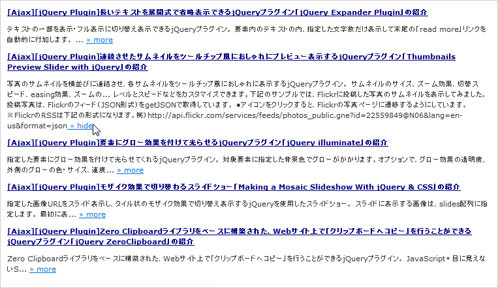 設置イメージ
<!DOCTYPE html PUBLIC "-//W3C//DTD XHTML 1.0 Transitional//EN" "http://www.w3.org/TR/xhtml1/DTD/xhtml1-transitional.dtd">
<html xmlns="http://www.w3.org/1999/xhtml" xml:lang="ja" lang="ja">
<head>
<meta http-equiv="Content-Type" content="text/html; charset=utf-8" />
<meta http-equiv="Content-Language" content="ja" />
<meta http-equiv="Content-Script-Type" content="text/javascript" />
<meta http-equiv="Content-Style-Type" content="text/css" />
<meta http-equiv="imagetoolbar" content="no" />
<title>設置サンプル</title>
<link rel="stylesheet" type="text/css" href="/content/lib/global.css" />
<!-- JS -->
<script src="https://ajax.googleapis.com/ajax/libs/jquery/1.3.2/jquery.min.js"></script>
<script type="text/javascript" src="/content/lib/jquery/jparse-0.3.3.js"></script>
<script type="text/javascript" src="/content/lib/jquery/jquery.readmore.js"></script>
<script type="text/javascript">
function start(){
$('#jparse-meta').html('<img src="/content/img/loading.gif" />');
}
function finish(){
$('#jparse-meta').remove();
/* Quick and Easy jQuery Read More Script Tutorial ここから */
// Grab all the excerpt class
$('dl#expander dd').each(function () {
// Run formatWord function and specify the length of words display to viewer
$(this).html(formatWords($(this).html(), 90));
// Hide the extra words
$(this).children('span').hide();
// Apply click event to read more link
}).click(function () {
// Grab the hidden span and anchor
var more_text = $(this).children('span.more_text');
var more_link = $(this).children('a.more_link');
// Toggle visibility using hasClass
// I know you can use is(':visible') but it doesn't work in IE8 somehow...
if (more_text.hasClass('hide')) {
more_text.show();
more_link.html(' « hide');
more_text.removeClass('hide');
} else {
more_text.hide();
more_link.html(' » more');
more_text.addClass('hide');
}
return false;
});
/* ここまで */
}
/* Quick and Easy jQuery Read More Script Tutorial ここから */
// Accept a paragraph and return a formatted paragraph with additional html tags
function formatWords(sentence, show) {
// split all the words and store it in an array
//var words = sentence.split(' ');
var words = sentence.split(''); /* 日本語対応のため''に */
var new_sentence = '';
// loop through each word
for (i = 0; i < words.length; i++) {
// process words that will visible to viewer
if (i <= show) {
//new_sentence += words[i] + ' ';
new_sentence += words[i] + ''; /* 日本語対応のため''に */
// process the rest of the words
} else {
// add a span at start
if (i == (show + 1)) new_sentence += '... <span class="more_text hide">';
new_sentence += words[i] + '';
// close the span tag and add read more link in the very end
if (words[i+1] == null) new_sentence += '</span><a href="#" class="more_link"> » more</a>';
}
}
return new_sentence;
}
/* ここまで */
$(function(){
// RSS取得
$('dl#expander').jParse({
ajaxOpts: {url: 'index.xml'},
elementTag: ['title', 'link', 'description'],
output: '<dt><a href="jpet01">jpet00</a></dt><dd>jpet02</dd>',
precallback: start,
callback: finish,
limit:5
});
});
</script>
<!-- CSS -->
<style media="screen,projection" type="text/css">
dl { margin:10px 0; padding:10px; border:1px solid #ccc; }
dt { margin:0; padding:0; font-size:11px; }
dd { font-size:11px; margin:10px 0 10px 0; padding:0; }
dt a { color:navy; }
.more { cursor:pointer; }
</style>
</head>
<body>
<div id="wrap">
<h1>設置サンプル</h1>
<p>参照:<a href='http://www.queness.com/post/5368/quick-and-easy-jquery-read-more-script-tutorial' target='_blank'>Quick and Easy jQuery Read More Script Tutorial</a></p>
<p>jQueryでXMLをパースするプラグイン「<a href='http://jparse.kylerush.net/'>jParse</a>」を使用して、当サイトのRSSフィードから最新5件を表示し、description部分を省略表示しています。「もっと見る」をクリックすると残り部分が展開します。</p>
<!-- CODE -->
<div id="jparse-meta" style="text-align: center; margin: 15px 0 0 0;"></div>
<dl id="expander"></dl>
<!-- / CODE -->
</div>
</body>
</html>

