jQuery pluginグラフ表示

- Building an animated 3D poll〔3D棒グラフをアニメーション表示〕
Building an animated 3D poll
3D棒グラフをアニメーション表示
2010/11/9
Building an animated 3D poll
jquery.js
jQueryのanimationメソッドを使用して、3D棒グラフをアニメーション表示する方法が掲載されています。
3D棒グラフをボディー部分とフッター部分に分け、ボディー部分の画像の高さをanimationメソッドで少しずつ伸ばしています。 なるほどというか発想が面白い!
ボディー部分の画像の高さを100%として、下記のようにグラフの項目分の高さをそのまま%で指定します。
SCRIPT
$function(){
	$('.bar1').animate({'height':'68%'},1000);
	$('.bar2').animate({'height':'12%'},1000);
});
HTML
<div class='polls cf'>
    <div class='rating'>
		<div class='graph'><strong class='bar1'><span>34%</span></strong></div>
		<div class='ans'>Google Chrome</div>
	</div>
	<div class='rating'>
		<div class='graph'><strong class='bar2'><span>6%</span></strong></div>
		<div class='ans'>Internet Explorer</div>
	</div>
	・・・
</div>
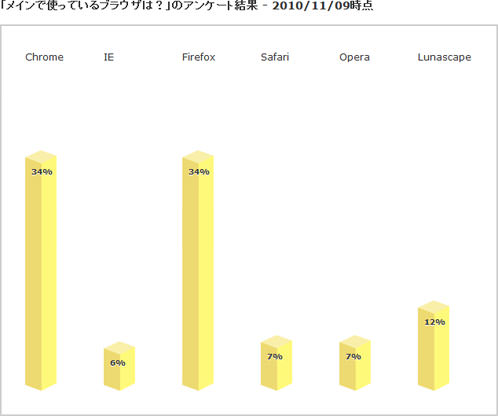 設置イメージ
設置サンプルサンプルを見る
<!DOCTYPE html PUBLIC "-//W3C//DTD XHTML 1.0 Transitional//EN" "http://www.w3.org/TR/xhtml1/DTD/xhtml1-transitional.dtd">
<html xmlns="http://www.w3.org/1999/xhtml" xml:lang="ja" lang="ja">
    <head>
        <meta http-equiv="Content-Type" content="text/html; charset=utf-8" />
        <meta http-equiv="Content-Language" content="ja" />
        <meta http-equiv="Content-Script-Type" content="text/javascript" />
        <meta http-equiv="Content-Style-Type" content="text/css" />
        <meta http-equiv="imagetoolbar" content="no" />
        <title>設置サンプル</title>
        <link rel="stylesheet" type="text/css" href="/content/lib/global.css" />
        <!-- JS -->
        <script src="https://ajax.googleapis.com/ajax/libs/jquery/1.4.2/jquery.min.js"></script>
        <script type="text/javascript">
            $(function() {
                $('.bar1').animate({'height':'68%'},1000);
                $('.bar2').animate({'height':'12%'},1000);
                $('.bar3').animate({'height':'68%'},1000);
                $('.bar4').animate({'height':'14%'},1000);
                $('.bar5').animate({'height':'14%'},1000);
                $('.bar6').animate({'height':'24%'},1000);
            });
        </script>
        <!-- CSS -->
        <style type="text/css">
.polls {
    border:2px solid #ccc;
    padding:30px 0 30px 30px;
    width:600px;
}
.rating {
    float:left;
    width:100px;
    background:transparent url(/content/img/ajax/poll-bottom.png) no-repeat bottom left;
}
.graph {
    float:left;
    margin:0; padding:0;
    position:relative;
    height:434px;
}
.graph strong {
    display:block;
    position:absolute;
    background:transparent url(/content/img/ajax/poll-body.png) no-repeat 0 0;
    color:#fff;
    width:40px;
    min-height:12px;
    font-size:8px;
    bottom:11px;
}
.graph span  {
    position:absolute;
    left:8px; top:20px;
    font-size:8px;
    color:#333;
    text-shadow:0 1px #fff;
}
        </style>
    </head>
    <body>
        <div id="wrap">
            <h1>設置サンプル</h1>
            <p>参照:<a href='http://papermashup.com/building-an-animated-3d-poll/' target='_blank'>Building an animated 3D poll</a></p>
            <p>▼3D棒グラフをアニメーション表示</p>
<!-- CODE -->
<h2>「メインで使っているブラウザは?」のアンケート結果 - 2010/11/09時点</h2>
<div class="polls cf">
    <div class="rating">
        <div class="graph"><strong class="bar1"><span>34%</span></strong></div>
        <div class="ans">Chrome</div>
    </div>
    <div class="rating">
        <div class="graph"><strong class="bar2"><span>6%</span></strong></div>
        <div class="ans">IE</div>
    </div>
    <div class="rating">
        <div class="graph"><strong class="bar3"><span>34%</span></strong></div>
        <div class="ans">Firefox</div>
    </div>
    <div class="rating">
        <div class="graph"><strong class="bar4"><span>7%</span></strong></div>
        <div class="ans">Safari</div>
    </div>
    <div class="rating">
        <div class="graph"><strong class="bar5"><span>7%</span></strong></div>
        <div class="ans">Opera</div>
    </div>
    <div class="rating">
        <div class="graph"><strong class="bar6"><span>12%</span></strong></div>
        <div class="ans">Lunascape</div>
    </div>
</div>
<!-- / CODE -->
        </div>
    </body>
</html>

