jQuery pluginページネーション(ページ送り)

- jQuery pager plug-in〔ページ送り〕
- jQuery Pagination Plugin〔ページネーション〕
jQuery pager plug-in
ページ送り
2009/2/27
jQuery pager plug-in
jquery.js、jquery.pager.js
同一ページ内でページ送りを実装するjQueryプラグイン。
$('#exp1').pager('div');のように、ページ送りするコンテンツを持つ親要素と各コンテンツの要素を指定します。
子要素の数だけ、ページが生成されます。
オプションで、リンクテキストやラベル名、ハイライト時のクラス名、コンテンツの最小高さ(min-height)などを指定することができます。
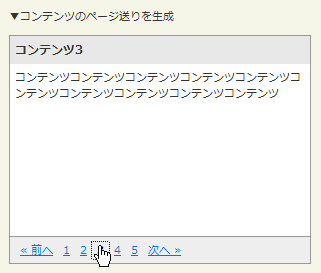 設置イメージ
設置サンプルサンプルを見る
<!DOCTYPE html PUBLIC "-//W3C//DTD XHTML 1.0 Transitional//EN" "http://www.w3.org/TR/xhtml1/DTD/xhtml1-transitional.dtd">
<html xmlns="http://www.w3.org/1999/xhtml" xml:lang="ja" lang="ja">
<head>
<meta http-equiv="Content-Type" content="text/html; charset=utf-8" />
<meta http-equiv="Content-Language" content="ja" />
<meta http-equiv="Content-Script-Type" content="text/javascript" />
<meta http-equiv="Content-Style-Type" content="text/css" />
<meta http-equiv="imagetoolbar" content="no" />
<title>jQuery pager plug-in | 設置サンプル</title>
<link rel="stylesheet" type="text/css" href="/content/lib/global.css" />
<!-- JS -->
<script src="https://ajax.googleapis.com/ajax/libs/jquery/1.3.2/jquery.min.js"></script>
<script type="text/javascript" src="/content/lib/jquery/jquery.pager.js"></script>
<script type="text/javascript">
$(function(){
$('#exp1').pager('div',
{
height:"200px",
prevText: "« 前へ",
nextText:"次へ »"
}
);
});
</script>
<!-- CSS -->
<style type="text/css">
.pager_examples { border:1px solid #999; margin:10px 0; background:#fff; width:300px; }
.pager_examples h2 { margin:0; padding:5px; background-color:#e8e8e8; font-size:1.1em; }
.pager_examples p { padding:0; margin:5px; }
.pager_examples .nav { background:#eee; border-top:1px solid #999; padding:5px; }
.pager_examples .nav#nav4 { border-top:0; border-bottom:1px solid #999; }
.pager_examples .nav a { padding:0 5px; }
.pager_examples .nav a.highlight { color:#000; font-weight:bold; }
</style>
</head>
<body>
<div id="wrap">
<h1><a href='http://rikrikrik.com/jquery/pager/'>jQuery pager plug-in</a> | 設置サンプル</h1>
<p>▼コンテンツのページ送りを生成</p>
<!-- CODE -->
<div id="exp1" class="pager_examples">
<div><h2>コンテンツ1</h2><p>コンテンツコンテンツコンテンツコンテンツコンテンツコンテンツコンテンツコンテンツコンテンツコンテンツ</p></div>
<div><h2>コンテンツ2</h2><p>コンテンツコンテンツコンテンツコンテンツコンテンツコンテンツコンテンツコンテンツコンテンツコンテンツ</p></div>
<div><h2>コンテンツ3</h2><p>コンテンツコンテンツコンテンツコンテンツコンテンツコンテンツコンテンツコンテンツコンテンツコンテンツ</p></div>
<div><h2>コンテンツ4</h2><p>コンテンツコンテンツコンテンツコンテンツコンテンツコンテンツコンテンツコンテンツコンテンツコンテンツ</p></div>
<div><h2>コンテンツ5</h2><p>コンテンツコンテンツコンテンツコンテンツコンテンツコンテンツコンテンツコンテンツコンテンツコンテンツ</p></div>
</div>
<!-- CODE / -->
</div>
</body>
</html>
jQuery Pagination Plugin
ページネーション
2009/2/27
jQuery Pagination Plugin
jquery.js、jquery.pagination.js v1.2
指定した要素の数に応じてページネーションを実装するjQueryプラグイン。
切替表示する要素の内容に、Ajaxを使用して外部ファイルを読込んだりすることもできます。 オプションで、ラベル名を変更したり、1ページあたりに表示するアイテム数やページネーションの数などのカスタマイズも可能です。
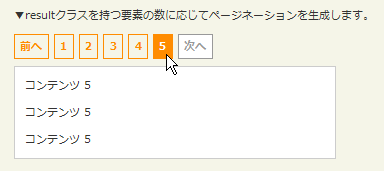 設置イメージ
設置サンプルサンプルを見る
<!DOCTYPE html PUBLIC "-//W3C//DTD XHTML 1.0 Transitional//EN" "http://www.w3.org/TR/xhtml1/DTD/xhtml1-transitional.dtd">
<html xmlns="http://www.w3.org/1999/xhtml" xml:lang="ja" lang="ja">
    <head>
        <meta http-equiv="Content-Type" content="text/html; charset=utf-8" />
        <meta http-equiv="Content-Language" content="ja" />
        <meta http-equiv="Content-Script-Type" content="text/javascript" />
        <meta http-equiv="Content-Style-Type" content="text/css" />
        <meta http-equiv="imagetoolbar" content="no" />
        <title>jQuery Pagination Plugin | 設置サンプル</title>
        <link rel="stylesheet" type="text/css" href="/content/lib/global.css" />
        <!-- JS -->
        <script src="https://ajax.googleapis.com/ajax/libs/jquery/1.3.2/jquery.min.js"></script>
        <script type="text/javascript" src="/content/lib/jquery/jquery.pagination.js"></script>
        <script type="text/javascript">
            $(function() {
                function pageselectCallback(page_index, jq){
                    var new_content = $('#hiddenresult div.result:eq('+page_index+')').clone();
                    $('#res').empty().append(new_content);
                    return false;
                }
                function initPagination() {
                    var num_entries = $('#hiddenresult div.result').length;
                    // Create pagination element
                    $("#Pagination").pagination(num_entries, {
                        num_edge_entries: 2,
                        num_display_entries: 8,
                        callback: pageselectCallback,
                        items_per_page:1
                    });
                }
                $(function(){
                    initPagination();
                });
            });
        </script>
        <!-- CSS -->
        <style type="text/css">
            .pagination { margin:0 0 5px 0; padding:0; height:2.5em; }
            .pagination a { text-decoration:none; border:solid 1px darkorange; color:darkorange; }
            .pagination a, .pagination span { font-weight:bold; display:block; float:left; margin:0 5px 0 0; padding:.3em .5em; }
            .pagination .current { background:darkorange; color:#fff; border:solid 1px darkorange; }
            .pagination .current.prev, .pagination .current.next { color:#999; border-color:#999; background:#fff; }
            #res { margin:0; padding:0 10px; border:solid 1px #ccc; background:#fff; width:300px; clear:both; }
        </style>
    </head>
    <body>
        <div id="wrap">
            <h1><a href='http://plugins.jquery.com/project/pagination'>jQuery Pagination Plugin</a></h1>
            <p>▼resultクラスを持つ要素の数に応じてページネーションを生成します。</p>
<!-- CODE -->
            <div id="Pagination" class="pagination"><!-- ページネーション表示 --></div>
            <div id="res"><!-- コンテンツ表示領域 --></div>
            <!-- Container element for all the Elements that are to be paginated -->
            <div id="hiddenresult" style="display:none;">
                <div class="result">
                    <p>コンテンツ 1</p>
                    <p>コンテンツ 1</p>
                    <p>コンテンツ 1</p>
                </div>
                <div class="result">
                    <p>コンテンツ 2</p>
                    <p>コンテンツ 2</p>
                    <p>コンテンツ 2</p>
                </div>
                <div class="result">
                    <p>コンテンツ 3</p>
                    <p>コンテンツ 3</p>
                    <p>コンテンツ 3</p>
                </div>
                <div class="result">
                    <p>コンテンツ 4</p>
                    <p>コンテンツ 4</p>
                    <p>コンテンツ 4</p>
                </div>
                <div class="result">
                    <p>コンテンツ 5</p>
                    <p>コンテンツ 5</p>
                    <p>コンテンツ 5</p>
                </div>
            </div>
<!-- CODE / -->
        </div>
    </body>
</html>

