jQuery plugin画像関連

- Image Rotator〔ドラッグ操作で画像をぐるぐる回転、HTML5のCanvasタグ使用〕
Image Rotator
ドラッグ操作で画像をぐるぐる回転、HTML5のCanvasタグ使用
2009/5/17
Image Rotator
ドラッグ操作で画像をぐるぐる回転できるjQueryプラグイン。 画像の回転は、HTML5のCanvasタグのrotate()メソッドで実装されています。 explorercanvasも併用されており、IEにも対応しています。
パラメータ、ドラッグ操作の有効化・無効化、デフォルトの角度を設定できます。 また、コールバックで、ドラッグ中、ドラッグ開始、ドラッグ終了のどらステータスが受け取れます。
※「explorercanvas」は、HTML5のCanvas要素をIEでも扱えるようにするためのJavaScriptライブラリです。Apache License, Version 2.0。
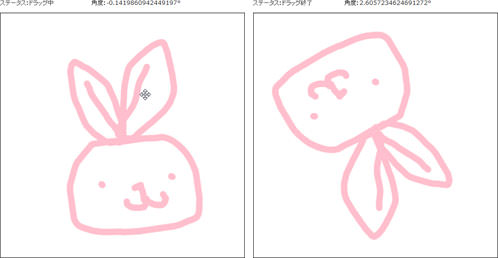 設置イメージ
設置サンプルサンプルを見る
<!DOCTYPE html PUBLIC "-//W3C//DTD XHTML 1.0 Transitional//EN" "http://www.w3.org/TR/xhtml1/DTD/xhtml1-transitional.dtd">
<html xmlns="http://www.w3.org/1999/xhtml" xml:lang="ja" lang="ja">
    <head>
        <meta http-equiv="Content-Type" content="text/html; charset=utf-8" />
        <meta http-equiv="Content-Language" content="ja" />
        <meta http-equiv="Content-Script-Type" content="text/javascript" />
        <meta http-equiv="Content-Style-Type" content="text/css" />
        <meta http-equiv="imagetoolbar" content="no" />
        <title>設置サンプル</title>
        <link rel="stylesheet" type="text/css" href="/content/lib/global.css" />
        <!-- JS -->
        <script type="text/javascript" src="http://ajax.googleapis.com/ajax/libs/jquery/1.4/jquery.min.js"></script>
        <script type="text/javascript" src="/content/lib/jquery/excanvas.js"></script>
        <script type="text/javascript" src="/content/lib/jquery/jquery.imgRotator.js"></script>
        <script type="text/javascript">
            $(function(){
                $('div.imgRotator').imgRotator({
                    startRotation:-0.1419860942449197,
                    dragstart:function(angle){
                        $("#angle").text(angle);
                        $("#status").text("ドラッグ開始");
                    },
                    dragfinish:function(angle){
                        $("#angle").text(angle);
                        $("#status").text("ドラッグ終了");
                    },
                    drag:function(angle){
                        $("#angle").text(angle);
                        $("#status").text("ドラッグ中");
                    },
                    disableDrag:false
                });
            });
        </script>
        <!-- CSS -->
        <style type="text/css">
            div.imgRotator {
                width:500px; height:500px;
                border:solid 1px black;
                cursor:move;
            }
            div.imgRotatorBox {
                width:500px; height:500px;
            }
            #status {
                width:10em;
                display:inline-block;
            }
        </style>
    </head>
    <body>
        <div id="wrap">
            <h1>設置サンプル</h1>
            <p>参照:<a href='http://bugsoftware.co.uk/jQuery/ImgRotator/' target='_blank'>Image Rotator</a></p>
<!-- CODE -->
            <p>ステータス:<span id="status">---</span> 角度:<span id="angle">---</span>°</p>
            <div class="imgRotatorBox">
<div class="imgRotator">
    <canvas></canvas>
    <img src="/content/img/ajax/kabu_usagi.jpg" alt="a rotating image" style="width:320px; height:460px"/>
</div>
            </div>
<!-- / CODE -->
    </body>
</html>

