jQuery pluginフィルタリング

- Quick and Easy Filtering with jQuery〔CSSのクラス名でフィルタリング〕
- jQuery Plugin: LiveFilter〔リスト要素あるいはテーブル要素の項目をテキストフィルタリング〕
Quick and Easy Filtering with jQuery
CSSのクラス名でフィルタリング
2010/1/24
Quick and Easy Filtering with jQuery
カテゴリ毎にCSS名を振り、要素のCSSクラス名で簡易フィルターをjQueryを使用して実装する方法が掲載されています。 複数のカテゴリを指定するには、「class='php html'」のようにクラス名を半角スペース区切りで指定します。
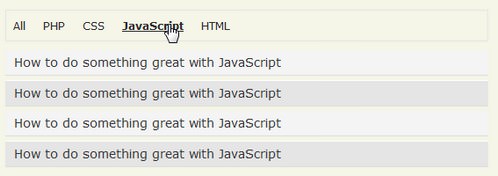
設置サンプルサンプルを見る
<!DOCTYPE html PUBLIC "-//W3C//DTD XHTML 1.0 Transitional//EN" "http://www.w3.org/TR/xhtml1/DTD/xhtml1-transitional.dtd">
<html xmlns="http://www.w3.org/1999/xhtml" xml:lang="ja" lang="ja">
    <head>
        <meta http-equiv="Content-Type" content="text/html; charset=utf-8" />
        <meta http-equiv="Content-Language" content="ja" />
        <meta http-equiv="Content-Script-Type" content="text/javascript" />
        <meta http-equiv="Content-Style-Type" content="text/css" />
        <meta http-equiv="imagetoolbar" content="no" />
        <title>設置サンプル</title>
        <link rel="stylesheet" href="/content/lib/global.css" type="text/css" />
        <!-- JS -->
        <script type="text/javascript" src="http://ajax.googleapis.com/ajax/libs/jquery/1.3.2/jquery.min.js"></script>
        <script type="text/javascript">
        $(function() {
            var ulOptions = '<ul id="options"> <li><a href="#" class="all">All</a></li><li><a href="#" class="php">PHP</a></li><li><a href="#" class="css">CSS</a></li><li><a href="#" class="js">JavaScript</a></li><li><a href="#" class="html">HTML</a></li></ul>';
            var $links = $('#links');
            $links.before(ulOptions)
                         .children('li')
                       .addClass('all')
                       .filter('li:odd')
                       .addClass('odd');
            $('#options li a').click(function() {
                var $this = $(this),
                    type = $this.attr('class');
                $links.children('li')
                    .removeClass('odd')
                    .hide()
                    .filter('.' + type)
                    .show()
                    .filter(':odd')
                    .addClass('odd');
                return false;
            });
        });
        </script>
        <!-- CSS -->
        <style type="text/css">
        #options {
            border:1px solid #e5e5e5;
            padding:8px;
        }
            #options li {
                display:inline;
                border-right:1px solid #e5e5e5;
                padding-right:10px;
                margin-right:10px;
                background:none;
                border:none;
                color:#ab1313;
                text-align:left;
            }
            #options li:last-child {
                border-right:none;
            }
            #options li a {
                text-decoration:none;
                color:#292929;
                outline:none;
            }
            #options li a:hover {
                text-decoration:underline;
            }
            #options li a:focus,
            #options li a:hover {
                font-weight:bold;
            }
        #links {
            margin:0;
            padding:0;
            clear:both;
        }
            #links .odd {
                background:#e5e5e5;
                border-top:1px solid white;
            }
            #links li {
                list-style:none;
                line-height:1.5em;
                padding:5px;
                padding-left:10px;
                background:#f4f4f4;
                text-align:left;
                border-bottom:1px solid #ddd;
            }
            #links li a {
                text-decoration:none;
                color:#353535;
                font-size:14px;
            }
            #links li a:focus,
            #links li a:hover {
                font-weight:bold;
            }
        </style>
    </head>
    <body>
        <div id="wrap">
            <h1>設置サンプル</h1>
            <div id="container">
                <p>参照:<a href='http://net.tutsplus.com/videos/screencasts/quick-and-easy-filtering-with-jquery/'>Quick and Easy Filtering with jQuery</a></p>
                <p>
                        要素のCSSクラス名で簡易フィルターを実装するjQueryプラグイン。<br>
                        リンクをクリックすると、関連付けられたクラス名でフィルタリングして表示します。
                </p>
            </div>
<!-- CODE -->
            <ul id="links">
                <li class="php html"><a href="#">How to do something great with PHP and HTML</a></li>
                <li class="php"><a href="#">How to do something great with PHP</a></li>
                <li class="css"><a href="#">How to do something great with CSS</a></li>
                <li class="js"><a href="#">How to do something great with JavaScript</a></li>
                <li class="html"><a href="#">How to do something great with HTML</a></li>
                <li class="php html"><a href="#">How to do something great with PHP and HTML</a></li>
                <li class="php"><a href="#">How to do something great with PHP</a></li>
                <li class="css"><a href="#">How to do something great with CSS</a></li>
                <li class="js"><a href="#">How to do something great with JavaScript</a></li>
                <li class="html"><a href="#">How to do something great with HTML</a></li>
                <li class="php html"><a href="#">How to do something great with PHP and HTML</a></li>
                <li class="php"><a href="#">How to do something great with PHP</a></li>
                <li class="css"><a href="#">How to do something great with CSS</a></li>
                <li class="js"><a href="#">How to do something great with JavaScript</a></li>
                <li class="html"><a href="#">How to do something great with HTML</a></li>
                <li class="php html"><a href="#">How to do something great with PHP and HTML</a></li>
                <li class="php"><a href="#">How to do something great with PHP</a></li>
                <li class="css"><a href="#">How to do something great with CSS</a></li>
                <li class="js"><a href="#">How to do something great with JavaScript</a></li>
                <li class="html"><a href="#">How to do something great with HTML</a></li>
            </ul>
<!-- CODE / -->
        </div>
    </body>
</html>
jQuery Plugin: LiveFilter
リスト要素あるいはテーブル要素の項目をテキストフィルタリング
2010/2/16
jQuery Plugin: LiveFilter 1.1
jquery.js、jquery.liveFilter.js
リスト要素(ol、ul)の項目、あるいはテーブル要素(table)の行をテキストでフィルタリング表示するjQueryプラグイン。
フィルタリングしたいテキストを入力し、キーを上げると、入力したテキストにマッチするテキストが含まれるリスト項目のみが表示されます。 プラグイン側ですべて大文字にして比較するようになっているため、大文字小文字の区別はありません。 日本語もOKです。 テーブルは、tr要素単位で検索しているので、tr要素内に複数のtd要素がある場合、colspan='2'などして行を結合している場合も問題なく動作します。
同一ページ内に複数配置する場合は、下記の部分を修正する必要があります。
// $('input.filter').keyup(function() {
$(wrap +' input.filter').keyup(function() {
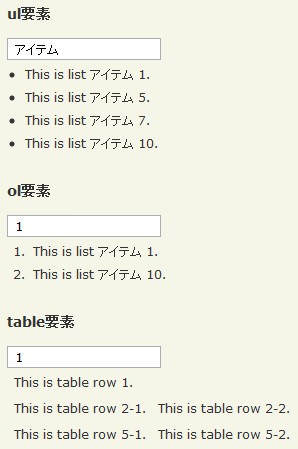
設置サンプルサンプルを見る
<!DOCTYPE html PUBLIC "-//W3C//DTD XHTML 1.0 Transitional//EN" "http://www.w3.org/TR/xhtml1/DTD/xhtml1-transitional.dtd">
<html xmlns="http://www.w3.org/1999/xhtml" xml:lang="ja" lang="ja">
    <head>
        <meta http-equiv="Content-Type" content="text/html; charset=utf-8" />
        <meta http-equiv="Content-Language" content="ja" />
        <meta http-equiv="Content-Script-Type" content="text/javascript" />
        <meta http-equiv="Content-Style-Type" content="text/css" />
        <meta http-equiv="imagetoolbar" content="no" />
        <title>設置サンプル</title>
        <link rel="stylesheet" type="text/css" href="/content/lib/global.css" />
        <!-- JS -->
        <script type="text/javascript" src="http://ajax.googleapis.com/ajax/libs/jquery/1.3.2/jquery.min.js"></script>
        <script type="text/javascript" src="/content/lib/jquery/jquery.liveFilter.js"></script>
        <script type="text/javascript">
            $(function(){
                $('#live_filter_ul').liveFilter('ul');
                $('#live_filter_ol').liveFilter('ol');
                $('#live_filter_table').liveFilter('table');
            });
        </script>
    </head>
    <body>
        <div id="wrap">
            <h1>設置サンプル</h1>
            <p>【参照】<a href='http://www.digitalinferno.net/blog/jquery-plugin-livefilter-1-1/'>jQuery Plugin: LiveFilter 1.1</a></p>
<!-- CODE -->
            <p>フィルタリングしたいテキストを入力し、キーを上げると、入力したテキストにマッチするテキストが含まれるリスト項目のみが表示されます。</p>
            <h2>ul要素</h2>
            <div id="live_filter_ul">
                <input type="text" class="filter" name="liveFilter" />
                <ul>
                    <li>This is list アイテム 1.</li>
                    <li>This is list item 2.</li>
                    <li>This is list item 3.</li>
                    <li>This is list item 4.</li>
                    <li>This is list アイテム 5.</li>
                    <li>This is list item 6.</li>
                    <li>This is list アイテム 7.</li>
                    <li>This is list item 8.</li>
                    <li>This is list item 9.</li>
                    <li>This is list アイテム 10.</li>
                </ul>
            </div><!-- #live_filter_ul -->

            <h2>ol要素</h2>
            <div id="live_filter_ol">
                <input type="text" class="filter" name="liveFilter" />
                <ol>
                    <li>This is list アイテム 1.</li>
                    <li>This is list item 2.</li>
                    <li>This is list item 3.</li>
                    <li>This is list item 4.</li>
                    <li>This is list アイテム 5.</li>
                    <li>This is list item 6.</li>
                    <li>This is list アイテム 7.</li>
                    <li>This is list item 8.</li>
                    <li>This is list item 9.</li>
                    <li>This is list アイテム 10.</li>
                </ol>
            </div><!-- #live_filter_ol -->

            <h2>table要素</h2>
            <div id="live_filter_table">
                <input type="text" class="filter" name="liveFilter" />
                <table>
                    <tr>
                        <td colspan='2'>This is table row 1.</td>
                    </tr>
                    <tr>
                        <td>This is table row 2-1.</td>
                        <td>This is table row 2-2.</td>
                    </tr>
                    <tr>
                        <td colspan='2'>This is table row 3.</td>
                    </tr>
                    <tr>
                        <td colspan='2'>This is table row 4.</td>
                    </tr>
                    <tr>
                        <td>This is table row 5-1.</td>
                        <td>This is table row 5-2.</td>
                    </tr>
                </table>
            </div><!-- #live_filter_table -->
<!-- / CODE -->
        </div>
    </body>
</html>

