jQuery APIリファレンスイベント操作:イベントヘルパー

- blur()〔マッチした各要素のblurイベントを実行〕
- blur(fn)〔マッチした各要素のblurイベントに関数をバインド〕
- change()〔マッチした各要素のchangeイベントを実行〕
- change(fn)〔マッチした各要素のchangeイベントに関数をバインド〕
- click()〔マッチした各要素のclickイベントを実行〕
- click(fn)〔マッチした各要素のclickイベントに関数をバインド〕
- dblclick()〔マッチした各要素のdblclickイベントを実行〕
- dblclick(fn)〔マッチした各要素のdblclickイベントに関数をバインド〕
- error()〔マッチした各要素のerrorイベントを実行〕
- error(fn)〔マッチした各要素のerrorイベントに関数をバインド〕
- focus()〔マッチした各要素のfocusイベントを実行〕
- focus(fn)〔マッチした各要素のfocusイベントに関数をバインド〕
- keydown()〔マッチした各要素のkeydownイベントを実行〕
- keydown(fn)〔マッチした各要素のkeydownイベントに関数をバインド〕
- keypress()〔マッチした各要素のkeypressイベントを実行〕
- keypress(fn)〔マッチした各要素のkeypressイベントに関数をバインド〕
- keyup()〔マッチした各要素のkeyupイベントを実行〕
- keyup(fn)〔マッチした各要素のkeyupイベントに関数をバインド〕
- load(fn)〔マッチした各要素のloadイベントに関数をバインド〕
- mousedown(fn)〔マッチした要素のmousedownイベントに関数をバインド〕
- mousemove(fn)〔マッチした要素のmousemoveイベントに関数をバインド〕
- mouseout(fn)〔マッチした要素のmouseoutイベントに関数をバインド〕
- mouseover(fn)〔マッチした要素のmouseoverイベントに関数をバインド〕
- mouseup(fn)〔マッチした要素のmouseupイベントに関数をバインド〕
- resize(fn)〔マッチした要素のresizeイベントに関数をバインド〕
- scroll(fn)〔マッチした要素のscrollイベントに関数をバインド〕
- select()〔マッチした要素のselectイベントを実行〕
- select(fn)〔マッチした要素のselectイベントに関数をバインド〕
- submit()〔マッチした要素のsubmitイベントを実行〕
- submit(fn)〔マッチした要素のsubmitイベントに関数をバインド〕
- unload(fn)〔マッチした各要素のunloadイベントに関数をバインド〕
blur()
マッチした各要素のblurイベントを実行
2009/2/27
マッチした各要素のblurイベントを実行します。
blueイベントは、ポインティングデバイスまたはタブナビゲーションによって、要素がフォーカスを失ったときに発生します。
blur()は、マッチた各要素のblurイベントに結び付けられた関数を実行し、ブラウザのデフォルトのblur動作を呼びます。 デフォルト動作は、blurイベントに結び付けられた関数のいずれかがFALSEを返せば実行されません。
/* すべてのp要素にblurイベントを実行 */
$("p").blur();
blur(fn)
マッチした各要素のblurイベントに関数をバインド
2009/2/27
マッチした各要素のblurイベントに関数を結び付けます。
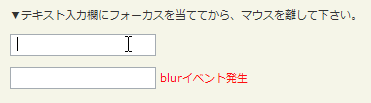
blueイベントは、ポインティングデバイスまたはタブナビゲーションによって、要素がフォーカスを失ったときに発生します。
第1引数fnには、マッチした各要素のblurイベントに結び付ける関数を指定します。
function callback(eventObject){
    this; /* DOM要素 */
}
<!DOCTYPE html PUBLIC "-//W3C//DTD XHTML 1.0 Transitional//EN" "http://www.w3.org/TR/xhtml1/DTD/xhtml1-transitional.dtd">
<html xmlns="http://www.w3.org/1999/xhtml" xml:lang="ja" lang="ja">
    <head>
        <meta http-equiv="Content-Type" content="text/html; charset=utf-8" />
        <meta http-equiv="Content-Language" content="ja" />
        <meta http-equiv="Content-Script-Type" content="text/javascript" />
        <meta http-equiv="Content-Style-Type" content="text/css" />
        <meta http-equiv="imagetoolbar" content="no" />
        <title>イベント操作:イベントヘルパー:blur(fn)の使用例 | jQuery</title>
        <link rel="stylesheet" type="text/css" href="/content/lib/global.css" />
        <!-- JS -->
        <script src="https://ajax.googleapis.com/ajax/libs/jquery/1.3.2/jquery.min.js"></script>
        <script type="text/javascript">
            $(function(){
                $("input").blur(function () {
                    $(this).next("span").css('display','inline').fadeOut(1000);
                });
            });
        </script>
        <style type="text/css">
            span { color:red; display:none;}
        </style>
    </head>
    <body>
        <div id="wrap">
            <h1>イベント操作:イベントヘルパー:blur(fn)の使用例 | jQuery</h1>
            <p>▼テキスト入力欄にフォーカスを当ててから、マウスを離して下さい。</p>
<!-- CODE -->
            <p><input type="text" /> <span>blurイベント発生</span></p>
            <p><input type="password" /> <span>blurイベント発生</span></p>
<!-- CODE / -->
        </div>
    </body>
</html>
change()
マッチした各要素のchangeイベントを実行
2009/2/27
マッチした各要素のchangeイベントを実行します。
changeイベントは、コントロールがinput要素のフォーカスを失ったときや、フォーカスと当てた後にその入力値が変更された時に発生します。
change()は、マッチした各要素のchangeイベントに結び付けられた関数を実行し、ブラウザのデフォルトのchange動作を呼びます。 デフォルト動作は、changeに結び付けられた関数のいずれかがFALSEを返せば実行されません。
/* テキスト入力欄の内容が変更された時に、値の整合性チェック */
$("input[@type='text']").change(function(){
    /* ($(this).val())で入力値を取得して整合性チェックを行う処理を書く */
});
change(fn)
マッチした各要素のchangeイベントに関数をバインド
2009/2/27
マッチした各要素のchangeイベントに関数を結び付けます。
changeイベントは、コントロールがinput要素のフォーカスを失ったときや、フォーカスと当てた後にその入力値が変更された時に発生します。
第1引数fnには、マッチした各要素のchangeイベントに結び付ける関数を指定します。
function callback(eventObject){
    this; /* DOM要素 */
}
<!DOCTYPE html PUBLIC "-//W3C//DTD XHTML 1.0 Transitional//EN" "http://www.w3.org/TR/xhtml1/DTD/xhtml1-transitional.dtd">
<html xmlns="http://www.w3.org/1999/xhtml" xml:lang="ja" lang="ja">
    <head>
        <meta http-equiv="Content-Type" content="text/html; charset=utf-8" />
        <meta http-equiv="Content-Language" content="ja" />
        <meta http-equiv="Content-Script-Type" content="text/javascript" />
        <meta http-equiv="Content-Style-Type" content="text/css" />
        <meta http-equiv="imagetoolbar" content="no" />
        <title>イベント操作:イベントヘルパー:change()イベントの使用例 | jQuery</title>
        <link rel="stylesheet" type="text/css" href="/content/lib/global.css" />
        <!-- JS -->
        <script src="https://ajax.googleapis.com/ajax/libs/jquery/1.3.2/jquery.min.js"></script>
        <script type="text/javascript">
            $(function(){
                $("select").change(function(){
                    var str="";
                    $("select option:selected").each(function(){
                        str+=$(this).text()+", ";
                    });
                    $("#res").html("選択されている値:<strong>"+str+"</strong>");
                })
                .change();
            });
        </script>
    </head>
    <body>
        <div id="wrap">
            <h1>イベント操作:イベントヘルパー:change()イベントの使用例 | jQuery</h1>
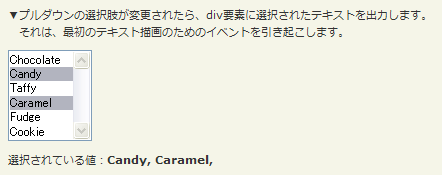
            <p>▼プルダウンの選択肢が変更されたら、div要素に選択されたテキストを出力します。<br> それは、最初のテキスト描画のためのイベントを引き起こします。</p>
<!-- CODE -->
            <p>
                <select name="sweets" multiple="multiple">
                    <option>Chocolate</option>
                    <option selected="selected">Candy</option>
                    <option>Taffy</option>
                    <option selected="selected">Caramel</option>
                    <option>Fudge</option>
                    <option>Cookie</option>
                </select>
                </p>
                <p id="res"></p>
<!-- CODE / -->
        </div>
    </body>
</html>
click()
マッチした各要素のclickイベントを実行
2009/2/27
マッチした各要素のclickイベントを実行します。
clickイベントは、ポインティングデバイスボタンが要素上でクリックされた時に発生します。
/* すべてのp要素にclickイベントを実行 */
$("p").click();
click(fn)
マッチした各要素のclickイベントに関数をバインド
2009/2/27
マッチした各要素のclickイベントに関数を結び付けます。
clickイベントは、ポインティングデバイスボタンが要素上でクリックされた時に発生します。 clickイベントは、同じところでmousedownイベントとmouseupイベントが発生するものとして定義されています。 これらのイベントの発生順序は、次の通りです。
第1引数fnには、マッチした各要素のclickイベントに結び付ける関数を指定します。
function callback(eventObject){
    this; /* DOM要素 */
}

<!DOCTYPE html PUBLIC "-//W3C//DTD XHTML 1.0 Transitional//EN" "http://www.w3.org/TR/xhtml1/DTD/xhtml1-transitional.dtd">
<html xmlns="http://www.w3.org/1999/xhtml" xml:lang="ja" lang="ja">
    <head>
        <meta http-equiv="Content-Type" content="text/html; charset=utf-8" />
        <meta http-equiv="Content-Language" content="ja" />
        <meta http-equiv="Content-Script-Type" content="text/javascript" />
        <meta http-equiv="Content-Style-Type" content="text/css" />
        <meta http-equiv="imagetoolbar" content="no" />
        <title>イベント操作:イベントヘルパー:click()イベントの使用例 | jQuery</title>
        <link rel="stylesheet" type="text/css" href="/content/lib/global.css" />
        <!-- JS -->
        <script src="https://ajax.googleapis.com/ajax/libs/jquery/1.3.2/jquery.min.js"></script>
        <script type="text/javascript">
            $(function(){
                $("#sample p").click(function(){
                    $(this).slideUp();
                });
                $("#sample p").hover(function(){
                    $(this).addClass("hilite");
                }, function () {
                    $(this).removeClass("hilite");
                });

                /* 【全解除】ボタンをクリックした時に、すべてのチェックボックスのチェックを外す */
                $("#btn_on").click(function(){
                    $("input[type='checkbox']").attr('checked', true);
                });
                /* 【全選択】ボタンをクリックした時に、すべてのチェックボックスを選択する */
                $("#btn_off").click(function(){
                    $("input[type='checkbox']").attr('checked', false);
                });
            });
        </script>
        <style type="text/css">
            #sample p { color:red; margin:5px; cursor:pointer; }
            #sample p.hilite { background:yellow; }
        </style>
    </head>
    <body>
        <div id="wrap">
            <h1>イベント操作:イベントヘルパー:click()イベントの使用例 | jQuery</h1>
<!-- CODE -->
            <p>▼クリックした段落を隠します。</p>
            <div id="sample">
                <p>First Paragraph</p>
                <p>Second Paragraph</p>
                <p>Yet one more Paragraph</p>
            </div>
            <br>
            <p>▼チェックボックスを全選択・全解除します。</p>
            <form id="checks" action="#">
                <p>
                    <input type="button" id="btn_on" name="btn_on" value="全選択" />
                    <input type="button" id="btn_off" name="btn_off" value="全解除" />
                </p>
                <p>
                    <label for="c1"><input type="checkbox" id="c1" name="c1" value="1" /> 選択肢1</label>
                    <label for="c2"><input type="checkbox" id="c2" name="c2" value="2" /> 選択肢2</label>
                    <label for="c3"><input type="checkbox" id="c3" name="c3" value="3" /> 選択肢3</label>
                </p>
            </form>
<!-- CODE / -->
        </div>
    </body>
</html>
dblclick()
マッチした各要素のdblclickイベントを実行
2009/2/27
マッチした各要素のdblclickイベントを実行します。
マッチした要素のdblclickイベントに結び付けられた関数をすべて実行し、ブラウザのデフォルトのdblclick動作を呼びます。 このデフォルト動作は、dblclickイベントに結び付けられた関数の内いずれかがFALSEを返す デフォルト動作は、dblclickに結び付られた関数のいずれかがFALSEを返せば実行されません。 dblclickイベントは、ポインティングデバイスボタンが要素上で、2回クリックされた時に発生します。
dblclick(fn)
マッチした各要素のdblclickイベントに関数をバインド
2009/2/27
マッチした各要素のdblclickイベントに関数を結び付けます。
dblclickイベントは、ポインティングデバイスボタンが要素上で、2回クリックされた時に発生します。
第1引数fnには、マッチした各要素のdblclickイベントに結び付ける関数を指定します。
function callback(eventObject){
    this; /* DOM要素 */
}
<!DOCTYPE html PUBLIC "-//W3C//DTD XHTML 1.0 Transitional//EN" "http://www.w3.org/TR/xhtml1/DTD/xhtml1-transitional.dtd">
<html xmlns="http://www.w3.org/1999/xhtml" xml:lang="ja" lang="ja">
    <head>
        <meta http-equiv="Content-Type" content="text/html; charset=utf-8" />
        <meta http-equiv="Content-Language" content="ja" />
        <meta http-equiv="Content-Script-Type" content="text/javascript" />
        <meta http-equiv="Content-Style-Type" content="text/css" />
        <meta http-equiv="imagetoolbar" content="no" />
        <title>イベント操作:イベントヘルパー:dblclickイベントの使用例 | jQuery</title>
        <link rel="stylesheet" type="text/css" href="/content/lib/global.css" />
        <!-- JS -->
        <script src="https://ajax.googleapis.com/ajax/libs/jquery/1.3.2/jquery.min.js"></script>
        <script type="text/javascript">
            $(function(){
                $("#sample").dblclick(function(){
                    $(this).toggleClass('dbl');
                });
            });
        </script>
        <!-- CSS -->
        <style type="text/css">
            #sample { background:blue; color:#fff; height:100px; width:200px; line-height:100px; text-align:center; }
            #sample.dbl { background:yellow; color:#000; }
        </style>
    </head>
    <body>
        <div id="wrap">
            <h1>イベント操作:イベントヘルパー:dblclickイベントの使用例 | jQuery</h1>
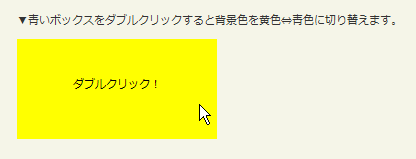
            <p>▼青いボックスをダブルクリックすると背景色を黄色⇔青色に切り替えます。</p>
<!-- CODE -->
            <div id="sample">ダブルクリック!</div>
<!-- CODE / -->
        </div>
    </body>
</html>
error()
マッチした各要素のerrorイベントを実行
2009/2/27
マッチした各要素のerrorイベントを実行します。
マッチした要素のerrorイベントに結び付けられた関数をすべて実行し、ブラウザのデフォルトのerror動作を呼びます。 このデフォルト動作は、errorイベントに結び付けられた関数の内いずれかがFALSEを返す デフォルト動作は、errorに結び付けた関数のいずれかがFALSEを返せば実行されません。 errorイベントは、ポインティングデバイスまたはタブナビゲーションによって、要素がフォーカスを失ったときに発生します。
error(fn)
マッチした各要素のerrorイベントに関数をバインド
2009/2/27
マッチした各要素のerrorイベントに関数を結び付けます。
errorイベントに正式な基準はありません。 多くのブラウザでは、windowオブジェクトのerrorイベントはページ上でJavaScriptエラーが発生した時に発生します。 画像オブジェクトのerrorイベントは、src属性に指定した画像ファイルが、存在しなかったり、画像データが壊れている時に発生します。
windowオブジェクトでイベントを投げた場合、イベントハンドラは3つのパラメータを受け取ります。
- イベントについて説明するメッセージ(「varNameが定義されていません」、「式の中のオペレータが見つかりません」など)
- エラーを含んでいるドキュメントのフルURL
- エラーが発生した行番号
イベントハンドラがTRUEを返す場合は、イベントが扱われたことを意味します。 そのためブラウザはエラーを出しません。
第1引数fnには、errorイベントに結び付けるイベントハンドラ関数を指定します。
function callback(eventObject){
    this; /* DOM要素 */
}
例:JavaScriptエラーのサーバーサイドのログを保持します。
<script type="text/javascript">
    $(function(){
        $(window).error(function(msg, url, line){
            jQuery.post("js_error_log.php", { msg: msg, url: url, line: line });
        });
    });
</script>
例:ユーザーからJavaScriptエラーが見えないようにします。
<script type="text/javascript">
    $(function(){
        $(window).error(function(){
            return true;
        });
    });
</script>
例:IEユーザーに対し、壊れている画像アイコンが見えないようにします。
<script type="text/javascript">
    $(function(){
        $(img).error(function(){
           $(this).hide();
        });
    });
</script>
focus()
マッチした各要素のfocusイベントを実行
2009/2/27
マッチした各要素のfocusイベントを実行します。
focusイベントに結び付けられた関数をすべて実行します。
マッチした要素内にある要素のfocusメソッドは実行されません。
focus(fn)
マッチした各要素のfocusイベントに関数をバインド
2009/2/27
マッチした各要素のfocusイベントに関数を結び付けます。
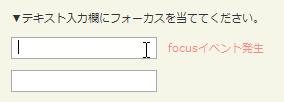
focusイベントは、ポインティングデバイスまたはタブナビゲーションによって、要素がフォーカスを受けた時に発生します。
第1引数fnには、マッチした各要素にfocusイベントをバンドする関数を指定します。
function callback(eventObject){
    this; /* DOM要素 */
}
<!DOCTYPE html PUBLIC "-//W3C//DTD XHTML 1.0 Transitional//EN" "http://www.w3.org/TR/xhtml1/DTD/xhtml1-transitional.dtd">
<html xmlns="http://www.w3.org/1999/xhtml" xml:lang="ja" lang="ja">
    <head>
        <meta http-equiv="Content-Type" content="text/html; charset=utf-8" />
        <meta http-equiv="Content-Language" content="ja" />
        <meta http-equiv="Content-Script-Type" content="text/javascript" />
        <meta http-equiv="Content-Style-Type" content="text/css" />
        <meta http-equiv="imagetoolbar" content="no" />
        <title>イベント操作:イベントヘルパー:focusイベントの使用例 | jQuery</title>
        <link rel="stylesheet" type="text/css" href="/content/lib/global.css" />
        <!-- JS -->
        <script src="https://ajax.googleapis.com/ajax/libs/jquery/1.3.2/jquery.min.js"></script>
        <script type="text/javascript">
            $(function(){
                $("input").focus(function(){
                    $(this).next("span").css('display','inline').fadeOut(1000);
                });
            });
        </script>
        <!-- CSS -->
        <style type="text/css">
            span { color:red; display:none; padding-left:1em; }
        </style>
    </head>
    <body>
        <div id="wrap">
            <h1>イベント操作:イベントヘルパー:focusイベントの使用例 | jQuery</h1>
            <p>▼テキスト入力欄にフォーカスを当ててください。</p>
<!-- CODE -->
            <p><input type="text" /><span>focusイベント発生</span></p>
            <p><input type="password" /><span>focusイベント発生</span></p>
<!-- CODE / -->
        </div>
    </body>
</html>
textarea要素にフォーカスが当たったら横幅を広げる
<!DOCTYPE html PUBLIC "-//W3C//DTD XHTML 1.0 Transitional//EN" "http://www.w3.org/TR/xhtml1/DTD/xhtml1-transitional.dtd">
<html xmlns="http://www.w3.org/1999/xhtml" xml:lang="ja" lang="ja">
    <head>
        <meta http-equiv="Content-Type" content="text/html; charset=utf-8" />
        <meta http-equiv="Content-Language" content="ja" />
        <meta http-equiv="Content-Script-Type" content="text/javascript" />
        <meta http-equiv="Content-Style-Type" content="text/css" />
        <meta http-equiv="imagetoolbar" content="no" />
        <title>イベント操作:イベントヘルパー:focusイベントの使用例 | jQuery</title>
        <link rel="stylesheet" type="text/css" href="/content/lib/global.css" />
        <!-- JS -->
        <script src="https://ajax.googleapis.com/ajax/libs/jquery/1.3.2/jquery.min.js"></script>
        <script type="text/javascript">
            $(function(){
                $("textarea.noani").focus(function(){
                     /* フォーカスが当たったら横幅を広げる */
                   $(this).css({ width:"600px"});
                }).blur(function(){
                    /* フォーカスが外れたら横幅を元のサイズに戻す */
                    $(this).css({ width:"200px"});
                });
                $("textarea.ani").focus(function(){
                     /* フォーカスが当たったら横幅を広げる */
                   $(this).animate({ width:"600px"}, 1000);
                }).blur(function(){
                    /* フォーカスが外れたら横幅を元のサイズに戻す */
                    $(this).animate({ width:"200px"}, 1000);
                });
            });
        </script>
        <!-- CSS -->
        <style type="text/css">
            textarea { width:200px; height:10em; }
        </style>
    </head>
    <body>
        <div id="wrap">
            <h1>イベント操作:イベントヘルパー:focusイベントの使用例 | jQuery</h1>
            <p>▼テキストエリアにフォーカスを当ててください。</p>
<!-- CODE -->
            <p><textarea class="noani">このテキストエリアにフォーカスを当てるとテキストエリアの幅を600pxにします。フォーカスを外すとテキストエリアの幅が元の200pxに戻ります。</textarea></p>
            <p><textarea class="ani">このテキストエリアにフォーカスを当てるとテキストエリアの幅をアニメーションしながら600pxにします。フォーカスを外すとテキストエリアの幅がアニメーションしながら元の200pxに戻ります。</textarea></p>
<!-- CODE / -->
        </div>
    </body>
</html>
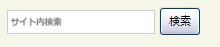
検索ボックスのヒントテキスト表示
検索ボックスに何も入力されていない時はヒントテキスト画像を表示し、そうでない時はヒント画像を表示しません。
<!DOCTYPE html PUBLIC "-//W3C//DTD XHTML 1.0 Transitional//EN" "http://www.w3.org/TR/xhtml1/DTD/xhtml1-transitional.dtd">
<html xmlns="http://www.w3.org/1999/xhtml" xml:lang="ja" lang="ja">
    <head>
        <meta http-equiv="Content-Type" content="text/html; charset=utf-8" />
        <meta http-equiv="Content-Language" content="ja" />
        <meta http-equiv="Content-Script-Type" content="text/javascript" />
        <meta http-equiv="Content-Style-Type" content="text/css" />
        <meta http-equiv="imagetoolbar" content="no" />
        <title>イベント操作:イベントヘルパー:focusイベントの使用例 | jQuery</title>
        <link rel="stylesheet" type="text/css" href="/content/lib/global.css" />
        <!-- JS -->
        <script src="https://ajax.googleapis.com/ajax/libs/jquery/1.3.2/jquery.min.js"></script>
        <script type="text/javascript">
            $(function(){
                if($("input#query").val()!=""){
                    $(this).addClass("nohint");
                }else{
                    $($("input#query")).addClass("hint");
                }
                $("input#query").focus(function(){
                     /* フォーカスが当たった時、何も入力されていなかったら背景画像を消す */
                     if($(this).val()=="") $(this).removeClass("hint").addClass("nohint");
                }).blur(function(){
                    /* フォーカスが外れた時、何も入力されていなかったら背景画像を表示 */
                     if($(this).val()=="") $(this).removeClass("nohint").addClass("hint");
                });
            });
        </script>
        <!-- CSS -->
        <style type="text/css">
            #query { width:150px; height:20px; background:#fff; border:1px solid #ccc; vertical-align:middle; }
            #query.hint { background:#fff url("/content/img/ajax/bg_search.png") no-repeat left center; }
            #query.nohint { background:#fff; }
        </style>
    </head>
    <body>
        <div id="wrap">
            <h1>イベント操作:イベントヘルパー:focusイベントの使用例 | jQuery</h1>
            <p>▼検索ボックスに何も入力されていない時はヒントテキスト画像を表示し、そうでない時はヒント画像を表示しません。 </p>
<!-- CODE -->
            <form action="#">
                <input type="text" name="query" id="query" title="サイト内検索" />
                <input type="submit" value="検索" onclick="return false;" />
            </form>
<!-- CODE / -->
        </div>
    </body>
</html>
keydown()
マッチした各要素のkeydownイベントを実行
2009/2/27
マッチした各要素のkeydownイベントを実行します。
keydownイベントは、キーボードのキーが押された時に発生します。
マッチした要素のkeydownイベントに結び付けられた関数をすべて実行し、ブラウザのデフォルトのkeydown動作を呼びます。 このデフォルト動作は、keydownイベントに結び付けられた関数のいずれかがFALSEを返せば実行されません。
keydown(fn)
マッチした各要素のkeydownイベントに関数をバインド
2009/2/27
マッチした各要素のkeydownイベントに関数を結び付けます。
keydownイベントは、キーボードのキーが押された時に発生します。
第1引数fnには、マッチした要素にkeydownイベントを結び付ける関数を指定します。
function callback(eventObject){
    this; /* DOM要素 */
}

<!DOCTYPE html PUBLIC "-//W3C//DTD XHTML 1.0 Transitional//EN" "http://www.w3.org/TR/xhtml1/DTD/xhtml1-transitional.dtd">
<html xmlns="http://www.w3.org/1999/xhtml" xml:lang="ja" lang="ja">
    <head>
        <meta http-equiv="Content-Type" content="text/html; charset=utf-8" />
        <meta http-equiv="Content-Language" content="ja" />
        <meta http-equiv="Content-Script-Type" content="text/javascript" />
        <meta http-equiv="Content-Style-Type" content="text/css" />
        <meta http-equiv="imagetoolbar" content="no" />
        <title>イベント操作:イベントヘルパー:keydownイベントの使用例 | jQuery</title>
        <link rel="stylesheet" type="text/css" href="/content/lib/global.css" />
        <!-- JS -->
        <script src="https://ajax.googleapis.com/ajax/libs/jquery/1.3.2/jquery.min.js"></script>
        <script type="text/javascript">
            $(function(){
                $(window).keydown(function(event){
                    $("#res").text(event.keyCode);
                });
            });
        </script>
        <!-- CSS -->
        <style type="text/css">
            strong { color:red; }
        </style>
    </head>
    <body>
        <div id="wrap">
            <h1>イベント操作:イベントヘルパー:keydownイベントの使用例 | jQuery</h1>
            <p>▼キーボードを押してください。押されたキーボードのキーコードを取得します。</p>
<!-- CODE -->
            <p>キーコード:<strong id="res">***</strong>が押されました。</p>
<!-- CODE / -->
        </div>
    </body>
</html>
keypress()
マッチした各要素のkeypressイベントを実行
2009/2/27
keypress()
マッチした各要素のkeypressイベントを実行します。
keydownイベントは、キーボードのキーが押された時に発生します。
マッチした各要素に、keypressイベントに結び付けられた関数をすべて実行し、ブラウザのデフォルトのkeypress動作を呼びます。 このデフォルト動作は、keypressイベントに結び付けられた関数のいずれかがFALSEを返せば実行されません。
keypress(fn)
マッチした各要素のkeypressイベントに関数をバインド
2009/2/27
マッチした各要素のkeypressイベントに関数を結び付けます。 keypressイベントはキーボードの上でキーが押された時に発生します。
keypressイベントは、同じキーの上でkeydownとkeyupイベントが発生するものとして定義されています。 これらのイベントの発生順序は次の通りです。
第1引数fnには、マッチした各要素にkeypressイベントを結び付ける関数を指定します。
function callback(eventObject){
    this; /* DOM要素 */
}
<!DOCTYPE html PUBLIC "-//W3C//DTD XHTML 1.0 Transitional//EN" "http://www.w3.org/TR/xhtml1/DTD/xhtml1-transitional.dtd">
<html xmlns="http://www.w3.org/1999/xhtml" xml:lang="ja" lang="ja">
    <head>
        <meta http-equiv="Content-Type" content="text/html; charset=utf-8" />
        <meta http-equiv="Content-Language" content="ja" />
        <meta http-equiv="Content-Script-Type" content="text/javascript" />
        <meta http-equiv="Content-Style-Type" content="text/css" />
        <meta http-equiv="imagetoolbar" content="no" />
        <title>イベント操作:イベントヘルパー:keypressイベントの使用例 | jQuery</title>
        <link rel="stylesheet" type="text/css" href="/content/lib/global.css" />
        <!-- JS -->
        <script src="https://ajax.googleapis.com/ajax/libs/jquery/1.3.2/jquery.min.js"></script>
        <script type="text/javascript">
            $(function(){
                $("input").keypress(function(e){
                    if (e.which==32 || (65<=e.which && e.which<=65+25) || (97<=e.which && e.which<=97+25)) {
                        var c = String.fromCharCode(e.which);
                        $(".addtxt").append($("<span/>")).children(":last").append(document.createTextNode(c));
                    }else if(e.which==8){
                        // backspace in IE only be on keydown
                        $(".addtxt").children(":last").remove();
                    }
                $("#keycode").text(e.which);
                });
            });
        </script>
        <!-- CSS -->
        <style type="text/css">
            input { margin:10px; }
            .addtxt { color:blue; }
            .hilite { background:yellow; }
            #keycode { color:red; }
        </style>
    </head>
    <body>
        <div id="wrap">
            <h1>イベント操作:イベントヘルパー:keypressイベントの使用例 | jQuery</h1>
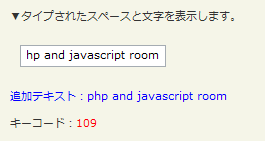
            <p>▼タイプされたスペースと文字を表示します。</p>
<!-- CODE -->
            <input type="text" />
            <p class="addtxt">追加テキスト:</p>
            <p>キーコード:<span id="keycode"></span></div>
<!-- CODE / -->
        </div>
    </body>
</html>
keyup()
マッチした各要素のkeyupイベントを実行
2009/2/27
マッチした各要素のkeyupイベントを実行します。
keyupイベントは、キーボードのキーが離された時に発生します。
マッチした要素のkeyupイベントに結び付けられた関数をすべて実行し、ブラウザのデフォルトのkeyup動作を呼びます。 このデフォルト動作は、keyupイベントに結び付けられた関数のいずれかがFALSEを返せば実行サレマsン。
keyup(fn)
マッチした各要素のkeyupイベントに関数をバインド
2009/2/27
マッチした各要素のkeyupイベントに関数を結び付けます。
keyupイベントはキーボードのキーが離された時に発生します。
第1引数fnには、マッチした各要素のkeyupイベントに結び付ける関数を指定します。
function callback(eventObject){
    this; /* DOM要素 */
}
<!DOCTYPE html PUBLIC "-//W3C//DTD XHTML 1.0 Transitional//EN" "http://www.w3.org/TR/xhtml1/DTD/xhtml1-transitional.dtd">
<html xmlns="http://www.w3.org/1999/xhtml" xml:lang="ja" lang="ja">
<head>
<meta http-equiv="Content-Type" content="text/html; charset=utf-8" />
<meta http-equiv="Content-Language" content="ja" />
<meta http-equiv="Content-Script-Type" content="text/javascript" />
<meta http-equiv="Content-Style-Type" content="text/css" />
<meta http-equiv="imagetoolbar" content="no" />
<title>イベント操作:イベントヘルパー:keyup()イベントの使用例 | jQuery</title>
<link rel="stylesheet" type="text/css" href="/content/lib/global.css" />
<!-- JS -->
<script src="https://ajax.googleapis.com/ajax/libs/jquery/1.3.2/jquery.min.js"></script>
<script type="text/javascript">
$(function(){
$("#sample").bind("keyup", function(){
var res=$(this).val();
var amp=/&/g;
var lt=/</g;
var gt=/>/g;
var crlf = /\n/g;
res=res.replace(amp, "&");
res=res.replace(lt, "<");
res=res.replace(gt, ">");
res=res.replace(crlf, "<br>");
$("#preview").html(res);
});
});
</script>
<style type="text/css">
#sample { width:500px; }
#preview { width:500px; border:1px solid #ccc; background-color:#fff; padding:10px; }
</style>
</head>
<body>
<div id="wrap">
<h1>イベント操作:イベントヘルパー:keyup()イベントの使用例 | jQuery</h1>
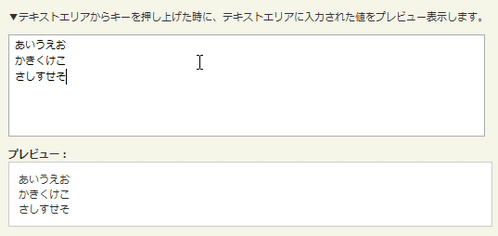
<p>▼テキストエリアからキーを押し上げた時に、テキストエリアに入力された値をプレビュー表示します。
<!-- CODE -->
<p><textarea id="sample" cols="50" rows="5" /></textarea></p>
<strong>プレビュー:</strong><br>
<div id="preview"></div>
<!-- CODE / -->
</div>
</body>
</html>
load(fn)
マッチした各要素のloadイベントに関数をバインド
2009/2/27
マッチした各要素のloadイベントに関数を結び付けます。
window要素に結び付けたイベントは、ユーザーエージェントがドキュメント内のすべてのコンテンツ(ウィンドウ、フレーム、オブジェクト、画像含む)を読み込み終わった時に発生します。 loadイベントは、対象となる要素とそのコンテンツが完全に読み込まれた時に発生します。 loadイベントは、要素が完全に読み込まれる前に設定した時だけ動作します。読み込まれた後では動作しません。 読み込まれた後に実行したり設定する場合は、$(document).ready()を使用してください。
第1引数fnには、マッチした各要素のloadイベントに結び付ける関数を指定します。
function callback(eventObject){
    this; /* DOM要素 */
}
例:ページがグラフィックを含みすべてを読み込んだ時に関数を実行します。
<script type="text/javascript">
    $(function(){
        $(window).load(function(){
            /* 処理 */
        });
    });
</script>
例:画像サイズが100より大きい画像すべてにに「bigImg」クラスを追加します。
<script type="text/javascript">
    $(function(){
        $("img.userIcon").load(function(){
        	if($(this).height() > 100){
        		$(this).addClass("bigImg");
            }
        });
    });
</script>
mousedown(fn)
マッチした要素のmousedownイベントに関数をバインド
2009/2/27
マッチした各要素のmousedownイベントに関数を結び付けます。
mousedownイベントは、ポインティングデバイスボタンが要素上で押された時に発生します。
第1引数fnには、マッチした各要素のmousedownイベントに結び付ける関数を指定します。
function callback(eventObject){
    this; /* DOM要素 */
}

<!DOCTYPE html PUBLIC "-//W3C//DTD XHTML 1.0 Transitional//EN" "http://www.w3.org/TR/xhtml1/DTD/xhtml1-transitional.dtd">
<html xmlns="http://www.w3.org/1999/xhtml" xml:lang="ja" lang="ja">
    <head>
        <meta http-equiv="Content-Type" content="text/html; charset=utf-8" />
        <meta http-equiv="Content-Language" content="ja" />
        <meta http-equiv="Content-Script-Type" content="text/javascript" />
        <meta http-equiv="Content-Style-Type" content="text/css" />
        <meta http-equiv="imagetoolbar" content="no" />
        <title>イベント操作:イベントヘルパー:mousedownイベントの使用例 | jQuery</title>
        <link rel="stylesheet" type="text/css" href="/content/lib/global.css" />
        <!-- JS -->
        <script src="https://ajax.googleapis.com/ajax/libs/jquery/1.3.2/jquery.min.js"></script>
        <script type="text/javascript">
            $(function(){
                $("#sample").mouseup(function(){
                    $(this).append("<span style='color:#f00'>マウスアップ</span>");
                }).mousedown(function(){
                    $(this).append("<span style='color:#00f'>マウスダウン</span>");
                });
            });
        </script>
        <!-- CSS -->
    </head>
    <body>
        <div id="wrap">
            <h1>イベント操作:イベントヘルパー:mousedownイベントの使用例 | jQuery</h1>
            <p>▼mouseupとmousedownイベントが発生した時にテキストを表示します。</p>
<!-- CODE -->
            <p id="sample">ここをマウスを押したり放してください。</p>
<!-- CODE / -->
        </div>
    </body>
</html>
mousemove(fn)
マッチした要素のmousemoveイベントに関数をバインド
2009/2/27
マッチした各要素のmousemoveイベントに関数を結び付けます。
mousemoveイベントは、ポインティングデバイスが要素上で移動された時に発生します。
イベントハンドラは、イベントオブジェクト(マウスの座標を表す.clientX、.clientYプロパティ)を渡します。
第1引数fnには、マッチした各要素のmousemoveイベントに結び付ける関数を指定します。
function callback(eventObject){
    this; /* DOM要素 */
}
<!DOCTYPE html PUBLIC "-//W3C//DTD XHTML 1.0 Transitional//EN" "http://www.w3.org/TR/xhtml1/DTD/xhtml1-transitional.dtd">
<html xmlns="http://www.w3.org/1999/xhtml" xml:lang="ja" lang="ja">
    <head>
        <meta http-equiv="Content-Type" content="text/html; charset=utf-8" />
        <meta http-equiv="Content-Language" content="ja" />
        <meta http-equiv="Content-Script-Type" content="text/javascript" />
        <meta http-equiv="Content-Style-Type" content="text/css" />
        <meta http-equiv="imagetoolbar" content="no" />
        <title>イベント操作:イベントヘルパー:mousemoveイベントの使用例 | jQuery</title>
        <link rel="stylesheet" type="text/css" href="/content/lib/global.css" />
        <!-- JS -->
        <script src="https://ajax.googleapis.com/ajax/libs/jquery/1.3.2/jquery.min.js"></script>
        <script type="text/javascript">
            $(function(){
                $("#box").mousemove(function(e){
                    var pageCoords = "( " + e.pageX + ", " + e.pageY + " )";
                    var clientCoords = "( " + e.clientX + ", " + e.clientY + " )";
                    $("span:first").text("( e.pageX, e.pageY ) - " + pageCoords);
                    $("span:last").text("( e.clientX, e.clientY ) - " + clientCoords);
                });
            });
        </script>
        <!-- CSS -->
        <style type="text/css">
            #box { width:250px; height:170px; margin:10px 10px 10px 0; background:yellow; border:2px groove; float:left; }
            #res { width:250px; height:120px; margin:10px; color:red; float:left; }
            span { display:block; }
        </style>
    </head>
    <body>
        <div id="wrap">
            <h1>イベント操作:イベントヘルパー:mousemoveイベントの使用例 | jQuery</h1>
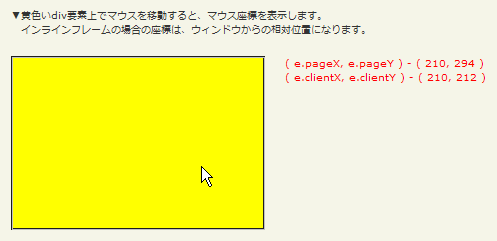
            <p>▼黄色いdiv要素上でマウスを移動すると、マウス座標を表示します。<br> インラインフレームの場合の座標は、ウィンドウからの相対位置になります。</p>
<!-- CODE -->
            <div class="cf">
                <p id="box"></p>
                <p id="res">
                    <span>div要素上でマウスを移動させてください。</span>
                    <span></span>
                </p>
            </div>
<!-- CODE / -->
        </div>
    </body>
</html>
mouseout(fn)
マッチした要素のmouseoutイベントに関数をバインド
2009/2/27
マッチした各要素のmouseoutイベントに関数を結び付けます。
mouseoutイベントは、ポインティングデバイスが要素から離された時に発生します。
第1引数fnには、マッチした各要素のmouseoutイベントに結び付ける関数を指定します。
function callback(eventObject){
    this; /* DOM要素 */
}

<!DOCTYPE html PUBLIC "-//W3C//DTD XHTML 1.0 Transitional//EN" "http://www.w3.org/TR/xhtml1/DTD/xhtml1-transitional.dtd">
<html xmlns="http://www.w3.org/1999/xhtml" xml:lang="ja" lang="ja">
    <head>
        <meta http-equiv="Content-Type" content="text/html; charset=utf-8" />
        <meta http-equiv="Content-Language" content="ja" />
        <meta http-equiv="Content-Script-Type" content="text/javascript" />
        <meta http-equiv="Content-Style-Type" content="text/css" />
        <meta http-equiv="imagetoolbar" content="no" />
        <title>イベント操作:イベントヘルパー:mouseoutイベントの使用例 | jQuery</title>
        <link rel="stylesheet" type="text/css" href="/content/lib/global.css" />
        <!-- JS -->
        <script src="https://ajax.googleapis.com/ajax/libs/jquery/1.3.2/jquery.min.js"></script>
        <script type="text/javascript">
            $(function(){
                var i = 0;
                $("div.overout").mouseout(function(){
                    $("p:first",this).text("mouse out");
                    $("p:last",this).text(++i);
                    }).mouseover(function(){
                    $("p:first",this).text("mouse over");
                });
                var n = 0;
                $("div.enterleave").bind("mouseenter",function(){
                    $("p:first",this).text("mouse enter");
                    }).bind("mouseleave",function(){
                    $("p:first",this).text("mouse leave");
                    $("p:last",this).text(++n);
                });
            });
        </script>
        <!-- CSS -->
        <style type="text/css">
            div.out {
                width:40%;
                height:120px;
                margin:0 15px;
                background-color:#D6EDFC;
                float:left;
            }
            div.in {
                width:60%;
                height:60%;
                background-color:#FFCC00;
                margin:10px auto;
            }
            div.out p,
            div.in p {
                line-height:1em;
                margin:0;
                padding:0;
            }
        </style>
    </head>
    <body>
        <div id="wrap">
            <h1>イベント操作:イベントヘルパー:mouseoutイベントの使用例 | jQuery</h1>
            <p>▼mouseoverとmouseoutイベントが発生した時にテキストを表示します。<br> mouseoutは、mouseleaveでない間、ポインタが子要素内外に移動した時に発生します。</p>
<!-- CODE -->
            <div class="cf">
                <div class="out overout"><p>move your mouse</p><div class="in overout"><p>move your mouse</p><p>0</p></div><p>0</p></div>
                <div class="out enterleave"><p>move your mouse</p><div class="in enterleave"><p>move your mouse</p><p>0</p></div><p>0</p></div>
            </div>
<!-- CODE / -->
        </div>
    </body>
</html>
mouseover(fn)
マッチした要素のmouseoverイベントに関数をバインド
2009/2/27
マッチした各要素のmouseoverイベントに関数を結び付けます。
mouseoverイベントは、ポインティングデバイスが要素上に乗った時に発生します。
第1引数fnには、マッチした各要素のmouseoverイベントに結び付ける関数を指定します。
function callback(eventObject){
    this; /* DOM要素 */
}

<!DOCTYPE html PUBLIC "-//W3C//DTD XHTML 1.0 Transitional//EN" "http://www.w3.org/TR/xhtml1/DTD/xhtml1-transitional.dtd">
<html xmlns="http://www.w3.org/1999/xhtml" xml:lang="ja" lang="ja">
    <head>
        <meta http-equiv="Content-Type" content="text/html; charset=utf-8" />
        <meta http-equiv="Content-Language" content="ja" />
        <meta http-equiv="Content-Script-Type" content="text/javascript" />
        <meta http-equiv="Content-Style-Type" content="text/css" />
        <meta http-equiv="imagetoolbar" content="no" />
        <title>イベント操作:イベントヘルパー:mouseoverイベントの使用例 | jQuery</title>
        <link rel="stylesheet" type="text/css" href="/content/lib/global.css" />
        <!-- JS -->
        <script src="https://ajax.googleapis.com/ajax/libs/jquery/1.3.2/jquery.min.js"></script>
        <script type="text/javascript">
            $(function(){
                var i = 0;
                $("div.overout").mouseover(function(){
                    $("p:first",this).text("mouse over");
                    $("p:last",this).text(++i);
                }).mouseout(function(){
                    $("p:first",this).text("mouse out");
                });
                var n = 0;
                $("div.enterleave").bind("mouseenter",function(){
                    $("p:first",this).text("mouse enter");
                    $("p:last",this).text(++n);
                }).bind("mouseleave",function(){
                    $("p:first",this).text("mouse leave");
                });
            });
        </script>
        <!-- CSS -->
        <style type="text/css">
            div.out {
                width:40%;
                height:120px;
                margin:0 15px;
                background-color:#D6EDFC;
                float:left;
            }
            div.in {
                width:60%;
                height:60%;
                background-color:#FFCC00;
                margin:10px auto;
            }
            div.out p,
            div.in p {
                line-height:1em;
                margin:0;
                padding:0;
            }
        </style>
    </head>
    <body>
        <div id="wrap">
            <h1>イベント操作:イベントヘルパー:mouseoverイベントの使用例 | jQuery</h1>
            <p>▼mouseoverとmouseoutイベントが発生した時にテキストを表示します。<br> mouseoutは、mouseenterでない間、ポインタが子要素内外に移動した時に発生します。</p>
<!-- CODE -->
            <div class="cf">
                <div class="out overout"><p>move your mouse</p><div class="in overout"><p>move your mouse</p><p>0</p></div><p>0</p></div>
                <div class="out enterleave"><p>move your mouse</p><div class="in enterleave"><p>move your mouse</p><p>0</p></div><p>0</p></div>
            </div>
<!-- CODE / -->
        </div>
    </body>
</html>
mouseup(fn)
マッチした要素のmouseupイベントに関数をバインド
2009/2/27
マッチした各要素のmouseupイベントに関数を結び付けます。
mouseupイベントは、ポインティングデバイスボタンが要素上から離された時に発生します。
第1引数fnには、マッチした各要素のmouseupイベントに結び付ける関数を指定します。
function callback(eventObject){
    this; /* DOM要素 */
}

<!DOCTYPE html PUBLIC "-//W3C//DTD XHTML 1.0 Transitional//EN" "http://www.w3.org/TR/xhtml1/DTD/xhtml1-transitional.dtd">
<html xmlns="http://www.w3.org/1999/xhtml" xml:lang="ja" lang="ja">
    <head>
        <meta http-equiv="Content-Type" content="text/html; charset=utf-8" />
        <meta http-equiv="Content-Language" content="ja" />
        <meta http-equiv="Content-Script-Type" content="text/javascript" />
        <meta http-equiv="Content-Style-Type" content="text/css" />
        <meta http-equiv="imagetoolbar" content="no" />
        <title>イベント操作:イベントヘルパー:mouseupイベントの使用例 | jQuery</title>
        <link rel="stylesheet" type="text/css" href="/content/lib/global.css" />
        <!-- JS -->
        <script src="https://ajax.googleapis.com/ajax/libs/jquery/1.3.2/jquery.min.js"></script>
        <script type="text/javascript">
            $(function(){
                $("#sample").mouseup(function(){
                    $(this).append("<span style='color:#f00'>マウスアップ</span>");
                }).mousedown(function(){
                    $(this).append("<span style='color:#00f'>マウスダウン</span>");
                });
            });
        </script>
        <!-- CSS -->
    </head>
    <body>
        <div id="wrap">
            <h1>イベント操作:イベントヘルパー:mouseupイベントの使用例 | jQuery</h1>
            <p>▼mouseupiとmousedownイベントが発生した時にテキストを表示します。</p>
<!-- CODE -->
            <p id="sample">ここをマウスを押したり放してください。</p>
<!-- CODE / -->
        </div>
    </body>
</html>
resize(fn)
マッチした要素のresizeイベントに関数をバインド
2009/2/27
マッチした各要素のresizeイベントに関数を結び付けます。
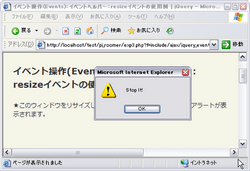
resizeイベントは、ドキュメントのビューがリサイズされた時に発生します。
第1引数fnには、マッチした各要素のresizeイベントに結び付ける関数を指定します。
function callback(eventObject){
    this; /* DOM要素 */
}
<!DOCTYPE html PUBLIC "-//W3C//DTD XHTML 1.0 Transitional//EN" "http://www.w3.org/TR/xhtml1/DTD/xhtml1-transitional.dtd">
<html xmlns="http://www.w3.org/1999/xhtml" xml:lang="ja" lang="ja">
    <head>
        <meta http-equiv="Content-Type" content="text/html; charset=utf-8" />
        <meta http-equiv="Content-Language" content="ja" />
        <meta http-equiv="Content-Script-Type" content="text/javascript" />
        <meta http-equiv="Content-Style-Type" content="text/css" />
        <meta http-equiv="imagetoolbar" content="no" />
        <title>イベント操作:イベントヘルパー:resizeイベントの使用例 | jQuery</title>
        <link rel="stylesheet" type="text/css" href="/content/lib/global.css" />
        <!-- JS -->
        <script src="https://ajax.googleapis.com/ajax/libs/jquery/1.3.2/jquery.min.js"></script>
        <script type="text/javascript">
            $(function(){
                $(window).resize(function(msg, url, line){
                    alert("Stop It!");
                });
            });
        </script>
        <!-- CSS -->
        <style type="text/css">
            span { color:red; display:none; }
        </style>
    </head>
    <body>
        <div id="wrap">
            <h1>イベント操作:イベントヘルパー:resizeイベントの使用例 | jQuery</h1>
            <p>★このウィンドウをリサイズしてみてください。リサイズすると、アラートが表示されます。</p>
<!-- CODE -->
<!-- CODE / -->
        </div>
    </body>
</html>
scroll(fn)
マッチした要素のscrollイベントに関数をバインド
2009/2/27
マッチした各要素のscrollイベントに関数を結び付けます。
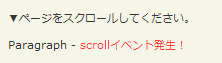
scrollイベントは、ドキュメントのビューがスクロールされた時に発生します。
例:ウェブページウィンドウがリサイズされた時にアラートを表示します。
<script type="text/javascript">
    $(function(){
        $(window).resize(function(msg, url, line){
            alert("Stop It!");
        });
    });
</script>
第1引数fnには、マッチした各要素のscrollイベントに結び付ける関数を指定します。
function callback(eventObject){
    this; /* DOM要素 */
}
<!DOCTYPE html PUBLIC "-//W3C//DTD XHTML 1.0 Transitional//EN" "http://www.w3.org/TR/xhtml1/DTD/xhtml1-transitional.dtd">
<html xmlns="http://www.w3.org/1999/xhtml" xml:lang="ja" lang="ja">
    <head>
        <meta http-equiv="Content-Type" content="text/html; charset=utf-8" />
        <meta http-equiv="Content-Language" content="ja" />
        <meta http-equiv="Content-Script-Type" content="text/javascript" />
        <meta http-equiv="Content-Style-Type" content="text/css" />
        <meta http-equiv="imagetoolbar" content="no" />
        <title>イベント操作:イベントヘルパー:scrollイベントの使用例 | jQuery</title>
        <link rel="stylesheet" type="text/css" href="/content/lib/global.css" />
        <!-- JS -->
        <script src="https://ajax.googleapis.com/ajax/libs/jquery/1.3.2/jquery.min.js"></script>
        <script type="text/javascript">
            $(function(){
                $("p").clone().appendTo(document.body);
                $("p").clone().appendTo(document.body);
                $("p").clone().appendTo(document.body);
                $(window).scroll(function () {
                    $("span").css("display", "inline").fadeOut("slow");
                });
            });
        </script>
        <!-- CSS -->
        <style type="text/css">
            span { color:red; display:none; }
        </style>
    </head>
    <body>
        <div id="wrap">
            <h1>イベント操作:イベントヘルパー:scrollイベントの使用例 | jQuery</h1>
            <p>▼ページをスクロールしてください。</p>
<!-- CODE -->
            <p>Paragraph - <span>scrollイベント発生!</span></p>
<!-- CODE / -->
        </div>
    </body>
</html>
select()
マッチした要素のselectイベントを実行
2009/2/27
マッチした各要素のselectイベントを実行します。
マッチした要素のselectイベントに結び付けられた関数をすべて実行し、ブラウザのデフォルトのselect動作を呼びます。 このデフォルト動作は、selectイベントに結び付けられた関数のいずれかがFALSEを返せば実行されません。
selectイベントとchangeイベントを混在せないでください。 changeイベントは、それは、htmlのselect要素がユーザーによって選択された選択肢(option要素)がある時に発生します。
select(fn)
マッチした要素のselectイベントに関数をバインド
2009/2/27
マッチした各要素のselectイベントに関数を結び付けます。
selectイベントは、input要素やtextarea要素を含むテキスト入力欄のテキストがユーザーによって選択された時に発生します。
第1引数fnには、マッチした各要素のscrollイベントに結び付ける関数を指定します。
function callback(eventObject){
    this; /* DOM要素 */
}

<!DOCTYPE html PUBLIC "-//W3C//DTD XHTML 1.0 Transitional//EN" "http://www.w3.org/TR/xhtml1/DTD/xhtml1-transitional.dtd">
<html xmlns="http://www.w3.org/1999/xhtml" xml:lang="ja" lang="ja">
    <head>
        <meta http-equiv="Content-Type" content="text/html; charset=utf-8" />
        <meta http-equiv="Content-Language" content="ja" />
        <meta http-equiv="Content-Script-Type" content="text/javascript" />
        <meta http-equiv="Content-Style-Type" content="text/css" />
        <meta http-equiv="imagetoolbar" content="no" />
        <title>イベント操作:イベントヘルパー:selectイベントの使用例 | jQuery</title>
        <link rel="stylesheet" type="text/css" href="/content/lib/global.css" />
        <!-- JS -->
        <script src="https://ajax.googleapis.com/ajax/libs/jquery/1.3.2/jquery.min.js"></script>
        <script type="text/javascript">
            $(function(){
                $(document).select( function () {
                    $("#res").text("Something was selected").css("color","red").show().fadeOut(1000);
                });
            });
        </script>
    </head>
    <body>
        <div id="wrap">
            <h1>イベント操作:イベントヘルパー:selectイベントの使用例 | jQuery</h1>
            <p>▼テキスト入力欄内のテキストを選択して、クリックしたりマウスでドラッグしてみてください。</p>
<!-- CODE -->
            <p></p>
            <p>
                <input type="text" value="Some text" />
                <input type="text" value="to test on" />
            </p>
            <p id="res"></p>
<!-- CODE / -->
        </div>
    </body>
</html>
submit()
マッチした要素のsubmitイベントを実行
2009/2/27
マッチした各要素のsubmitイベントを実行します。
マッチした各要素に、submitイベントを結び付られた関数をすべて時候氏、ブラウザのデフォルトのsubmit動作を呼びます。 このデフォルト動作は、submitイベントに結び付けられた関数のいずれかがFALSEを返せば実行されません。
例:ページ上にある最初のフォームにsubmitイベントを実行します。
$("form:first").submit();
submit(fn)
マッチした要素のsubmitイベントに関数をバインド
2009/2/27
マッチした各要素のsubmitイベントに関数を結び付けます。
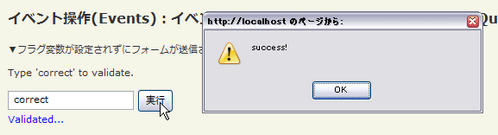
submitイベントは、フォームが送信された時に発生します。
第1引数fnには、マッチした各要素のsubmitイベントに結び付ける関数を指定します。
function callback(eventObject){
    this; /* DOM要素 */
}
<!DOCTYPE html PUBLIC "-//W3C//DTD XHTML 1.0 Transitional//EN" "http://www.w3.org/TR/xhtml1/DTD/xhtml1-transitional.dtd">
<html xmlns="http://www.w3.org/1999/xhtml" xml:lang="ja" lang="ja">
    <head>
        <meta http-equiv="Content-Type" content="text/html; charset=utf-8" />
        <meta http-equiv="Content-Language" content="ja" />
        <meta http-equiv="Content-Script-Type" content="text/javascript" />
        <meta http-equiv="Content-Style-Type" content="text/css" />
        <meta http-equiv="imagetoolbar" content="no" />
        <title>イベント操作:イベントヘルパー:submitイベントの使用例 | jQuery</title>
        <link rel="stylesheet" type="text/css" href="/content/lib/global.css" />
        <!-- JS -->
        <script src="https://ajax.googleapis.com/ajax/libs/jquery/1.3.2/jquery.min.js"></script>
        <script type="text/javascript">
            $(function(){
                $("form").submit(function() {
                    if ($("input:first").val() == "correct") {
                        $("span").text("Validated...").css("color","blue").show();
                        return true;
                    }
                    $("span").text("Not valid!").css("color","red").show().fadeOut(1000);
                    return false;
                });
            });
        </script>
    </head>
    <body>
        <div id="wrap">
            <h1>イベント操作:イベントヘルパー:submitイベントの使用例 | jQuery</h1>
            <p>▼フラグ変数が設定されずにフォームが送信されるのを防ぎます。</p>
<!-- CODE -->
            <p>Type 'correct' to validate.</p>
            <form action="javascript:alert('success!');">
                <div>
                    <input type="text" />
                    <input type="submit" />
                </div>
            </form>
            <span></span>
<!-- CODE / -->
        </div>
    </body>
</html>
unload(fn)
マッチした各要素のunloadイベントに関数をバインド
2009/2/27
マッチした各要素のunloadイベントに関数を結び付けます。
第1引数fnには、マッチした各要素のunloadイベントに結び付ける関数を指定します。
function callback(eventObject){
    this; /* DOM要素 */
}
例:ページがアンロードされた時にアラートを表示します。
<script type="text/javascript">
    $(function(){
        $(window).unload(function(){
           alert("さようなら");
        });
    });
</script>

