jQuery APIリファレンスエフェクト操作:スライディング

- slideDown(speed[,callback])〔要素を上→下にスライドダウン〕
- slideUp(speed[, callback])〔要素を下→上にスライドアップ〕
- slideToggle(speed[, callback])〔要素のスライドダウン・スライドアップ切替〕
- スライドするお問合せフォーム〔slideDown()+slideUp()の使用例〕
slideDown(speed[,callback])
要素を上→下にスライドダウン
2009/2/27
マッチした要素がその要素の高さになるまで上→下へアニメーションしながら表示します。 オプションの第2引数callbackを指定した場合は、要素のアニメーション完了時に指定したコールバック関数を実行します。
マッチした要素すべてをスライドして表示にするアニメーションは要素の高さだけが調整されます。 jQuery v1.3からは、垂直方向の内外余白(margin、padding)が、より滑らかにアニメーションをするようになりました。
-
第1引数speedには、要素がスライドダウンする時のアニメーション速度を指定します。 数値(ミリ秒)あるいは文字列を指定可能です。 数値の場合、例えば3秒なら「3000」を指定します。 文字列の場合、「slow」(ゆっくり)、「normal」(通常)、「fast」(速く)のあらかじめ決められた速度のいずれかを指定します。
-
オプションの第2引数callbackには、アニメーションが完了した時に実行される関数を指定します。 関数は、アニメーションが完了した各要素に対し、一度だけ実行されます。
function callback(){
    this; /* DOM要素 */
}
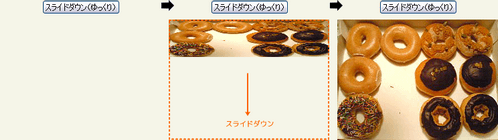 設置イメージ
<!DOCTYPE html PUBLIC "-//W3C//DTD XHTML 1.0 Transitional//EN" "http://www.w3.org/TR/xhtml1/DTD/xhtml1-transitional.dtd">
<html xmlns="http://www.w3.org/1999/xhtml" xml:lang="ja" lang="ja">
<head>
<meta http-equiv="Content-Type" content="text/html; charset=utf-8" />
<meta http-equiv="Content-Language" content="ja" />
<meta http-equiv="Content-Script-Type" content="text/javascript" />
<meta http-equiv="Content-Style-Type" content="text/css" />
<meta http-equiv="imagetoolbar" content="no" />
<title>エフェクト操作:スライディング:slideDown()の使用例 | jQuery</title>
<link rel="stylesheet" type="text/css" href="/content/lib/global.css" />
<script src="https://ajax.googleapis.com/ajax/libs/jquery/1.3.2/jquery.min.js"></script>
<script type="text/javascript">
$(function(){
$("#btn_slow").click(function(){
$("#panel1 img").slideDown("slow");
});
$("#btn_normal").click(function(){
$("#panel2 img").slideDown("normal");
});
$("#btn_fast").click(function(){
$("#panel3 img").slideDown("fast");
});
$("#btn_slow_str").click(function(){
$("#panel4 p").slideDown("slow");
});
$("#btn_normal_str").click(function(){
$("#panel5 p").slideDown("normal");
});
$("#btn_fast_str").click(function(){
$("#panel6 p").slideDown("fast");
});
});
</script>
<style type="text/css">
th { text-align:center; width:280px; }
td { text-align:center; width:280px; height:240px; }
#panel1, #panel2, #panel3, #panel4, #panel5, #panel6 { width:280px; height:240px; }
#panel1 img, #panel2 img, #panel3 img { display:none; }
#panel4 p, #panel5 p, #panel6 p { display:none; width:80%; height:200px; padding:20px; background-color:#000; color:#fff; text-align:left; }
</style>
</head>
<body>
<div id="wrap">
<h1>エフェクト操作:スライディング:slideDown()の使用例 | jQuery</h1>
<p>▼ボタンをクリックすると、指定した速度でスライドダウンします。</p>
<!-- CODE -->
<table>
<tr>
<th><button id="btn_slow">スライドダウン(ゆっくり)</button></th>
<th><button id="btn_normal">スライドダウン(普通)</button></th>
<th><button id="btn_fast">スライドダウン(速く)</button></th>
</tr>
<tr>
<td><div id="panel1"><img src="http://farm4.static.flickr.com/3327/3190782567_01fd8855f0_m.jpg" width="240" height="180" alt="クリスピー・クリーム・ドーナツ" /></div></td>
<td><div id="panel2"><img src="http://farm4.static.flickr.com/3336/3190782595_f789def132_m.jpg" width="240" height="180" alt="クリスピー・クリーム・ドーナツ" /></div></td>
<td><div id="panel3"><img src="http://farm4.static.flickr.com/3317/3191630438_f057b231a3_m.jpg" width="240" height="180" alt="クリスピー・クリーム・ドーナツ" /></div></td>
</tr>
</table>
<table>
<tr>
<th><button id="btn_slow_str">スライドダウン(ゆっくり)</button></th>
<th><button id="btn_normal_str">スライドダウン(普通)</button></th>
<th><button id="btn_fast_str">スライドダウン(速く)</button></th>
</tr>
<tr>
<td><div id="panel4"><p>slideDown()メソッドの第1引数に「slow」を指定すると、要素が上→下へゆっくりとスライドダウンします。</p></div></td>
<td><div id="panel5"><p>slideDown()メソッドの第1引数に「normal」を指定すると、要素が上→下へ普通にスライドダウンします(デフォルト)。</p></div></td>
<td><div id="panel6"><p>slideDown()メソッドの第1引数に「fast」を指定すると、要素が上→下へ速くとスライドダウンします。</p></div></td>
</tr>
</table>
<!-- / CODE -->
</div>
</body>
</html>
slideUp(speed[, callback])
要素を下→上にスライドアップ
2009/2/27
マッチした各要素がその要素の高さになるまで下→上へアニメーションしながら表示します。 オプションの第2引数callbackを指定した場合は、要素のアニメーション完了時に指定したコールバック関数を実行します。
マッチした要素すべてをスライドして非表示にするアニメーションは要素の高さだけが調整されます。 jQuery v1.3からは、垂直方向の内外余白(margin、padding)が、より滑らかにアニメーションをするようになりました。
-
第1引数speedには、要素がスライドアップする時のアニメーション速度を指定します。 数値(ミリ秒)あるいは文字列を指定可能です。 数値の場合、例えば3秒なら「3000」を指定します。 文字列の場合、「slow」(ゆっくり)、「normal」(通常)、「fast」(速く)のあらかじめ決められた速度のいずれかを指定します。
-
オプションの第2引数callbackには、アニメーションが完了した時に実行される関数を指定します。 関数は、アニメーションが完了した各要素に対し、一度だけ実行されます。
function callback(){
    this; /* DOM要素 */
}
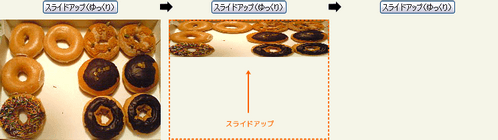 設置イメージ
<!DOCTYPE html PUBLIC "-//W3C//DTD XHTML 1.0 Transitional//EN" "http://www.w3.org/TR/xhtml1/DTD/xhtml1-transitional.dtd">
<html xmlns="http://www.w3.org/1999/xhtml" xml:lang="ja" lang="ja">
<head>
<meta http-equiv="Content-Type" content="text/html; charset=utf-8" />
<meta http-equiv="Content-Language" content="ja" />
<meta http-equiv="Content-Script-Type" content="text/javascript" />
<meta http-equiv="Content-Style-Type" content="text/css" />
<meta http-equiv="imagetoolbar" content="no" />
<title>エフェクト操作:スライディング:slideUp()の使用例 | jQuery</title>
<link rel="stylesheet" type="text/css" href="/content/lib/global.css" />
<script src="https://ajax.googleapis.com/ajax/libs/jquery/1.3.2/jquery.min.js"></script>
<script type="text/javascript">
$(document).ready(function(){
$("#btn_slow").click(function(){
$("#panel1 img").slideUp("slow");
});
$("#btn_normal").click(function(){
$("#panel2 img").slideUp("normal");
});
$("#btn_fast").click(function(){
$("#panel3 img").slideUp("fast");
});
$("#btn_slow_str").click(function(){
$("#panel4 p").slideUp("slow");
});
$("#btn_normal_str").click(function(){
$("#panel5 p").slideUp("normal");
});
$("#btn_fast_str").click(function(){
$("#panel6 p").slideUp("fast");
});
});
</script>
<style type="text/css">
th { text-align:center; width:280px; }
td { text-align:center; width:280px; height:240px; }
#panel1, #panel2, #panel3, #panel4, #panel5, #panel6 { width:280px; height:240px; }
#panel4 p, #panel5 p, #panel6 p { width:80%; height:200px; padding:20px; background-color:#000; color:#fff; text-align:left; }
</style>
</head>
<body>
<div id="wrap">
<h1>エフェクト操作:スライディング:slideUp()の使用例 | jQuery</h1>
<!-- CODE -->
<table>
<tr>
<th><button id="btn_slow">スライドアップ(ゆっくり)</button></th>
<th><button id="btn_normal">スライドアップ(普通)</button></th>
<th><button id="btn_fast">スライドアップ(速く)</button></th>
</tr>
<tr>
<td><div id="panel1"><img src="http://farm4.static.flickr.com/3327/3190782567_01fd8855f0_m.jpg" width="240" height="180" alt="クリスピー・クリーム・ドーナツ" /></div></td>
<td><div id="panel2"><img src="http://farm4.static.flickr.com/3336/3190782595_f789def132_m.jpg" width="240" height="180" alt="クリスピー・クリーム・ドーナツ" /></div></td>
<td><div id="panel3"><img src="http://farm4.static.flickr.com/3317/3191630438_f057b231a3_m.jpg" width="240" height="180" alt="クリスピー・クリーム・ドーナツ" /></div></td>
</tr>
</table>
<table>
<tr>
<th><button id="btn_slow_str">スライドアップ(ゆっくり)</button></th>
<th><button id="btn_normal_str">スライドアップ(普通)</button></th>
<th><button id="btn_fast_str">スライドアップ(速く)</button></th>
</tr>
<tr>
<td><div id="panel4"><p>slideUp()メソッドの第1引数に「slow」を指定すると、要素が下→上へゆっくりとスライドアップします。</p></div></td>
<td><div id="panel5"><p>slideUp()メソッドの第1引数に「normal」を指定すると、要素が下→上へ普通にスライドアップします(デフォルト)。</p></div></td>
<td><div id="panel6"><p>slideUp()メソッドの第1引数に「fast」を指定すると、要素が下→上へ速くとスライドアップします。</p></div></td>
</tr>
</table>
<!-- / CODE -->
</div>
</body>
</html>
slideToggle(speed[, callback])
要素のスライドダウン・スライドアップ切替
2009/2/27
マッチした各要素が、その要素の高さになるまで交互にスライドアップ・スライドダウンします。 オプションの第2引数callbackを指定した場合は、要素のアニメーション完了時に指定したコールバック関数を実行します。
マッチした要素すべてをスライドして表示・非表示にするアニメーションは要素の高さだけが調整されます。 jQuery v1.3からは、垂直方向の内外余白(margin、padding)が、より滑らかにアニメーションをするようになりました。
-
第1引数speedには、要素を表示・非表示にする時のアニメーション速度を指定します。 数値(ミリ秒)あるいは文字列を指定可能です。 数値の場合、例えば3秒なら「3000」を指定します。 文字列の場合、「slow」(ゆっくり)、「normal」(通常)、「fast」(速く)のあらかじめ決められた速度のいずれかを指定します。
-
オプションの第2引数callbackには、アニメーションが完了した時に実行される関数を指定します。 関数は、アニメーションが完了した各要素に対し、一度だけ実行されます。
function callback(){
    this; /* DOM要素 */
}
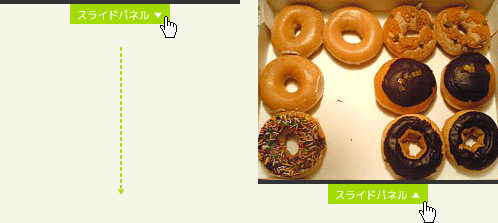 設置イメージ
<!DOCTYPE html PUBLIC "-//W3C//DTD XHTML 1.0 Transitional//EN" "http://www.w3.org/TR/xhtml1/DTD/xhtml1-transitional.dtd">
<html xmlns="http://www.w3.org/1999/xhtml" xml:lang="ja" lang="ja">
<head>
<meta http-equiv="Content-Type" content="text/html; charset=utf-8" />
<meta http-equiv="Content-Language" content="ja" />
<meta http-equiv="Content-Script-Type" content="text/javascript" />
<meta http-equiv="Content-Style-Type" content="text/css" />
<meta http-equiv="imagetoolbar" content="no" />
<title>エフェクト操作:スライディング:slideToggle()の使用例 | jQuery</title>
<link rel="stylesheet" type="text/css" href="/content/lib/global.css" />
<script src="https://ajax.googleapis.com/ajax/libs/jquery/1.3.2/jquery.min.js"></script>
<script type="text/javascript">
$(document).ready(function(){
$(".btn-slide").click(function(){
$("#slidepanel").slideToggle("slow");
$(this).toggleClass("active"); return false;
});
});
</script>
<style type="text/css">
#slidepanel { background: #333; width:240px; height: 180px; display: none; }
.slide { margin:0; padding:0; width:240px; border-top: solid 4px #333; }
.btn-slide { background:transparent url("/content/img/ajax/jquery/btn_slidetoggle.png") no-repeat 0 0; margin: 0 auto; display:block; width:100px; height:20px; text-decoration:none; text-indent:-9999px; overflow:hidden; }
.active { background-position:0 -20px; }
</style>
</head>
<body>
<div id="wrap">
<h1>エフェクト操作:スライディング:slideToggle()の使用例 | jQuery</h1>
<div id="slidepanel"><a href="http://www.flickr.com/photos/22559849@N06/2973155055/" title="クリスピー・クリーム・ドーナツ by php_javascript_room, on Flickr"><img src="http://farm4.static.flickr.com/3141/2973155055_4cf4370939_m.jpg" width="240" height="180" alt="クリスピー・クリーム・ドーナツ" /></a></div>
<p class="slide"><a href="#" class="btn-slide">スライドパネル</a></p>
</div>
</body>
</html>
ナビゲーションメニューのスライドアップ・ダウン
<!DOCTYPE html PUBLIC "-//W3C//DTD XHTML 1.0 Transitional//EN" "http://www.w3.org/TR/xhtml1/DTD/xhtml1-transitional.dtd">
<html xmlns="http://www.w3.org/1999/xhtml" xml:lang="ja" lang="ja">
    <head>
        <meta http-equiv="Content-Type" content="text/html; charset=utf-8" />
        <meta http-equiv="Content-Language" content="ja" />
        <meta http-equiv="Content-Script-Type" content="text/javascript" />
        <meta http-equiv="Content-Style-Type" content="text/css" />
        <meta http-equiv="imagetoolbar" content="no" />
        <title>エフェクト操作:スライディング:slideToggle()の使用例 | jQuery</title>
        <link rel="stylesheet" type="text/css" href="/content/lib/global.css" />
        <!-- JS -->
        <script src="https://ajax.googleapis.com/ajax/libs/jquery/1.3.2/jquery.min.js"></script>
        <script type="text/javascript">
            $(function(){
                $("#nav span").click(function(){
                    $("#nav ul").slideToggle("slow");
                });
                $("#nav a").click(function(){
                    return false;
                });
            });
        </script>
        <!-- CSS -->
        <style type="text/css">
            body {
                background:#999;
                color:#fff;
            }
            #nav {
                 width:160px;
                 border:1px solid #fff;
            }
             #nav span {
                 background:transparent url("/content/img/ajax/navigationmenu.png") no-repeat 0 0;
                 display:block;
                 margin:0; padding:0;
                 width:160px; height:27px;
                text-indent:-9999px;
             }
             #nav ul {
                 margin:5px 0 0 0;
                 list-style:none;
                 margin:0; padding:0;
                 display:none;
                 background-color:#000;
                height:20em;
                 border-top:1px solid #fff;
            }
             #nav li {
                 list-style:none;
                 margin:0; padding:0;
                 display:block;
             }
             #nav li a {
                 color:#fff;
                 margin:0; padding:5px 10px;
                 display:block;
                 text-decoration:none;
             }
             #nav li a:hover {
                 background-color:#ff6699;
             }
        </style>
    </head>
    <body>
        <div id="wrap">
            <h1>エフェクト操作:スライディング:slideToggle()の使用例 | jQuery</h1>
            <h2>ナビゲーションメニューのスライドアップ・ダウン</h2>
<!-- CODE -->
            <div id="nav">
                <span>navigation menu | ▼</span>
                <ul>
                    <li><a href="#">menu #1</a></li>
                    <li><a href="#">menu #2</a></li>
                    <li><a href="#">menu #3</a></li>
                    <li><a href="#">menu #4</a></li>
                    <li><a href="#">menu #5</a></li>
                    <li><a href="#">menu #6</a></li>
                    <li><a href="#">menu #7</a></li>
                </ul>
            </div>
<!-- / CODE -->
        </div>
    </body>
</html>
パネルのスライドアップ・ダウン
参照:Up and Down slider using JQuery
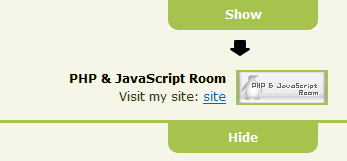 設置イメージ
<!DOCTYPE html PUBLIC "-//W3C//DTD XHTML 1.0 Transitional//EN" "http://www.w3.org/TR/xhtml1/DTD/xhtml1-transitional.dtd">
<html xmlns="http://www.w3.org/1999/xhtml" xml:lang="ja" lang="ja">
<head>
<meta http-equiv="Content-Type" content="text/html; charset=utf-8" />
<meta http-equiv="Content-Language" content="ja" />
<meta http-equiv="Content-Script-Type" content="text/javascript" />
<meta http-equiv="Content-Style-Type" content="text/css" />
<meta http-equiv="imagetoolbar" content="no" />
<title>エフェクト操作:スライディング:slideToggle()の使用例 | jQuery</title>
<link rel="stylesheet" type="text/css" href="/content/lib/global.css" />
<!-- JS -->
<script src="https://ajax.googleapis.com/ajax/libs/jquery/1.3.2/jquery.min.js"></script>
<script type="text/javascript">
$(function(){
$("#sub-panel").click(function(){
$("#top-panel").slideToggle();
var el = $("#shText");
var state = $("#shText").html();
state = (state == 'Hide' ? '<span id="shText">Show</span>' : '<span id="shText">Hide</span>');
el.replaceWith(state);
});
});
</script>
<!-- CSS -->
<style type="text/css">
#top-panel { background:#e8f3c6; border-bottom:3px solid #a6c34e; padding:14px 20px; text-align:right; }
#sub-panel { text-align:center; }
#sub-panel a { width:150px; float:right; color:#fff; text-decoration:none; margin-right:30px; font-weight:bold; background:url("/content/img/ajax/sub-left.png") bottom left no-repeat #a6c34e; }
#sub-panel a span { padding:6px; background:url("/content/img/ajax/sub-right.png") right bottom no-repeat; display:block; }
#sub-panel strong { color:#000;}
.face { border:solid 2px #a6c34e; margin-left:10px; float:right;}
</style>
</head>
<body>
<div id="wrap">
<h1>エフェクト操作:スライディング:slideToggle()の使用例 | jQuery</h1>
<h2>パネルのスライドアップ・ダウン</h2>
<p>参照:<a href='http://www.thatagency.com/design-studio-blog/2009/02/up-and-down-slider-using-jquery/'>Up and Down slider using JQuery</a></p>
<!-- CODE -->
<div id="top-panel">
<img src="/content/img/banner/banner2.gif" width="88" height="31" class="face"/>
<strong>PHP & JavaScript Room</strong><br>
Visit my site: <a href="http://phpjavascriptroom.com/">site</a>
</div>
<div id="sub-panel"><a href="#" id="toggle"><span id="shText">Hide</span></a></div>
<!-- / CODE -->
</div>
</body>
</html>
スライドするお問合せフォーム
slideDown()+slideUp()の使用例
2009/2/27
Creating a Slide-In jQuery Contact Form
お問合せフォームをスライドダウンして表示し、スライドアップして非表示にします。
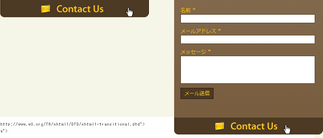 設置イメージ
<!DOCTYPE html PUBLIC "-//W3C//DTD XHTML 1.0 Transitional//EN" "http://www.w3.org/TR/xhtml1/DTD/xhtml1-transitional.dtd">
<html xmlns="http://www.w3.org/1999/xhtml" xml:lang="ja" lang="ja">
<head>
<meta http-equiv="Content-Type" content="text/html; charset=utf-8" />
<meta http-equiv="Content-Language" content="ja" />
<meta http-equiv="Content-Script-Type" content="text/javascript" />
<meta http-equiv="Content-Style-Type" content="text/css" />
<meta http-equiv="imagetoolbar" content="no" />
<title>エフェクト操作:スライディング:slideDown()+slideUp()の使用例 | jQuery</title>
<link rel="stylesheet" type="text/css" href="/content/lib/global.css" />
<script src="https://ajax.googleapis.com/ajax/libs/jquery/1.3.2/jquery.min.js"></script>
<script type="text/javascript">
$(function(){
$("#contactLink").click(function(){
if ($("#contactForm").is(":hidden")){
$("#contactForm").slideDown("slow");
}
else{
$("#contactForm").slideUp("slow");
}
});
});
function closeForm(){
$("#messageSent").show("slow");
setTimeout('$("#messageSent").hide();$("#contactForm").slideUp("slow")', 2000);
}
</script>
<style type="text/css">
.box {
margin:0auto;
width:351px;
text-align:left;
position: absolute;
top:0; right:0;
}
#contactFormContainer {
margin:0; padding:0;
width:351px; height:277px;
}
#contactForm {
background:transparent url("/content/img/ajax/bkg.jpg") repeat 0 0;
width:351px; height:277px;
display:none;
overflow:hidden;
}
#contactForm fieldset {
background:transparent url("/content/img/ajax/bkg.jpg") repeat 0 0;
padding:15px 30px 45px 15px;
border:none;
}
#contactForm label {
display:block;
color:#ffc400;
}
#contactForm input.txt {
display:block;
border:solid 1px #4d3a24;
width:100%;
margin-bottom:10px;
}
#contactForm textarea {
display:block;
border:solid 1px #4d3a24;
width:100%; height:60px;
}
#contactForm input.btn_submit {
margin-top:10px;
background-color:#4d3a24;
border:solid 1px #23150c;
color:#fecd28;
padding:2px 5px;
}
#contactLink {
width:351px; height:40px;
background:transparent url('/content/img/ajax/slidein_button.png') no-repeat 0 0;
display:block;
cursor:pointer;
}
#messageSent {
color:#ff9933;
display:none;
}
</style>
</head>
<body>
<div id="wrap">
<h1>エフェクト操作:スライディング:slideDown()+slideUp()の使用例 | jQuery</h1>
<h2>参照:<a href='http://www.designshack.co.uk/tutorials/creating-a-slide-in-jquery-contact-form'>Creating a Slide-In jQuery Contact Form</a></h2>
<p>画面右上にある【Contact US】ボタンをクリックすると、お問合せフォームがスライドダウンします。</p>
<!-- CODE -->
<div class="box">
<div id="contactFormContainer">
<div id="contactForm">
<fieldset>
<label for="Name">名前 *</label><input id="name" type="text" class="txt" />
<label for="Email">メールアドレス *</label><input id="Email" type="text" class="txt" />
<label for="Message">メッセージ *</label>
<textarea id="Message" rows="3" cols="20"></textarea>
<input id="sendMail" type="submit" name="submit" class="btn_submit" onclick="closeForm()" value="メール送信" />
<div id="messageSent">メッセージの送信に成功しました!</div>
</fieldset>
</div>
<div id="contactLink"></div>
</div>
<!-- / CODE -->
</div>
</body>
</html>

