jQuery APIリファレンスエフェクト操作:基本

- show()〔要素を表示する〕
- show(speed[, callback])〔指定した速度で要素を表示する〕
- hide()〔要素を非表示にする〕
- hide(speed[, callback])〔指定した速度で要素を非表示にする〕
- toggle()〔要素の表示・非表示切替〕
- toggle(switch) ※v1.3~〔スイッチに基づいて要素の表示・非表示切替〕
- toggle(speed[, callback])〔指定した速度で要素の表示・非表示切替〕
- タブ切替〔show()、hide()使用〕
show()
要素を表示する
2009/2/27
マッチした要素がhide()またはスタイルシートのdisplay:none;で非表示になっている場合に、その要素を表示します。
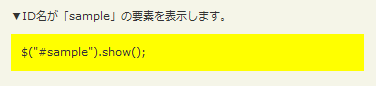
<!DOCTYPE html PUBLIC "-//W3C//DTD XHTML 1.0 Transitional//EN" "http://www.w3.org/TR/xhtml1/DTD/xhtml1-transitional.dtd">
<html xmlns="http://www.w3.org/1999/xhtml" xml:lang="ja" lang="ja">
<head>
<meta http-equiv="Content-Type" content="text/html; charset=utf-8" />
<meta http-equiv="Content-Language" content="ja" />
<meta http-equiv="Content-Script-Type" content="text/javascript" />
<meta http-equiv="Content-Style-Type" content="text/css" />
<meta http-equiv="imagetoolbar" content="no" />
<title>エフェクト操作:基本:show()の使用例 | jQuery</title>
<link rel="stylesheet" type="text/css" href="/content/lib/global.css" />
<!-- JS -->
<script src="https://ajax.googleapis.com/ajax/libs/jquery/1.3.2/jquery.min.js"></script>
<script type="text/javascript">
$(function(){
$("#sample").show();
});
</script>
<!-- CSS -->
<style type="text/css">
#sample { display:none; padding:10px; background:yellow; }
</style>
</head>
<body>
<div id="wrap">
<h1>エフェクト操作:基本:show()の使用例 | jQuery</h1>
<!-- CODE -->
<p>▼ID名が「sample」の要素を表示します。</p>
<div id="sample">$("#sample").show();</div>
<!-- CODE / -->
</div>
</body>
</html>
show(speed[, callback])
指定した速度で要素を表示する
2009/2/27
マッチした要素をアニメーションしながら表示します。 オプションの第2引数callbackを指定した場合は、要素のアニメーション完了時に指定したコールバック関数を実行します。
マッチした各要素の高さ・幅・透明度は、指定した速度にしたがって動的に変更されます。 jQuery v1.3からは、paddingとmarginがより滑らかにアニメーションされるようになりました。
-
第1引数speedには、要素を表示時のアニメーション速度を指定します。 数値(ミリ秒)あるいは文字列を指定可能です。 数値の場合、例えば3秒なら「3000」を指定します。 文字列の場合、あらかじめ定義されている速度(「slow」(ゆっくり)、「normal」(通常)、「fast」(速く))のいずれかを指定します。
-
オプションの第2引数callbackには、アニメーションが完了した時に実行する関数を指定します。 関数が実行されるのは各要素に対して1度だけです。
function callback(){
    this; /* DOM要素 */
}
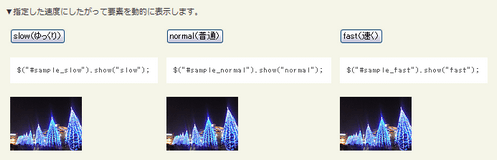
<!DOCTYPE html PUBLIC "-//W3C//DTD XHTML 1.0 Transitional//EN" "http://www.w3.org/TR/xhtml1/DTD/xhtml1-transitional.dtd">
<html xmlns="http://www.w3.org/1999/xhtml" xml:lang="ja" lang="ja">
    <head>
        <meta http-equiv="Content-Type" content="text/html; charset=utf-8" />
        <meta http-equiv="Content-Language" content="ja" />
        <meta http-equiv="Content-Script-Type" content="text/javascript" />
        <meta http-equiv="Content-Style-Type" content="text/css" />
        <meta http-equiv="imagetoolbar" content="no" />
        <title>エフェクト操作:基本:show(speed[, callback])の使用例 | jQuery</title>
        <link rel="stylesheet" type="text/css" href="/content/lib/global.css" />
        <!-- JS -->
        <script src="https://ajax.googleapis.com/ajax/libs/jquery/1.3.2/jquery.min.js"></script>
        <script type="text/javascript">
            $(function(){
                /* 【slow(ゆっくり)】ボタンをクリックしたら、ID名が「sample_slow」の要素をゆっくり表示 */
                $("#btn_slow").click(function(){
                    $("#sample_slow").show("slow");
                });
                /* 【normal(普通)】ボタンをクリックしたら、ID名が「sample_normal」の要素をゆっくり表示 */
                $("#btn_normal").click(function(){
                    $("#sample_normal").show("normal");
                });
                /* 【fast(速く)】ボタンをクリックしたら、ID名が「sample_fast」の要素をゆっくり表示 */
                $("#btn_fast").click(function(){
                    $("#sample_fast").show("fast");
                });
            });
        </script>
    </head>
    <body>
        <div id="wrap">
            <h1>エフェクト操作:基本:show(speed[, callback])の使用例 | jQuery</h1>
<!-- CODE -->
            <p>▼指定した速度にしたがって要素を動的に表示します。</p>
            <table>
                <tr>
                    <td><button id="btn_slow">slow(ゆっくり)</button></td>
                    <td><button id="btn_normal">normal(普通)</button></td>
                    <td><button id="btn_fast">fast(速く)</button></td>
                </tr>
                <tr>
                    <td><pre>$("#sample_slow").show("slow");</pre></td>
                    <td><pre>$("#sample_normal").show("normal");</pre></td>
                    <td><pre>$("#sample_fast").show("fast");</pre></td>
                </tr>
                <tr>
                    <td><div id="sample_slow" style="display:none"><img src="http://farm4.static.flickr.com/3214/3142429603_3b4ddd96a9_t.jpg" alt="" /></div></td>
                    <td><div id="sample_normal" style="display:none"><img src="http://farm4.static.flickr.com/3214/3142429603_3b4ddd96a9_t.jpg" alt="" /></div></td>
                    <td><div id="sample_fast" style="display:none"><img src="http://farm4.static.flickr.com/3214/3142429603_3b4ddd96a9_t.jpg" alt="" /></div></td>
                </tr>
            </table>
<!-- CODE / -->
        </div>
    </body>
</html>
hide()
要素を非表示にする
2009/2/27
マッチした要素が非表示になっている場合に、その要素を表示します。

<!DOCTYPE html PUBLIC "-//W3C//DTD XHTML 1.0 Transitional//EN" "http://www.w3.org/TR/xhtml1/DTD/xhtml1-transitional.dtd">
<html xmlns="http://www.w3.org/1999/xhtml" xml:lang="ja" lang="ja">
    <head>
        <meta http-equiv="Content-Type" content="text/html; charset=utf-8" />
        <meta http-equiv="Content-Language" content="ja" />
        <meta http-equiv="Content-Script-Type" content="text/javascript" />
        <meta http-equiv="Content-Style-Type" content="text/css" />
        <meta http-equiv="imagetoolbar" content="no" />
        <title>エフェクト操作:基本:hide()の使用例 | jQuery</title>
        <link rel="stylesheet" type="text/css" href="/content/lib/global.css" />
        <!-- JS -->
        <script src="https://ajax.googleapis.com/ajax/libs/jquery/1.3.2/jquery.min.js"></script>
        <script type="text/javascript">
            $(function(){
                $("#sample p").hide();
                $("a").click(function(){
                    $(this).hide();
                    return false;
                });
            });
        </script>
    </head>
    <body>
        <div id="wrap">
            <h1>エフェクト操作:基本:hide()の使用例 | jQuery</h1>
            <p>▼すべてのp要素を非表示にし、リンクをクリックするとリンクを非表示にします。</p>
<!-- CODE -->
            <div id="sample">
                <p>段落</p>
                <a href="#">クリックすると、このリンクも隠れます</a>
                <p>段落</p>
            </div>
<!-- CODE / -->
        </div>
    </body>
</html>
hide(speed[, callback])
指定した速度で要素を非表示にする
2009/2/27
マッチした要素をアニメーションしながら非表示にします。 オプションの第2引数callbackを指定した場合は、要素のアニメーション完了時に指定したコールバック関数を実行します。
マッチした各要素の高さ・幅・透明度は、指定した速度にしたがって動的に変更されます。 jQuery v1.3からは、paddingとmarginがより滑らかにアニメーションされるようになりました。
-
第1引数speedには、要素を非表示にする時のアニメーション速度を指定します。 数値(ミリ秒)あるいは文字列を指定可能です。 数値の場合、例えば3秒なら「3000」を指定します。 文字列の場合、あらかじめ定義されている速度(「slow」(ゆっくり)、「normal」(通常)、「fast」(速く))のいずれかを指定します。
-
オプションの第2引数callbackには、アニメーションが完了した時に実行する関数を指定します。 関数が実行されるのは各要素に対して1度だけです。
function callback(){
    this; /* DOM要素 */
}
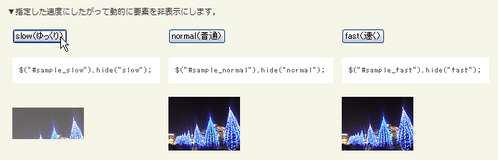
<!DOCTYPE html PUBLIC "-//W3C//DTD XHTML 1.0 Transitional//EN" "http://www.w3.org/TR/xhtml1/DTD/xhtml1-transitional.dtd">
<html xmlns="http://www.w3.org/1999/xhtml" xml:lang="ja" lang="ja">
    <head>
        <meta http-equiv="Content-Type" content="text/html; charset=utf-8" />
        <meta http-equiv="Content-Language" content="ja" />
        <meta http-equiv="Content-Script-Type" content="text/javascript" />
        <meta http-equiv="Content-Style-Type" content="text/css" />
        <meta http-equiv="imagetoolbar" content="no" />
        <title>エフェクト操作:基本:hide(speed[, callback])の使用例 | jQuery</title>
        <link rel="stylesheet" type="text/css" href="/content/lib/global.css" />
        <!-- JS -->
        <script src="https://ajax.googleapis.com/ajax/libs/jquery/1.3.2/jquery.min.js"></script>
        <script type="text/javascript">
            $(function(){
                $("#sample").hide();

                /* 【slow(ゆっくり)】ボタンをクリックしたら、ID名が「sample_slow」の要素をゆっくり表示 */
                $("#btn_slow").click(function(){
                    $("#sample_slow").hide("slow");
                });
                /* 【normal(普通)】ボタンをクリックしたら、ID名が「sample_normal」の要素をゆっくり表示 */
                $("#btn_normal").click(function(){
                    $("#sample_normal").hide("normal");
                });
                /* 【fast(速く)】ボタンをクリックしたら、ID名が「sample_fast」の要素をゆっくり表示 */
                $("#btn_fast").click(function(){
                    $("#sample_fast").hide("fast");
                });
            });
        </script>
    </head>
    <body>
        <div id="wrap">
            <h1>エフェクト操作:基本:hide(speed[, callback])の使用例 | jQuery</h1>
<!-- CODE -->
            <p>▼指定した速度にしたがって動的に要素を非表示にします。</p>
            <table>
                <tr>
                    <td><button id="btn_slow">slow(ゆっくり)</button></td>
                    <td><button id="btn_normal">normal(普通)</button></td>
                    <td><button id="btn_fast">fast(速く)</button></td>
                </tr>
                <tr>
                    <td><pre>$("#sample_slow").hide("slow");</pre></td>
                    <td><pre>$("#sample_normal").hide("normal");</pre></td>
                    <td><pre>$("#sample_fast").hide("fast");</pre></td>
                </tr>
                <tr>
                    <td><div id="sample_slow"><img src="http://farm4.static.flickr.com/3214/3142429603_3b4ddd96a9_t.jpg" alt="" /></div></td>
                    <td><div id="sample_normal"><img src="http://farm4.static.flickr.com/3214/3142429603_3b4ddd96a9_t.jpg" alt="" /></div></td>
                    <td><div id="sample_fast"><img src="http://farm4.static.flickr.com/3214/3142429603_3b4ddd96a9_t.jpg" alt="" /></div></td>
                </tr>
            </table>
<!-- CODE / -->
        </div>
    </body>
</html>
toggle()
要素の表示・非表示切替
2009/2/27
マッチした各要素の表示・非表示を切り替えます。
要素が表示されているなら、hide()を使用してそれらを交互に非表示にします。 要素が非表示にされているなら、show()を使用してそれらを交互に表示します。
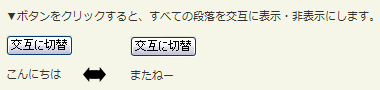
<!DOCTYPE html PUBLIC "-//W3C//DTD XHTML 1.0 Transitional//EN" "http://www.w3.org/TR/xhtml1/DTD/xhtml1-transitional.dtd">
<html xmlns="http://www.w3.org/1999/xhtml" xml:lang="ja" lang="ja">
    <head>
        <meta http-equiv="Content-Type" content="text/html; charset=utf-8" />
        <meta http-equiv="Content-Language" content="ja" />
        <meta http-equiv="Content-Script-Type" content="text/javascript" />
        <meta http-equiv="Content-Style-Type" content="text/css" />
        <meta http-equiv="imagetoolbar" content="no" />
        <title>エフェクト操作:基本:toggle()の使用例 | jQuery</title>
        <link rel="stylesheet" type="text/css" href="/content/lib/global.css" />
        <!-- JS -->
        <script src="https://ajax.googleapis.com/ajax/libs/jquery/1.3.2/jquery.min.js"></script>
        <script type="text/javascript">
            $(function(){
                $("button").click(function(){
                    $("#sample p").toggle();
                });
            });
        </script>
    </head>
    <body>
        <div id="wrap">
            <h1>エフェクト操作:基本:toggle()の使用例 | jQuery</h1>
            <p>▼ボタンをクリックすると、すべての段落を交互に表示・非表示にします。</p>
<!-- CODE -->
            <div id="sample">
                <button>交互に切替</button>
                <p>こんにちは</p>
                <p style="display:none;">またねー</p>
            </div>
<!-- CODE / -->
        </div>
    </body>
</html>
toggle(switch) ※v1.3~
スイッチに基づいて要素の表示・非表示切替
2009/2/27
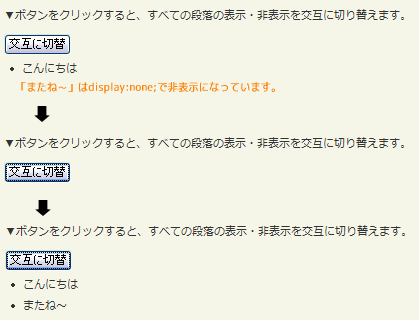
スイッチ(TRUEならすべての要素を表示、FALSEならすべての要素を非表示)に基づいて、マッチした各要素の表示・非表示を切り替えます。
スイッチがTRUEなら、hide()を使用して、マッチした全要素を交互に非表示にします。 スイッチがFALSEなら、show()を使用して、マッチした全要素を交互に表示します。
-
第1引数switchには、表示を切り替えるスイッチを真偽値で指定します。
<!DOCTYPE html PUBLIC "-//W3C//DTD XHTML 1.0 Transitional//EN" "http://www.w3.org/TR/xhtml1/DTD/xhtml1-transitional.dtd">
<html xmlns="http://www.w3.org/1999/xhtml" xml:lang="ja" lang="ja">
    <head>
        <meta http-equiv="Content-Type" content="text/html; charset=utf-8" />
        <meta http-equiv="Content-Language" content="ja" />
        <meta http-equiv="Content-Script-Type" content="text/javascript" />
        <meta http-equiv="Content-Style-Type" content="text/css" />
        <meta http-equiv="imagetoolbar" content="no" />
        <title>エフェクト操作:基本:toggle(switch)の使用例 | jQuery</title>
        <link rel="stylesheet" type="text/css" href="/content/lib/global.css" />
        <!-- JS -->
        <script src="https://ajax.googleapis.com/ajax/libs/jquery/1.3.2/jquery.min.js"></script>
        <script type="text/javascript">
            $(function(){
                var flip=0;
                $("button").click(function(){
                    flip++;
                    $("li").toggle(flip%2==0);
                });
            });
        </script>
    </head>
    <body>
        <div id="wrap">
            <h1>エフェクト操作:基本:toggle(switch)の使用例 | jQuery</h1>
            <p>▼ボタンをクリックすると、すべての段落の表示・非表示を交互に切り替えます。</p>
<!-- CODE -->
            <div id="sample">
                <button>交互に切替</button>
                <ul>
                    <li>こんにちは</li>
                    <li style="display:none;">またね~</li>
                </ul>
            </div>
<!-- CODE / -->
        </div>
    </body>
</html>
toggle(speed[, callback])
指定した速度で要素の表示・非表示切替
2009/2/27
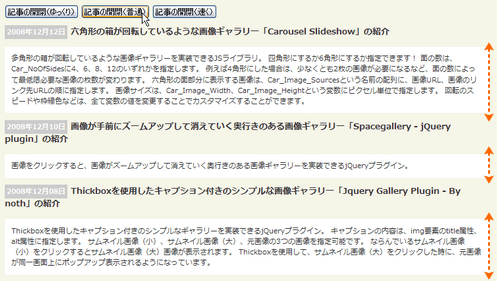
アニメーションしながら、マッチした要素の表示・非表示を交互に切り替え、アニメーションが完了した時にオプションのコールバック関数を呼びます。 マッチした各要素の高さ・幅・透明度は、指定した速度にしたがって動的に変更されます。
jQuery v1.3からは、内外余白(margin、padding)が、より滑らかにアニメーションをするようになりました。
-
第1引数speedには、要素を表示・非表示にする時のアニメーション速度を指定します。 数値(ミリ秒)あるいは文字列を指定可能です。 数値の場合、例えば3秒なら「3000」を指定します。 文字列の場合、「slow」(ゆっくり)、「normal」(通常)、「fast」(速く)のあらかじめ定義されている速度のいずれかを指定します。
-
オプションの第2引数callbackには、アニメーション完了時に実行する関数を指定します。 関数は、各要素のアニメーション完了時に一度だけ実行されます。
function callback(){
    this; /* DOM要素 */
}
<!DOCTYPE html PUBLIC "-//W3C//DTD XHTML 1.0 Transitional//EN" "http://www.w3.org/TR/xhtml1/DTD/xhtml1-transitional.dtd">
<html xmlns="http://www.w3.org/1999/xhtml" xml:lang="ja" lang="ja">
    <head>
        <meta http-equiv="Content-Type" content="text/html; charset=utf-8" />
        <meta http-equiv="Content-Language" content="ja" />
        <meta http-equiv="Content-Script-Type" content="text/javascript" />
        <meta http-equiv="Content-Style-Type" content="text/css" />
        <meta http-equiv="imagetoolbar" content="no" />
        <title>エフェクト操作:基本:toggle(speed[,callback])の使用例 | jQuery</title>
        <link rel="stylesheet" type="text/css" href="/content/lib/global.css" />
        <!-- JS -->
        <script src="https://ajax.googleapis.com/ajax/libs/jquery/1.3.2/jquery.min.js"></script>
        <script type="text/javascript">
            $(function(){
                /* ページ読み込み完了時に、記事部分の要素を非表示にする */
                $("#entries dd").hide();
                /* 【記事の開閉(ゆっくり)】ボタンをクリックしたら、ID名が「sample_slow」の要素をゆっくり表示 */
                $("#btn_toggle_slow").click(function(){
                    $("#entries dd").toggle("slow");
                });
                /* 【記事の開閉(普通)】ボタンをクリックしたら、ID名が「sample_normal」の要素をゆっくり表示 */
                $("#btn_toggle_normal").click(function(){
                    $("#entries dd").toggle("normal");
                });
                /* 【記事の開閉(速く)】ボタンをクリックしたら、ID名が「sample_fast」の要素をゆっくり表示 */
                $("#btn_toggle_fast").click(function(){
                    $("#entries dd").toggle("fast");
                });
            });
        </script>
        <style type="text/css">
            #entries dl { margin:0; padding:0; }
            #entries dt { margin:0 0 1em 0; padding:0; }
            #entries dt span { margin:0 5px 0 0; padding:2px 3px; background-color:#ccc; font-size:.85em; color:#fff; }
            #entries dd { margin:0 0 1em 0; padding:10px; background-color:#fff;  }
        </style>
    </head>
    <body>
        <div id="wrap">
            <h1>エフェクト操作:基本:toggle(speed[,callback])の使用例 | jQuery</h1>
<!-- CODE -->
        <p>
            <button id="btn_toggle_slow">記事の開閉(ゆっくり)</button>
            <button id="btn_toggle_normal">記事の開閉(普通)</button>
            <button id="btn_toggle_fast">記事の開閉(速く)</button>
        </p>
        <div id="entries">
            <dl>
                <dt><span class="date">2008年12月12日</span>六角形の箱が回転しているような画像ギャラリー「Carousel Slideshow」の紹介</dt>
                    <dd>多角形の箱が回転しているような画像ギャラリーを実装できるJSライブラリ。 四角形にするか6角形にするか指定できます! 面の数は、Car_NoOfSidesに4、6、8、12のいずれかを指定します。 例えば4角形にした場合は、少なくとも2枚の画像が必要になるなど、面の数によって最低限必要な画像の枚数が変わります。 六角形の面部分に表示する画像は、Car_Image_Sourcesという名前の配列に、画像URL、画像のリンク先URLの順に指定します。 画像サイズは、Car_Image_Width、Car_Image_Heightという変数にピクセル単位で指定します。 回転のスピードや枠線色などは、すべて変数の値を変更することでカスタマイズすることができます。</dd>
                <dt><span class="date">2008年12月10日</span>画像が手前にズームアップして消えていく奥行きのある画像ギャラリー「Spacegallery - jQuery plugin」の紹介</dt>
                    <dd>画像をクリックすると、画像がズームアップして消えていく奥行きのある画像ギャラリーを実装できるjQueryプラグイン。</dd>
                <dt><span class="date">2008年12月08日</span>Thickboxを使用したキャプション付きのシンプルな画像ギャラリー「Jquery Gallery Plugin - By noth」の紹介</dt>
                    <dd>Thickboxを使用したキャプション付きのシンプルなギャラリーを実装できるjQueryプラグイン。 キャプションの内容は、img要素のtitle属性、alt属性に指定します。 サムネイル画像(小)、サムネイル画像(大)、元画像の3つの画像を指定可能です。 ならんでいるサムネイル画像(小)をクリックするとサムネイル画像(大)画像が表示されます。 Thickboxを使用して、サムネイル画像(大)をクリックした時に、元画像が同一画面上にポップアップ表示されるようになっています。</dd>
            </dl>
        </div>
<!-- CODE / -->
        </div>
    </body>
</html>
タブ切替
show()、hide()使用
2009/2/27
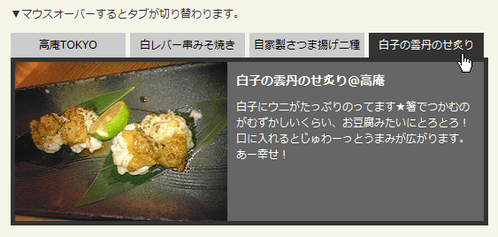
show()とhide()を使用して、タブ切替で要素を表示・非表示にする例です。
<!DOCTYPE html PUBLIC "-//W3C//DTD XHTML 1.0 Transitional//EN" "http://www.w3.org/TR/xhtml1/DTD/xhtml1-transitional.dtd">
<html xmlns="http://www.w3.org/1999/xhtml" xml:lang="ja" lang="ja">
    <head>
        <meta http-equiv="Content-Type" content="text/html; charset=utf-8" />
        <meta http-equiv="Content-Language" content="ja" />
        <meta http-equiv="Content-Script-Type" content="text/javascript" />
        <meta http-equiv="Content-Style-Type" content="text/css" />
        <meta http-equiv="imagetoolbar" content="no" />
        <title>エフェクト操作:基本:show()、hide()の使用例 | jQuery</title>
        <link rel="stylesheet" type="text/css" href="/content/lib/global.css" />
        <!-- JS -->
        <script src="https://ajax.googleapis.com/ajax/libs/jquery/1.3.2/jquery.min.js"></script>
        <script type="text/javascript">
            $(function(){
                var tab_container = $('div.tabs > div');
                tab_container.hide().filter(':first').show();

                $('div.tabs ul.tab_navi a').mouseover(function () {
                    tab_container.hide();
                    tab_container.filter(this.hash).show();
                    $('div.tabs ul.tab_navi a').removeClass('selected');
                    $(this).addClass('selected');
                    return false;
                }).filter(':first').mouseover();
            });
        </script>
        <style type="text/css">
            .sample { width:540px; }
            ul.tab_navi,
            ul.tab_navi li {
                list-style:none;
                margin:0; padding:0;
                overflow:hidden;
            }
            ul.tab_navi li {
                display:inline;
            }
            ul.tab_navi li a {
                margin:0 5px 0 0; padding:5px;
                display:block;
                width:10em;
                text-align:center;
                float:left;
                background-color:#ccc;
                color:#000;
                text-decoration:none;
            }
            ul.tab_navi li a.selected,
            ul.tab_navi li a:hover {
                background-color:#333;
                color:#fff;
            }
            ul.tab_navi li a:focus {
                outline:0;
            }
            div.tabs div {
                margin:0; padding:0;
                clear:both;
                height:100%;
                overflow:hidden;
            }
            div.tabs div h2 {
                margin:10px;
            }
            div.tabs div img {
                float:left; margin-right:10px;
            }
            #first,
            #third { background-color:#e8e8e8; border:5px solid #333; }
            #second,
            #fourth { background-color:#666; color:#fff; border:5px solid #333; }

            #first p,
            #third p,
            #second p,
            #fourth p { margin:10px 5px 0 0; }
        </style>
    </head>
    <body>
        <div id="wrap">
            <h1>エフェクト操作:基本:show()、hide()の使用例 | jQuery</h1>
            <p>▼マウスオーバーするとタブが切り替わります。</p>
<!-- CODE -->
<div class="sample">
    <div class="tabs">
        <ul class="tab_navi">
            <li><a href="#first">高庵TOKYO</a></li>
            <li><a href="#second">白レバー串みそ焼き</a></li>
            <li><a href="#third">自家製さつま揚げ二種</a></li>
            <li><a href="#fourth">白子の雲丹のせ炙り</a></li>
        </ul>
        <div id="first">
            <img src="http://farm4.static.flickr.com/3166/3104684235_537e3463be_m.jpg" alt="" />
            <h2>高庵TOKYO</h2>
            <p>新宿三丁目にある焼酎と焼き鳥が美味しいお店。店内は、ほの暗い照明で、焼酎棚がライトアップされていておしゃれ。バーカウンターがメインで焼き鳥屋さんというよりシックなバーのような雰囲気★梅酒、焼酎、地酒の品揃えが豊富で珍しいものもあったり♪料理はどれも手が込んでいてお酒に合うメニューがいっぱいあります!</p>
        </div>
        <div id="second">
            <img src="http://farm4.static.flickr.com/3203/3105515562_b203eee85a_m.jpg" alt="" />
            <h2>白レバー串みそ焼き@高庵</h2>
            <p>白レバーは、ほぼレア状態で口にいれるとふわっととろけます♪味噌ダレととっても合ってます。5本くらいはぺろりといけそうwフォアグラステーキより美味しいかも!?</p>
        </div>
        <div id="third">
            <img src="http://farm4.static.flickr.com/3033/3104683957_a8b91f3235_m.jpg" alt="" />
            <h2>自家製さつま揚げ二種@高庵</h2>
            <p>黒いのはしいたけじゃありませんwさつま揚げです。箸で切らずに、そのまま揚げたてをぱくぱくいただくのが流儀のようです。味がしっかりついているので、このままいけます!</p>
        </div>
        <div id="fourth">
            <img src="http://farm4.static.flickr.com/3015/3104684027_a215663229_m.jpg" alt="" />
            <h2>白子の雲丹のせ炙り@高庵</h2>
            <p>白子にウニがたっぷりのってます★箸でつかむのがむずかしいくらい、お豆腐みたいにとろとろ!口に入れるとじゅわーっとうまみが広がります。あー幸せ!</p>
        </div>
    </div>
</div>
<!-- CODE / -->
        </div>
    </body>
</html>

