Twitter関連Twitter関連サービス&Twitterのつぶやきやきをブログに設置する方法

Twitter公式サイトで配布されているウィジェットとフォローボタン
unknown
ウィジェット
下記の4種類のウィジェットが提供されています。 Webサイトやブログの表示したい位置に貼り付けるだけで簡単に設置することができます。 デザイン、サイズ、ツイート表示方法、表示ツイート数、プロフィール画像表示の有無など細かなカスタマイズが可能です。
設置サンプル
プロフィールウィジェット - @cocoism
<script src="http://widgets.twimg.com/j/2/widget.js"></script>
<script>
new TWTR.Widget({
  version: 2,
  type: 'profile',
  rpp: 5,
  interval: 2000,
  width: 250,
  height: 300,
  theme: {
    shell: {
      background: '#6d96c9',
      color: '#ffffff'
    },
    tweets: {
      background: '#ffffff',
      color: '#444444',
      links: '#4070c2'
    }
  },
  features: {
    scrollbar: true,
    loop: true,
    live: true,
    hashtags: true,
    timestamp: false,
    avatars: false,
    behavior: 'default'
  }
}).render().setUser('cocoism').start();
</script>
リストウィジェット - @cocoism/lifeline
<script src="http://widgets.twimg.com/j/2/widget.js"></script>
<script>
new TWTR.Widget({
  version: 2,
  type: 'list',
  rpp: 30,
  interval: 6000,
  title: '防災情報リスト',
  subject: '何もないことを祈りましょう',
  width: '480',
  height: 300,
  theme: {
    shell: {
      background: '#6d96c9',
      color: '#ffffff'
    },
    tweets: {
      background: '#ffffff',
      color: '#444444',
      links: '#4070c2'
    }
  },
  features: {
    scrollbar: true,
    loop: false,
    live: true,
    hashtags: true,
    timestamp: true,
    avatars: true,
    behavior: 'all'
  }
}).render().setList('cocoism', 'lifeline').start();
</script>
【Follow Me】ボタン作成ツール
unknown
twignature(トゥイグネチャー) / twitter用署名画像を自動生成するツール
twitter用の署名画像を自動生成するツール。 画像パターンは3種類あり、サイズも豊富に用意されています。
<a href="http://twitter.com/cocoism"><img src="/content/img/topic/twitter/twignature.gif" alt="twitter / cocoism" /></a>
Free Twitter Ribbon Ad Generator
Twitterリボンを作成ツール
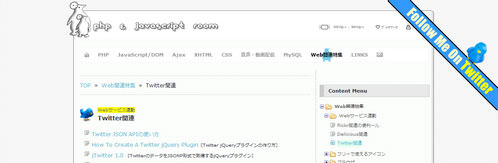
サイトやブログのページの右上角に設置するのに最適! Twitterのユーザー名を入力し、好きなデザインのリボンを選択したら【Submit】ボタンをクリックします。 生成されたタグをページのどこかに貼り付けるだけで設置できます。
<!--Ribbon Ad Start-->
<script type='text/javascript'>document.write("<style><!-- @import url(http://www.twitterknowhow.com/twitterribbons/ribbonad.css); --></style><div class='ribbon'><img src='http://www.twitterknowhow.com/twitterribbons/images/template1.gif' border='0' usemap='#ribbonad' /></div><map name='ribbonad'><area shape='poly' coords='0,0,250,250,250,205,45,0' href='http://twitter.com/cocoism' target='_blank' alt='Follow Me On Twitter - by twitterribbons.com' /></map>");</script>
<!--Ribbon Ad End-->
Twitter My Site - Get customized buttons for Twitter
Twitterボタン作成ツール
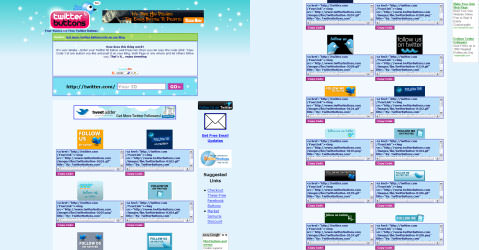
かわいらしい【Follow Me】ボタンが18種類! Twitterのユーザー名を入力し、生成されたタグをサイトやブログに貼るだけで設置できます。 ボタンの下に任意のテキストを入れることもできます(テキストの色も選択可)。
<script type='text/javascript' src='http://www.twittermysite.com/mytwitter.js?id=44465&button=12'></script>
Twitter Buttons
Twitterのユーザー名を入力するだけで、すごい種類のTwitterボタンをコピペで設置できるコードをプレビューつきで生成してくれます。
Twitter "Follow" Badge for your site / blog
Twitterボタン作成ツール(ページの左右いずれかに固定表示するタイプ)
Twitterアカウント(ユーザー名)を入力し、ラベル(ボタン表示)、色、固定表示する位置をカスタマイズできます。 生成されたタグをサイトやブログに貼り付けるだけで簡単に設置できます(IE 6には対応していません)。
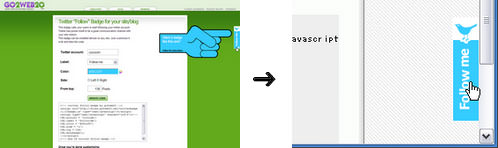
<p>→ ページの右側にボタンが表示されます。</p>
<!-- twitter follow badge by go2web20 -->
<script src='http://files.go2web20.net/twitterbadge/1.0/badge.js' type='text/javascript'></script><script type='text/javascript' charset='utf-8'><!--
tfb.account = 'cocoism';
tfb.label = 'follow-me';
tfb.color = '#35ccff';
tfb.side = 'r';
tfb.top = 136;
tfb.showbadge();
--></script>
<!-- end of twitter follow badge -->
【Twitterに送る】ボタンおよびリンクの設置方法
unknown
現在のページのタイトルとURLをTwitterに送信するボタンを設置することができます。
Twitterにログインしている場合は、入力フォームにページのタイトルとURLが入力された状態で投稿画面が表示されますので、そのまま【投稿する】ボタンをクリックするとTwitterへの投稿することができます。
※Twitterにログインしていない場合は、ログイン画面が表示されます。
「Twitterに送る」リンク
jQueryを使用して、リンクをクリックした時に現在のページのタイトルとURLをTwitterに送信します。
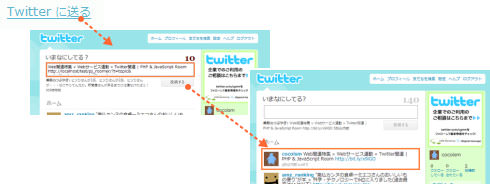
<a href="#" onclick="window.open('http://twitter.com/home?status='+encodeURIComponent(document.title+'\n'+location.href));return false;">Twitter に送る</a>
Create a Digg-style post sharing tool with jQuery | Queness
jQueryを使用して指定したタイトルとURLをブックマークサイトやTwitterなどの共有メディアに送信する方法が掲載されています。
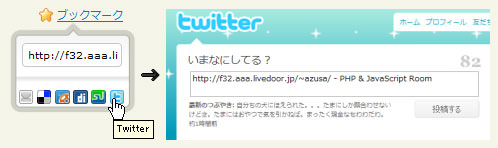
<!DOCTYPE html PUBLIC "-//W3C//DTD XHTML 1.0 Transitional//EN" "http://www.w3.org/TR/xhtml1/DTD/xhtml1-transitional.dtd">
<html xmlns="http://www.w3.org/1999/xhtml" xml:lang="ja" lang="ja">
<head>
<meta http-equiv="Content-Type" content="text/html; charset=utf-8" />
<meta http-equiv="Content-Language" content="ja" />
<meta http-equiv="Content-Script-Type" content="text/javascript" />
<meta http-equiv="Content-Style-Type" content="text/css" />
<meta http-equiv="imagetoolbar" content="no" />
<title>jQuery jqtwitter | 設置サンプル</title>
<link rel="stylesheet" type="text/css" href="/content/lib/global.css" />
<!-- JS -->
<script type="text/javascript" src="http://ajax.googleapis.com/ajax/libs/jquery/1.3.2/jquery.min.js"></script>
<script type="text/javascript">
$(function() {
//grab all the anchor tag with rel set to shareit
$('a[rel=shareit], #shareit-box').mouseenter(function() {
//get the height, top and calculate the left value for the sharebox
var height = $(this).height();
var top = $(this).offset().top;
//get the left and find the center value
var left = $(this).offset().left + ($(this).width() /2) - ($('#shareit-box').width() / 2);
//grab the href value and explode the bar symbol to grab the url and title
//the content should be in this format url|title
var value = $(this).attr('href').split('|');
//assign the value to variables and encode it to url friendly
var field = value[0];
var url = encodeURIComponent(value[0]);
var title = encodeURIComponent(value[1]);
//assign the height for the header, so that the link is cover
$('#shareit-header').height(height);
//display the box
$('#shareit-box').show();
//set the position, the box should appear under the link and centered
$('#shareit-box').css({'top':top, 'left':left});
//assign the url to the textfield
$('#shareit-field').val(field);
//make the bookmark media open in new tab/window
$('a.shareit-sm').attr('target','_blank');
//Setup the bookmark media url and title
$('a[rel=shareit-mail]').attr('href', 'http://mailto:?subject=' + title);
$('a[rel=shareit-delicious]').attr('href', 'http://del.icio.us/post?v=4&noui&jump=close&url=' + url + '&title=' + title);
$('a[rel=shareit-designfloat]').attr('href', 'http://www.designfloat.com/submit.php?url=' + url + '&title=' + title);
$('a[rel=shareit-digg]').attr('href', 'http://digg.com/submit?phase=2&url=' + url + '&title=' + title);
$('a[rel=shareit-stumbleupon]').attr('href', 'http://www.stumbleupon.com/submit?url=' + url + '&title=' + title);
$('a[rel=shareit-twitter]').attr('href', 'http://twitter.com/home?status=' + url + '%20-%20' + title);
});
//onmouse out hide the shareit box
$('#shareit-box').mouseleave(function () {
$('#shareit-field').val('');
$(this).hide();
});
//hightlight the textfield on click event
$('#shareit-field').click(function () {
$(this).select();
});
});
</script>
<!-- CSS -->
<style type="text/css">
#shareit-box {
position:absolute;
display:none;
}
#shareit-header {
width:138px;
}
#shareit-body {
width:138px; height:100px;
background:url(/content/img/topic/twitter/shareit//shareit.png);
}
#shareit-blank {
height:20px;
}
#shareit-url {
height:50px;
text-align:center;
}
#shareit-url input.field{
width:100px; height:26px;
background: transparent url(/content/img/topic/twitter/shareit/field.gif) no-repeat;
border:none; outline:none;
padding:7px 5px 0 5px;
margin:3px auto;font-size:11px;
}
#shareit-icon {
height:20px;
}
#shareit-icon ul {
list-style:none;
width:130px;
margin:0; padding:0 0 0 8px;
}
#shareit-icon ul li{
float:left;
padding:0 2px;
}
#shareit-icon ul li img{
border:none;
}
</style>
</head>
<body>
<div id="wrap">
<h1><a href='http://www.queness.com/post/309/create-a-digg-style-post-sharing-tool-with-jquery'>Create a Digg-style post sharing tool with jQuery | Queness</a> | 設置サンプル</h1>
<!-- CODE -->
<a href="http://phpjavascriptroom.com/|PHP & JavaScript Room" rel="shareit" style="background:transparent url(/content/img/icon/16/star_on.png) no-repeat left center; padding-left:20px;">ブックマーク</a>
<div id="shareit-box">
<div id="shareit-header"></div>
<div id="shareit-body">
<div id="shareit-blank"></div>
<div id="shareit-url"><input type="text" value="" name="shareit-field" id="shareit-field" class="field"/></div>
<div id="shareit-icon">
<ul>
<li><a href="#" rel="shareit-mail" class="shareit-sm"><img src="/content/img/topic/twitter/shareit/sm_mail.gif" width="16" height="16" alt="Mail" title="Mail" /></a></li>
<li><a href="#" rel="shareit-delicious" class="shareit-sm"><img src="/content/img/topic/twitter/shareit/sm_delicious.gif" width="16" height="16" alt="Delicious" title="Delicious" /></a></li>
<li><a href="#" rel="shareit-designfloat" class="shareit-sm"><img src="/content/img/topic/twitter/shareit/sm_designfloat.gif" width="16" height="16" alt="Designfloat" title="Designfloat" /></a></li>
<li><a href="#" rel="shareit-digg" class="shareit-sm"><img src="/content/img/topic/twitter/shareit/sm_digg.gif" width="16" height="16" alt="Digg" title="Digg" /></a></li>
<li><a href="#" rel="shareit-stumbleupon" class="shareit-sm"><img src="/content/img/topic/twitter/shareit/sm_stumbleupon.gif" width="16" height="16" alt="StumbleUpon" title="StumbleUpon" /></a></li>
<li><a href="#" rel="shareit-twitter" class="shareit-sm"><img src="/content/img/topic/twitter/shareit/sm_twitter.gif" width="16" height="16" alt="Twitter" title="Twitter" /></a></li>
</ul>
</div><!-- #shareit-icon -->
</div><!-- #shareit-body -->
</div><!-- #shareit-box -->
<br><br><br>
<!-- / CODE -->
</div>
</body>
</html>
Twitterアイコン配布サイト
unknown
50 Free and Exclusive Twitter Icons | Webdesigner Depot
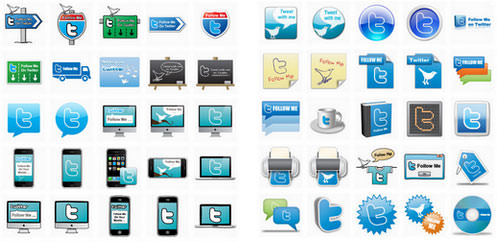
個人・商用利用OKの「Follow Me」アイコンが50種類ダウンロードできます。
Twitterウィジェット、バッジ
unknown
Flash
Twitterpin(ツイッターピン)
Twitterの最新のつぶやきをプロフィールアイコン付きの吹き出しでティッカー表示するFlash製のブログパーツです。 サイズは幅160×高さ100(px)固定です。 TwitterのユーザーIDを入力し、【Submit】ボタンをクリックするだけで貼り付け用のタグが生成できます。
<object classid='clsid:d27cdb6e-ae6d-11cf-96b8-444553540000' codebase='http://download.macromedia.com/pub/shockwave/cabs/flash/swflash.cab#version=10,0,0,0' width='160' height='100' id='twitter_parts' align='middle'><param name='movie' value='http://www.duboot.com/lab/twitter/parts/twitter_parts.swf?ID=cocoism' /><param name='quality' value='high' /><param name='wmode' value='transparent'><embed src='http://www.duboot.com/lab/twitter/parts/twitter_parts.swf?ID=cocoism' wmode='transparent' quality='high' width='160' height='100' name='twitter_parts' allowScriptAccess='always' allowFullScreen='false' type='application/x-shockwave-flash' pluginspage='http://www.adobe.com/go/getflashplayer_jp' /></object>
Twitch beta - Twitter Flash Badge
TwitterのユーザーIDを入力すると、あなたのつぶやきを吹き出し風のレイアウトで一覧表示してくれるFlash製のブログパーツが作れます。 生成されたコードをページの表示したい場所にコピペするだけで設置できます。 ※うまく動作してないみたい。
<script type="text/javascript">function relative_time(time_value) {time_values = time_value.split(" ");time_value = time_values[1]+" "+time_values[2]+", "+time_values[5]+" "+time_values[3];var parsed_date = Date.parse(time_value);var relative_to = (arguments.length > 1) ? arguments[1] : new Date();var delta = parseInt((relative_to.getTime() - parsed_date) / 1000);delta = delta + (relative_to.getTimezoneOffset()*60);if(delta < 60){return 'less than a minute ago';}else if(delta < 120){return 'about a minute ago';} else if(delta < (45*60)) {return (parseInt(delta / 60)).toString() + ' minutes ago';}else if(delta < (90*60)){return 'about an hour ago';}else if(delta < (24*60*60)){return 'about ' + (parseInt(delta / 3600)).toString() + ' hours ago';}else if(delta < (48*60*60)){return '1 day ago';}else{return (parseInt(delta / 86400)).toString() + ' days ago';}}</script><object classid="clsid:d27cdb6e-ae6d-11cf-96b8-444553540000" codebase="http://fpdownload.macromedia.com/pub/shockwave/cabs/flash/swflash.cab#version=8,0,0,0" width="200" height="350" id="twitch" align="middle"><param name="allowScriptAccess" value="always" /><param name="movie" value="http://ooze-flash.com/twitch/twitch.swf" /><param name="FlashVars" value="id=cocoism" /><param name="loop" value="false" /><param name="menu" value="false" /><param name="quality" value="high" /><param name="wmode" value="transparent" /><param name="bgcolor" value="#ffffff" /><embed src="http://ooze-flash.com/twitch/twitch.swf" loop="false" menu="false" quality="high" wmode="transparent" FlashVars="id=cocoism" bgcolor="#ffffff" width="200" height="350" name="twitch" align="middle" allowScriptAccess="always" type="application/x-shockwave-flash" pluginspage="http://www.macromedia.com/go/getflashplayer" /></object>
Twitterブログパーツ更新 - FICC LABS
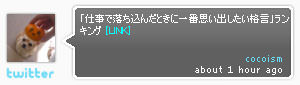
つぶやきをタイムラインに沿って自動再生できるされる、Flash製のTwitterバッジ。 バッジの幅、バッジの背景色、Twitterのユーザー名を変更したら、ページの表示したい場所にコードを貼り付けるだけで設置できます。
<script type="text/javascript" src="http://labs.ficc.jp/projects/twitter_blogparts/js/twitter2.js"></script>
<script type="text/javascript" >attachBlogParts(300, "#fafafa", "cocoism");</script>
JS
A Resizable CSS-based Twitter Site Badge
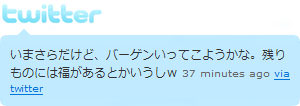
CSSベースのリサイズ可能なTwitterバッジ。 コールバック関数を使用して、Twitterフィードのから最新のつぶやきを1件取得し、吹き出し表示する方法が掲載されています。
青字部分にTwitterのユーザーID、オレンジ色部分にコールバック関数の名前を指定します。
最近のお知らせを1件だけ取得するので、&count=1を指定します。
下記のようにユーザーのタイムラインを取得するURLにこれらをパラメータとして指定すると、ユーザー情報を含む最新のつぶやきを取得することができます。
<script type="text/javascript"
src="http://www.twitter.com/statuses/user_timeline/7948862.json?
callback=twitterCallback&count=1"></script>
/* コールバック関数 */
function twitterCallback(obj) {
    var id = obj[0].user.id;
    ・・・
    // 処理
}
Twitter APIから返されるオブジェクトは下記のようにアクセスします。
obj[0].text = Gyao見てたらこんな時間。このまま朝までネットしませう。
obj[0].favorited = false
obj[0].user.profile_link_color = 0099B9
obj[0].user.description = 渋谷で働いてるけど、渋谷はきらいです。
obj[0].user.profile_background_tile = false
obj[0].user.utc_offset = 32400
obj[0].user.favourites_count = 0
obj[0].user.profile_background_color = 0099B9
obj[0].user.statuses_count = 50
obj[0].user.profile_sidebar_fill_color = 95E8EC
obj[0].user.followers_count = 21
obj[0].user.url = http://phpjavascriptroom.com/
obj[0].user.profile_image_url = http://s3.amazonaws.com/twitter_production/profile_images/296864667/ohmydog_normal.png
obj[0].user.name = cocoism
obj[0].user.notifications = null
obj[0].user.created_at = Sat Aug 04 05:52:33 +0000 2007
obj[0].user.protected = false
obj[0].user.friends_count = 25
obj[0].user.profile_sidebar_border_color = 5ED4DC
obj[0].user.screen_name = cocoism
obj[0].user.time_zone = Tokyo
obj[0].user.verified = false
obj[0].user.following = null
obj[0].user.profile_text_color = 3C3940
obj[0].user.location = Tokyo Japan
obj[0].user.profile_background_image_url = http://s3.amazonaws.com/twitter_production/profile_background_images/21914065/starbucks.jpg
obj[0].in_replay_to_screen_name = undefined
obj[0].created_at = Fri Jul 10 18:49:56 +0000 2009
obj[0].truncated = false
obj[0].in_reply_to_status = undefined
obj[0].id = 2571999065
obj[0].in_reply_to_user_id = null
obj[0].source = web
<!DOCTYPE html PUBLIC "-//W3C//DTD XHTML 1.0 Transitional//EN" "http://www.w3.org/TR/xhtml1/DTD/xhtml1-transitional.dtd">
<html xmlns="http://www.w3.org/1999/xhtml" xml:lang="ja" lang="ja">
    <head>
        <meta http-equiv="Content-Type" content="text/html; charset=utf-8" />
        <meta http-equiv="Content-Language" content="ja" />
        <meta http-equiv="Content-Script-Type" content="text/javascript" />
        <meta http-equiv="Content-Style-Type" content="text/css" />
        <meta http-equiv="imagetoolbar" content="no" />
        <title>A Resizable CSS-based Twitter Site Badge | 設置サンプル</title>
        <link rel="stylesheet" type="text/css" href="/content/lib/global.css" />
        <!-- JS -->
        <script type="text/javascript">
            function relative_time(time_value) {
                var values = time_value.split(" ");
                time_value = values[1] + " " + values[2] + ", " + values[5] + " " + values[3];
                var parsed_date = Date.parse(time_value);
                var relative_to = (arguments.length > 1) ? arguments[1] : new Date();
                var delta = parseInt((relative_to.getTime() - parsed_date) / 1000);
                delta = delta + (relative_to.getTimezoneOffset() * 60);

                if (delta < 60) {
                    return 'less than a minute ago';
                } else if(delta < 120) {
                    return 'about a minute ago';
                } else if(delta < (45*60)) {
                    return (parseInt(delta / 60)).toString() + ' minutes ago';
                } else if(delta < (90*60)) {
                    return 'about an hour ago';
                } else if(delta < (24*60*60)) {
                    return 'about ' + (parseInt(delta / 3600)).toString() + ' hours ago';
                } else if(delta < (48*60*60)) {
                    return '1 day ago';
                } else {
                    return (parseInt(delta / 86400)).toString() + ' days ago';
                }
            }
            function twitterCallback(obj) {
                var id = obj[0].user.id;
                document.getElementById('my_twitter_status').innerHTML = obj[0].text;
                document.getElementById('my_twitter_status_time').innerHTML = relative_time(obj[0].created_at);
            }
        </script>
        <!-- CSS -->
        <style type="text/css">
            body { background:#fff; }
            #twitter_badge_container{width: 300px; background: #C1EAFF}
            #twitter_badge_tl{background: transparent url(/content/img/topic/twitter/twitter_tl.png) top left no-repeat;}
            #twitter_badge_tr{background: transparent url(/content/img/topic/twitter/twitter_tr.png) top right no-repeat;}
            #twitter_badge_bl{background: transparent url(/content/img/topic/twitter/twitter_bl.png) bottom left no-repeat;}
            #twitter_badge_br{background: transparent url(/content/img/topic/twitter/twitter_br.png) bottom right no-repeat; }
            #twitter_badge_inner{padding: 45px 10px 10px 10px;}
            #twitter_badge_via {font-size: 10px }
            #twitter_badge_via a {color #666}
            /* defaults */
            #my_twitter_status{}
            #my_twitter_status_time{color: #666; font-size: 10px;}
        </style>
    </head>
    <body>
        <div id="wrap">
            <h1><a href='http://trainque.com/blog/2007/06/03/a-resizable-css-based-twitter-site-badge/'>A Resizable CSS-based Twitter Site Badge</a> | 設置サンプル</h1>
<!-- CODE -->
            <div id="twitter_badge_container">
                <div id="twitter_badge_tl">
                    <div id="twitter_badge_tr">
                        <div id="twitter_badge_bl">
                            <div id="twitter_badge_br">
                                <div id="twitter_badge_inner">
                                    <span id="my_twitter_status"></span> <span id="my_twitter_status_time"></span><span id="twitter_badge_via"> <a href="http://twitter.com/">via twitter</a></span>
                                    <script type="text/javascript" src="http://www.twitter.com/statuses/user_timeline/7948862.json?callback=twitterCallback&count=1"></script>
                                </div>
                            </div>
                        </div>
                    </div>
                </div>
            </div>
<!-- / CODE -->
        </div>
    </body>
</html>
TwitterCounter - Twitter Follower Statistics
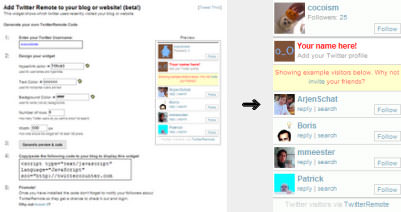
<script type="text/javascript" language="JavaScript" src="http://twittercounter.com/remote/?username_owner=cocoism&users_id=3486102&width=200&nr_show=6&hr_color=cccccc&a_color=709cb2&bg_color=ffffff"></script>
Widgetbox › World's best place to find and make web widgets
Widgetboxでは、ユーザーから投稿されたいろいろなTwitterウィジェットが掲載されています。
my Twitter Widget. - kadazuro.blog
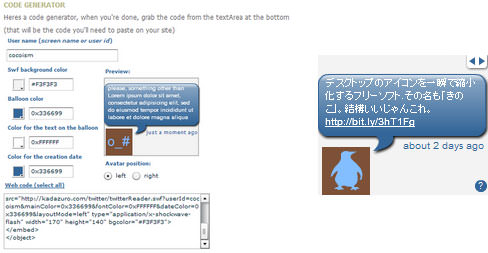
Twitterのつぶやきを吹き出し表示するブログパーツ(Flash)を作成できます。 矢印ボタンをクリックすると、前後のつぶやきに移動できます。
<object width="170" height="140" bgcolor="#F3F3F3">
<param name="movie" value="http://kadazuro.com/twitter/twitterReader.swf?userId=cocoism&mainColor=0x336699&fontColor=0xFFFFFF&dateColor=0x336699&layoutMode=left">
</param>
<embed src="http://kadazuro.com/twitter/twitterReader.swf?userId=cocoism&mainColor=0x336699&fontColor=0xFFFFFF&dateColor=0x336699&layoutMode=left" type="application/x-shockwave-flash" width="170" height="140" bgcolor="#F3F3F3">
</embed>
</object>
Twitterのつぶやきを取得してWebページに埋め込むJavaScriptライブラリ
unknown
Add Twitter to your blog (step-by-step)
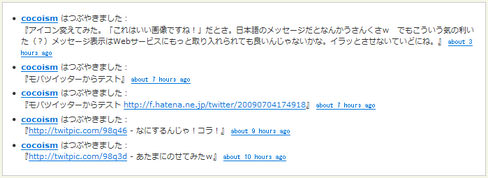
Twitterのつぶやきを取得してWebページに埋め込むJavaScriptライブラリ。
ユーザー名、表示件数、リンク有効化の有無、返答を無視するかの有無、つぶやきを表示するli要素のテンプレート(テンプレート用変数あり)などいろいろ設定できます。
<!DOCTYPE html PUBLIC "-//W3C//DTD XHTML 1.0 Transitional//EN" "http://www.w3.org/TR/xhtml1/DTD/xhtml1-transitional.dtd">
<html xmlns="http://www.w3.org/1999/xhtml" xml:lang="ja" lang="ja">
    <head>
        <meta http-equiv="Content-Type" content="text/html; charset=utf-8" />
        <meta http-equiv="Content-Language" content="ja" />
        <meta http-equiv="Content-Script-Type" content="text/javascript" />
        <meta http-equiv="Content-Style-Type" content="text/css" />
        <meta http-equiv="imagetoolbar" content="no" />
        <title>jQuery jqtwitter | 設置サンプル</title>
        <link rel="stylesheet" type="text/css" href="/content/lib/global.css" />
        <!-- JS -->
        <script type="text/javascript" src="/content/lib/twitter-1.12.2.js"></script>
        <script type="text/javascript">
            getTwitters('tweet', {
                id: 'cocoism',
                count: 5,
                enableLinks: true,
                ignoreReplies: true,
                clearContents: true,
                template: '<span class="prefix"><a href="http://twitter.com/%user_screen_name%">%user_name%</a> はつぶやきました</span>:<br>『%text%』 <span class="time"><a href="http://twitter.com/%user_screen_name%/statuses/%id%">%time%</a></span>'
            });
        </script>
        <!-- CSS -->
        <style type="text/css">
            #tweet { border:2px solid #ccc; background:#fff; margin:0; padding:10px; }
            #tweet .prefix a { font-weight:bold; }
            #tweet .time { font-size:.8em; font-family:monospace; }
        </style>
    </head>
    <body>
        <div id="wrap">
            <h1><a href='http://remysharp.com/2007/05/18/add-twitter-to-your-blog-step-by-step/'>Add Twitter to your blog (step-by-step)</a> | 設置サンプル</h1>
<!-- CODE -->
<div id="tweet">
    <p><a href="http://twitter.com/cocoism">If you can't wait - check out what I've been twittering</a></p>
</div>
<!-- / CODE -->
        </div>
    </body>
</html>
Twitter検索ツール
2009/7/4
tweetcloud - what's being said?
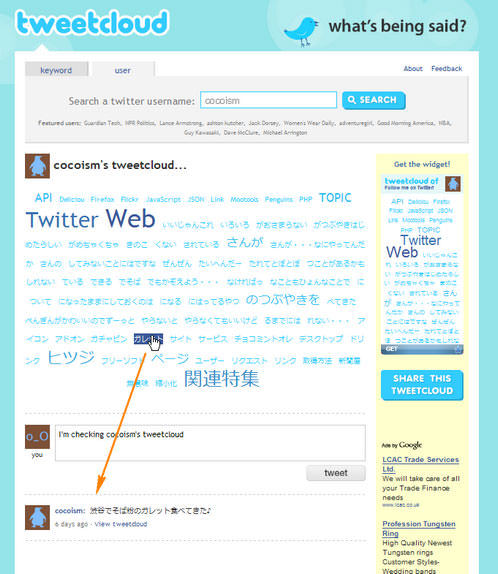
キーワードとユーザー名からTwitter内を検索し、関連する単語をクラウド表示してくれる検索ツールです。 日本語も使えます! 検索すると、サイトやブログに貼れるウィジェットが自動生成されます。 【GET】ボタンをクリックすると簡単に持ち帰れます。
ユーザー名検索の場合は、指定したユーザーのつぶやきから単語を抜き出して、クラウド表示されます。 各クラウドをクリックすると、該当する単語を含むそのユーザーのつぶやきが一覧表示されます。
<script type='text/javascript' src='http://widgets.clearspring.com/o/4a1ffba43dd314b5/4a4edc2b5c622a82/4a1ffe2391449884/9aa98f52/-cpid/d0a3dd16d7799e29/widget.js'></script>
Twitter写真共有サービス
2009/7/4
Twitpic - Share photos on Twitter
Twitter専用の写真共有サイト。
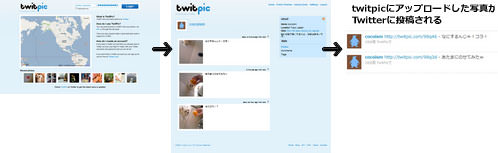
アップロードした写真をTwitter上で共有できます。 写真にはタグと説明文を付けられます(日本語OK)。 投稿した写真は、あなたのTwitterのつぶやきにURLと説明文付き(あるばあいは)で自動的に投稿されます。 Twitter上に表示したくない場合は設定で変えられます。
Twitterアカウントでログインできます。 携帯から写真を投稿できる専用のメールアドレスが発行されるので、こに携帯から写真を送れば、TwitPicに写真を投稿することができ簡単に共有できます。
投稿した写真には、他のユーザーがコメントできるようになっています。 APIも公開されています。
Twitter測定ツール
unknown
TwitterCounter - Twitter Follower Statistics
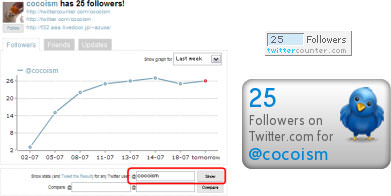
Twitterのユーザー名を入力し【Show】ボタンをクリックすると、フォロワー数、友達の数、アップデート状況がグラフ表示されます。 グラフの表示期間は、最近一週間、1ヶ月間、3ヶ月間に切替可能です。 フォローワー数カウンターボタンもあります。
<script type="text/javascript" language="javascript" src="http://twittercounter.com/embed/?username=cocoism"></script>
<br>
<script type="text/javascript" language="JavaScript" src="http://twittercounter.com/embed/?username=cocoism&style=bird"></script>
TweetStats :: Graphin' Your Stats
Twitterのユーザー名を入力するとつぶやき状況グラフとつぶやいた単語のクラウドが表示されます。

Twitter Grader | Get Your Twitter Ranking
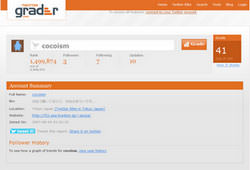
Twitterのユーザー名を入力すると、そのユーザーのTwitterにおけるランクが分かります。
TwitterFriends - Your relevant network on Twitter
Twitterのユーザー名を入力すると、Twitter上でのネットワーク状況を調査してくれます。 気づかなかった友達とのつながりを発見できるかもしれません。 ちょっと重いです。
Twitterプロフィールアイコンジェネレータ
unknown
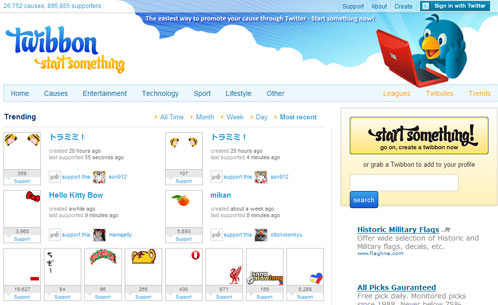
50 Free and Exclusive Twitter Icons | Webdesigner Depot
個人・商用利用OKの「Follow Me」アイコンが50種類ダウンロードできます。
携帯向けTwitterサービス
unknown
モバツイッター
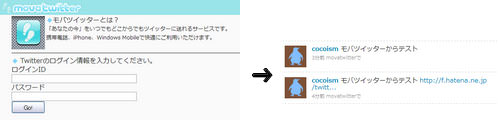
携帯からTwitterにつぶやけるWebサービス。 TwitterのIDとパスワードを入力すると、専用のアドレスが発行されます。 このアドレスをクリックした後に表示されるページを携帯のお気に入りに登録すればOK!
- タイムライン表示
- ダイレクトメッセージ受信
- 返信(@)リスト
- メール投稿(写ツ) ※つぶやき+写真を送信(写真は、http://f.hatena.ne.jp/にアップされる)
- イマココ ※GPS情報(現在位置)を送信
Twitter名刺作成ツール
unknown
ついったー名刺ジェネレータ twitter meishi generator
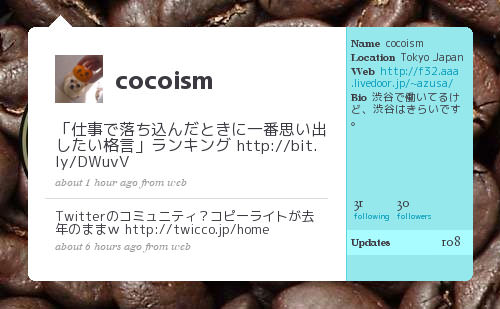
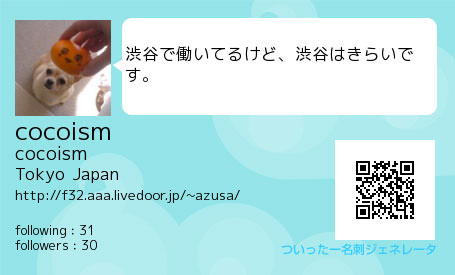
Twitterのユーザー名を入力するとQRコード付きのTwitter名刺ができるジェネレータ。 吹き出しに入れる文字(最新発言 or Bio or なし)と名刺の色をカスタマイズできます。 通常サイズはW455×H275のPNG形式ですが、大きいサイズ(W1075×H650、PNG形式)で出力することも可能です。
 Bio
Bioめいしったー : cocoism の名刺
Twitterのユーザー名を入力すると、あなたのプロフィールページのスクリーンショットを撮って名刺風にしてくれるジェネレータ。 通常サイズはW500×H309のPNG形式ですが、大きいサイズ(W1280×H791、PNG形式)で出力することも可能です。