Twitter関連Twitter関連のjQueryプラグイン

- A jQuery Twitter Ticker〔TLをティッカー表示〕
- Adding Twitter to your site with jQuery Part 2〔指定したユーザーのタイムラインを取得して表示するjQueryプラグイン〕
- Display your latest Twitter update with jQuery〔あなたの最新のつぶやき1件を取得して表示するjQueryプラグイン〕
- How To Create A Twitter jQuery Plugin〔Twitter jQueryプラグインの作り方〕
- jqtwitter〔指定したユーザーのつぶやきを表示するjQueryプラグイン〕
- jQuery – PHP & Ajax with the Twitter API〔PHPとjQueryを使用したTwitter検索〕
- jQuery plugin for Twitter〔指定したユーザーのつぶやきを表示するjQueryプラグイン〕
- jQuery+Twitter APIの簡単な例〔TwitterフィードをJSON形式で取得しjQueryで読み込む〕
- jTwitter 1.0 〔TwitterのデータをJSONP形式で取得するjQueryプラグイン〕
- Juitter 〔最近投稿されたつぶやきをライブ表示するjQueryプラグイン〕
- Monitter Widget〔指定したキーワードのつぶやきをリアルタイムに取得〕
- Tweet〔指定したユーザーのつぶやきとTwitter検索結果を表示するjQueryプラグイン〕
- Tweetable〔指定したTwitterユーザーのつぶやきをコンパクトにサイトに表示〕
- Twit - Display Twitter Tweets on a Blog〔Twitterのつぶやきをブログに表示〕
- Twitter API: How to create a stream of messages Monitter-like with PHP and jQuery〔PHPとjQueryを使用したTwitter検索〕
- Twitter Friends & Followers Widget - A jQuery Plugin! 〔Twitterの友達とフォロワーを取得して表示するjQueryプラグイン〕
- Twitter Trackbacks Widget - A jQuery Plugin 〔指定したURLを含むつぶやき、返信やRTをティッカー表示〕
- TwitterGraph〔1時間ごとのつぶやきをTwitterから取得してチャート表示〕
- Use Twitter API and jQuery to display lastest Tweet: Part 1 The Basics〔PHPとjQueryを使用してつぶやきを吹き出し表示〕
- Who-Tweet Button : Fancy jQuery Plugin for Twitter〔現在のページあるいは指定したURLのトラックバック状況をRetweetボタン付きで表示〕
A jQuery Twitter Ticker
TLをティッカー表示
2009/12/13
A jQuery Twitter Ticker
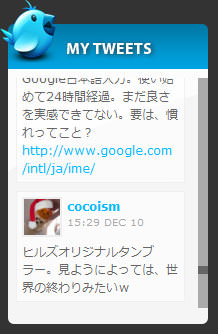
スクロールパネルを実装するjQueryプラグイン「jScrollPanel」を使用して、指定したユーザー(複数指定可)のTLをコンパクトに表示する方法が掲載されています。
マウスホイールイベントをJSで制御するjQueryプラグイン「jquery.mousewheel.js」を使用することで、マウスホイールでスクロールできるようになっています。 鳥アイコンやデザインはCSSで変更できるようになっています。角丸は画像でなく、CSS3を使用して実装されています。
<!DOCTYPE html PUBLIC "-//W3C//DTD XHTML 1.0 Transitional//EN" "http://www.w3.org/TR/xhtml1/DTD/xhtml1-transitional.dtd">
<html xmlns="http://www.w3.org/1999/xhtml" xml:lang="ja" lang="ja">
   <head>
        <meta http-equiv="Content-Type" content="text/html; charset=utf-8" />
        <meta http-equiv="Content-Language" content="ja" />
        <meta http-equiv="Content-Script-Type" content="text/javascript" />
        <meta http-equiv="Content-Style-Type" content="text/css" />
        <meta http-equiv="imagetoolbar" content="no" />
        <title>A jQuery Twitter Ticker | 設置サンプル</title>
        <link rel="stylesheet" type="text/css" href="/content/lib/global.css" />
        <link rel="stylesheet" type="text/css" href="/content/lib/jquery/jScrollPane.css" />
        <script src="https://ajax.googleapis.com/ajax/libs/jquery/1.2.6/jquery.min.js"></script>
        <script type="text/javascript" src="/content/lib/jquery/jquery.mousewheel.js"></script>
        <script type="text/javascript" src="/content/lib/jquery/jScrollPane.js"></script>
        <script type="text/javascript" src="/content/lib/jquery/twitter_ticker/script.js"></script>
        <link rel="stylesheet" type="text/css" href="/content/lib/jquery/twitter_ticker/demo.css" />
<!--[if lt IE 7]>
<style type="text/css">
div.tweet {
    background:none;
    border:none;
}
div#twitIcon{
    filter:progid:DXImageTransform.Microsoft.AlphaImageLoader(src=/content/lib/jquery/twitter_ticker/img/twitter_64.png, sizingMethod=crop);
}
div#twitIcon img{
    display:none;
}
</style>
<![endif]-->
   </head>
   <body>
      <div id="wrapper">
        <h1>設置サンプル</h1>
        <p>参照:<a href='http://tutorialzine.com/2009/10/jquery-twitter-ticker/'>A jQuery Twitter Ticker – Tutorialzine</a></p>
<!-- CODE -->
        <div id="twitter-ticker">
            <div id="top-bar">
                <div id="twitIcon"><img src="/content/lib/jquery/twitter_ticker/img/twitter_64.png" width="64" height="64" alt="Twitter icon" /></div>
                <h2 class="tut">つぶやき</h2>
            </div>
            <div id="tweet-container"><img id="loading" src="/content/lib/jquery/twitter_ticker/img/loading.gif" width="16" height="11" alt="Loading.." /></div>
            <div id="scroll"></div>
        </div><!-- #twitter-ticker -->
 <!-- / CODE -->
     </div>
   </body>
</html>
Adding Twitter to your site with jQuery Part 2
指定したユーザーのタイムラインを取得して表示するjQueryプラグイン
2010/1/24
Adding Twitter to your site with jQuery Part 2
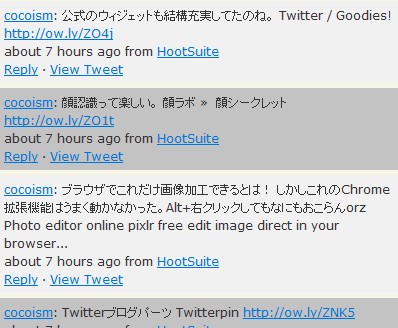
指定したユーザーのタイムラインを取得して表示するjQueryプラグイン。 日付、投稿元アプリ、返信、つぶやきへのパーマリンク、Twitterユーザー名およびURLのリンク表示がデフォルト機能として実装されています。
オプションのパラメータに「from:ユーザーID」と指定します。
<!DOCTYPE html PUBLIC "-//W3C//DTD XHTML 1.0 Transitional//EN" "http://www.w3.org/TR/xhtml1/DTD/xhtml1-transitional.dtd">
<html xmlns="http://www.w3.org/1999/xhtml" xml:lang="ja" lang="ja">
    <head>
        <meta http-equiv="Content-Type" content="text/html; charset=utf-8" />
        <meta http-equiv="Content-Language" content="ja" />
        <meta http-equiv="Content-Script-Type" content="text/javascript" />
        <meta http-equiv="Content-Style-Type" content="text/css" />
        <meta http-equiv="imagetoolbar" content="no" />
        <title>設置サンプル</title>
        <link rel="stylesheet" type="text/css" href="/content/lib/global.css" />
        <!-- JS -->
        <script type="text/javascript" src="http://ajax.googleapis.com/ajax/libs/jquery/1.3.2/jquery.min.js"></script>
        <script type="text/javascript" src="/content/lib/jquery/jquery.tweets.js"></script>
        <script type="text/javascript">
            $(function(){
                var options={
                    query:"from:cocoism"
                };
                $("#container").tweets(options);
            });
        </script>
        <!-- CSS -->
        <style type="text/css">
            ul.tweet-cont{
                list-style:none;
                margin:0px;
                padding:0px;
                width:400px;
                font-size:12px;
            }
            ul.tweet-cont li{
                padding:5px;
                background:#f1f1f1;
            }
            ul.tweet-cont li.odd{
                background:#c3c3c3;
            }
        </style>
    </head>
    <body>
        <div id="wrap">
            <h1>設置サンプル</h1>
            <p>参照:<a href='http://think2loud.com/adding-twitter-site-jquery-part-2/'>Adding Twitter to your site with jQuery Part 2</a></p>
<!-- CODE -->
            <div id="container"></div>
<!-- / CODE -->
        </div>
    </body>
</html>
Display your latest Twitter update with jQuery
あなたの最新のつぶやき1件を取得して表示するjQueryプラグイン
2010/1/24
Display your latest Twitter update with jQuery - Carron Media
指定したユーザーのタイムラインから最新のつぶやき1件取得して表示するjQueryプラグイン。 フェードイン効果ありで表示されます。

<!DOCTYPE html PUBLIC "-//W3C//DTD XHTML 1.0 Transitional//EN" "http://www.w3.org/TR/xhtml1/DTD/xhtml1-transitional.dtd">
<html xmlns="http://www.w3.org/1999/xhtml" xml:lang="ja" lang="ja">
    <head>
        <meta http-equiv="Content-Type" content="text/html; charset=utf-8" />
        <meta http-equiv="Content-Language" content="ja" />
        <meta http-equiv="Content-Script-Type" content="text/javascript" />
        <meta http-equiv="Content-Style-Type" content="text/css" />
        <meta http-equiv="imagetoolbar" content="no" />
        <title>設置サンプル</title>
        <link rel="stylesheet" href="/content/lib/global.css" type="text/css" />
        <!-- JS -->
        <script type="text/javascript" src="http://ajax.googleapis.com/ajax/libs/jquery/1.3.2/jquery.min.js"></script>
        <script type="text/javascript" src="/content/lib/jquery/twitter.js"></script>
        <script type="text/javascript">
        $(function() {
        });
        </script>
        <!-- CSS -->
        <style type="text/css">
            #latest_tweet {
                border: 1px solid #dfdfdf;
                width: 250px;
                padding: 20px;
            }
            #latest_tweet small, #latest_tweet a {
                color: #7aa6cb;
            }
            .loading {
                background: url('ajax-loader.gif') center no-repeat;
                height: 60px;
            }
        </style>
    </head>
    <body>
        <div id="wrap">
            <h1>設置サンプル</h1>
            <p>参照:<a href='http://www.carronmedia.com/display-your-latest-twitter-update-with-jquery/'>Display your latest Twitter update with jQuery - Carron Media</a></p>
            <p>
                あなたの最新のつぶやき1件を取得して表示するjQueryプラグイン。
            </p>
<!-- CODE -->
            <div id="latest_tweet">
                <h3>最近のつぶやき</h3>
                <div class="loading"></div>
            </div>
            <a href="" onclick="window.refresh();">Reload</a>
<!-- CODE / -->
        </div>
    </body>
</html>
How To Create A Twitter jQuery Plugin
Twitter jQueryプラグインの作り方
unknown
How To Create A Twitter jQuery Plugin
Webページ上で、Twitterのフィードを表示するjQueryプラグインの作成方法が掲載されています。
- head要素内でjquery.jsを読み込み、body要素内にTwitterのフィードを表示するブロック要素を定義します。
<html> <head> <script type="text/javascript" src="http://ajax.googleapis.com/ajax/libs/jquery/1.3.2/jquery.min.js"></script> </head> <body> <div id="tweets"></div> </body> </html> - まず、基本的なjQueryプラグインの枠組みを作成します。
(function($){ $.fn.twitterize=function(username, options){ return this; }; })(jQuery); - プラグイン内に初期値の設定を記述します。
(function($){ $.fn.twitterize=function(username, options){ if(username){ var defaultsettings={ count:"1" } var settings=$.extend(defaultsettings, options); }else{ console.debug("ユーザー名は必須です。パラメータを確認してください。"); } return this; }; })(jQuery); - JSON経由でTwitterとコンタクトし、最近のつぶやきを取得するプラグイン内に追記し、ファイル名「twitterize.jquery.js」として保存します。
// This is a self invoking function.
// $パラメータはjQueryアイテムを参照することを許可します
(function($){
// fnは、プロトタイプと基本的に同じです
// $('#jqueryItem).twitterize(username)のように使用します
$.fn.twitterize = function(username,options){
	// usernameが指定されているかチェック
	if (username){
		// 初期設定
		var defaultSettings = {
			count:'1'
		}
		// 初期設定をオプションのオブジェクトで上書きして新しいオブジェクトを生成
		var settings = $.extend(defaultSettings, options);
		// Twitter JSON APIをたたくURL
		var url = "http://twitter.com/status/user_timeline/"+username+".json?count="+settings.count+"&callback=??";
		コールバック関数内のスコープ周りの問題を回避する変数
		var holder = this;
		$.getJSON(url,
		// この関数はつぶやきが適切な情報である場合にコールされます。
		    function(data){
		    	// 各つぶやきを取得
				$.each(data, function(i, item) {
					// p要素内につぶやきを挿入
					holder.append("<pっ>"+item.text.makeLinks()+"</p>");
				}
			);
	    });
    }else{
    	// usernameがパラメータとして指定されていない場合
    	console.debug("ユーザー名は必須です。パラメータを確認してください。");
    }
    // リンク内につぶやきを含むURLに変更
    String.prototype.makeLinks = function() {
		return this.replace(/[A-Za-z]+:\/\/[A-Za-z0-9-_]+\.[A-Za-z0-9-_:%&\?\/.=]+/, function(str) {
    		return str.link(str);
 		});
 	};
	// オブジェクト自身を返す
	return this;
};
})(jQuery);
- Webページ上でjQueryプラグインをコールします。
<html>
  <head>
    <script type="text/javascript" src="http://ajax.googleapis.com/ajax/libs/jquery/1.3.2/jquery.min.js"></script>
    <script type="text/javascript" src="twitterize.jquery.js"></script>
    <script type="text/javascript">
      $(function(){
        $("#tweets").twitterize("cocoism");
      });
    </script>
  </head>
  <body>
    <div id="tweets"></div>
  </body>
</html>

<!DOCTYPE html PUBLIC "-//W3C//DTD XHTML 1.0 Transitional//EN" "http://www.w3.org/TR/xhtml1/DTD/xhtml1-transitional.dtd">
<html xmlns="http://www.w3.org/1999/xhtml" xml:lang="ja" lang="ja">
    <head>
        <meta http-equiv="Content-Type" content="text/html; charset=utf-8" />
        <meta http-equiv="Content-Language" content="ja" />
        <meta http-equiv="Content-Script-Type" content="text/javascript" />
        <meta http-equiv="Content-Style-Type" content="text/css" />
        <meta http-equiv="imagetoolbar" content="no" />
        <title>Twitter API - jTwitter | 設置サンプル</title>
        <link rel="stylesheet" type="text/css" href="/content/lib/global.css" />
        <!-- JS -->
        <script type="text/javascript" src="http://ajax.googleapis.com/ajax/libs/jquery/1.3.2/jquery.min.js"></script>
        <script type="text/javascript" src="include/topic/twitter_jquery/twitterize.jquery.js"></script>
        <script type="text/javascript">
            $(function(){
                $('#tweets').twitterize('cocoism',{count:3});
            });
        </script>
    </head>
    <body>
        <div id="wrap">
            <h1><a href='http://www.devirtuoso.com/2009/06/how-to-create-a-twitter-jquery-plugin/?dzref=193075'>How To Create A Twitter jQuery Plugin</a> | 設置サンプル</h1>
<!-- CODE -->
            <div id="tweets"></div>
<!-- / CODE -->
        </div>
    </body>
</html>
jqtwitter
指定したユーザーのつぶやきを表示するjQueryプラグイン
unknown
jQuery jqtwitter
[画像]ajax-loader.gif
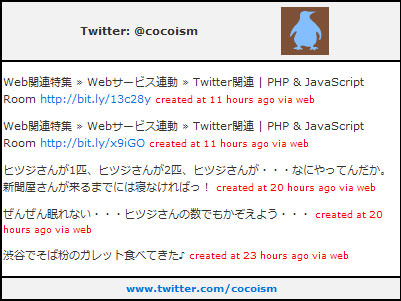
指定したユーザーのTwitterフィードをウェブページに埋め込むjQueryプラグイン。 ヘッダにはTwitterのユーザー名とアバターアイコン、フッタにはユーザーのTwitterページへのリンクがあります。
<!DOCTYPE html PUBLIC "-//W3C//DTD XHTML 1.0 Transitional//EN" "http://www.w3.org/TR/xhtml1/DTD/xhtml1-transitional.dtd">
<html xmlns="http://www.w3.org/1999/xhtml" xml:lang="ja" lang="ja">
    <head>
        <meta http-equiv="Content-Type" content="text/html; charset=utf-8" />
        <meta http-equiv="Content-Language" content="ja" />
        <meta http-equiv="Content-Script-Type" content="text/javascript" />
        <meta http-equiv="Content-Style-Type" content="text/css" />
        <meta http-equiv="imagetoolbar" content="no" />
        <title>jQuery jqtwitter | 設置サンプル</title>
        <link rel="stylesheet" type="text/css" href="/content/lib/global.css" />
        <!-- JS -->
        <script type="text/javascript" src="http://ajax.googleapis.com/ajax/libs/jquery/1.3.2/jquery.min.js"></script>
        <script type="text/javascript" src="/content/lib/jquery/jquery.jqtwitter.js"></script>
        <script type="text/javascript">
            function twitter()    {
                $("#tweets").empty();
                $("#tweets").html("<div align='center'><img src='/content/img/loader.gif' /><br>Loading...</div>");
                $("#tweets").empty();
                $('#tweets').jqtwitter("cocoism");
                setTimeout(twitter, 60000);
            }
            $(function(){
                twitter();
            });
        </script>
        <!-- CSS -->
        <style type="text/css">
            table {
                border:0;
                border-spacing:0;
                border-collapse:collapse;
                width:100%;
            }
            #container {
                width:400px; height:auto;
                background-color:#ccc;
                border:1px solid #000;
                font-size:11px;
            }
                #container    a {
                    text-decoration:none;
                }
                #container .header {
                    background-color:#f2f2f2;
                    line-height:50px;
                    border:1px solid #000;
                    padding:1px;
                }
                #container .footer {
                    background-color:#f2f2f2;
                    border:1px solid #000;
                }
                #container .footer a {
                    font-size:10px;
                }
            #tweets    {
                border:1px solid #000;
                background-color:#fff;
                padding:1px;
            }
                #tweets .created_at    {
                    color:#ff0000;
                    font-size:9px;
                }
        </style>
    </head>
    <body>
        <div id="wrap">
            <h1><a href='http://www.killingismybusiness.co.cc/desenvolvimento/jquery-jqtwitter'>jQuery jqtwitter</a> | 設置サンプル</h1>
<!-- CODE -->
            <div id="container">
                <div align='center' class='header'>
                    <table>
                        <tr>
                            <td align='center'><div id="uname"></div></td>
                            <td><img id="profile" /></td>
                        </tr>
                    </table>
                </div>
                <div id="tweets"></div>
                <div align='center' class='footer'>
                    <table>
                        <tr>
                            <td align='center'><div id="ulink"></div></td>
                        </tr>
                    </table>
                </div>
            </div>
<!-- / CODE -->
        </div>
    </body>
</html>
jQuery – PHP & Ajax with the Twitter API
PHPとjQueryを使用したTwitter検索
2009/12/13
jQuery – PHP & Ajax with the Twitter API
[PHP]index.php、getSearch.php
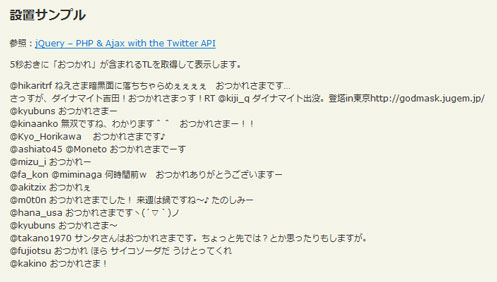
PHPでTwitter APIを叩いて、指定したキーワードにマッチする最新のつぶやきを定期的に取得して自動表示する方法が掲載されています。
<html xmlns="http://www.w3.org/1999/xhtml" xml:lang="ja" lang="ja">
<head>
<meta http-equiv="Content-Type" content="text/html; charset=utf-8" />
<meta http-equiv="Content-Language" content="ja" />
<meta http-equiv="Content-Script-Type" content="text/javascript" />
<meta http-equiv="Content-Style-Type" content="text/css" />
<meta http-equiv="imagetoolbar" content="no" />
<title>設置サンプル</title>
<link rel="stylesheet" type="text/css" href="/content/lib/global.css" />
<script type="text/javascript" src="/content/lib/jquery/jquery-1.3.2.min.js"></script>
<script src="controller.js"></script>
</head>
<body>
<h1>設置サンプル</h1>
<p>参照:<a href='http://www.reynoldsftw.com/2009/02/using-jquery-php-ajax-with-the-twitter-api/'>jQuery – PHP & Ajax with the Twitter API</a></p>
<p>5秒おきに「おつかれ」が含まれるTLを取得して表示します。</p>
<div id="container"></div>
</body>
</html>
<?php
//Created by Steve Reynolds : http://www.reynoldsftw.com
$query = $_POST['query'];
$curl = curl_init();
curl_setopt ($curl, CURLOPT_URL, "http://search.twitter.com/search.atom?q=" . urlencode($query) . "&amp;rpp=10");
curl_setopt($curl, CURLOPT_RETURNTRANSFER, 1);
$result = curl_exec ($curl);
curl_close ($curl);
header('Content-Type: application/xml; charset=utf-8');
print $result;
?>
jQuery plugin for Twitter
指定したユーザーのつぶやきを表示するjQueryプラグイン
unknown
jQuery plugin for Twitter
[CSS]jquery.twitter.css
[画像]loading.gif
指定したユーザーのTwitterフィードをウェブページに埋め込むjQueryプラグイン。
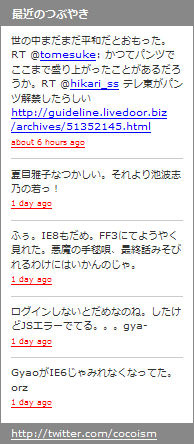
- head要素内でjquery.js、jquery.twitter.js、jquery.twitter.cssを読み込みます。
<script type="text/javascript" src="http://ajax.googleapis.com/ajax/libs/jquery/1.3.2/jquery.min.js"></script>
<script type="text/javascript" src="jquery_twitter/jquery.twitter.js"></script>
<link rel="stylesheet" type="text/css" href="jquery_twitter/jquery.twitter.css" />
- head要素内につづけて、下記のようにプラグインのパラメータを設定します。
<script type="text/javascript"> $(function() { $("#twitter").getTwitter({ userName: "cocoism", // ユーザー名 numTweets: 5, // 表示件数 loaderText: "読み込み中...", // ローディングテキスト slideIn: true, // スライド効果の有無 showHeading: true, // 見出し表示の有無 headingText: "最近のつぶやき", // 見出しテキスト showProfileLink: true // プロフィールリンク表示の有無 }); }); </script> -
body要素内に、下記のコードを記述します。
この部分に最新のつぶやきが表示されます。
<div id="twitter"></div>
<!DOCTYPE html PUBLIC "-//W3C//DTD XHTML 1.0 Transitional//EN" "http://www.w3.org/TR/xhtml1/DTD/xhtml1-transitional.dtd">
<html xmlns="http://www.w3.org/1999/xhtml" xml:lang="ja" lang="ja">
    <head>
        <meta http-equiv="Content-Type" content="text/html; charset=utf-8" />
        <meta http-equiv="Content-Language" content="ja" />
        <meta http-equiv="Content-Script-Type" content="text/javascript" />
        <meta http-equiv="Content-Style-Type" content="text/css" />
        <meta http-equiv="imagetoolbar" content="no" />
        <title>jQuery plugin for Twitter | 設置サンプル</title>
        <link rel="stylesheet" type="text/css" href="/content/lib/global.css" />
        <!-- JS -->
        <script type="text/javascript" src="http://ajax.googleapis.com/ajax/libs/jquery/1.3.2/jquery.min.js"></script>
        <script type="text/javascript" src="/content/lib/jquery/jquery_twitter/jquery.twitter.js"></script>
        <script type="text/javascript">
            $(function() {
                $("#twitter").getTwitter({
                    userName: "cocoism", /* ユーザー名 */
                    numTweets: 5,
                    loaderText: "読み込み中...",
                    slideIn: true,
                    showHeading: true,
                    headingText: "最近のつぶやき",
                    showProfileLink: true
                });
            });
        </script>
        <!-- CSS -->
        <link rel="stylesheet" type="text/css" href="/content/lib/jquery/jquery_twitter/jquery.twitter.css" />
    </head>
    <body>
        <div id="wrap">
            <h1><a href='http://coda.co.za/blog/2008/10/26/jquery-plugin-for-twitter'>jQuery plugin for Twitter</a> | 設置サンプル</h1>
<!-- CODE -->
            <div id="twitter"></div>
<!-- / CODE -->
        </div>
    </body>
</html>
jQuery+Twitter APIの簡単な例
TwitterフィードをJSON形式で取得しjQueryで読み込む
unknown
Twitter JSON APIを利用するのに必要なのは下記のURLだけです。
http://twitter.com/status/user_timeline/ユーザー名.json?count=表示件数&callback=?
このURLをjQueryのgetJSON()を使用して、HTTP GET通信で指定したユーザーのJSON形式のデータを読み込みます。
getJSON()では、URLのパラメータに&callback=??のようにJSONPのコールバック関数を指定することで別ドメインにあるJSON形式のデータを読み込めます。
$(function(){
  var tweeturl="http://twitter.com/status/user_timeline/cocoism.json?count=5&callback=??";
  $.getJSON(tweeturl, function(data){
    // JSONデータ読み込み
    $.each(data, function(i, item){
      $("<p></p>")
        .addClass(i%2 ? "even" : "odd")
        .html(item.text)
        .prependTo("tweet");
    });
  });
});
取得したJSON形式のデータは下記のようになります。
見やすくするために改行を入れていますが、実際に改行は入りません。
(
    [
        {
            "text":"Web\u95a2\u9023\u7279\u96c6 \u00bb Web\u30b5\u30fc\u30d3\u30b9\u9023\u52d5 \u00bb Twitter\u95a2\u9023 | PHP & JavaScript Room\nhttp:\/\/bit.ly\/13c28y",
            "in_reply_to_user_id":null,
            "user":{"favourites_count":1,
            "profile_image_url":"http:\/\/s3.amazonaws.com\/twitter_production\/profile_images\/182357931\/twitter_normal.png",
            "description":"\u6e0b\u8c37\u3067\u50cd\u3044\u3066\u308b\u3051\u3069\u3001\u6e0b\u8c37\u306f\u304d\u3089\u3044\u3067\u3059\u3002",
            "utc_offset":32400,
            "profile_sidebar_border_color":"BDDCAD",
            "screen_name":"cocoism",
            "profile_text_color":"333333",
            "url":"http:\/\/f32.aaa.livedoor.jp\/~azusa\/",
            "name":"cocoism",
            "notifications":null,
            "profile_background_image_url":"http:\/\/static.twitter.com\/images\/themes\/theme1\/bg.gif",
            "created_at":"Sat Aug 04 05:52:33 +0000 2007",
            "protected":false,
            "verified":false,
            "time_zone":"Tokyo",
            "profile_link_color":"0084B4",
            "profile_background_tile":false,
            "followers_count":2,
            "profile_background_color":"9AE4E8",
            "following":null,
            "friends_count":2,
            "location":"Tokyo Japan",
            "id":7948862,
            "statuses_count":6,
            "profile_sidebar_fill_color":"DDFFCC"},
            "favorited":false,
            "in_reply_to_screen_name":null,
            "created_at":"Sun Jun 28 02:32:41 +0000 2009",
            "truncated":false,
            "id":2366799620,
            "in_reply_to_status_id":null,
            "source":"web"
        },
        {
            "text":"Web\u95a2\u9023\u7279\u96c6 \u00bb Web\u30b5\u30fc\u30d3\u30b9\u9023\u52d5 \u00bb Twitter\u95a2\u9023 | PHP & JavaScript Room http:\/\/bit.ly\/x9iGO",
            "favorited":false,
            "user":{"friends_count":2,
            "profile_image_url":"http:\/\/s3.amazonaws.com\/twitter_production\/profile_images\/182357931\/twitter_normal.png",
            "description":"\u6e0b\u8c37\u3067\u50cd\u3044\u3066\u308b\u3051\u3069\u3001\u6e0b\u8c37\u306f\u304d\u3089\u3044\u3067\u3059\u3002",
            "utc_offset":32400,
            "statuses_count":6,
            "profile_text_color":"333333",
            "screen_name":"cocoism",
            "notifications":null,
            "profile_background_image_url":"http:\/\/static.twitter.com\/images\/themes\/theme1\/bg.gif",
            "favourites_count":1,
            "time_zone":"Tokyo",
            "profile_link_color":"0084B4",
            "url":"http:\/\/f32.aaa.livedoor.jp\/~azusa\/",
            "name":"cocoism",
            "profile_background_tile":false,
            "created_at":"Sat Aug 04 05:52:33 +0000 2007",
            "protected":false,
            "verified":false,
            "profile_background_color":"9AE4E8",
            "profile_sidebar_fill_color":"DDFFCC",
            "following":null,
            "followers_count":2,
            "location":"Tokyo Japan",
            "id":7948862,
            "profile_sidebar_border_color":"BDDCAD"},
            "in_reply_to_screen_name":null,
            "created_at":"Sun Jun 28 02:14:57 +0000 2009",
            "truncated":false,
            "in_reply_to_status_id":null,
            "id":2366618864,
            "in_reply_to_user_id":null,
            "source":"web"
        },
        {
            "text":"\u30d2\u30c4\u30b8\u3055\u3093\u304c1\u5339\u3001\u30d2\u30c4\u30b8\u3055\u3093\u304c2\u5339\u3001\u30d2\u30c4\u30b8\u3055\u3093\u304c\u30fb\u30fb\u30fb\u306a\u306b\u3084\u3063\u3066\u3093\u3060\u304b\u3002\u65b0\u805e\u5c4b\u3055\u3093\u304c\u6765\u308b\u307e\u3067\u306b\u306f\u5bdd\u306a\u3051\u308c\u3070\u3063\uff01",
            "favorited":false,
            "user":{"friends_count":2,
            "profile_image_url":"http:\/\/s3.amazonaws.com\/twitter_production\/profile_images\/182357931\/twitter_normal.png",
            "description":"\u6e0b\u8c37\u3067\u50cd\u3044\u3066\u308b\u3051\u3069\u3001\u6e0b\u8c37\u306f\u304d\u3089\u3044\u3067\u3059\u3002",
            "utc_offset":32400,
            "statuses_count":6,
            "profile_text_color":"333333",
            "screen_name":"cocoism",
            "notifications":null,
            "profile_background_image_url":"http:\/\/static.twitter.com\/images\/themes\/theme1\/bg.gif",
            "favourites_count":1,
            "time_zone":"Tokyo",
            "profile_link_color":"0084B4",
            "url":"http:\/\/f32.aaa.livedoor.jp\/~azusa\/",
            "name":"cocoism",
            "profile_background_tile":false,
            "created_at":"Sat Aug 04 05:52:33 +0000 2007",
            "protected":false,
            "verified":false,
            "profile_background_color":"9AE4E8",
            "profile_sidebar_fill_color":"DDFFCC",
            "following":null,
            "followers_count":2,
            "location":"Tokyo Japan",
            "id":7948862,
            "profile_sidebar_border_color":"BDDCAD"},
            "in_reply_to_screen_name":null,
            "created_at":"Sat Jun 27 17:43:02 +0000 2009",
            "truncated":false,
            "in_reply_to_status_id":null,
            "id":2361364510,
            "in_reply_to_user_id":null,
            "source":"web"
        },
        {
            "favorited":false,
            "text":"\u305c\u3093\u305c\u3093\u7720\u308c\u306a\u3044\u30fb\u30fb\u30fb\u30d2\u30c4\u30b8\u3055\u3093\u306e\u6570\u3067\u3082\u304b\u305e\u3048\u3088\u3046\u30fb\u30fb\u30fb",
            "user":{"following":null,
            "description":"\u6e0b\u8c37\u3067\u50cd\u3044\u3066\u308b\u3051\u3069\u3001\u6e0b\u8c37\u306f\u304d\u3089\u3044\u3067\u3059\u3002",
            "statuses_count":6,
            "utc_offset":32400,
            "profile_text_color":"333333",
            "screen_name":"cocoism",
            "notifications":null,
            "profile_background_image_url":"http:\/\/static.twitter.com\/images\/themes\/theme1\/bg.gif",
            "favourites_count":1,
            "time_zone":"Tokyo",
            "profile_link_color":"0084B4",
            "profile_background_tile":false,
            "created_at":"Sat Aug 04 05:52:33 +0000 2007",
            "url":"http:\/\/f32.aaa.livedoor.jp\/~azusa\/",
            "name":"cocoism",
            "verified":false,
            "profile_background_color":"9AE4E8",
            "protected":false,
            "profile_sidebar_fill_color":"DDFFCC",
            "followers_count":2,
            "profile_sidebar_border_color":"BDDCAD",
            "location":"Tokyo Japan",
            "id":7948862,
            "friends_count":2,
            "profile_image_url":"http:\/\/s3.amazonaws.com\/twitter_production\/profile_images\/182357931\/twitter_normal.png"},
            "in_reply_to_screen_name":null,
            "created_at":"Sat Jun 27 17:41:19 +0000 2009",
            "truncated":false,
            "in_reply_to_status_id":null,
            "in_reply_to_user_id":null,
            "id":2361346512,
            "source":"web"
        },
        {
            "favorited":false,
            "text":"\u6e0b\u8c37\u3067\u305d\u3070\u7c89\u306e\u30ac\u30ec\u30c3\u30c8\u98df\u3079\u3066\u304d\u305f\u266a",
            "user":{"following":null,
            "description":"\u6e0b\u8c37\u3067\u50cd\u3044\u3066\u308b\u3051\u3069\u3001\u6e0b\u8c37\u306f\u304d\u3089\u3044\u3067\u3059\u3002",
            "statuses_count":6,
            "utc_offset":32400,
            "profile_text_color":"333333",
            "screen_name":"cocoism",
            "notifications":null,
            "profile_background_image_url":"http:\/\/static.twitter.com\/images\/themes\/theme1\/bg.gif",
            "favourites_count":1,
            "time_zone":"Tokyo",
            "profile_link_color":"0084B4",
            "profile_background_tile":false,
            "created_at":"Sat Aug 04 05:52:33 +0000 2007",
            "url":"http:\/\/f32.aaa.livedoor.jp\/~azusa\/",
            "name":"cocoism",
            "verified":false,
            "profile_background_color":"9AE4E8",
            "protected":false,
            "profile_sidebar_fill_color":"DDFFCC",
            "followers_count":2,
            "profile_sidebar_border_color":"BDDCAD",
            "location":"Tokyo Japan",
            "id":7948862,
            "friends_count":2,
            "profile_image_url":"http:\/\/s3.amazonaws.com\/twitter_production\/profile_images\/182357931\/twitter_normal.png"},
            "in_reply_to_screen_name":null,
            "created_at":"Sat Jun 27 14:28:47 +0000 2009",
            "truncated":false,
            "in_reply_to_status_id":null,
            "in_reply_to_user_id":null,
            "id":2359153981,
            "source":"web"
        }
    ]
);
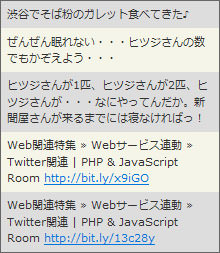
<!DOCTYPE html PUBLIC "-//W3C//DTD XHTML 1.0 Transitional//EN" "http://www.w3.org/TR/xhtml1/DTD/xhtml1-transitional.dtd">
<html xmlns="http://www.w3.org/1999/xhtml" xml:lang="ja" lang="ja">
    <head>
        <meta http-equiv="Content-Type" content="text/html; charset=utf-8" />
        <meta http-equiv="Content-Language" content="ja" />
        <meta http-equiv="Content-Script-Type" content="text/javascript" />
        <meta http-equiv="Content-Style-Type" content="text/css" />
        <meta http-equiv="imagetoolbar" content="no" />
        <title>Twitter JSON APIの使い方 | 設置サンプル</title>
        <link rel="stylesheet" type="text/css" href="/content/lib/global.css" />
        <!-- JS -->
        <script type="text/javascript" src="http://ajax.googleapis.com/ajax/libs/jquery/1.3.2/jquery.min.js"></script>
        <script type="text/javascript">
            $(function(){
                /* 例1 */
                var tweeturl="http://twitter.com/status/user_timeline/cocoism.json?count=5&callback=?";
                $.getJSON(tweeturl, function(data){
                    // JSONデータ読み込み
                    $.each(data, function(i, item){
                        // URLにテキストがある場合はリンク設置
                        var txt = item.text
                            .replace(/(https?:\/\/[-a-z0-9._~:\/?#@!$&\'()*+,;=%]+)/ig,'<a href="$1">$1</a>')
                            .replace(/@+([_A-Za-z0-9-]+)/ig, '<a href="http://twitter.com/$1">@$1</a>')
                            .replace(+([_A-Za-z0-9-]+)/ig, '<a href="http://search.twitter.com/search?q=$1">#$1</a>');
                        $("<li></li>")
                            .addClass(i%2 ? "even" : "odd")
                            .html(txt)
                            .prependTo("#tweet");
                    });
                });
            });
        </script>
        <!-- CSS -->
        <style type="text/css">
            #tweet {
                margin:0; padding:0;
                list-style:none;
                border:1px solid #666;
                width:30em;
            }
            #tweet li {
                margin:0; padding:.5em;
                list-style:none;
                background-color:#fff;

            }
            #tweet li.odd {
                background-color:#ddd;
            }
        </style>
    </head>
    <body>
        <div id="wrap">
            <h1>Twitter JSON APIの使い方</h1>
<!-- CODE -->
            <ul id="tweet"></ul>
            <ul id="tweet2"></ul>
<!-- / CODE -->
        </div>
    </body>
</html>
jTwitter 1.0
TwitterのデータをJSONP形式で取得するjQueryプラグイン
unknown
Twitter API - jTwitter
Twitter APIを使用して、指定したユーザー名のTwitter情報をJSONP形式で取得するjQueryプラグイン。
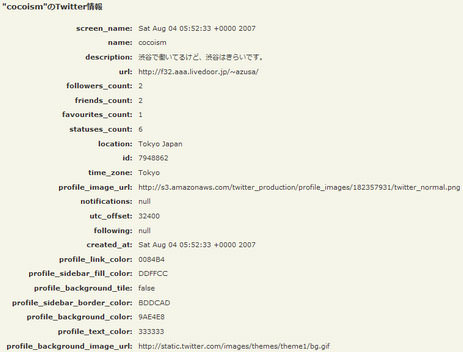
<!DOCTYPE html PUBLIC "-//W3C//DTD XHTML 1.0 Transitional//EN" "http://www.w3.org/TR/xhtml1/DTD/xhtml1-transitional.dtd">
<html xmlns="http://www.w3.org/1999/xhtml" xml:lang="ja" lang="ja">
    <head>
        <meta http-equiv="Content-Type" content="text/html; charset=utf-8" />
        <meta http-equiv="Content-Language" content="ja" />
        <meta http-equiv="Content-Script-Type" content="text/javascript" />
        <meta http-equiv="Content-Style-Type" content="text/css" />
        <meta http-equiv="imagetoolbar" content="no" />
        <title>Twitter API - jTwitter | 設置サンプル</title>
        <link rel="stylesheet" type="text/css" href="/content/lib/global.css" />
        <!-- JS -->
        <script type="text/javascript" src="http://ajax.googleapis.com/ajax/libs/jquery/1.3.2/jquery.min.js"></script>
        <script type="text/javascript" src="/content/lib/jquery/jquery.jtwitter.js"></script>
        <script type="text/javascript">
            $(function() {
                $.jTwitter('cocoism', function(info){
                    var s="";
//                    console.log(info);
                    s+="<tr><th>screen_name:</th><td>"+info.created_at+"</td>";
                    s+="<tr><th>name:</th><td>"+info.name+"</td>";
                    s+="<tr><th>description:</th><td>"+info.description+"</td>";
                    s+="<tr><th>url:</th><td>"+info.url+"</td>";
                    s+="<tr><th>followers_count:</th><td>"+info.followers_count+"</td>";
                    s+="<tr><th>friends_count:</th><td>"+info.friends_count+"</td>";
                    s+="<tr><th>favourites_count:</th><td>"+info.favourites_count+"</td>";
                    s+="<tr><th>statuses_count:</th><td>"+info.statuses_count+"</td>";
                    s+="<tr><th>location:</th><td>"+info.location+"</td>";
                    s+="<tr><th>id:</th><td>"+info.id+"</td>";
                    s+="<tr><th>time_zone:</th><td>"+info.time_zone+"</td>";
                    s+="<tr><th>profile_image_url:</th><td>"+info.profile_image_url+"</td>";
                    s+="<tr><th>notifications:</th><td>"+info.notifications+"</td>";
                    s+="<tr><th>utc_offset:</th><td>"+info.utc_offset+"</td>";
                    s+="<tr><th>following:</th><td>"+info.following+"</td>";
                    s+="<tr><th>created_at:</th><td>"+info.created_at+"</td>";
                    s+="<tr><th>profile_link_color:</th><td>"+info.profile_link_color+"</td>";
                    s+="<tr><th>profile_sidebar_fill_color:</th><td>"+info.profile_sidebar_fill_color+"</td>";
                    s+="<tr><th>profile_background_tile:</th><td>"+info.profile_background_tile+"</td>";
                    s+="<tr><th>profile_sidebar_border_color:</th><td>"+info.profile_sidebar_border_color+"</td>";
                    s+="<tr><th>profile_background_color:</th><td>"+info.profile_background_color+"</td>";
                    s+="<tr><th>profile_text_color:</th><td>"+info.profile_text_color+"</td>";
                    s+="<tr><th>profile_background_image_url:</th><td>"+info.profile_background_image_url+"</td>";
                    $("#result").html(s);
                    $("#result th").css("text-align","right");

                    //Callback functn with the user data as shown above
                    $('#profile input.url').val(info.url).css("width","300px");
                    $('#profile #avatar').html('<img src="'+ info.profile_image_url + '" />');
                });
            });
        </script>
    </head>
    <body>
        <div id="wrap">
            <h1><a href='http://plugins.jquery.com/project/jtwitter'>Twitter API - jTwitter</a> | 設置サンプル</h1>
<!-- CODE -->
            <h2>"cocoism"のTwitter情報</h2>
            <table id="result"></table>
            <h2>プロフィール出力</h2>
            <div id="profile">
                <div id="avatar"></div>
                <input class="url" type="text" />
                <div id="created_at"></div>
            </div>
<!-- / CODE -->
        </div>
    </body>
</html>
Juitter
最近投稿されたつぶやきをライブ表示するjQueryプラグイン
unknown
Juitter - More fun to your website
Ajaxで最近投稿されたつぶやきを自動取得してライブ表示(リアルタイム)するjQueryプラグイン。
キーワードやオブジェクトで表示するつぶやきを絞り込むこともできます。 オプションでアバター表示をしたり、CSSでスタイルを変更することができます。
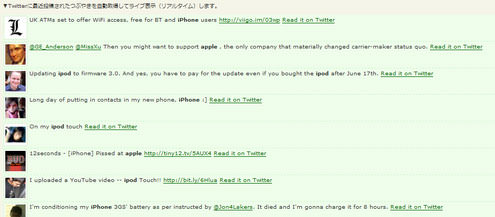
<!DOCTYPE html PUBLIC "-//W3C//DTD XHTML 1.0 Transitional//EN" "http://www.w3.org/TR/xhtml1/DTD/xhtml1-transitional.dtd">
<html xmlns="http://www.w3.org/1999/xhtml" xml:lang="ja" lang="ja">
    <head>
        <meta http-equiv="Content-Type" content="text/html; charset=utf-8" />
        <meta http-equiv="Content-Language" content="ja" />
        <meta http-equiv="Content-Script-Type" content="text/javascript" />
        <meta http-equiv="Content-Style-Type" content="text/css" />
        <meta http-equiv="imagetoolbar" content="no" />
        <title>Juitter | 設置サンプル</title>
        <link rel="stylesheet" type="text/css" href="/content/lib/global.css" />
        <!-- JS -->
        <script type="text/javascript" src="http://ajax.googleapis.com/ajax/libs/jquery/1.3.2/jquery.min.js"></script>
        <script type="text/javascript" src="/content/lib/jquery/juitter/jquery.juitter.js"></script>
        <script type="text/javascript" src="/content/lib/jquery/juitter/system.js"></script>
        <script type="text/javascript">
            $(function() {
                $("#twitter").getTwitter({
                    userName: "cocoism", /* ユーザー名 */
                    numTweets: 5,
                    loaderText: "読み込み中...",
                    slideIn: true,
                    showHeading: true,
                    headingText: "最近のつぶやき",
                    showProfileLink: true
                });
            });
        </script>
        <!-- CSS -->
        <style type="text/css">
            /*JUITTER PLUGIN CSS*/
            #juitterContainer{} /*Juitter container*/
            #juitterContainer .twittList{margin:0;padding:0;} /* UL that will contain the list of tweets */
            /* Bellow the list of tweets "<li>" */
            #juitterContainer .twittLI{list-style:none;background:#EEFDEA;margin:0;padding:5px 0 0 0;border-bottom:dashed 1px #CAF8C9;padding:3px;clear:both;height:55px;}
            #juitterContainer .twittList A{color:#006600;} /*Links inside the tweets list */
            /* Bellow the CSS for the avatar image  */
            #juitterContainer .juitterAvatar{float:left;border:solid 1px #D3EECA;background:#FFF;margin-right:5px;padding:2px;width:48px;;height:48px;}
            #juitterContainer .jRM{float:right;clear:both} /*read it on twitter link*/
            #juitterContainer .extLink{} /*CSS for the external links*/
            #juitterContainer .hashLink{} /*CSS for the hash links*/
            /*end of Juitter CSS*/
        </style>
    </head>
    <body>
        <div id="wrap">
            <h1><a href='http://juitter.com/'>Juitter - More fun to your website</a> | 設置サンプル</h1>
            <p>▼Twitterに最近投稿されたつぶやきを自動取得してライブ表示(リアルタイム)します。</p>
<!-- CODE -->
            <div id="juitterContainer"></div>
<!-- / CODE -->
        </div>
    </body>
</html>
Monitter Widget
指定したキーワードのつぶやきをリアルタイムに取得
unknown
Monitter Widget: Embed Twitter on your website for free
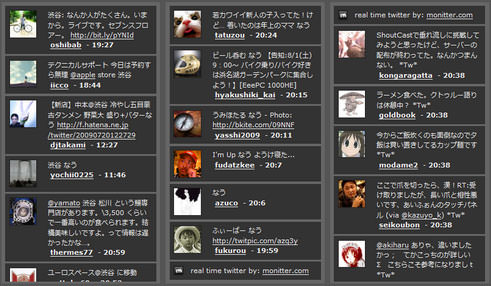
指定したキーワードのつぶやきをリアルタイムに取得して表示するウィジェットを作成できるjQueryプラグイン。 日本語限定にするなど、言語の指定も可能です。
<!DOCTYPE html PUBLIC "-//W3C//DTD XHTML 1.0 Transitional//EN" "http://www.w3.org/TR/xhtml1/DTD/xhtml1-transitional.dtd">
<html xmlns="http://www.w3.org/1999/xhtml" xml:lang="ja" lang="ja">
    <head>
        <meta http-equiv="Content-Type" content="text/html; charset=utf-8" />
        <meta http-equiv="Content-Language" content="ja" />
        <meta http-equiv="Content-Script-Type" content="text/javascript" />
        <meta http-equiv="Content-Style-Type" content="text/css" />
        <meta http-equiv="imagetoolbar" content="no" />
        <title>Monitter Widget | 設置サンプル</title>
        <link rel="stylesheet" type="text/css" href="/content/lib/global.css" />
        <!-- JS -->
        <script type="text/javascript" src="http://ajax.googleapis.com/ajax/libs/jquery/1.3.2/jquery.min.js"></script>
        <script type="text/javascript" src="/content/lib/jquery/monitter.min.js"></script>
        <!-- CSS -->
        <style type="text/css">
            .tweet {
                display:block;
                background:#333;
                clear:both;
                margin:.3em; padding:.6em;
                overflow:hidden;
            }
            .tweet img {
                float:left;
                margin-right:1em;
                border:2px solid #222;
                background:#444;
            }
            .tweet p.text {
                margin:0; padding:0 0 0 70px;
            }
            .monitter {
                float:left;
                width:280px; height:500px;
                margin:5px;
                border:4px solid #666;
                background:#666;
                overflow:hidden;
            }
            body, a {
                color:#efefef;
            }
            body {
                background:#555;
            }
            textarea {
                display:block;
                width:400px; height:80px;
                padding:4px;
                font-size:11px;
                background:#444;
                color:#ccc;
            }
        </style>
    </head>
    <body>
        <div id="wrap">
            <h1><a href='http://monitter.com/widget/index.html'>Monitter Widget: Embed Twitter on your website for free</a> | 設置サンプル</h1>
            <p>指定したキーワードのつぶやきをリアルタイムに取得して表示します。</p>
<!-- CODE -->
            <div class="cf">
                <div class="monitter" id="tweets" title="渋谷" lang="ja"></div>
                <div class="monitter" id="tweets2" title="なう" lang="ja"></div>
                <div class="monitter" id="tweets3" title="*Tw*" lang="ja"></div>
            </div>
<!-- / CODE -->
        </div>
    </body>
</html>
Tweet
指定したユーザーのつぶやきとTwitter検索結果を表示するjQueryプラグイン
unknown
Tweet!
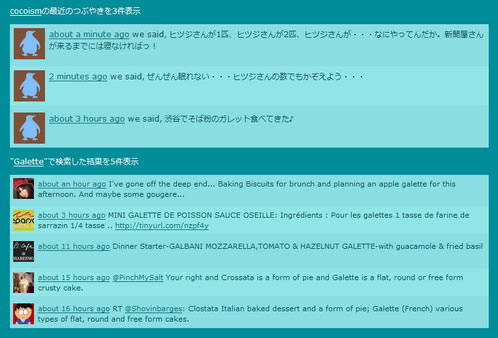
ウェブサイトにあなたのTwitterのつぶやきを表示したり、任意のキーワードでTwitter内を検索した結果をHTML表示することができるjQueryプラグイン。 表示件数(最大100件)、アバターアイコンのサイズ、自動結合テキスト、ローディングテキストなどを指定することができます。
<!DOCTYPE html PUBLIC "-//W3C//DTD XHTML 1.0 Transitional//EN" "http://www.w3.org/TR/xhtml1/DTD/xhtml1-transitional.dtd">
<html xmlns="http://www.w3.org/1999/xhtml" xml:lang="ja" lang="ja">
    <head>
        <meta http-equiv="Content-Type" content="text/html; charset=utf-8" />
        <meta http-equiv="Content-Language" content="ja" />
        <meta http-equiv="Content-Script-Type" content="text/javascript" />
        <meta http-equiv="Content-Style-Type" content="text/css" />
        <meta http-equiv="imagetoolbar" content="no" />
        <title>Tweet! | 設置サンプル</title>
        <link rel="stylesheet" type="text/css" href="/content/lib/global.css" />
        <!-- JS -->
        <script type="text/javascript" src="http://ajax.googleapis.com/ajax/libs/jquery/1.3.2/jquery.min.js"></script>
        <script type="text/javascript" src="/content/lib/jquery/jquery.tweet.js"></script>
        <script type="text/javascript">
            $(function() {
                $(".tweet").tweet({
                    join_text: "auto",
                    username: "cocoism",
                    avatar_size: 48,
                    count: 3,
                    auto_join_text_default: "we said,",
                    auto_join_text_ed: "we",
                    auto_join_text_ing: "we were",
                    auto_join_text_reply: "we replied",
                    auto_join_text_url: "we were checking out",
                    loading_text: "loading tweets..."
                });
                $(".query").tweet({
                    avatar_size: 32,
                    count: 5,
                    query: "Galette",
                    loading_text: "searching twitter..."
                });
            });
        </script>
        <!-- CSS -->
        <style type="text/css">
            body {
                background:#008D99;
                color:#fff;
            }
            a {
                color:#fff;
            }
            .tweet {
                color:#085258;
            }
                .tweet .tweet_list {
                    -webkit-border-radius:.5em;
                    list-style-type:none;
                    margin:0; padding:0;
                    background-color:#8adee2;
                }
                .tweet .tweet_list li {
                    overflow:auto;
                    padding:.5em;
                }
                .tweet .tweet_list li a {
                    color:#0c717a;
                }
                .tweet .tweet_list .tweet_even {
                    background-color:#91e5e7;
                }
                .tweet .tweet_list .tweet_avatar {
                padding-right:.5em;
                    float:left;
                }
                .tweet .tweet_list .tweet_avatar img {
                    vertical-align:middle;
                }
            .query {
                font-size:90%;
                color:#085258;
            }
                .query .tweet_list {
                    -webkit-border-radius:.5em;
                    list-style-type:none;
                    margin:0; padding:0;
                    background-color:#8adee2;
                }
                .query .tweet_list li {
                    overflow:auto;
                    padding:.5em;
                }
                .query .tweet_list li a {
                    color:#0c717a;
                }
                .query .tweet_list .tweet_even {
                    background-color:#91e5e7;
                }
                .query .tweet_list .tweet_avatar {
                    padding-right:.5em;
                    float:left;
                }
                .query .tweet_list .tweet_avatar img {
                    vertical-align:middle;
                }
        </style>
    </head>
    <body>
        <div id="wrap">
            <h1><a href='http://tweet.seaofclouds.com/'>Tweet!</a> | 設置サンプル</h1>
<!-- CODE -->
            <p><a href="http://twitter.com/cocoism">cocoism</a>の最近のつぶやきを3件表示</a></p>
            <div class='tweet'></div>

            <p>"<a href="http://search.twitter.com/search?q=Galette">Galette</a>"で検索した結果を5件表示</p>
            <div class='query'></div>
<!-- / CODE -->
        </div>
    </body>
</html>
Tweetable
指定したTwitterユーザーのつぶやきをコンパクトにサイトに表示
2009/12/13
Tweetable
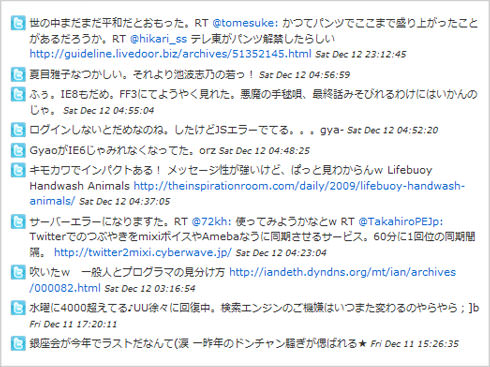
指定したTwitterユーザーのつぶやきをコンパクトにサイトに表示できる軽量のjQueryプラグイン。 URLと返信を表す「@ユーザー名」部分は、リンク表示されます。 TLを取得するTwitterユーザー名の他に、投稿時間表示の有無(time:true/false)、表示するつぶやき数(limit:数値)も指定可能です。
<!DOCTYPE html PUBLIC "-//W3C//DTD XHTML 1.0 Transitional//EN" "http://www.w3.org/TR/xhtml1/DTD/xhtml1-transitional.dtd">
<html xmlns="http://www.w3.org/1999/xhtml" xml:lang="ja" lang="ja">
   <head>
        <meta http-equiv="Content-Type" content="text/html; charset=utf-8" />
        <meta http-equiv="Content-Language" content="ja" />
        <meta http-equiv="Content-Script-Type" content="text/javascript" />
        <meta http-equiv="Content-Style-Type" content="text/css" />
        <meta http-equiv="imagetoolbar" content="no" />
        <title>設置サンプル</title>
        <link rel="stylesheet" type="text/css" href="/content/lib/global.css" />
        <script src="https://ajax.googleapis.com/ajax/libs/jquery/1.3.2/jquery.min.js"></script>
        <script type="text/javascript" src="/content/lib/jquery/jquery.tweetable.js"></script>
        <script type="text/javascript">
            $(function(){
                $('#tweets').tweetable({username: 'cocoism', time: true, limit: 10});
            });
        </script>
        <style type="text/css">
            small {font-style:italic; }
            #tweets ul {
                margin:10px; padding:10px;
                list-style-type:none;
                width:500px;
                border:1px solid #ccc;
                background-color:#fff;
                font-size:11px;
            }
            #tweets li {
                background:transparent url(/content/img/topic/twitter/twicon.png) no-repeat 0 0;
                padding-left:20px;
                list-style-type:none;
            }
            #tweets .hash { color:#0066CC; }
            #tweets .reply { color:#0066CC; }
            #tweets a:link { text-decoration:none; color:#0066CC;}
            #tweets a:active { text-decoration:none; color:#0066CC;}
            #tweets a:hover { text-decoration:underline; color:#0066CC;}
            #tweets a:visited { text-decoration:none; color:#0066CC;}
        </style>
   </head>
   <body>
      <div id="wrapper">
        <h1>設置サンプル</h1>
        <p>参照:<a href='http://theodin.co.uk/blog/javascript/tweetable-jquery-plugin.html'>Tweetable</a></p>
<!-- CODE -->
            <div id="tweets">
            </div><!-- #tweets -->
<!-- / CODE -->
        </div>
   </body>
</html>
Twit - Display Twitter Tweets on a Blog
Twitterのつぶやきをブログに表示
2010/1/4
Twit - Display Twitter Tweets on a Blog.
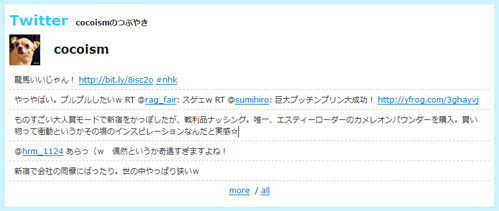
Twitterユーザー名を指定するだけで、そのユーザーのタイムラインを取得してHTML表示するjQueryプラグイン。 URLや@ユーザー名部分は、リンクに変換されて表示されます。
タイムラインの下に、「more」、「all」リンクが表示されます。 「more」リンクをクリックすると、つぶやき表示数分過去のタイムラインが表示されます。 「all」リンクをクリックすると、取得したタイムラインすべてを表示します。
オプションで、タイムライン表示数(デフォルトは7件)、ラベル、タイトルなど指定可能です。
| オプション | 型 | 説明 |
|---|---|---|
| count | 数値 | 取得するタイムライン数を指定。デフォルトは200。 |
| callback | funtion | JSONPフォーマットで結果を取得する場合はコールバック関数の名前を指定。 |
| icon | 真偽値 | プロフィールアイコン表示の有無を指定。デフォルトはTRUE。 |
| label | 文字列 | 表示するラベル名を指定。デフォルトは、「Twitter」。 |
| limit | 数値 | 表示するタイムライン数を指定。デフォルトは、7。 |
| title | 文字列 | 表示するタイトルを指定。デフォルトは、空文字列 |
| text | 真偽値 | テキスト表示の有無を指定。デフォルトはTRUE。 |
| username | 真偽値 | Twitterユーザー名表示の有無を指定。デフォルトはTRUE。 |
<!DOCTYPE html PUBLIC "-//W3C//DTD XHTML 1.0 Transitional//EN" "http://www.w3.org/TR/xhtml1/DTD/xhtml1-transitional.dtd">
<html xmlns="http://www.w3.org/1999/xhtml" xml:lang="ja" lang="ja">
    <head>
        <meta http-equiv="Content-Type" content="text/html; charset=utf-8" />
        <meta http-equiv="Content-Language" content="ja" />
        <meta http-equiv="Content-Script-Type" content="text/javascript" />
        <meta http-equiv="Content-Style-Type" content="text/css" />
        <meta http-equiv="imagetoolbar" content="no" />
        <title>設置サンプル</title>
        <link rel="stylesheet" type="text/css" href="/content/lib/global.css" />
        <!-- JS -->
        <script type="text/javascript" src="http://ajax.googleapis.com/ajax/libs/jquery/1.3.2/jquery.min.js"></script>
        <script type="text/javascript" src="/content/lib/jquery/jquery.twit.0.1.1.js"></script>
        <script type="text/javascript">
            $(function(){
                $('#twit').twit(
                    "cocoism",
                    {
                        limit: 5,
                        label: 'Twitter',
                        title: 'cocoismのつぶやき'
                    }
                );
              });
        </script>
        <!-- CSS -->
        <style type="text/css">

/** Twit **/
.twit {
background-color: #cbf2ff;
padding: 7px;
}
.twitHeader {
background-color: #fff;
margin: 0;
padding: 7px 7px 0 7px;
}
.twitLabel {
font-weight: bold;
font-size: 22px;
color: #33ccff;
}
.twitTitle {
font-weight: bold;
}
.twitUser {
background-color: #fff;
border-bottom: none;
font-size:160%;
padding: 7px;
}
.twitUser a{
color:#222;
font-weight:bold;
text-decoration: none;
}
.twitBody {
background-color: #ffffff;
padding: 0 7px 7px 7px;
margin: 0;
list-style: none;
}
.twitEntry {
padding: 6px 8px;
margin: 0;
border-bottom: dashed 1px #ccc;
height: auto !important;
}
.twitNavi {
clear: both;
text-align: center;
margin-top: 0;
padding: 5px;
background-color: #ffffff;
}

        </style>
    </head>
    <body>
        <div id="wrap">
            <p>参照:<a href='http://www.mudaimemo.com/p/twit/'>Twit - Display Twitter Tweets on a Blog.</a></p>
<!-- CODE -->
            <div id="twit"></div>
<!-- / CODE -->
        </div>
    </body>
</html>
Twitter API: How to create a stream of messages Monitter-like with PHP and jQuery
PHPとjQueryを使用したTwitter検索
2009/12/13
Twitter API: How to create a stream of messages Monitter-like with PHP and jQuery
[PHP]index.php、search.php、twitterapi.php
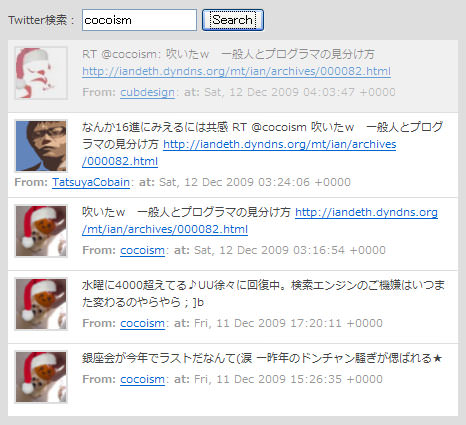
PHPでTwitter APIを叩いて、指定したキーワードにマッチする最新のつぶやきを取得し、jQueryを使用して、モーション表示する方法が掲載されています。
<!DOCTYPE html PUBLIC "-//W3C//DTD XHTML 1.0 Transitional//EN" "http://www.w3.org/TR/xhtml1/DTD/xhtml1-transitional.dtd">
<html xmlns="http://www.w3.org/1999/xhtml" xml:lang="ja" lang="ja">
   <head>
        <meta http-equiv="Content-Type" content="text/html; charset=utf-8" />
        <meta http-equiv="Content-Language" content="ja" />
        <meta http-equiv="Content-Script-Type" content="text/javascript" />
        <meta http-equiv="Content-Style-Type" content="text/css" />
        <meta http-equiv="imagetoolbar" content="no" />
        <title>設置サンプル</title>
        <link rel="stylesheet" type="text/css" href="/content/lib/global.css" />
        <script type="text/javascript" src="/content/lib/jquery/jquery-1.3.2.min.js"></script>
        <script type="text/javascript">
            $(function(){
                var twitterq = '';
                function displayTweet(){
                    var i= 0;
                    var limit = $("#twitter-results > div").size();
                    var myInterval = window.setInterval(function () {
                    var element =  $("#twitter-results div:last-child");
                    $("#twitter-results").prepend(element);
                    element.fadeIn("slow");
                    i++;
                    if(i==limit){
                        window.setTimeout(function () {
                            clearInterval(myInterval);
                        });
                    }
                },2000);
            }
            $("form#twittersearch").submit(function() {
                twitterq = $('#twitterq').attr('value');
                $.ajax({
                    type: "POST",
                    url: "search.php",
                    cache: false,
                    data: "twitterq="+ twitterq,
                    success: function(html){
                        $("#twitter-results").html(html);
                        displayTweet();
                    }
                });
                return false;
            });
        });
        </script>
        <style type="text/css">
        .woork{
            width:600px;
            margin:20px;
            color:#444;
        }
        .twitter_container{
            color:#444;
            width:450px;
            margin:0; padding:8px;
            background:#dedede;
            font-size:11px;
        }
        .twitter_container a{
            color:#0066cc;
        }
        .twitter_status{
            min-height:60px;
            height:auto!important;
            height:60px;
            padding:6px;
            border-bottom:solid 1px #dedede;
            background:#fff;
        }
        .twitter_image {
            float:left;
            width:50px; height:50px;
            margin-right:14px;
            border:solid 2px #dedede;
        }
        .twitter_small {
            display:block;
            padding-top:4px;
            color:#999;
            font-size:11px;
        }
        #twitter-results {
            padding-top:8px;
        }
        </style>
    </head>
    <body>
        <h1>設置サンプル</h1>
        <p>参照:<a href="http://woork.blogspot.com/2009/07/twitter-api-how-to-create-stream-of.html">Twitter API: How to create a stream of messages Monitter-like with PHP and jQuery </a></p>
        <p>※ローディングにちょっと時間がかかります。</p>
<!-- CODE -->
        <div class="twitter_container">
            <form id="twittersearch" method="post" action="">
                <label for="twitterq">Twitter検索:</label>
                <input name="twitterq" type="text" id="twitterq" />
                <button type="submit">Search</button>
            </form>
            <div id="twitter-results"></div>
        </div>
<!--  CODE -->
    </body>
</html>
<?php
include('twitterapi.php');

if($_POST['twitterq']){
    $twitter_query= $_POST['twitterq'];
    $search = new TwitterSearch($twitter_query);
    $results = $search->results();


    foreach($results as $result){
            echo '<div class="twitter_status" style="display:none;">';
            echo '<img src="'.$result->profile_image_url.'" class="twitter_image">';
            $text_n=toLink($result->text);
            echo $text_n;
            echo '<span class="twitter_small">';
            echo '<strong>From:</strong> <a href="http://www.twitter.com/'.$result->from_user.'">'.$result->from_user.'</a>: ';
            echo '<strong>at:</strong> '.$result->created_at;
            echo '<input type="hidden" value="'.$result->id.'"></input>';
            echo '</span>';
            echo '</div>';
    }
}
?>
<?
/**
 * Wrapper class around the Twitter Search API for PHP
 * Based on the class originally developed by David Billingham
 * and accessible at http://twitter.slawcup.com/twitter.class.phps
 * @author Ryan Faerman <ryan.faerman@gmail.com>
 * @version 0.2
 * @package PHPTwitterSearch
 */
class TwitterSearch {
    /**
     * Can be set to JSON (requires PHP 5.2 or the json pecl module) or XML - json|xml
     * @var string
     */
    var $type = 'json';

    /**
     * It is unclear if Twitter header preferences are standardized, but I would suggest using them.
     * More discussion at http://tinyurl.com/3xtx66
     * @var array
     */
    var $headers=array('X-Twitter-Client: PHPTwitterSearch','X-Twitter-Client-Version: 0.1','X-Twitter-Client-URL: http://ryanfaerman.com/twittersearch');

    /**
     * Recommend setting a user-agent so Twitter knows how to contact you inc case of abuse. Include your email
     * @var string
     */
    var $user_agent='';

    /**
     * @var string
     */
    var $query='';

    /**
     * @var array
     */
    var $responseInfo=array();

    /**
     * Use an ISO language code. en, de...
     * @var string
     */
    var $lang;

    /**
     * The number of tweets to return per page, max 100
     * @var int
     */
    var $rpp;

    /**
     * The page number to return, up to a max of roughly 1500 results
     * @var int
     */
    var $page;

    /**
     * Return tweets with a status id greater than the since value
     * @var int
     */
    var $since;

    /**
     * Returns tweets by users located within a given radius of the given latitude/longitude, where the user's location is taken from their Twitter profile. The parameter value is specified by "latitide,longitude,radius", where radius units must be specified as either "mi" (miles) or "km" (kilometers)
     * @var string
     */
    var $geocode;

    /**
     * When "true", adds "<user>:" to the beginning of the tweet. This is useful for readers that do not display Atom's author field. The default is "false"
     * @var boolean
     */
    var $show_user = false;

    /**
    * @param string $query optional
    */
    function TwitterSearch($query=false) {
        $this->query = $query;
    }

    /**
    * Find tweets from a user
    * @param string $user required
    * @return object
    */
    function from($user) {
        $this->query .= ' from:'.str_replace('@', '', $user);
        return $this;
    }

    /**
    * Find tweets to a user
    * @param string $user required
    * @return object
    */
    function to($user) {
        $this->query .= ' to:'.str_replace('@', '', $user);
        return $this;
    }

    /**
    * Find tweets referencing a user
    * @param string $user required
    * @return object
    */
    function about($user) {
        $this->query .= ' @'.str_replace('@', '', $user);
        return $this;
    }

    /**
    * Find tweets containing a hashtag
    * @param string $user required
    * @return object
    */
    function with($hashtag) {
        $this->query .= ' #'.str_replace('#', '', $hashtag);
        return $this;
    }

    /**
    * Find tweets containing a word
    * @param string $user required
    * @return object
    */
    function contains($word) {
        $this->query .= ' '.$word;
        return $this;
    }

    /**
    * Set show_user to true
    * @return object
    */
    function show_user() {
        $this->show_user = true;
        return $this;
    }

    /**
    * @param int $since_id required
    * @return object
    */
    function since($since_id) {
        $this->since = $since_id;
        return $this;
    }

    /**
    * @param int $language required
    * @return object
    */
    function lang($language) {
        $this->lang = $language;
        return $this;
    }

    /**
    * @param int $n required
    * @return object
    */
    function rpp($n) {
        $this->rpp = $n;
        return $this;
    }

    /**
    * @param int $n required
    * @return object
    */
    function page($n) {
        $this->page = $n;
        return $this;
    }

    /**
    * @param float $lat required. lattitude
    * @param float $long required. longitude
    * @param int $radius required.
    * @param string optional. mi|km
    * @return object
    */
    function geocode($lat, $long, $radius, $units='mi') {
        $this->geocode = $lat.','.$long.','.$radius.$units;
        return $this;
    }

    /**
    * Build and perform the query, return the results.
    * @param $reset_query boolean optional.
    * @return object
    */
    function results($reset_query=true) {
        $request  = 'http://search.twitter.com/search.'.$this->type;
        $request .= '?q='.urlencode($this->query);

        if(isset($this->rpp)) {
            $request .= '&rpp='.$this->rpp;
        }

        if(isset($this->page)) {
            $request .= '&page='.$this->page;
        }

        if(isset($this->lang)) {
            $request .= '&lang='.$this->lang;
        }

        if(isset($this->since)) {
            $request .= '&since_id='.$this->since;
        }

        if($this->show_user) {
            $request .= '&show_user=true';
        }

        if(isset($this->geocode)) {
            $request .= '&geocode='.$this->geocode;
        }

        if($reset_query) {
            $this->query = '';
        }

        return $this->objectify($this->process($request))->results;
    }

    /**
    * Returns the top ten queries that are currently trending on Twitter.
    * @return object
    */
    function trends() {
        $request  = 'http://search.twitter.com/trends.json';

        return $this->objectify($this->process($request));
    }

    /**
     * Internal function where all the juicy curl fun takes place
     * this should not be called by anything external unless you are
     * doing something else completely then knock youself out.
     * @access private
     * @param string $url Required. API URL to request
     * @param string $postargs Optional. Urlencoded query string to append to the $url
     */
    function process($url, $postargs=false) {
        $ch = curl_init($url);
        if($postargs !== false) {
            curl_setopt ($ch, CURLOPT_POST, true);
            curl_setopt ($ch, CURLOPT_POSTFIELDS, $postargs);
        }

        curl_setopt($ch, CURLOPT_VERBOSE, 1);
        curl_setopt($ch, CURLOPT_NOBODY, 0);
        curl_setopt($ch, CURLOPT_HEADER, 0);
        curl_setopt($ch, CURLOPT_USERAGENT, $this->user_agent);
        curl_setopt($ch, CURLOPT_FOLLOWLOCATION,1);
        curl_setopt($ch, CURLOPT_RETURNTRANSFER, 1);
        curl_setopt($ch, CURLOPT_HTTPHEADER, $this->headers);

        $response = curl_exec($ch);

        $this->responseInfo=curl_getinfo($ch);
        curl_close($ch);

        if( intval( $this->responseInfo['http_code'] ) == 200 )
            return $response;
        else
            return false;
    }

    /**
     * Function to prepare data for return to client
     * @access private
     * @param string $data
     */
    function objectify($data) {
        if( $this->type ==  'json' )
            return (object) json_decode($data);

        else if( $this->type == 'xml' ) {
            if( function_exists('simplexml_load_string') ) {
                $obj = simplexml_load_string( $data );

                $statuses = array();
                foreach( $obj->status as $status ) {
                    $statuses[] = $status;
                }
                return (object) $statuses;
            }
            else {
                return $out;
            }
        }
        else
            return false;
    }
}

?>

<?php
function toLink($text){
        $text = html_entity_decode($text);
        $text = " ".$text;
        $text = eregi_replace('(((f|ht){1}tp://)[-a-zA-Z0-9@:%_\+.~#?&//=]+)',
                '<a href="\\1">\\1</a>', $text);
        $text = eregi_replace('(((f|ht){1}tps://)[-a-zA-Z0-9@:%_\+.~#?&//=]+)',
                '<a href="\\1">\\1</a>', $text);
        $text = eregi_replace('([[:space:]()[{}])(www.[-a-zA-Z0-9@:%_\+.~#?&//=]+)',
        '\\1<a href="http://\\2">\\2</a>', $text);
        $text = eregi_replace('([_\.0-9a-z-]+@([0-9a-z][0-9a-z-]+\.)+[a-z]{2,3})',
        '<a href="mailto:\\1">\\1</a>', $text);
        return $text;
}
?>
Twitter Friends & Followers Widget - A jQuery Plugin!
Twitterの友達とフォロワーを取得して表示するjQueryプラグイン
2009/12/13
Twitter Friends & Followers Widget - A jQuery Plugin!
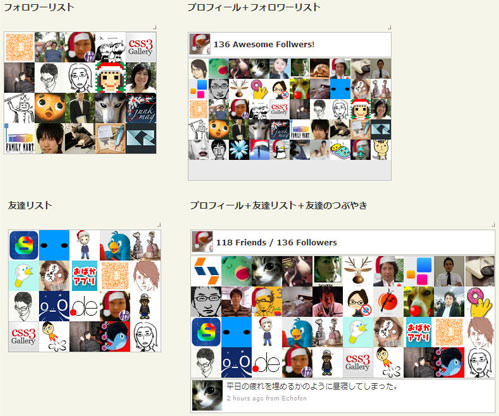
Google CodeのjQueryライブラリを使用して、Google Connect風に、Twitterの友達とフォロワーリストをアイコン付きでサイトに表示する方法が掲載されています。 フォロワーリスト、友達リストなど4種類のデモが公開されています。 プロフィール付きや友達のつぶやきをティッカー表示することも可能です。
- フォロワーリスト
- プロフィール+フォロワーリスト
- 友達リスト
- プロフィール+友達リスト+友達のつぶやき
<!DOCTYPE html PUBLIC "-//W3C//DTD XHTML 1.0 Transitional//EN" "http://www.w3.org/TR/xhtml1/DTD/xhtml1-transitional.dtd">
<html xmlns="http://www.w3.org/1999/xhtml" xml:lang="ja" lang="ja">
<head>
<meta http-equiv="Content-Type" content="text/html; charset=utf-8" />
<meta http-equiv="Content-Language" content="ja" />
<meta http-equiv="Content-Script-Type" content="text/javascript" />
<meta http-equiv="Content-Style-Type" content="text/css" />
<meta http-equiv="imagetoolbar" content="no" />
<title>設置サンプル</title>
<link rel="stylesheet" type="text/css" href="/content/lib/global.css" />
<script type="text/javascript" src="http://ajax.googleapis.com/ajax/libs/jquery/1.3.2/jquery.min.js"></script>
<script type="text/javascript" src="http://twitter-friends-widget.googlecode.com/files/jquery.twitter-friends-1.0.min.js"></script>
<script type="text/javascript">
$(function(){
$('#friends').twitterFriends({
debug:1
,username:'cocoism'
});
});
</script>
<style type="text/css">
/*---- Users ----*/
div.tf-users{
/* fixed height so container will not flicker within transitions */
height:192px;
border:silver 1px solid;
overflow:hidden;
background-color:#eaeaea;
}
/* user img link*/
div.tf-users a{
display:block;
float:left;
}
/* user img */
div.tf-users img{ }
/*---- Tweets ----*/
div.tf-tweet{
/* fixed height so container will not flicker with different length tweets */
height:100px;
overflow:hidden;
}
/* tweet li */
div.tf-tweet li{
border:silver 1px solid;
position:relative;
padding:2px;
list-style-type:none;
margin:1px 0;
overflow:hidden;
}
/* tweet author avatar */
div.tf-tweet span.tf-avatar{
display:block;
width:48px;
height:48px;
margin:0 2px 0 2px;
left:0;
position:absolute;
overflow:hidden;
}
/* author name */
div.tf-tweet strong a{
margin-right:5px;
}
/* tweet body */
div.tf-tweet span.tf-body {
display:block;
margin-left:55px;
}
/* tweet content */
div.tf-tweet span.tf-content{
}
/* tweet date and source */
div.tf-tweet span.tf-meta {
color:#999999;
display:block;
font-size:0.764em;
margin:3px 0 0;
}
div.tf-tweet span.tf-meta a{
color:#999999;
text-decoration:none;
}
div.tf-tweet span.tf-meta a:hover{
text-decoration:underline;
}
/* customize date link */
div.tf-tweet a.tf-date { }
/* customize source link */
div.tf-tweet a.tf-source { }
/* customize links */
div.tf-tweet a.tf-link { }
/* customize @user links */
div.tf-tweet a.tf-at { }
/* customize #hashtags links */
div.tf-tweet a.tf-hashtag { }
/* ---- Info Link ----- */
div.tf-info{
text-align:right;
}
div.tf-info a{
text-decoration:none;
font-size:9px;
font-weight:bolder;
color:gray;
font-family:tahoma;
}
/**** for demo2 */
/*---- Header ----*/
div.tf-header{
border:silver 1px solid;
overflow:hidden;
margin:0 0 1px 0;
background:#fff;
}
div.tf-header img{
border:silver 1px solid;
margin:1px;
float:left;
width:32px;
height:32px;
}
div.tf-header h2{
line-height:32px;
font-weight:bolder;
display:block;
margin:3px;
padding:0;
float:left;
font-size:12px;
}
/**** for demo4 */
/* tweet item */
div.tf-tweet div{
border:silver 1px solid;
position:relative;
padding:1px;
margin:1px 0 0 0;
overflow:hidden;
height:50px;
background:#fff;
}
/* tweet author avatar */
div.tf-tweet span.tf-avatar{
display:block;
width:48px;
height:48px;
margin:0 2px 0 2px;
left:0;
position:absolute;
overflow:hidden;
}
/* tweet author name */
div.tf-tweet strong a{
margin-right:5px;
}
/* tweet body */
div.tf-tweet span.tf-body {
display:block;
margin-left:55px;
}
/* tweet content */
div.tf-tweet span.tf-content{
}
/* tweet date and source */
div.tf-tweet span.tf-meta {
color:#999999;
display:block;
font-size:0.764em;
margin:3px 0 0;
}
div.tf-tweet span.tf-meta a{
color:#999999;
text-decoration:none;
}
div.tf-tweet span.tf-meta a:hover{
text-decoration:underline;
}
/* tweet date link */
div.tf-tweet a.tf-date { }
/* tweet source link */
div.tf-tweet a.tf-source { }
/* tweet links */
div.tf-tweet a.tf-link { }
/* tweet @user links */
div.tf-tweet a.tf-at { }
/* tweet #hashtags links */
div.tf-tweet a.tf-hashtag { }
</style>
</head>
<body>
<div id="wrapper">
<h1>設置サンプル</h1>
<p>参照:<a href='http://www.moretechtips.net/2009/10/twitter-friends-followers-widget-jquery.html'>Twitter Friends & Followers Widget - A jQuery Plugin!</a></p>
<!-- CODE -->
<h2>フォロワーリスト</h2>
<div class="some-fixed-width-container" style="width:242px">
<div id="friends"></div>
</div>
<h2>プロフィール+フォロワーリスト</h2>
<div class="some-fixed-width-container" style="width:322px">
<div class="twitter-friends" options="{
debug:1
,username:'cocoism'
,header:'<a href=\'_tp_\'><img src=\'_ti_\'/></a><h2>_fo_ Awesome Follwers!</h2>'
,user_animate:'width'
,users:50
,user_image:32
}"></div>
</div>
<h2>友達リスト</h2>
<div class="some-fixed-width-container" style="width:242px">
<div class="twitter-friends" options="{
debug:1
,friends:1
,username:'cocoism'
}"></div>
</div>
<h2>プロフィール+友達リスト+友達のつぶやき</h2>
<div class="some-fixed-width-container" style="width:482px">
<div class="twitter-friends" options="{
debug:1
,username:'cocoism'
,friends:1
,tweet:1
,header:'<a href=\'_tp_\' title=\'follow me\'><img src=\'_ti_\'/></a><h2>_fr_ Friends / _fo_ Followers</h2>'
,loop:1
,users:50
,user_animate:'height'
}"></div>
</div>
<!-- / CODE -->
</div>
</body>
</html>
Twitter Trackbacks Widget - A jQuery Plugin
指定したURLを含むつぶやき、返信やRTをティッカー表示
2009/12/13
twitter-trackbacks-widget - Project Hosting on Google Code
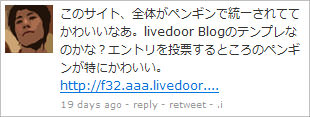
指定したURLを含む投稿、返信、RTを表示するウィジェットです。 ティッカー、固定リストなど表示方法が異なる3種類のデモが公開されています。
- トラック・バー
- トリプル・トラック・バー
- 固定リスト
<!DOCTYPE html PUBLIC "-//W3C//DTD XHTML 1.0 Transitional//EN" "http://www.w3.org/TR/xhtml1/DTD/xhtml1-transitional.dtd">
<html xmlns="http://www.w3.org/1999/xhtml" xml:lang="ja" lang="ja">
   <head>
        <meta http-equiv="Content-Type" content="text/html; charset=utf-8" />
        <meta http-equiv="Content-Language" content="ja" />
        <meta http-equiv="Content-Script-Type" content="text/javascript" />
        <meta http-equiv="Content-Style-Type" content="text/css" />
        <meta http-equiv="imagetoolbar" content="no" />
        <title>設置サンプル</title>
        <link rel="stylesheet" type="text/css" href="/content/lib/global.css" />
        <script type="text/javascript" src="http://ajax.googleapis.com/ajax/libs/jquery/1.3.2/jquery.min.js"></script>
        <script type="text/javascript" src="http://twitter-trackbacks-widget.googlecode.com/files/jquery.twittertrackbacks-1.0.min.js"></script>
        <style type="text/css">
            /* container */
            div.twitter-trackbacks{ }
            /* ul list */
            ul.ttw-inner{
                border:silver 1px solid;
                min-height:48px;
                height:auto!important;
                height:48px;
                padding:4px;
                overflow:hidden;
                margin:0;
                background:#fff;
                width:300px;
            }
            ul.ttw-inner li {
                float:left;
                margin:0;
                min-height:48px;
                height:auto!important;
                height:48px;
                list-style-type:none;
                position:relative;
            }
            /* author img */
            ul.ttw-inner span.ttw-author-img{
                display:block;
                width:48px;
                height:48px;
                margin:0 5px 0 0;
                overflow:hidden;
                left:0;
                position:absolute;
            }
            /* author name */
            ul.ttw-inner strong a{
                margin-right:5px;
            }
            /* tweet body */
            ul.ttw-inner span.ttw-body {
                display:block;
                margin-left:55px;
            }
            /* tweet content */
            ul.ttw-inner span.ttw-content{}
            /* tweet meta : date, reply, retweet line */
            ul.ttw-inner span.ttw-meta {
                color:#999999;
                display:block;
                font-size:0.764em;
                margin:3px 0 0;
            }
            ul.ttw-inner span.ttw-meta a{
                color:#999999;
                text-decoration:none;
            }
            ul.ttw-inner span.ttw-meta a:hover{
                text-decoration:underline;
            }
            /* customize reply link */
            ul.ttw-inner a.ttw-reply { }
            /* customize retweet link */
            ul.ttw-inner a.ttw-retweet { }
            /* customize links */
            ul.ttw-inner a.ttw-link { }
            /* customize @user links */
            ul.ttw-inner a.ttw-at { }
            /* customize #hashtags links */
            ul.ttw-inner a.ttw-hashtag { }
            /* li's will have class that reflects users influence levels from 0 to 10 */
            /* Customize tweets of users with influence levels from 0 to 10 */
            li.ttw-inf-0{}
            /* ...... */
            li.ttw-inf-10{}
            /* Customize users image with influence levels from 0 to 10 */
            li.ttw-inf-0 img{}
            /* ...... */
            li.ttw-inf-10 img{}
            /* Customize users name with influence levels from 0 to 10 */
            li.ttw-inf-0 strong{}
            /* ...... */
            li.ttw-inf-10 strong{}
        </style>
   </head>
   <body>
      <div id="wrapper">
        <h1>設置サンプル</h1>
        <p>参照:<a href='http://www.moretechtips.net/2009/11/twitter-trackbacks-widget-jquery-plugin.html'>Twitter Trackbacks Widget - A jQuery Plugin</a></p>
        <p>「http://phpjavascriptroom.com/」を含む投稿、返信、RTをティッカー表示します。</p>
<!-- CODE -->
        <h2>トラックバック・バー</h2>
        <div class="twitter-trackbacks" options="{
            url:'http://phpjavascriptroom.com/'
        }">loading..
        </div>
<!-- / CODE -->
     </div>
   </body>
</html>
TwitterGraph
1時間ごとのつぶやきをTwitterから取得してチャート表示
unknown
TwitterGraph
1時間ごとのつぶやきをTwitterから取得してチャート表示するjQueryプラグイン。
URLでTwitter Seach APIをコールし、検索結果をJSON形式で受け取り、そこから必要なデータを取り出し、チャートを描画しています。 チャートの描画には、jQueryベースのSparklinesプラグインを使用しています。

<!DOCTYPE html PUBLIC "-//W3C//DTD XHTML 1.0 Transitional//EN" "http://www.w3.org/TR/xhtml1/DTD/xhtml1-transitional.dtd">
<html xmlns="http://www.w3.org/1999/xhtml" xml:lang="ja" lang="ja">
    <head>
        <meta http-equiv="Content-Type" content="text/html; charset=utf-8" />
        <meta http-equiv="Content-Language" content="ja" />
        <meta http-equiv="Content-Script-Type" content="text/javascript" />
        <meta http-equiv="Content-Style-Type" content="text/css" />
        <meta http-equiv="imagetoolbar" content="no" />
        <title>TwitterGraph | 設置サンプル</title>
        <link rel="stylesheet" type="text/css" href="/content/lib/global.css" />
        <!-- JS -->
        <script type="text/javascript" src="http://ajax.googleapis.com/ajax/libs/jquery/1.3.2/jquery.min.js"></script>
        <script type="text/javascript" src="/content/lib/jquery/twittergraph/jquery.sparkline.min.js"></script>
        <script type="text/javascript" src="/content/lib/jquery/twittergraph/jquery.twittergraph.js"></script>
        <script type="text/javascript">
            $(function() {
                $.twitterGraph('cocoism', $(".twitterUsage"));
            });
        </script>
        <!-- CSS -->
        <style type="text/css">
            .twitterUsage { width: 120px; height: 40px; padding-top: 15px; background: transparent url('lib/jquery/twittergraph/twitter-logo-bg.gif') no-repeat top center; }
            .twitterUsage span { display: block; color: #0482AD; font-size: 9px; text-align: center; font-family: Sans-Serif; }
        </style>
    </head>
    <body>
        <div id="wrap">
            <h1><a href='http://net.tutsplus.com/tutorials/javascript-ajax/create-a-fun-tweet-counter-with-jquery/'>TwitterGraph</a> | 設置サンプル</h1>
<!-- CODE -->
            <div class="twitterUsage"></div>
<!-- / CODE -->
        </div>
    </body>
</html>
Use Twitter API and jQuery to display lastest Tweet: Part 1 The Basics
PHPとjQueryを使用してつぶやきを吹き出し表示
unknown
Use Twitter API and jQuery to display lastest Tweet: Part 1 The Basics
[PHP]tweet.php
[画像]ajax-loader.gif、speech.jpg、twitter.jpg
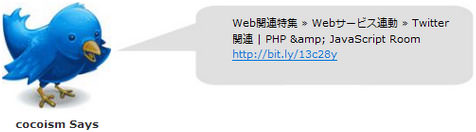
Twitter JSON APIから指定したユーザーの情報を取得するPHPファイルをjQueryで読み込み、最新のつぶやきをかわいく吹き出し表示する方法が掲載されています。
<!DOCTYPE html PUBLIC "-//W3C//DTD XHTML 1.0 Transitional//EN" "http://www.w3.org/TR/xhtml1/DTD/xhtml1-transitional.dtd">
<html xmlns="http://www.w3.org/1999/xhtml" xml:lang="ja" lang="ja">
    <head>
        <meta http-equiv="Content-Type" content="text/html; charset=utf-8" />
        <meta http-equiv="Content-Language" content="ja" />
        <meta http-equiv="Content-Script-Type" content="text/javascript" />
        <meta http-equiv="Content-Style-Type" content="text/css" />
        <meta http-equiv="imagetoolbar" content="no" />
        <title>jQuery and PHP ajax lastest Tweet | 設置サンプル</title>
        <link rel="stylesheet" type="text/css" href="/content/lib/global.css" />
        <!-- JS -->
        <script type="text/javascript" src="http://ajax.googleapis.com/ajax/libs/jquery/1.3.2/jquery.min.js"></script>
        <script type="text/javascript">
            $(function(){
                $("#content").hide();
                $("#content").load("include/topic/twitter_jquery/tweetbasic/tweet.php", function(){
                    $(this).fadeIn();
                    $("#loading").hide();
                });
            });
        </script>
        <!-- CSS -->
        <style type="text/css">
            body { background:#fff; }
            #demo {
                width:600px;
                margin:20px;
            }
            #pic {
                width:127px; height:150px;
                float:left;
                background:transparent url("include/topic/twitter_jquery/tweetbasic/twitter.jpg") no-repeat 0 0;
                position:relative;
            }
            #name {
                width:127px;
                position:absolute;
                bottom:0; left:0;
                text-align:center;
            }
            #speech {
                float:left;
                width:260px; height:93px;
                color:#000;
                background:transparent url("include/topic/twitter_jquery/tweetbasic/speech.jpg") no-repeat 0 0;
                padding:15px 20px 0px 140px;
            }
            #loading {
                padding-left:100px;
                background:transparent url("include/topic/twitter_jquery/tweetbasic/ajax-loader.gif") no-repeat 0 0;
                width:54px; height:54px;
            }
            .clear {
                clear:both;
            }
            #name {
                text-align:center;
                font-weight:bold;
            }
            #logo {
                width:302px;
                margin:0px auto;
            }
            #title {
                text-align:center;
            }
        </style>
    </head>
    <body>
        <div id="wrap">
            <h1><a href='http://www.codetricky.com/2009/06/use-twitter-api-and-jquery-to-display-lastest-tweet-part-1-the-basics/'>Use Twitter API and jQuery to display lastest Tweet: Part 1 The Basics</a> | 設置サンプル</h1>
            <p>▼Twitterに最近投稿されたつぶやきを取得して吹き出し表示します。</p>
<!-- CODE -->
            <div id="demo">
                <div id="pic">
                    <div id="name">cocoism Says</div>
                </div>
                <div id="speech">
                    <div id="content"></div>
                    <div id="loading"></div>
                </div>
                <p><br class="clear" />
            </div>
<!-- / CODE -->
        </div>
    </body>
</html>
Who-Tweet Button : Fancy jQuery Plugin for Twitter
現在のページあるいは指定したURLのトラックバック状況をRetweetボタン付きで表示
2010/1/4
who-tweet-button - Project Hosting on Google Code
現在のページあるいは指定したURLのトラックバック状況をRetweetボタン付きで表示するjQueryプラグイン。 例えば、あなたのサイトのURLを指定すれば、そのURLを含むつぶやきが何件あり、どのTwitterユーザーが投稿したのかを知ることができます。
下記のように、アイコン部分にはReTweetしたユーザーのプロフィールアイコンがローテーション表示されます。

件数ボタンをクリックすると、TOPSYサービスページへアクセスし、下記のようなTwitterトラックバック状況が一覧表示されます。 赤字部分が現在のページのURLまたはオプションの「url」で指定したURLになります。
▼ http://topsy.com/tb/f32.aaa.livedoor.jp/~azusa/
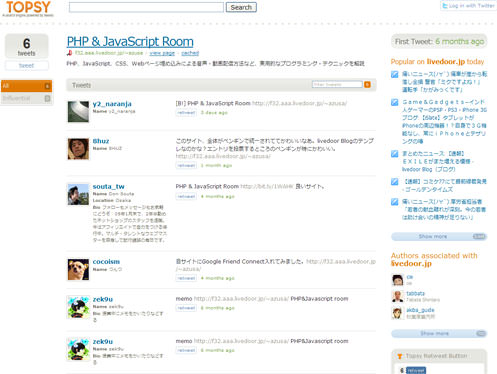
オプションの「url」に特定のURLを指定することも可能です。 「nick」にはあなたのTwitterユーザー名を指定します。
Retweetボタンをクリックすると、現在のページあるいは指定したURLをTwitterにReTweet(引用返信)することができます。
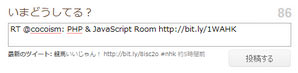
<!DOCTYPE html PUBLIC "-//W3C//DTD XHTML 1.0 Transitional//EN" "http://www.w3.org/TR/xhtml1/DTD/xhtml1-transitional.dtd">
<html xmlns="http://www.w3.org/1999/xhtml" xml:lang="ja" lang="ja">
    <head>
        <meta http-equiv="Content-Type" content="text/html; charset=utf-8" />
        <meta http-equiv="Content-Language" content="ja" />
        <meta http-equiv="Content-Script-Type" content="text/javascript" />
        <meta http-equiv="Content-Style-Type" content="text/css" />
        <meta http-equiv="imagetoolbar" content="no" />
        <title>設置サンプル</title>
        <link rel="stylesheet" type="text/css" href="/content/lib/global.css" />
        <!-- JS -->
        <script type="text/javascript" src="http://ajax.googleapis.com/ajax/libs/jquery/1.3.2/jquery.min.js"></script>
        <script type="text/javascript" src="/content/lib/jquery/jquery.who-tweet-button-1.0.min.js"></script>
        <link rel="stylesheet" type="text/css" href="/content/lib/jquery/who-tweet-button-1.0.css" />
    </head>
    <body>
        <div id="wrap">
            <h1>設置サンプル</h1>
            <p>参照:<a href='http://code.google.com/p/who-tweet-button/'>who-tweet-button - Project Hosting on Google Code</a></p>
<!-- CODE -->
            <h2>基本</h2>
            <div class="who-tweet" options="{
                url:'http://phpjavascriptroom.com/'
                ,nick:'cocoism'
            }">読込中...</div>

            <h2>応用</h2>
            <div class="who-tweet-2">読込中...</div>
            <script type="text/javascript">
                $(function(){
                    $('div.who-tweet-2').whoTweet({
                        nick:'cocoism'
                        ,url:'http://phpjavascriptroom.com/'
                        ,n:20
                        ,inf_tip:1
                        ,tweet_tip:1
                        ,animate:'width'
                    });
                  });
            </script>
</script>
<!-- / CODE -->
        </div>
    </body>
</html>

