prototype.jsベースウィンドウ、モーダル

- Control.Window〔多目的ウィンドウツールキット〕
Control.Window
多目的ウィンドウツールキット
2008/11/22
Control.Window
prototype.js v1.6.0.3、scriptaculous.js v1.8(effects.js、dragdrop.js、resizable.js)、Livepipe UI(livepipe.js、window.js)
ウィンドウ、モーダルウィンドウ、Lightbox、ホバーボックス、ツールチップなど、様々な目的のウィンドウを簡単に実装できるprototypeベースのツールキット。
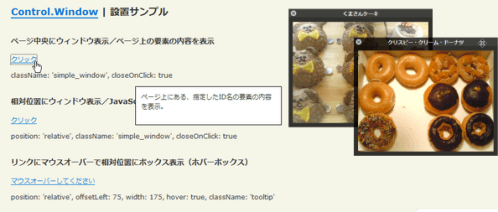 設置イメージ
Control.Windowの設置サンプルサンプルを見る
<!DOCTYPE html PUBLIC "-//W3C//DTD XHTML 1.0 Transitional//EN" "http://www.w3.org/TR/xhtml1/DTD/xhtml1-transitional.dtd">
<html xmlns="http://www.w3.org/1999/xhtml" xml:lang="ja" lang="ja">
    <head>
        <meta http-equiv="Content-Type" content="text/html; charset=utf-8" />
        <meta http-equiv="Content-Language" content="ja" />
        <meta http-equiv="Content-Script-Type" content="text/javascript" />
        <meta http-equiv="Content-Style-Type" content="text/css" />
        <meta http-equiv="imagetoolbar" content="no" />
        <title>Control.Window | 設置サンプル</title>
        <link rel="stylesheet" type="text/css" href="/content/lib/global.css" />
        <script type="text/javascript" src="/content/lib/prototype/prototype-1.6.0.3.js"></script>
        <script type="text/javascript" src="/content/lib/scriptaculous/scriptaculous.js?load=effects,dragdrop,resizable"></script>
        <script type="text/javascript" src="/content/lib/livepipe-ui/livepipe.js"></script>
        <script type="text/javascript" src="/content/lib/livepipe-ui/window.js"></script>
        <script type="text/javascript">
            document.observe('dom:loaded',function(){
                //Centered Window / Content on Page
                var centered = new Control.Window($(document.body).down('[href=#centered]'),{
                    className: 'simple_window',
                    closeOnClick: true
                });

                //Relative Window / Dynamic Content
                var relative = new Control.Window($(document.body).down('[href=#relative]'),{
                    position: 'relative',
                    className: 'simple_window',
                    closeOnClick: true
                });
                relative.container.insert('このコンテンツはJavaScriptで挿入されています。');
                //HoverBox
                var relative = new Control.Window($(document.body).down('[href=#hoverbox]'),{
                    position: 'relative',
                    hover: true,
                    offsetLeft: 75,
                    width : 200,
                    height : 100,
                    className: 'tooltip'
                });
                //styled examples use the window factory for a shared set of behavior
                var window_factory = function(container,options){
                    var window_header = new Element('div',{
                        className: 'window_header'
                    });
                    var window_title = new Element('div',{
                        className: 'window_title'
                    });
                    var window_close = new Element('div',{
                        className: 'window_close'
                    });
                    var window_contents = new Element('div',{
                        className: 'window_contents'
                    });
                    var w = new Control.Window(container,Object.extend({
                        className: 'window',
                        closeOnClick: window_close,
                        draggable: window_header,
                        insertRemoteContentAt: window_contents,
                        afterOpen: function(){
                            window_title.update(container.readAttribute('title'))
                        }
                    },options || {}));
                    w.container.insert(window_header);
                    window_header.insert(window_title);
                    window_header.insert(window_close);
                    w.container.insert(window_contents);
                    return w;
                };
                var styled_window_one = window_factory($('styled_window_one'));
                var styled_window_two = window_factory($('styled_window_two'));
                //Modal Window
                var modal = new Control.Modal($('modal'),{
                    overlayOpacity: 0.75,
                    className: 'modal',
                    fade: true
                });
                //ToolTip
                var tooltip = new Control.ToolTip($('tooltip'),'ツールチップの内容です',{
                    className: 'tooltip'
                });
            });
        </script>
        <style type="text/css">
            #control_overlay { background-color:#000; }
            .modal { background-color:#fff; padding:10px; border:1px solid #333; }
            .tooltip { border:1px solid #000; background-color:#fff; width:200px; color:#333; padding:10px; }
            .simple_window { width:250px; height:50px; border:1px solid #000; background-color:#fff; padding:10px; text-align:left; color:#333; }
            .window { background-image:url(/content/img/ajax/control_window/window_background.png); background-position:top left; -moz-border-radius: 10px; -webkit-border-radius: 10px; padding:10px; font-weight:bold; color:#fff; text-align:center; min-width:150px; min-height:100px; }
            .window .window_contents { margin-top:10px; width:100%; height:100%; }
            .window .window_header { text-align:center; }
            .window .window_title { margin-top:-7px; margin-bottom:7px; cursor:move; }
            .window .window_close { display:block; position:absolute; top:4px; left:5px; height:13px; width:13px; background-image:url(/content/img/ajax/control_window/window_close.gif); cursor:pointer; cursor:hand; }
        </style>
    </head>
    <body>
        <div id="wrap">
            <h1><a href='http://livepipe.net/control/window'>Control.Window</a> | 設置サンプル</h1>
            <div id="centered">ページ上にある、指定したID名の要素の内容を表示。</div>
            <div id="hoverbox">ページ上にある、指定したID名の要素の内容を表示。</div>

            <h2>ページ中央にウィンドウ表示/ページ上の要素の内容を表示</h2>
            <p><a href="#centered">クリック</a></p>
            <p>className: 'simple_window', closeOnClick: true</p>

            <h2>相対位置にウィンドウ表示/JavaScriptで動的に内容を表示</h2>
            <p><a href="#relative">クリック</a></p>
            <p>position: 'relative', className: 'simple_window', closeOnClick: true</p>

            <h2>リンクにマウスオーバーで相対位置にボックス表示(ホバーボックス)</h2>
            <p><a href="#hoverbox">マウスオーバーしてください</a></p>
            <p>position: 'relative', offsetLeft: 75, width: 175, hover: true, className: 'tooltip'</p>

            <h2>ドラッグ可能な装飾ウィンドウ</h2>
            <p><a
                href="http://farm4.static.flickr.com/3222/2974008614_f4b59bf651_o.png"
                id="styled_window_one" title="くまさんケーキ">その1</a>、
                <a
                href="http://farm4.static.flickr.com/3141/2973155055_385036c286_o.png"
                id="styled_window_two" title="クリスピー・クリーム・ドーナツ">その2</a>
            </p>

            <h2>モーダルウィンドウ</h2>
            <p><a
                href="http://farm4.static.flickr.com/3239/3032375082_fd66d11941.jpg"
                id="modal">クリック</a>
            </p>
            <p>fade: true, overlayOpacity: 0.75, className: 'modal'</p>

            <h2>リンクにマウスオーバーでツールチップ表示</h2>
            <p><a href="#" id="tooltip">マウスオーバーしてください</a></p>
            <p>className: 'tooltip'</p>
        </div>
    </body>
</html>

