prototype.jsベースプログレスバー

- Control.ProgressBar〔CSSベースの進捗の割合を指定可能なプログレスバー〕
Control.ProgressBar
CSSベースの進捗の割合を指定可能なプログレスバー
2008/11/23
Control.ProgressBar: CSS based progress bar widget for Prototype
prototype.js v1.6、Livepipe UI(livepipe.js、progressbar.js)
prototypeを使用したCSSベースのプログレスバーウィジェットを実装できるプラグイン。 バーの進捗部分の割合は、CSSのID名の指定を変更するだけでOK。 伸びるスピードは、秒単位で指定できます。「interval: 0.15」なら0.15秒間隔となります。
/* JS */
$('progress_bar_step_25').observe('click',progress_bar.step.bind(progress_bar,25));
/* HTML */
<input type='button' value='+ 25%' id='progress_bar_step_25' />
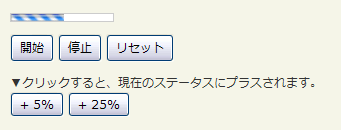 設置イメージ
HEAD
<!-- JS -->
<script type="text/javascript" src="prototype-1.6.0.3.js" charset="utf-8"></script>
<script type="text/javascript" src="livepipe-ui/livepipe.js" charset="utf-8"></script>
<script type="text/javascript" src="livepipe-ui/progressbar.js" charset="utf-8"></script>
<script type="text/javascript">
  document.observe('dom:loaded',function(){
    var progress_bar = new Control.ProgressBar('progress_bar',{
      interval: 0.15
    });
    $('progress_bar_stop').observe('click',progress_bar.stop.bind(progress_bar));
    $('progress_bar_start').observe('click',progress_bar.start.bind(progress_bar));
    $('progress_bar_reset').observe('click',progress_bar.reset.bind(progress_bar));
    $('progress_bar_step_5').observe('click',progress_bar.step.bind(progress_bar,5));
    $('progress_bar_step_25').observe('click',progress_bar.step.bind(progress_bar,25));
  });
</script>
<!-- CSS -->
<style type="text/css">
  #progress_bar { width:102px; height:7px; border:1px solid #ccc; padding:0; margin:0; position:relative; background-image:url("/content/img/ajax/progress_bar.gif"); background-repeat:repeat-x; }
  #progress_bar div { background-color:#fff; }
</style>
HTML
<div id="progress_bar"></div>
<p>
  <input type="button" value="開始" id="progress_bar_start" />
  <input type="button" value="停止" id="progress_bar_stop" />
  <input type="button" value="リセット" id="progress_bar_reset" />
  <input type="button" value="+ 5%" id="progress_bar_step_5" />
  <input type="button" value="+ 25%" id="progress_bar_step_25" />
</p>
Control.Windowの設置サンプルサンプルを見る
<!DOCTYPE html PUBLIC "-//W3C//DTD XHTML 1.0 Transitional//EN" "http://www.w3.org/TR/xhtml1/DTD/xhtml1-transitional.dtd">
<html xmlns="http://www.w3.org/1999/xhtml" xml:lang="ja" lang="ja">
    <head>
        <meta http-equiv="Content-Type" content="text/html; charset=utf-8" />
        <meta http-equiv="Content-Language" content="ja" />
        <meta http-equ
        iv="Content-Script-Type" content="text/javascript" />
        <meta http-equiv="Content-Style-Type" content="text/css" />
        <meta http-equiv="imagetoolbar" content="no" />
        <title>Control.ProgressBar | 設置サンプル</title>
        <link rel="stylesheet" type="text/css" href="/content/lib/global.css" />
        <script src="/content/lib/prototype/prototype-1.6.0.3.js"></script>
        <script src="/content/lib/livepipe-ui/livepipe.js"></script>
        <script src="/content/lib/livepipe-ui/progressbar.js"></script>
        <script type="text/javascript">
            document.observe('dom:loaded',function(){
                var progress_bar = new Control.ProgressBar('progress_bar',{
                    interval: 0.15
                });
                $('progress_bar_stop').observe('click',progress_bar.stop.bind(progress_bar));
                $('progress_bar_start').observe('click',progress_bar.start.bind(progress_bar));
                $('progress_bar_reset').observe('click',progress_bar.reset.bind(progress_bar));
                $('progress_bar_step_5').observe('click',progress_bar.step.bind(progress_bar,5));
                $('progress_bar_step_25').observe('click',progress_bar.step.bind(progress_bar,25));
            });
        </script>
        <style type="text/css">
            #progress_bar { width:102px; height:7px; border:1px solid #ccc; padding:0; margin:0; position:relative; background-image:url(/content/img/ajax/progress_bar.gif); background-repeat:repeat-x; }
            #progress_bar div { background-color:#fff; }
        </style>
    </head>
    <body>
        <div id="wrap">
            <h1><a href='http://livepipe.net/control/progressbar'>Control.ProgressBar: CSS based progress bar widget for Prototype</a> | 設置サンプル</h1>
            <div id="progress_bar"></div>
            <div style="margin-top:10px;">
                <p>
                    <input type="button" value="開始" id="progress_bar_start" />
                    <input type="button" value="停止" id="progress_bar_stop" />
                    <input type="button" value="リセット" id="progress_bar_reset" />
                </p>
                <p>
                    ▼クリックすると、現在のステータスにプラスされます。<br>
                    <input type="button" value="+ 5%" id="progress_bar_step_5" />
                    <input type="button" value="+ 25%" id="progress_bar_step_25" />
                </p>
            </div>
        </div>
    </body>
</html>

