jQuery APIリファレンスDOM要素:階層構造

- ancestor descendant〔指定した先祖要素の指定した子孫要素を選択〕
- parent > child〔指定した親要素の指定した子要素を選択〕
- prev + next〔指定した要素の兄弟要素を選択〕
- prev ~ siblings〔指定した要素の後にある兄弟要素をフィルタリングして選択〕
ancestor descendant
指定した先祖要素の指定した子孫要素を選択
2009/2/27
戻り値:配列<要素>
ancestorに指定した要素の中から、descendantに指定した子孫要素を選択します。
第1引数ancestorには、有効なセレクタを指定します。
第2引数descendantには、ancestorに指定したセレクタの子孫要素とマッチさせるセレクタを指定します。
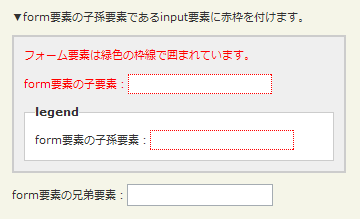
階層構造:ancestor descendantの使用例サンプルを見る
<!DOCTYPE html PUBLIC "-//W3C//DTD XHTML 1.0 Transitional//EN" "http://www.w3.org/TR/xhtml1/DTD/xhtml1-transitional.dtd">
<html xmlns="http://www.w3.org/1999/xhtml" xml:lang="ja" lang="ja">
    <head>
        <meta http-equiv="Content-Type" content="text/html; charset=utf-8" />
        <meta http-equiv="Content-Language" content="ja" />
        <meta http-equiv="Content-Script-Type" content="text/javascript" />
        <meta http-equiv="Content-Style-Type" content="text/css" />
        <meta http-equiv="imagetoolbar" content="no" />
        <title>DOM要素:階層構造:ancestor descendantの使用例 | jQuery</title>
        <link rel="stylesheet" type="text/css" href="/content/lib/global.css" />
        <!-- JS -->
        <script src="https://ajax.googleapis.com/ajax/libs/jquery/1.3.2/jquery.min.js"></script>
        <script type="text/javascript">
            $(function(){
                $("form input").css("border","1px dotted red");
            });
        </script>
        <style type="text/css">
            form { border:2px solid #ccc; padding:10px; margin:1em 0; background:#efefef; }
            form p { margin:0 0 10px 0; color:red; }
            form fieldset { margin:1em 0 0 0; padding:10px; }
         </style>
    </head>
    <body>
        <div id="wrap">
            <h1>DOM要素:階層構造:ancestor descendantの使用例 | jQuery</h1>
            <p>▼form要素の子孫要素であるinput要素に赤枠を付けます。</p>
<!-- CODE -->
            <form action="#">
                <p>フォーム要素は緑色の枠線で囲まれています。</p>
                <p><label>form要素の子要素:</label><input name="name" /></p>
                <fieldset>
                    <legend>legend</legend>
                    <label>form要素の子孫要素:</label><input name="newsletter" />
                </fieldset>
              </form>
              form要素の兄弟要素:<input name="none" />
<!-- CODE / -->
        </div>
    </body>
</html>
parent > child
指定した親要素の指定した子要素を選択
2009/2/27
戻り値:配列<要素>
parentに指定した要素の中から、childに指定した子要素を選択します。
第1引数parentには、有効なセレクタを指定します。
第2引数childには、parentに指定したセレクタの子要素とマッチさせるセレクタを指定します。
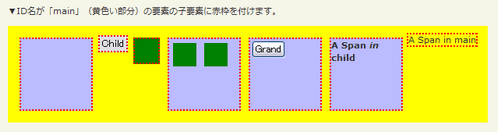
parent < childの使用例サンプルを見る
<!DOCTYPE html PUBLIC "-//W3C//DTD XHTML 1.0 Transitional//EN" "http://www.w3.org/TR/xhtml1/DTD/xhtml1-transitional.dtd">
<html xmlns="http://www.w3.org/1999/xhtml" xml:lang="ja" lang="ja">
<head>
<meta http-equiv="Content-Type" content="text/html; charset=utf-8" />
<meta http-equiv="Content-Language" content="ja" />
<meta http-equiv="Content-Script-Type" content="text/javascript" />
<meta http-equiv="Content-Style-Type" content="text/css" />
<meta http-equiv="imagetoolbar" content="no" />
<title>DOM要素:階層構造:parent > childの使用例 | jQuery</title>
<link rel="stylesheet" type="text/css" href="/content/lib/global.css" />
<!-- JS -->
<script src="https://ajax.googleapis.com/ajax/libs/jquery/1.3.2/jquery.min.js"></script>
<script type="text/javascript">
$(function(){
$("#main > *").css("border","2px dotted red");
});
</script>
<style type="text/css">
#main { display:block; background:yellow; padding:10px; overflow:hidden; }
#main button { display:block; float:left; margin:2px; font-size:14px; }
#main div { width:90px; height:90px; margin:5px; float:left; background:#bbf; font-weight:bold; }
#main div.mini { width:30px; height:30px; background:green; }
</style>
</head>
<body>
<div id="wrap">
<h1>DOM要素:階層構造:parent > childの使用例 | jQuery</h1>
<p>▼ID名が「main」(黄色い部分)の要素の子要素に赤枠を付けます。</p>
<!-- CODE -->
<span id="main">
<div></div>
<button>Child</button>
<div class="mini"></div>
<div>
<div class="mini"></div>
<div class="mini"></div>
</div>
<div><button>Grand</button></div>
<div><span>A Span <em>in</em> child</span></div>
<span>A Span in main</span>
</span>
<!-- CODE / -->
</div>
</body>
</html>
prev + next
指定した要素の兄弟要素を選択
2009/2/27
戻り値:配列<要素>
prevに指定した要素の次にあるnextに指定した兄弟要素を選択します。
第1引数parentには、有効なセレクタを指定します。
第2引数childには、parentに指定したセレクタの次にある要素とマッチさせるセレクタを指定します。
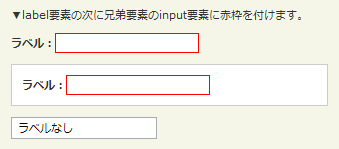
prev + nextの使用例サンプルを見る
<!DOCTYPE html PUBLIC "-//W3C//DTD XHTML 1.0 Transitional//EN" "http://www.w3.org/TR/xhtml1/DTD/xhtml1-transitional.dtd">
<html xmlns="http://www.w3.org/1999/xhtml" xml:lang="ja" lang="ja">
    <head>
        <meta http-equiv="Content-Type" content="text/html; charset=utf-8" />
        <meta http-equiv="Content-Language" content="ja" />
        <meta http-equiv="Content-Script-Type" content="text/javascript" />
        <meta http-equiv="Content-Style-Type" content="text/css" />
        <meta http-equiv="imagetoolbar" content="no" />
        <title>DOM要素:階層構造:prev + nextの使用例 | jQuery</title>
        <link rel="stylesheet" type="text/css" href="/content/lib/global.css" />
        <!-- JS -->
        <script src="https://ajax.googleapis.com/ajax/libs/jquery/1.3.2/jquery.min.js"></script>
        <script type="text/javascript">
            $(function(){
                $("label + input").css("border","1px solid red");
            });
        </script>
        <style type="text/css">
            form div { width:90px; height:90px; margin:5px; float:left; background:#bbf; font-weight:bold; }
            form fieldset { margin:1em 0; padding:10px; }
            label { font-weight:bold; }
         </style>
    </head>
    <body>
        <div id="wrap">
            <h1>DOM要素:階層構造:prev + nextの使用例 | jQuery</h1>
            <p>▼label要素の次に兄弟要素のinput要素に赤枠を付けます。</p>
<!-- CODE -->
            <form action="#">
                <label>ラベル:</label><input name="name" />
                <fieldset>
                    <label>ラベル:</label><input name="newsletter" />
                </fieldset>
            </form>
            <input name="none" value="ラベルなし" />
<!-- CODE / -->
        </div>
    </body>
</html>
prev ~ siblings
指定した要素の後にある兄弟要素をフィルタリングして選択
2009/2/27
戻り値:配列<要素>
prevに指定した要素の後にある兄弟要素の中から、siblingsにしていしたセレクタとマッチする兄弟要素を選択します。
第1引数prevには、有効なセレクタを指定します。
第2引数siblingsには、prevに指定したセレクタの後にある兄弟要素とマッチさせるフィルター用のセレクタを指定します。
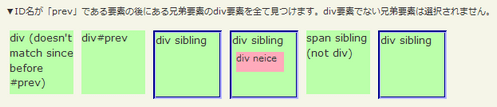
prev ~ siblingsの使用例サンプルを見る
<!DOCTYPE html PUBLIC "-//W3C//DTD XHTML 1.0 Transitional//EN" "http://www.w3.org/TR/xhtml1/DTD/xhtml1-transitional.dtd">
<html xmlns="http://www.w3.org/1999/xhtml" xml:lang="ja" lang="ja">
    <head>
        <meta http-equiv="Content-Type" content="text/html; charset=utf-8" />
        <meta http-equiv="Content-Language" content="ja" />
        <meta http-equiv="Content-Script-Type" content="text/javascript" />
        <meta http-equiv="Content-Style-Type" content="text/css" />
        <meta http-equiv="imagetoolbar" content="no" />
        <title>DOM要素:階層構造:prev ~ siblingsの使用例 | jQuery</title>
        <link rel="stylesheet" type="text/css" href="/content/lib/global.css" />
        <!-- JS -->
        <script src="https://ajax.googleapis.com/ajax/libs/jquery/1.3.2/jquery.min.js"></script>
        <script type="text/javascript">
            $(function(){
                $("#prev ~ div").css("border", "3px groove blue");
            });
        </script>
        <style type="text/css">
        #sample div,
        #sample span {
            display:block;
            width:80px;
            height:80px;
            margin:5px;
            background:#bbffaa;
            float:left;
            font-size:14px;
        }
        #sample #small {
            width:60px;
            height:25px;
            font-size:12px;
            background:#fab;
        }
         </style>
    </head>
    <body>
        <div id="wrap">
            <h1>DOM要素:階層構造:prev ~ siblingsの使用例 | jQuery</h1>
            <p>▼ID名が「prev」である要素の後にある兄弟要素のdiv要素をすべて見つけます。div要素でない兄弟要素は選択されません。</p>
<!-- CODE -->
            <div id="sample" class="cf">
                <div>div (doesn't match since before #prev)</div>
                <div id="prev">div#prev</div>
                <div>div sibling</div>
                <div>div sibling <div id="small">div neice</div></div>
                <span>span sibling (not div)</span>
                <div>div sibling</div>
            </div>
<!-- CODE / -->
        </div>
    </body>
</html>

