jQuery APIリファレンスDOM要素:フォーム

- :input〔input要素、textarea要素、select要素、button要素をすべ選択〕
- :text〔type属性が「text」のinput要素をすべて選択〕
- :password〔type属性が「password」のinput要素をすべて選択〕
- :radio〔type属性が「radio」のinput要素をすべて選択〕
- :checkbox〔type属性が「checkbox」のinput要素をすべて選択〕
- :submit〔type属性が「submit」のinput要素をすべて選択〕
- :image〔type属性が「imaget」のinput要素をすべて選択〕
- :reset〔type属性が「reset」のinput要素をすべて選択〕
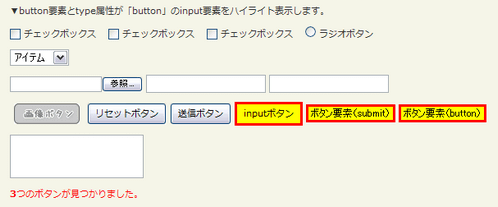
- :button〔button要素およびtype属性が「button」のinput要素をすべて選択〕
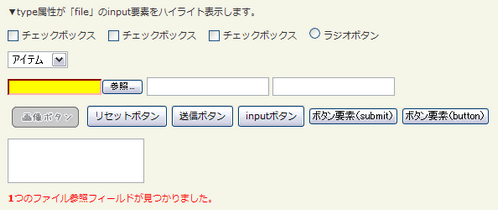
- :file〔type属性が「reset」のinput要素をすべて選択〕
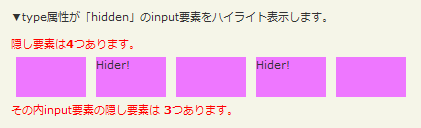
- :hidden〔隠し要素と、type属性が「hidden」のinput要素をすべて選択〕
:input
input要素、textarea要素、select要素、button要素をすべ選択
2009/2/27
input要素、textarea要素、select要素、button要素をすべて選択します。
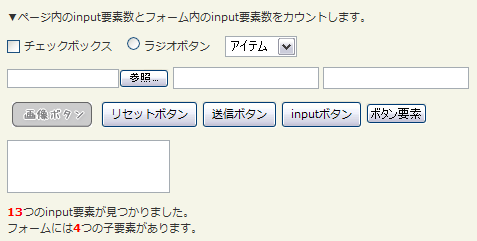
<!DOCTYPE html PUBLIC "-//W3C//DTD XHTML 1.0 Transitional//EN" "http://www.w3.org/TR/xhtml1/DTD/xhtml1-transitional.dtd">
<html xmlns="http://www.w3.org/1999/xhtml" xml:lang="ja" lang="ja">
    <head>
        <meta http-equiv="Content-Type" content="text/html; charset=utf-8" />
        <meta http-equiv="Content-Language" content="ja" />
        <meta http-equiv="Content-Script-Type" content="text/javascript" />
        <meta http-equiv="Content-Style-Type" content="text/css" />
        <meta http-equiv="imagetoolbar" content="no" />
        <title>DOM要素:フォーム:「:input」の使用例 | jQuery</title>
        <link rel="stylesheet" type="text/css" href="/content/lib/global.css" />
        <!-- JS -->
        <script src="https://ajax.googleapis.com/ajax/libs/jquery/1.3.2/jquery.min.js"></script>
        <script type="text/javascript">
            $(function(){
                var allInputs=$(":input");
                var formChildren=$("form > *");
                $("#res").html("<strong>"+allInputs.length+"</strong>つのinput要素が見つかりました。<br>フォームには<strong>"+formChildren.length+"</strong>つの子要素があります。");
              });
        </script>
        <style type="text/css">
            textarea { height:45px; }
            strong { color:red; }
        </style>
    </head>
    <body>
        <div id="wrap">
            <h1>DOM要素:フォーム:「:input」の使用例 | jQuery</h1>
            <p>▼ページ内のinput要素数とフォーム内のinput要素数をカウントします。</p>
<!-- CODE -->
            <form action="#" onsubmit="return false">
                <p>
                    <label for="chk"><input type="checkbox" id="chk" /> チェックボックス</label>
                    <label for="ra"><input type="radio" id="ra" /> ラジオボタン</label>
                    <select><option>アイテム</option><option>アイテム</option><option>アイテム</option></select>
                </p>
                <p>
                    <input type="file" />
                    <input type="hidden" />
                    <input type="text" />
                    <input type="password" />
                </p>
                <p>
                    <input type="image" src="/content/img/btn/imagebutton.png" style="vertical-align:middle;" />
                    <input type="reset" value="リセットボタン" />
                    <input type="submit" value="送信ボタン" />
                    <input type="button" value="inputボタン"/>
                    <button>ボタン要素</button>
                </p>
                <p>
                    <textarea></textarea>
                </p>
            </form>
            <div id="res"></div>
<!-- CODE / -->
        </div>
    </body>
</html>
:text
type属性が「text」のinput要素をすべて選択
2009/2/27
type属性が「text」のinput要素(<input type="text /">)をすべて選択します。
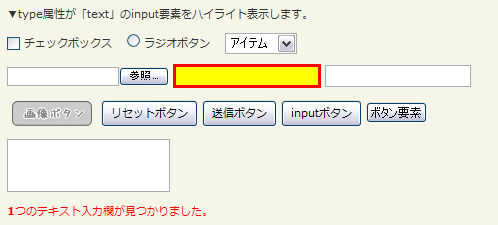
<!DOCTYPE html PUBLIC "-//W3C//DTD XHTML 1.0 Transitional//EN" "http://www.w3.org/TR/xhtml1/DTD/xhtml1-transitional.dtd">
<html xmlns="http://www.w3.org/1999/xhtml" xml:lang="ja" lang="ja">
    <head>
        <meta http-equiv="Content-Type" content="text/html; charset=utf-8" />
        <meta http-equiv="Content-Language" content="ja" />
        <meta http-equiv="Content-Script-Type" content="text/javascript" />
        <meta http-equiv="Content-Style-Type" content="text/css" />
        <meta http-equiv="imagetoolbar" content="no" />
        <title>DOM要素:フォーム:「:text」の使用例 | jQuery</title>
        <link rel="stylesheet" type="text/css" href="/content/lib/global.css" />
        <!-- JS -->
        <script src="https://ajax.googleapis.com/ajax/libs/jquery/1.3.2/jquery.min.js"></script>
        <script type="text/javascript">
            $(function(){
                var input=$(":text").css({background:"yellow",border:"3px solid red"});
                $("#res").html("<strong>"+input.length+"</strong>つのテキスト入力欄が見つかりました。").css("color","red");
              });
        </script>
        <style type="text/css">
            textarea { height:45px; }
        </style>
    </head>
    <body>
        <div id="wrap">
            <h1>DOM要素:フォーム:「:text」の使用例 | jQuery</h1>
            <p>▼type属性が「text」のinput要素をハイライト表示します。</p>
<!-- CODE -->
            <form action="#" onsubmit="return false">
                <p>
                    <label for="chk"><input type="checkbox" id="chk" /> チェックボックス</label>
                    <label for="ra"><input type="radio" id="ra" /> ラジオボタン</label>
                    <select><option>アイテム</option><option>アイテム</option><option>アイテム</option></select>
                </p>
                <p>
                    <input type="file" />
                    <input type="hidden" />
                    <input type="text" />
                    <input type="password" />
                </p>
                <p>
                    <input type="image" src="/content/img/btn/imagebutton.png" style="vertical-align:middle;" />
                    <input type="reset" value="リセットボタン" />
                    <input type="submit" value="送信ボタン" />
                    <input type="button" value="inputボタン"/>
                    <button>ボタン要素</button>
                </p>
                <p>
                    <textarea></textarea>
                </p>
            </form>
            <div id="res"></div>
<!-- CODE / -->
        </div>
    </body>
</html>
:password
type属性が「password」のinput要素をすべて選択
2009/2/27
type属性が「password」のinput要素(<input type="password /">)をすべて選択します。
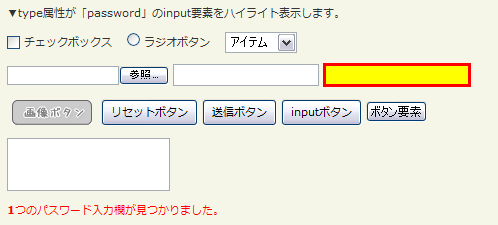
<!DOCTYPE html PUBLIC "-//W3C//DTD XHTML 1.0 Transitional//EN" "http://www.w3.org/TR/xhtml1/DTD/xhtml1-transitional.dtd">
<html xmlns="http://www.w3.org/1999/xhtml" xml:lang="ja" lang="ja">
    <head>
        <meta http-equiv="Content-Type" content="text/html; charset=utf-8" />
        <meta http-equiv="Content-Language" content="ja" />
        <meta http-equiv="Content-Script-Type" content="text/javascript" />
        <meta http-equiv="Content-Style-Type" content="text/css" />
        <meta http-equiv="imagetoolbar" content="no" />
        <title>DOM要素:フォーム:「:password」の使用例 | jQuery</title>
        <link rel="stylesheet" type="text/css" href="/content/lib/global.css" />
        <!-- JS -->
        <script src="https://ajax.googleapis.com/ajax/libs/jquery/1.3.2/jquery.min.js"></script>
        <script type="text/javascript">
            $(function(){
                var input=$(":password").css({background:"yellow",border:"3px solid red"});
                $("#res").html("<strong>"+input.length+"</strong>つのパスワード入力欄が見つかりました。").css("color","red");
              });
        </script>
        <style type="text/css">
            textarea { height:45px; }
        </style>
    </head>
    <body>
        <div id="wrap">
            <h1>DOM要素:フォーム:「:password」の使用例 | jQuery</h1>
            <p>▼type属性が「password」のinput要素をハイライト表示します。</p>
<!-- CODE -->
            <form action="#" onsubmit="return false">
                <p>
                    <label for="chk"><input type="checkbox" id="chk" /> チェックボックス</label>
                    <label for="ra"><input type="radio" id="ra" /> ラジオボタン</label>
                    <select><option>アイテム</option><option>アイテム</option><option>アイテム</option></select>
                </p>
                <p>
                    <input type="file" />
                    <input type="hidden" />
                    <input type="text" />
                    <input type="password" />
                </p>
                <p>
                    <input type="image" src="/content/img/btn/imagebutton.png" style="vertical-align:middle;" />
                    <input type="reset" value="リセットボタン" />
                    <input type="submit" value="送信ボタン" />
                    <input type="button" value="inputボタン"/>
                    <button>ボタン要素</button>
                </p>
                <p>
                    <textarea></textarea>
                </p>
            </form>
            <div id="res"></div>
<!-- CODE / -->
        </div>
    </body>
</html>
:radio
type属性が「radio」のinput要素をすべて選択
2009/2/27
type属性が「radio」のinput要素(<input type="radio /">)をすべて選択します。
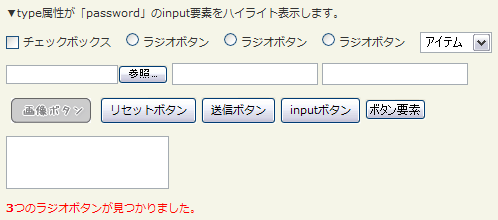
<!DOCTYPE html PUBLIC "-//W3C//DTD XHTML 1.0 Transitional//EN" "http://www.w3.org/TR/xhtml1/DTD/xhtml1-transitional.dtd">
<html xmlns="http://www.w3.org/1999/xhtml" xml:lang="ja" lang="ja">
    <head>
        <meta http-equiv="Content-Type" content="text/html; charset=utf-8" />
        <meta http-equiv="Content-Language" content="ja" />
        <meta http-equiv="Content-Script-Type" content="text/javascript" />
        <meta http-equiv="Content-Style-Type" content="text/css" />
        <meta http-equiv="imagetoolbar" content="no" />
        <title>DOM要素:フォーム:「:radio」の使用例 | jQuery</title>
        <link rel="stylesheet" type="text/css" href="/content/lib/global.css" />
        <!-- JS -->
        <script src="https://ajax.googleapis.com/ajax/libs/jquery/1.3.2/jquery.min.js"></script>
        <script type="text/javascript">
            $(function(){
                var input=$(":radio").css({background:"yellow",border:"3px solid red"});
                $("#res").html("<strong>"+input.length+"</strong>つのラジオボタンが見つかりました。").css("color","red");
              });
        </script>
        <style type="text/css">
            textarea { height:45px; }
        </style>
    </head>
    <body>
        <div id="wrap">
            <h1>DOM要素:フォーム:「:radio」の使用例 | jQuery</h1>
            <p>▼type属性が「password」のinput要素をハイライト表示します。</p>
<!-- CODE -->
            <form action="#" onsubmit="return false">
                <p>
                    <label for="chk"><input type="checkbox" id="chk" /> チェックボックス</label>
                    <label for="ra1"><input type="radio" id="ra1" name="ra" /> ラジオボタン</label>
                    <label for="ra2"><input type="radio" id="ra2" name="ra" /> ラジオボタン</label>
                    <label for="ra3"><input type="radio" id="ra3" name="ra" /> ラジオボタン</label>
                    <select><option>アイテム</option><option>アイテム</option><option>アイテム</option></select>
                </p>
                <p>
                    <input type="file" />
                    <input type="hidden" />
                    <input type="text" />
                    <input type="password" />
                </p>
                <p>
                    <input type="image" src="/content/img/btn/imagebutton.png" style="vertical-align:middle;" />
                    <input type="reset" value="リセットボタン" />
                    <input type="submit" value="送信ボタン" />
                    <input type="button" value="inputボタン"/>
                    <button>ボタン要素</button>
                </p>
                <p>
                    <textarea></textarea>
                </p>
            </form>
            <div id="res"></div>
<!-- CODE / -->
        </div>
    </body>
</html>
:checkbox
type属性が「checkbox」のinput要素をすべて選択
2009/2/27
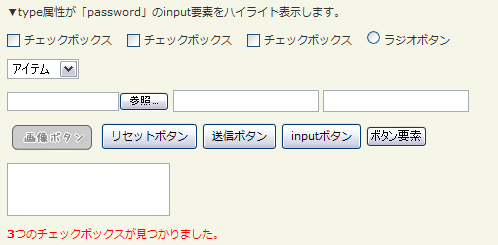
type属性が「checkbox」のinput要素(<input type="checkbox /">)をすべて選択します。
<!DOCTYPE html PUBLIC "-//W3C//DTD XHTML 1.0 Transitional//EN" "http://www.w3.org/TR/xhtml1/DTD/xhtml1-transitional.dtd">
<html xmlns="http://www.w3.org/1999/xhtml" xml:lang="ja" lang="ja">
    <head>
        <meta http-equiv="Content-Type" content="text/html; charset=utf-8" />
        <meta http-equiv="Content-Language" content="ja" />
        <meta http-equiv="Content-Script-Type" content="text/javascript" />
        <meta http-equiv="Content-Style-Type" content="text/css" />
        <meta http-equiv="imagetoolbar" content="no" />
        <title>DOM要素:フォーム:「:checkbox」の使用例 | jQuery</title>
        <link rel="stylesheet" type="text/css" href="/content/lib/global.css" />
        <!-- JS -->
        <script src="https://ajax.googleapis.com/ajax/libs/jquery/1.3.2/jquery.min.js"></script>
        <script type="text/javascript">
            $(function(){
                var input=$(":checkbox").css({background:"yellow",border:"3px solid red"});
                $("#res").html("<strong>"+input.length+"</strong>つのチェックボックスが見つかりました。").css("color","red");
              });
        </script>
        <style type="text/css">
            textarea { height:45px; }
        </style>
    </head>
    <body>
        <div id="wrap">
            <h1>DOM要素:フォーム:「:checkbox」の使用例 | jQuery</h1>
            <p>▼type属性が「password」のinput要素をハイライト表示します。</p>
<!-- CODE -->
            <form action="#" onsubmit="return false">
                <p>
                    <label for="chk1"><input type="checkbox" id="chk1" /> チェックボックス</label>
                    <label for="chk2"><input type="checkbox" id="chk2" /> チェックボックス</label>
                    <label for="chk3"><input type="checkbox" id="chk3" /> チェックボックス</label>
                    <label for="ra"><input type="radio" id="ra" name="ra" /> ラジオボタン</label>
                </p>
                <p>
                    <select><option>アイテム</option><option>アイテム</option><option>アイテム</option></select>
                </p>
                <p>
                    <input type="file" />
                    <input type="hidden" />
                    <input type="text" />
                    <input type="password" />
                </p>
                <p>
                    <input type="image" src="/content/img/btn/imagebutton.png" style="vertical-align:middle;" />
                    <input type="reset" value="リセットボタン" />
                    <input type="submit" value="送信ボタン" />
                    <input type="button" value="inputボタン"/>
                    <button>ボタン要素</button>
                </p>
                <p>
                    <textarea></textarea>
                </p>
            </form>
            <div id="res"></div>
<!-- CODE / -->
        </div>
    </body>
</html>
:submit
type属性が「submit」のinput要素をすべて選択
2009/2/27
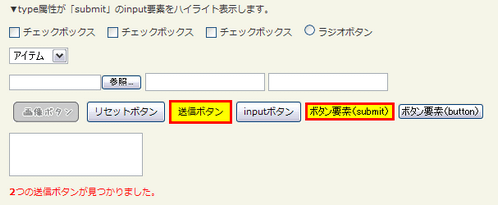
button要素(<button>、<button type="submit /">)とtype属性が「submit」のinput要素(<input type="submit /">)をすべて選択します。
<!DOCTYPE html PUBLIC "-//W3C//DTD XHTML 1.0 Transitional//EN" "http://www.w3.org/TR/xhtml1/DTD/xhtml1-transitional.dtd">
<html xmlns="http://www.w3.org/1999/xhtml" xml:lang="ja" lang="ja">
    <head>
        <meta http-equiv="Content-Type" content="text/html; charset=utf-8" />
        <meta http-equiv="Content-Language" content="ja" />
        <meta http-equiv="Content-Script-Type" content="text/javascript" />
        <meta http-equiv="Content-Style-Type" content="text/css" />
        <meta http-equiv="imagetoolbar" content="no" />
        <title>DOM要素:フォーム:「:submit」の使用例 | jQuery</title>
        <link rel="stylesheet" type="text/css" href="/content/lib/global.css" />
        <!-- JS -->
        <script src="https://ajax.googleapis.com/ajax/libs/jquery/1.3.2/jquery.min.js"></script>
        <script type="text/javascript">
            $(function(){
                var input=$(":submit").css({background:"yellow",border:"3px solid red"});
                $("#res").html("<strong>"+input.length+"</strong>つの送信ボタンが見つかりました。").css("color","red");
              });
        </script>
        <style type="text/css">
            textarea { height:45px; }
        </style>
    </head>
    <body>
        <div id="wrap">
            <h1>DOM要素:フォーム:「:submit」の使用例 | jQuery</h1>
            <p>▼type属性が「submit」のinput要素をハイライト表示します。</p>
<!-- CODE -->
            <form action="#" onsubmit="return false">
                <p>
                    <label for="chk1"><input type="checkbox" id="chk1" /> チェックボックス</label>
                    <label for="chk2"><input type="checkbox" id="chk2" /> チェックボックス</label>
                    <label for="chk3"><input type="checkbox" id="chk3" /> チェックボックス</label>
                    <label for="ra"><input type="radio" id="ra" name="ra" /> ラジオボタン</label>
                </p>
                <p>
                    <select><option>アイテム</option><option>アイテム</option><option>アイテム</option></select>
                </p>
                <p>
                    <input type="file" />
                    <input type="hidden" />
                    <input type="text" />
                    <input type="password" />
                </p>
                <p>
                    <input type="image" src="/content/img/btn/imagebutton.png" style="vertical-align:middle;" />
                    <input type="reset" value="リセットボタン" />
                    <input type="submit" value="送信ボタン" />
                    <input type="button" value="inputボタン"/>
                    <button>ボタン要素(submit)</button>
                    <button type="button">ボタン要素(button)</button>
                </p>
                <p>
                    <textarea></textarea>
                </p>
            </form>
            <div id="res"></div>
<!-- CODE / -->
        </div>
    </body>
</html>
:image
type属性が「imaget」のinput要素をすべて選択
2009/2/27
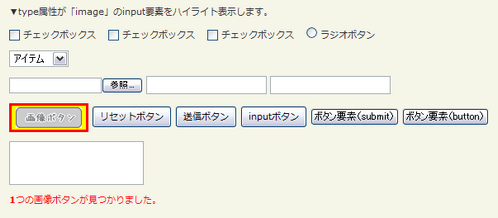
type属性が「image」のinput要素(<input type="image /">)をすべて選択します。
<!DOCTYPE html PUBLIC "-//W3C//DTD XHTML 1.0 Transitional//EN" "http://www.w3.org/TR/xhtml1/DTD/xhtml1-transitional.dtd">
<html xmlns="http://www.w3.org/1999/xhtml" xml:lang="ja" lang="ja">
    <head>
        <meta http-equiv="Content-Type" content="text/html; charset=utf-8" />
        <meta http-equiv="Content-Language" content="ja" />
        <meta http-equiv="Content-Script-Type" content="text/javascript" />
        <meta http-equiv="Content-Style-Type" content="text/css" />
        <meta http-equiv="imagetoolbar" content="no" />
        <title>DOM要素:フォーム:「:image」の使用例 | jQuery</title>
        <link rel="stylesheet" type="text/css" href="/content/lib/global.css" />
        <!-- JS -->
        <script src="https://ajax.googleapis.com/ajax/libs/jquery/1.3.2/jquery.min.js"></script>
        <script type="text/javascript">
            $(function(){
                var input=$(":image").css({background:"yellow",border:"3px solid red"});
                $("#res").html("<strong>"+input.length+"</strong>つの画像ボタンが見つかりました。").css("color","red");
              });
        </script>
        <style type="text/css">
            textarea { height:45px; }
        </style>
    </head>
    <body>
        <div id="wrap">
            <h1>DOM要素:フォーム:「:image」の使用例 | jQuery</h1>
            <p>▼type属性が「image」のinput要素をハイライト表示します。</p>
<!-- CODE -->
            <form action="#" onsubmit="return false">
                <p>
                    <label for="chk1"><input type="checkbox" id="chk1" /> チェックボックス</label>
                    <label for="chk2"><input type="checkbox" id="chk2" /> チェックボックス</label>
                    <label for="chk3"><input type="checkbox" id="chk3" /> チェックボックス</label>
                    <label for="ra"><input type="radio" id="ra" name="ra" /> ラジオボタン</label>
                </p>
                <p>
                    <select><option>アイテム</option><option>アイテム</option><option>アイテム</option></select>
                </p>
                <p>
                    <input type="file" />
                    <input type="hidden" />
                    <input type="text" />
                    <input type="password" />
                </p>
                <p>
                    <input type="image" src="/content/img/btn/imagebutton.png" style="vertical-align:middle;" />
                    <input type="reset" value="リセットボタン" />
                    <input type="submit" value="送信ボタン" />
                    <input type="button" value="inputボタン"/>
                    <button>ボタン要素(submit)</button>
                    <button type="button">ボタン要素(button)</button>
                </p>
                <p>
                    <textarea></textarea>
                </p>
            </form>
            <div id="res"></div>
<!-- CODE / -->
        </div>
    </body>
</html>
:reset
type属性が「reset」のinput要素をすべて選択
2009/2/27
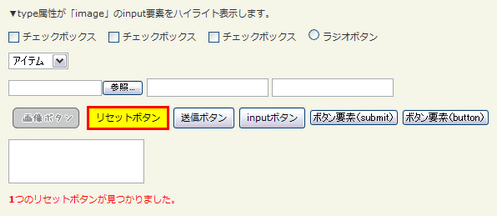
type属性が「reset」のinput要素(<input type="reset /">)をすべて選択します。
<!DOCTYPE html PUBLIC "-//W3C//DTD XHTML 1.0 Transitional//EN" "http://www.w3.org/TR/xhtml1/DTD/xhtml1-transitional.dtd">
<html xmlns="http://www.w3.org/1999/xhtml" xml:lang="ja" lang="ja">
    <head>
        <meta http-equiv="Content-Type" content="text/html; charset=utf-8" />
        <meta http-equiv="Content-Language" content="ja" />
        <meta http-equiv="Content-Script-Type" content="text/javascript" />
        <meta http-equiv="Content-Style-Type" content="text/css" />
        <meta http-equiv="imagetoolbar" content="no" />
        <title>DOM要素:フォーム:「:reset」の使用例 | jQuery</title>
        <link rel="stylesheet" type="text/css" href="/content/lib/global.css" />
        <!-- JS -->
        <script src="https://ajax.googleapis.com/ajax/libs/jquery/1.3.2/jquery.min.js"></script>
        <script type="text/javascript">
            $(function(){
                var input=$(":reset").css({background:"yellow",border:"3px solid red"});
                $("#res").html("<strong>"+input.length+"</strong>つのリセットボタンが見つかりました。").css("color","red");
              });
        </script>
        <style type="text/css">
            textarea { height:45px; }
        </style>
    </head>
    <body>
        <div id="wrap">
            <h1>DOM要素:フォーム:「:reset」の使用例 | jQuery</h1>
            <p>▼type属性が「image」のinput要素をハイライト表示します。</p>
<!-- CODE -->
            <form action="#" onsubmit="return false">
                <p>
                    <label for="chk1"><input type="checkbox" id="chk1" /> チェックボックス</label>
                    <label for="chk2"><input type="checkbox" id="chk2" /> チェックボックス</label>
                    <label for="chk3"><input type="checkbox" id="chk3" /> チェックボックス</label>
                    <label for="ra"><input type="radio" id="ra" name="ra" /> ラジオボタン</label>
                </p>
                <p>
                    <select><option>アイテム</option><option>アイテム</option><option>アイテム</option></select>
                </p>
                <p>
                    <input type="file" />
                    <input type="hidden" />
                    <input type="text" />
                    <input type="password" />
                </p>
                <p>
                    <input type="image" src="/content/img/btn/imagebutton.png" style="vertical-align:middle;" />
                    <input type="reset" value="リセットボタン" />
                    <input type="submit" value="送信ボタン" />
                    <input type="button" value="inputボタン"/>
                    <button>ボタン要素(submit)</button>
                    <button type="button">ボタン要素(button)</button>
                </p>
                <p>
                    <textarea></textarea>
                </p>
            </form>
            <div id="res"></div>
<!-- CODE / -->
        </div>
    </body>
</html>
:button
button要素およびtype属性が「button」のinput要素をすべて選択
2009/2/27
button要素とtype属性が「button」のinput要素(<input type="button /">)をすべて選択します。
<!DOCTYPE html PUBLIC "-//W3C//DTD XHTML 1.0 Transitional//EN" "http://www.w3.org/TR/xhtml1/DTD/xhtml1-transitional.dtd">
<html xmlns="http://www.w3.org/1999/xhtml" xml:lang="ja" lang="ja">
    <head>
        <meta http-equiv="Content-Type" content="text/html; charset=utf-8" />
        <meta http-equiv="Content-Language" content="ja" />
        <meta http-equiv="Content-Script-Type" content="text/javascript" />
        <meta http-equiv="Content-Style-Type" content="text/css" />
        <meta http-equiv="imagetoolbar" content="no" />
        <title>DOM要素:フォーム:「:button」の使用例 | jQuery</title>
        <link rel="stylesheet" type="text/css" href="/content/lib/global.css" />
        <!-- JS -->
        <script src="https://ajax.googleapis.com/ajax/libs/jquery/1.3.2/jquery.min.js"></script>
        <script type="text/javascript">
            $(function(){
                var input=$(":button").css({background:"yellow",border:"3px solid red"});
                $("#res").html("<strong>"+input.length+"</strong>つのボタンが見つかりました。").css("color","red");
              });
        </script>
        <style type="text/css">
            textarea { height:45px; }
        </style>
    </head>
    <body>
        <div id="wrap">
            <h1>DOM要素:フォーム:「:reset」の使用例 | jQuery</h1>
            <p>▼button要素とtype属性が「button」のinput要素をハイライト表示します。</p>
<!-- CODE -->
            <form action="#" onsubmit="return false">
                <p>
                    <label for="chk1"><input type="checkbox" id="chk1" /> チェックボックス</label>
                    <label for="chk2"><input type="checkbox" id="chk2" /> チェックボックス</label>
                    <label for="chk3"><input type="checkbox" id="chk3" /> チェックボックス</label>
                    <label for="ra"><input type="radio" id="ra" name="ra" /> ラジオボタン</label>
                </p>
                <p>
                    <select><option>アイテム</option><option>アイテム</option><option>アイテム</option></select>
                </p>
                <p>
                    <input type="file" />
                    <input type="hidden" />
                    <input type="text" />
                    <input type="password" />
                </p>
                <p>
                    <input type="image" src="/content/img/btn/imagebutton.png" style="vertical-align:middle;" />
                    <input type="reset" value="リセットボタン" />
                    <input type="submit" value="送信ボタン" />
                    <input type="button" value="inputボタン"/>
                    <button>ボタン要素(submit)</button>
                    <button type="button">ボタン要素(button)</button>
                </p>
                <p>
                    <textarea></textarea>
                </p>
            </form>
            <div id="res"></div>
<!-- CODE / -->
        </div>
    </body>
</html>
:file
type属性が「reset」のinput要素をすべて選択
2009/2/27
type属性が「file」のinput要素(<input type="file /">)をすべて選択します。
<!DOCTYPE html PUBLIC "-//W3C//DTD XHTML 1.0 Transitional//EN" "http://www.w3.org/TR/xhtml1/DTD/xhtml1-transitional.dtd">
<html xmlns="http://www.w3.org/1999/xhtml" xml:lang="ja" lang="ja">
    <head>
        <meta http-equiv="Content-Type" content="text/html; charset=utf-8" />
        <meta http-equiv="Content-Language" content="ja" />
        <meta http-equiv="Content-Script-Type" content="text/javascript" />
        <meta http-equiv="Content-Style-Type" content="text/css" />
        <meta http-equiv="imagetoolbar" content="no" />
        <title>DOM要素:フォーム:「:file」の使用例 | jQuery</title>
        <link rel="stylesheet" type="text/css" href="/content/lib/global.css" />
        <!-- JS -->
        <script src="https://ajax.googleapis.com/ajax/libs/jquery/1.3.2/jquery.min.js"></script>
        <script type="text/javascript">
            $(function(){
                var input=$(":file").css({background:"yellow",border:"3px solid red"});
                $("#res").html("<strong>"+input.length+"</strong>つのファイル参照フィールドが見つかりました。").css("color","red");
              });
        </script>
        <style type="text/css">
            textarea { height:45px; }
        </style>
    </head>
    <body>
        <div id="wrap">
            <h1>DOM要素:フォーム:「:file」の使用例 | jQuery</h1>
            <p>▼type属性が「file」のinput要素をハイライト表示します。</p>
<!-- CODE -->
            <form action="#" onsubmit="return false">
                <p>
                    <label for="chk1"><input type="checkbox" id="chk1" /> チェックボックス</label>
                    <label for="chk2"><input type="checkbox" id="chk2" /> チェックボックス</label>
                    <label for="chk3"><input type="checkbox" id="chk3" /> チェックボックス</label>
                    <label for="ra"><input type="radio" id="ra" name="ra" /> ラジオボタン</label>
                </p>
                <p>
                    <select><option>アイテム</option><option>アイテム</option><option>アイテム</option></select>
                </p>
                <p>
                    <input type="file" />
                    <input type="hidden" />
                    <input type="text" />
                    <input type="password" />
                </p>
                <p>
                    <input type="image" src="/content/img/btn/imagebutton.png" style="vertical-align:middle;" />
                    <input type="reset" value="リセットボタン" />
                    <input type="submit" value="送信ボタン" />
                    <input type="button" value="inputボタン"/>
                    <button>ボタン要素(submit)</button>
                    <button type="button">ボタン要素(button)</button>
                </p>
                <p>
                    <textarea></textarea>
                </p>
            </form>
            <div id="res"></div>
<!-- CODE / -->
        </div>
    </body>
</html>
:hidden
隠し要素と、type属性が「hidden」のinput要素をすべて選択
2009/2/27
隠し要素とtype属性が「hidden」のinput要素(<input type="hidden /">)をすべて選択します。
<!DOCTYPE html PUBLIC "-//W3C//DTD XHTML 1.0 Transitional//EN" "http://www.w3.org/TR/xhtml1/DTD/xhtml1-transitional.dtd">
<html xmlns="http://www.w3.org/1999/xhtml" xml:lang="ja" lang="ja">
    <head>
        <meta http-equiv="Content-Type" content="text/html; charset=utf-8" />
        <meta http-equiv="Content-Language" content="ja" />
        <meta http-equiv="Content-Script-Type" content="text/javascript" />
        <meta http-equiv="Content-Style-Type" content="text/css" />
        <meta http-equiv="imagetoolbar" content="no" />
        <title>DOM要素:フォーム:「:hidden」の使用例 | jQuery</title>
        <link rel="stylesheet" type="text/css" href="/content/lib/global.css" />
        <!-- JS -->
        <script src="https://ajax.googleapis.com/ajax/libs/jquery/1.3.2/jquery.min.js"></script>
        <script type="text/javascript">
            $(function(){
                $("span:first").html("隠し要素は<strong>"+$(":hidden", document.body).length +"</strong>つあります。<br>");
                $("div:hidden").show(3000);
                $("span:last").html("その内input要素の隠し要素は<strong> "+$("input:hidden").length+"</strong>つあります。");
              });
        </script>
        <style type="text/css">
            #sample div { width:70px; height:40px; background:#ee77ff; margin:5px; float:left; }
            #sample span { display:block; clear:left; color:red; }
        </style>
    </head>
    <body>
        <div id="wrap">
            <h1>DOM要素:フォーム:「:hidden」の使用例 | jQuery</h1>
            <p>▼type属性が「hidden」のinput要素をハイライト表示します。</p>
<!-- CODE -->
            <div id="sample" class="cf">
                <span></span>
                <div></div>
                <div style="display:none;">Hider!</div>
                <div></div>
                <div class="starthidden">Hider!</div>
                <div></div>
                <form>
                    <input type="hidden" />
                    <input type="hidden" />
                    <input type="hidden" />
                </form>
                <span></span>
            </div>
<!-- CODE / -->
        </div>
    </body>
</html>

