jQuery APIリファレンスDOM要素:フォームフィルター

:enabled
有効化されている要素をすべて選択
2009/2/27
戻り値:配列<要素>
有効化されている要素をすべて選択します。
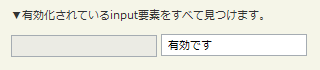
「:enabled」の使用例サンプルを見る
<!DOCTYPE html PUBLIC "-//W3C//DTD XHTML 1.0 Transitional//EN" "http://www.w3.org/TR/xhtml1/DTD/xhtml1-transitional.dtd">
<html xmlns="http://www.w3.org/1999/xhtml" xml:lang="ja" lang="ja">
    <head>
        <meta http-equiv="Content-Type" content="text/html; charset=utf-8" />
        <meta http-equiv="Content-Language" content="ja" />
        <meta http-equiv="Content-Script-Type" content="text/javascript" />
        <meta http-equiv="Content-Style-Type" content="text/css" />
        <meta http-equiv="imagetoolbar" content="no" />
        <title>DOM要素:フォームフィルター:「:enabled」の使用例 | jQuery</title>
        <link rel="stylesheet" type="text/css" href="/content/lib/global.css" />
        <!-- JS -->
        <script src="https://ajax.googleapis.com/ajax/libs/jquery/1.3.2/jquery.min.js"></script>
        <script type="text/javascript">
            $(function(){
                $("input:enabled").val("有効です");
              });
        </script>
    </head>
    <body>
        <div id="wrap">
            <h1>DOM要素:フォームフィルター:「:enabled」の使用例 | jQuery</h1>
            <p>▼有効化されているinput要素をすべて見つけます。</p>
<!-- CODE -->
            <form action="#" onsubmit="return false">
                <p>
                    <input name="email" disabled="disabled" />
                    <input name="id" />
                </p>
            </form>
            <div id="res"></div>
<!-- CODE / -->
        </div>
    </body>
</html>
:disabled
無効化されている要素をすべて選択
2009/2/27
戻り値:配列<要素>
無効化されている要素(disabled="disabled")をすべて選択します。
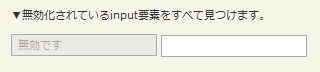
「:disabled」の使用例サンプルを見る
<!DOCTYPE html PUBLIC "-//W3C//DTD XHTML 1.0 Transitional//EN" "http://www.w3.org/TR/xhtml1/DTD/xhtml1-transitional.dtd">
<html xmlns="http://www.w3.org/1999/xhtml" xml:lang="ja" lang="ja">
    <head>
        <meta http-equiv="Content-Type" content="text/html; charset=utf-8" />
        <meta http-equiv="Content-Language" content="ja" />
        <meta http-equiv="Content-Script-Type" content="text/javascript" />
        <meta http-equiv="Content-Style-Type" content="text/css" />
        <meta http-equiv="imagetoolbar" content="no" />
        <title>DOM要素:フォームフィルター(Form Filters):「:disabled」の使用例 | jQuery</title>
        <link rel="stylesheet" type="text/css" href="/content/lib/global.css" />
        <!-- JS -->
        <script src="https://ajax.googleapis.com/ajax/libs/jquery/1.3.2/jquery.min.js"></script>
        <script type="text/javascript">
            $(function(){
                $("input:disabled").val("無効です");
              });
        </script>
    </head>
    <body>
        <div id="wrap">
            <h1>DOM要素:フォームフィルター(Form Filters):「:disabled」の使用例 | jQuery</h1>
            <p>▼無効化されているinput要素をすべて見つけます。</p>
<!-- CODE -->
            <form action="#" onsubmit="return false">
                <p>
                    <input name="email" disabled="disabled" />
                    <input name="id" />
                </p>
            </form>
            <div id="res"></div>
<!-- CODE / -->
        </div>
    </body>
</html>
:checked
チェックされている要素をすべて選択
2009/2/27
戻り値:配列<要素>
チェックされている要素(checked="checked")をすべて選択します。
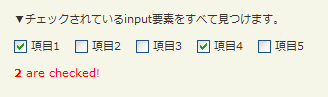
「:chceked」の使用例サンプルを見る
<!DOCTYPE html PUBLIC "-//W3C//DTD XHTML 1.0 Transitional//EN" "http://www.w3.org/TR/xhtml1/DTD/xhtml1-transitional.dtd">
<html xmlns="http://www.w3.org/1999/xhtml" xml:lang="ja" lang="ja">
    <head>
        <meta http-equiv="Content-Type" content="text/html; charset=utf-8" />
        <meta http-equiv="Content-Language" content="ja" />
        <meta http-equiv="Content-Script-Type" content="text/javascript" />
        <meta http-equiv="Content-Style-Type" content="text/css" />
        <meta http-equiv="imagetoolbar" content="no" />
        <title>DOM要素:フォームフィルター(Form Filters):「:checked」の使用例 | jQuery</title>
        <link rel="stylesheet" type="text/css" href="/content/lib/global.css" />
        <!-- JS -->
        <script src="https://ajax.googleapis.com/ajax/libs/jquery/1.3.2/jquery.min.js"></script>
        <script type="text/javascript">
            $(function(){
                function countChecked() {
                    var n = $("input:checked").length;
                        $("#res").html("<strong>"+n +"</strong>"+(n == 1 ? " is" : " are")+" checked!").css("color","red");
                    }
                    countChecked();
                    $(":checkbox").click(countChecked);
              });
        </script>
    </head>
    <body>
        <div id="wrap">
            <h1>DOM要素:フォームフィルター(Form Filters):「:checked」の使用例 | jQuery</h1>
            <p>▼チェックされているinput要素をすべて見つけます。</p>
<!-- CODE -->
            <form action="#" onsubmit="return false">
                <label for="chk1"><input type="checkbox" name="chk" id="chk1" checked="checked" value="1" /> 項目1</label>
                <label for="chk2"><input type="checkbox" name="chk" id="chk2" value="2" /> 項目2</label>
                <label for="chk3"><input type="checkbox" name="chk" id="chk3" value="3" /> 項目3</label>
                <label for="chk4"><input type="checkbox" name="chk" id="chk4" checked="checked" value="4" /> 項目4</label>
                <label for="chk5"><input type="checkbox" name="chk" id="chk5" value="5" /> 項目5</label>
            </form>
            <p id="res"></p>
<!-- CODE / -->
        </div>
    </body>
</html>
:selected
選択されている要素をすべて選択
2009/2/27
戻り値:配列<要素>
選択されている要素(selected="selected")をすべて選択します。
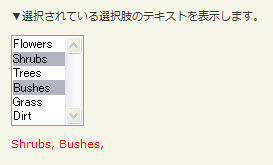
「:selected」の使用例サンプルを見る
<!DOCTYPE html PUBLIC "-//W3C//DTD XHTML 1.0 Transitional//EN" "http://www.w3.org/TR/xhtml1/DTD/xhtml1-transitional.dtd">
<html xmlns="http://www.w3.org/1999/xhtml" xml:lang="ja" lang="ja">
    <head>
        <meta http-equiv="Content-Type" content="text/html; charset=utf-8" />
        <meta http-equiv="Content-Language" content="ja" />
        <meta http-equiv="Content-Script-Type" content="text/javascript" />
        <meta http-equiv="Content-Style-Type" content="text/css" />
        <meta http-equiv="imagetoolbar" content="no" />
        <title>DOM要素:フォームフィルター(Form Filters):「:selected」の使用例 | jQuery</title>
        <link rel="stylesheet" type="text/css" href="/content/lib/global.css" />
        <!-- JS -->
        <script src="https://ajax.googleapis.com/ajax/libs/jquery/1.3.2/jquery.min.js"></script>
        <script type="text/javascript">
            $(function(){
                $("select").change(function(){
                    var str="";
                    $("select option:selected").each(function(){
                        str+=$(this).text() + ", ";
                    });
                    $("#res").text(str).css("color","red");
                })
                .trigger('change');
              });
        </script>
    </head>
    <body>
        <div id="wrap">
            <h1>DOM要素:フォームフィルター(Form Filters):「:selected」の使用例 | jQuery</h1>
            <p>▼選択されている選択肢のテキストを表示します。</p>
<!-- CODE -->
            <form action="#" onsubmit="return false">
            <select name="garden" multiple="multiple">
                <option>Flowers</option>
                <option selected="selected">Shrubs</option>
                <option>Trees</option>
                <option selected="selected">Bushes</option>
                <option>Grass</option>
                <option>Dirt</option>
            </select>
            </form>
            <p id="res"></p>
<!-- CODE / -->
        </div>
    </body>
</html>

