jQuery pluginQRコードイメージ生成

- QRコードイメージ生成生成(imgタグ出力)〔Google Chart API使用〕
- QRコードイメージ生成生成(canvasタグ出力)〔QRCode for JavaScript使用〕
QRコードイメージ生成生成(imgタグ出力)
Google Chart API使用
2011/6/23
MyQRCode jquery plugin v0.5
Google Chart APIを使用して、モバイル向けのQRコードイメージを自動生成する超軽量のシンプルなjQueryプラグイン。
デフォルトの場合は、現在のURLをQRコードにした画像が出力されます。
$('#qrcode').MyQRCode();
オプションをパラメータとして指定する場合は、下記3つのパラメータを指定可能です。
- 「encoding」には、QRコード化するデータのエンコード方法を指定します。
デフォルトは「utf-8」。 - 「size」には、出力するQRコードイメージのサイズを指定します。
デフォルトは「150x150」。最小サイズは「37x37」ですが読み取りにくいので大きめで。 - 「content」には、QRコード化するデータをテキストで指定します。
省略した場合は、現在のURL(window.locationの値)が適用されます。
$('#qrcode').MyQRCode({
  /* エンコード */
  encoding:'utf-8',
  /* QRコード化するデータ */
  content:'PHP & JavaScript Room\nhttp://phpjavascriptroom.com/',
  /* QRコードイメージのサイズ */
  size:'150x150'
});
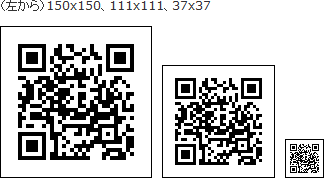 設置イメージ
設置サンプルサンプルを見る
<!DOCTYPE html PUBLIC "-//W3C//DTD XHTML 1.0 Transitional//EN" "http://www.w3.org/TR/xhtml1/DTD/xhtml1-transitional.dtd">
<html xmlns="http://www.w3.org/1999/xhtml" xml:lang="ja" lang="ja">
    <head>
        <meta http-equiv="Content-Type" content="text/html; charset=utf-8" />
        <meta http-equiv="Content-Language" content="ja" />
        <meta http-equiv="Content-Script-Type" content="text/javascript" />
        <meta http-equiv="Content-Style-Type" content="text/css" />
        <meta http-equiv="imagetoolbar" content="no" />
        <title>設置サンプル</title>
        <link rel="stylesheet" type="text/css" href="/content/lib/global.css" />
        <!-- JS -->
        <script type="text/javascript" src="http://ajax.googleapis.com/ajax/libs/jquery/1.6.1/jquery.min.js" ></script>
        <script type="text/javascript" src="/content/lib/jquery/jquery.MyQRCode.js" ></script>
        <script type="text/javascript">
            $(function(){
                $("#qrcode").MyQRCode({
                    content:"PHP & JavaScript Room\nhttp://phpjavascriptroom.com/"
                });
                $("#qrcode").MyQRCode({
                    content:"PHP & JavaScript Room\nhttp://phpjavascriptroom.com/",
                    size:"111x111"
                });
                $("#qrcode").MyQRCode({
                    content:"PHP & JavaScript Room\nhttp://phpjavascriptroom.com/",
                    size:"37x37"
                });
            });
        </script>
        <!-- CSS -->
        <style type="text/css">
            #qrcode img { margin:0 10px 0 0; padding:0; border:1px solid #000; }
        </style>
    </head>
    <body>
        <div id="wrap">
            <h1>設置サンプル</h1>
            <p>参照:<a href='http://www.kfsoft.info/MyQRCode/demo.php' target='_blank'>MyQRCode jquery plugin v0.5</a></p>
<!-- CODE -->
<p>(左から)150x150、111x111、37x37</p>
<div id="qrcode"></div>
<!-- / CODE -->
        </div>
    </body>
</html>
QRコードイメージ生成生成(canvasタグ出力)
QRCode for JavaScript使用
2011/6/23
jquery.qrcode.js
jquery.js、jquery.qrcode.min.js
canvasタグでQRコード生成するjQueryプラグイン。
QRコード生成ライブラリは、QRCode for JavaScript(MIT License)が使用されており、QRコードイメージはcanvasタグでページ上に描画されます。 またQRコード生成ライブラリが日本語未対応のため、日本語を含むQRコードは生成できません。
下記のように文字列を指定した場合は、そのデータのQRコードイメージが出力されます。 QRコードイメージのサイズは、デフォルトで256x256です。
$('#qrcode').qrcode('http://phpjavascriptroom.com/');
QRコードイメージのサイズを指定する場合は、下記のように指定します。
$('#qrcode').qrcode({
  /* QRコードイメージの幅 */
  width:150,
  /* QRコードイメージの高さ */
  height:150,
  /* QRコード化するデータ */
  text:'http://phpjavascriptroom.com/'
});
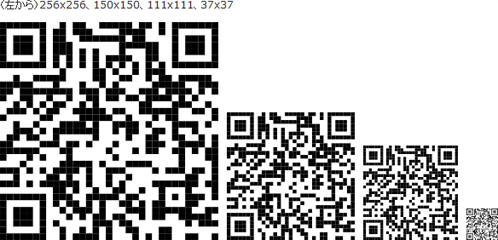 設置イメージ
設置サンプルサンプルを見る
<!DOCTYPE html PUBLIC "-//W3C//DTD XHTML 1.0 Transitional//EN" "http://www.w3.org/TR/xhtml1/DTD/xhtml1-transitional.dtd">
<html xmlns="http://www.w3.org/1999/xhtml" xml:lang="ja" lang="ja">
    <head>
        <meta http-equiv="Content-Type" content="text/html; charset=utf-8" />
        <meta http-equiv="Content-Language" content="ja" />
        <meta http-equiv="Content-Script-Type" content="text/javascript" />
        <meta http-equiv="Content-Style-Type" content="text/css" />
        <meta http-equiv="imagetoolbar" content="no" />
        <title>設置サンプル</title>
        <link rel="stylesheet" type="text/css" href="/content/lib/global.css" />
        <!-- JS -->
        <script type="text/javascript" src="http://ajax.googleapis.com/ajax/libs/jquery/1.6.1/jquery.min.js" ></script>
        <script type="text/javascript" src="/content/lib/jquery/jquery-qrcode/jquery.qrcode.min.js" ></script>
        <script type="text/javascript">
            $(function(){
                $('#qrcode').qrcode(
                    /* デフォルト 256x256 */
                    "http://phpjavascriptroom.com/"
                );
                $('#qrcode').qrcode({
                    width:150,
                    height:150,
                    text:"http://phpjavascriptroom.com/"
                });
                $('#qrcode').qrcode({
                    width:111,
                    height:111,
                    text:"http://phpjavascriptroom.com/"
                });
                $('#qrcode').qrcode({
                    width:37,
                    height:37,
                    text:"http://phpjavascriptroom.com/"
                });
            });
        </script>
        <!-- CSS -->
        <style type="text/css">
            #qrcode canvas { margin:0 10px 0 0; padding:0; }
        </style>
    </head>
    <body>
        <div id="wrap">
            <h1>設置サンプル</h1>
            <p>参照:<a href='http://jeromeetienne.github.com/jquery-qrcode/' target='_blank'>jquery.qrcode.js</a></p>
<!-- CODE -->
<p>(左から)256x256、150x150、111x111、37x37</p>
<div id="qrcode"></div>
<!-- / CODE -->
        </div>
    </body>
</html>

