jQuery APIリファレンスイベント操作:ライブイベント

- live(type, fn) ※v1.3~〔現在とこれからマッチする要素にイベントを結び付ける〕
- die([type], fn]]) ※v1.3~〔Liveイベントを解除(live()の逆)〕
live(type, fn) ※v1.3~
現在とこれからマッチする要素にイベントを結び付ける
2009/2/27
live(type, fn) 戻り値:jQuery
マッチした要素、これからマッチする要素(生成した新しい要素など)に対するイベントをハンドラに結び付けます。
利用可能なイベントは、click、dblclick、mousedown、mouseup、mousemove、mouseover、mouseout、keydown、keypress、keyupです。 その他、カスタムイベントも指定可能です。
blur、focus、mouseenter、mouseleave、change、submitは、現在サポートされていません。
bind()と異なり、live()の各呼び出しには、1つのイベントしか結び付けられません。
第1引数typeには、イベントタイプを指定します。
第2引数fnには、マッチした各要素にイベントを結び付ける関数を指定します。
function callback(eventObject){
    this; /* DOM要素 */
}
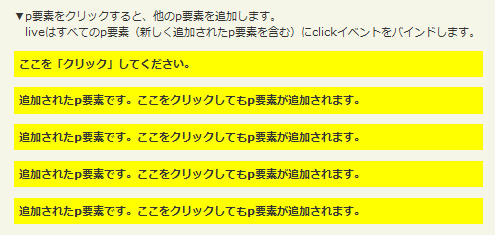
liveの使用例サンプルを見る
<!DOCTYPE html PUBLIC "-//W3C//DTD XHTML 1.0 Transitional//EN" "http://www.w3.org/TR/xhtml1/DTD/xhtml1-transitional.dtd">
<html xmlns="http://www.w3.org/1999/xhtml" xml:lang="ja" lang="ja">
    <head>
        <meta http-equiv="Content-Type" content="text/html; charset=utf-8" />
        <meta http-equiv="Content-Language" content="ja" />
        <meta http-equiv="Content-Script-Type" content="text/javascript" />
        <meta http-equiv="Content-Style-Type" content="text/css" />
        <meta http-equiv="imagetoolbar" content="no" />
        <title>イベント操作:ライブイベント:liveの使用例 | jQuery</title>
        <link rel="stylesheet" type="text/css" href="/content/lib/global.css" />
        <!-- JS -->
        <script src="https://ajax.googleapis.com/ajax/libs/jquery/1.3.2/jquery.min.js"></script>
        <script type="text/javascript">
            $(function(){
                $("#sample p").live("click", function(){
                    $(this).after("<p>追加されたp要素です。ここをクリックしてもp要素が追加されます。</p>");
                });
              });
        </script>
        <style type="text/css">
            #sample p { background:yellow; font-weight:bold; cursor:pointer; padding:5px; }
            #sample p.over { background: #ccc; }
            span { color:red; }
        </style>
    </head>
    <body>
        <div id="wrap">
            <h1>イベント操作:ライブイベント:liveの使用例 | jQuery</h1>
            <p>▼p要素をクリックすると、他のp要素を追加します。<br> liveはすべてのp要素(新しく追加されたp要素を含む)にclickイベントを結び付けます。</p>
<!-- CODE -->
            <div id="sample">
                  <p>ここを「クリック」してください。</p>
                <span></span>
            </div>
<!-- CODE / -->
        </div>
    </body>
</html>
die([type], fn]]) ※v1.3~
Liveイベントを解除(live()の逆)
2009/2/27
die([type], fn]]) 戻り値:jQuery
liveの逆。 結び付けられたliveイベントを解除します。 引数を省略すると、結び付けたliveイベントがすべて解除されます。 liveで登録したカスタムイベントも解除することができます。
第1引数typeを指定すると、結び付けたliveイベントのうち、そのイベントタイプのliveイベントだけが解除されます。 第2引数fnに結び付けるために渡された関数を指定した場合は、指定したイベントハンドラだけが解除されます。
オプションの第1引数typeには、解除するイベントタイプを指定します。
オプションの第2引数fnには、マッチした各要素に結び付けたイベントを解除する関数を指定します。

dieの使用例サンプルを見る
<!DOCTYPE html PUBLIC "-//W3C//DTD XHTML 1.0 Transitional//EN" "http://www.w3.org/TR/xhtml1/DTD/xhtml1-transitional.dtd">
<html xmlns="http://www.w3.org/1999/xhtml" xml:lang="ja" lang="ja">
    <head>
        <meta http-equiv="Content-Type" content="text/html; charset=utf-8" />
        <meta http-equiv="Content-Language" content="ja" />
        <meta http-equiv="Content-Script-Type" content="text/javascript" />
        <meta http-equiv="Content-Style-Type" content="text/css" />
        <meta http-equiv="imagetoolbar" content="no" />
        <title>イベント操作:ライブイベント:dieの使用例 | jQuery</title>
        <link rel="stylesheet" type="text/css" href="/content/lib/global.css" />
        <!-- JS -->
        <script src="https://ajax.googleapis.com/ajax/libs/jquery/1.3.2/jquery.min.js"></script>
        <script type="text/javascript">
            $(function(){
                function aClick() {
                    $("#res").show().fadeOut("slow");
                }
                $("#bind").click(function () {
                    $("#theone").live("click", aClick).text("クリックできます!");
                });
                $("#unbind").click(function () {
                    $("#theone").die("click", aClick).text("Does nothing...");
                });
              });
        </script>
        <style type="text/css">
             button { margin:5px; }
              button#theone { color:red; background:yellow; }
        </style>
    </head>
    <body>
        <div id="wrap">
            <h1>イベント操作:ライブイベント:dieの使用例 | jQuery</h1>
            <p>▼ボタンをクリックするとイベントを結び付けたり、結び付けたイベントを解除します。</p>
<!-- CODE -->
            <button id="theone">Does nothing...</button>
            <button id="bind">イベントを結び付ける</button>
            <button id="unbind">結び付けたイベントを解除</button>
            <div id="res" style="display:none;">クリック!</div>
<!-- CODE / -->
        </div>
    </body>
</html>

