jQuery APIリファレンスエフェクト操作:カスタム

- animate(params[, duration[, easing[, callback]]])〔カスタムアニメーション作成〕
- animate(params, options)〔カスタムアニメーション作成〕
- stop([clearQueue[, gotoEnd]])〔現在動作中のアニメーションをすべて停止〕
animate(params[, duration[, easing[, callback]]])
カスタムアニメーション作成
2009/2/27
カスタムアニメーションを作るための関数です。
この関数のポイントは、アニメーション開始から終了までのスタイルプロパティのオブジェクトです。 オブジェクト内の各キーは、「height」、「top」、「opacity」など、アニメーションするスタイルプロパティを表します。
プロパティは、「margin-left」なら「marginLeft」のようにラクダ形式で指定する必要があります。
キーの値には、アニメーション終了時のプロパティを表します。 値に数値を指定した場合、スタイルプロパティは、現在の状態から、指定した数値になるまで移動します。 値に文字列(「hide」、「show」、「toggle」)を指定した場合、デフォルトのアニメーションはそのプロパティで構成されます。 数値の値をとるプロパティだけがサポートされています。例えば、backgroundColorはサポートされていません。
jQuery v1.2からは、emおよび%でプロパティをアニメーションすることができます。 さらに、jQuery v1.2では、相対的なアニメーションをすることができるようになりました。 プロパティの値の前に「+=」または「-=」を指定することで、現在位置からプラス・マイナス方向に移動することができます。、
jQuery v1.3からは、duration(アニメーション持続期間)が0のアニメーションを指定すれば、アニメーションは同時にそれらの最後の状態に要素を設定します。
- 第1引数paramsには、アニメーション終了時のスタイル属性のセットを指定します。
-
オプションの第2引数durationには、アニメーションs速度またはアニメーション持続時間を指定します。 数値(ミリ秒)あるいは文字列で指定可能です。 数値の場合は、例えば3秒なら「3000」を指定します。 文字列の場合は、「slow」(ゆっくり)、「normal」(通常)、「fast」(速く)のあらかじめ定義された速度のいずれかを指定します。
-
オプションの第3引数easingには、使用したいエフェクト名(要プラグイン)を指定します。 あらかじめ定義されている値には、「linear」(線状の動き)と「swing」(曲線状の動き)の2つがあります。
-
オプションの第4引数callbackには、各要素のアニメーション完了時に実行する関数を指定します。 関数は各要素に対して1度だけ実行されます。
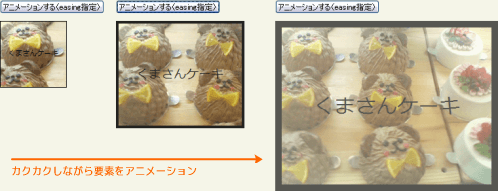 設置イメージ
<!DOCTYPE html PUBLIC "-//W3C//DTD XHTML 1.0 Transitional//EN" "http://www.w3.org/TR/xhtml1/DTD/xhtml1-transitional.dtd">
<html xmlns="http://www.w3.org/1999/xhtml" xml:lang="ja" lang="ja">
<head>
<meta http-equiv="Content-Type" content="text/html; charset=utf-8" />
<meta http-equiv="Content-Language" content="ja" />
<meta http-equiv="Content-Script-Type" content="text/javascript" />
<meta http-equiv="Content-Style-Type" content="text/css" />
<meta http-equiv="imagetoolbar" content="no" />
<title>エフェクト操作:カスタム:animate(params, [duration[, easing, [callback]]])の使用例 | jQuery</title>
<link rel="stylesheet" type="text/css" href="/content/lib/global.css" />
<script src="https://ajax.googleapis.com/ajax/libs/jquery/1.3.2/jquery.min.js"></script>
<script type="text/javascript" src="/content/lib/jquery/jquery.easing.1.3.js"></script>
<script type="text/javascript">
$(function(){
$("#btn_animate1").click(function(){
$("#sample1").animate(
{
width: "320px",
height: "240px",
opacity: 0.65,
fontSize: "3em",
borderWidth: "10px"
},
3000 /* アニメーション速度 */
);
});
$("#btn_animate2").click(function(){
$("#sample2").animate(
{
width: "320px",
height: "240px",
opacity: 0.65,
fontSize: "3em",
borderWidth: "10px"
},
3000, /* アニメーション速度 */
"kakukaku"
);
});
/* カクカクとアニメーションさせる */
jQuery.extend(jQuery.easing,{
kakukaku: function (x, t, b, c, d) {
return c*((t=Math.round((t+0.5)/200)*200)/d) + b;
}
});
});
</script>
<style type="text/css">
#sample1, #sample2 { background-color:#000; width:100px; height:100px; border:1px solid #000; overflow:hidden; position:relative; }
#sample1 span, #sample2 span { position:absolute; top:40%; left:0; text-align:center; width:100%; color:#000; }
</style>
</head>
<body>
<div id="wrap">
<h1>エフェクト操作:カスタム:animate(params, [duration[, easing, [callback]]])の使用例 | jQuery</h1>
<!-- CODE -->
<p><button id="btn_animate1">アニメーションする</button></p>
<div id="sample1"><img src="http://farm4.static.flickr.com/3222/2974008614_736e2d5b50.jpg" alt="くまさんケーキ" /><span>くまさんケーキ</span></div>
<br>
<p><button id="btn_animate2">アニメーションする(easing指定)</button></p>
<div id="sample2"><img src="http://farm4.static.flickr.com/3222/2974008614_736e2d5b50.jpg" alt="くまさんケーキ" /><span>くまさんケーキ</span></div>
<!-- / CODE -->
</div>
</body>
</html>
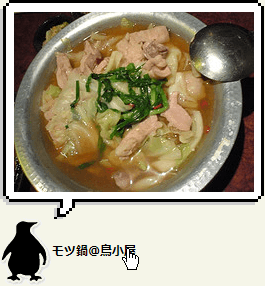 設置イメージ
<!DOCTYPE html PUBLIC "-//W3C//DTD XHTML 1.0 Transitional//EN" "http://www.w3.org/TR/xhtml1/DTD/xhtml1-transitional.dtd">
<html xmlns="http://www.w3.org/1999/xhtml" xml:lang="ja" lang="ja">
<head>
<meta http-equiv="Content-Type" content="text/html; charset=utf-8" />
<meta http-equiv="Content-Language" content="ja" />
<meta http-equiv="Content-Script-Type" content="text/javascript" />
<meta http-equiv="Content-Style-Type" content="text/css" />
<meta http-equiv="imagetoolbar" content="no" />
<title>エフェクト操作:カスタム:animate(params, options)の使用例 | jQuery</title>
<link rel="stylesheet" type="text/css" href="/content/lib/global.css" />
<script src="https://ajax.googleapis.com/ajax/libs/jquery/1.3.2/jquery.min.js"></script>
<script type="text/javascript">
$(document).ready(function(){
$(".menu a").hover(function() {
$(this).next("span").animate({opacity:"show", top:"-220"}, "slow");
}, function() {
$(this).next("span").animate({opacity:"hide", top:"-200"}, "fast");
});
});
</script>
<style type="text/css">
.menu { margin:270px 0 0 0; padding:0; list-style:none; }
.menu li { margin:0 10px 0 0; padding:0; float:left; position:relative; text-align:center; }
.menu a { margin:0; padding:0 0 0 55px; display:block; color:#000; width:270px; line-height:68px; text-decoration:none; font-weight:bold; display:block; background:transparent url("/content/img/ajax/jquery/pengin.gif") no-repeat 0 0; text-align:left; }
.menu li span { background:transparent url("/content/img/ajax/jquery/speechbubble.gif") no-repeat 0 0; width:270px; height:222px; position:absolute; top:-200px; left:0; margin:0; padding:0; text-align:center; font-style:normal; z-index:2; display:none; }
.menu li span img { padding:15px 0 0 5px; }
</style>
</head>
<body>
<div id="wrap">
<h1>エフェクト操作:カスタム:animate(params, options)の使用例 | jQuery</h1>
<p>▼ペンギン(テキスト含む)にマウスオーバーすると、吹き出しがアニメーション表示されます。</p>
<!-- CODE -->
<div class="cf">
<ul class="menu">
<li><a href="http://www.webdesignerwall.com">モツ鍋@鳥小屋</a><span><img src="http://farm4.static.flickr.com/3239/3032375082_fd66d11941_m.jpg" width="240" height="180" alt="モツ鍋@鳥小屋" /></span></li>
<li><a href="http://bestwebgallery.com">レバ刺@鳥小屋</a><span><img src="http://farm4.static.flickr.com/3064/3031535599_2f8b454232_m.jpg" width="240" height="180" alt="レバ刺@鳥小屋" /></span></li>
<li><a href="http://www.ndesign-studio.com">明太子玉子焼き@鳥小屋</a><span><img src="http://farm4.static.flickr.com/3217/3031535573_6e541be249_m.jpg" width="240" height="180" alt="明太子玉子焼き@鳥小屋" /></span></li>
</ul>
</div>
<!-- / CODE -->
</div>
</body>
</html>
マウスを乗せると展開するバナー
参照:deviantART/リボン素材:Ribbon Navigation Bar PSD
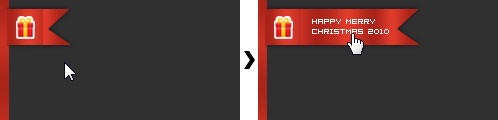 設置イメージ
<!DOCTYPE html PUBLIC "-//W3C//DTD XHTML 1.0 Transitional//EN" "http://www.w3.org/TR/xhtml1/DTD/xhtml1-transitional.dtd">
<html xmlns="http://www.w3.org/1999/xhtml" xml:lang="ja" lang="ja">
<head>
<meta http-equiv="Content-Type" content="text/html; charset=utf-8" />
<meta http-equiv="Content-Language" content="ja" />
<meta http-equiv="Content-Script-Type" content="text/javascript" />
<meta http-equiv="Content-Style-Type" content="text/css" />
<meta http-equiv="imagetoolbar" content="no" />
<title>エフェクト操作:カスタム:animate(params, options)の使用例 | jQuery</title>
<link rel="stylesheet" type="text/css" href="/content/lib/global.css" />
<script src="https://ajax.googleapis.com/ajax/libs/jquery/1.3.2/jquery.min.js"></script>
<script type="text/javascript">
$(function(){
var promo=$('#ribbon');
var slider=$('#ribbon span');
$('#ribbon a').mouseenter(function() {
promo.addClass('active');
slider.stop().animate({width: '158px'}, 180);
}).mouseleave(function() {
promo.removeClass('active');
slider.stop().animate({width: '67px'}, 180);
});
});
</script>
<style type="text/css">
#demo {
background:transparent url("/content/img/ajax/ribbon_bg.png") no-repeat 0 0;
position:relative;
width:500px; height:300px;
overflow:hidden;
margin:0; padding:0;
}
#ribbon {
position:relative;
z-index:400;
left:-1px;
height:40px;
}
#ribbon span {
display:block;
background:transparent url("/content/img/ajax/ribbon_bar.png") no-repeat 100% 0;
position:absolute;
top:5px; left:8px;
height:44px; width:67px;
overflow:hidden;
}
#ribbon.active span {
background:transparent url("/content/img/ajax/ribbon_bar.png") no-repeat 100% -44px;
}
#ribbon img {
position:absolute;
display:block;
z-index:22;
top:9px; left:8px;
}
</style>
</head>
<body>
<div id="wrap">
<h1>エフェクト操作:カスタム:animate(params, options)の使用例 | jQuery</h1>
<p>マウスを乗せると展開するバナー</p>
<p>参照:<a href='http://www.deviantart.com/' target='_blank'>deviantART</a>/リボン素材:<a href="http://experiencearts.deviantart.com/art/Ribbon-Navigation-Bar-PSD-43799728">Ribbon Navigation Bar PSD</a></p>
<!-- CODE -->
<div id="demo">
<div id="ribbon">
<a href="#"><img src="/content/img/ajax/ribbon_icon.png" alt="" /><span></span></a>
</div>
</div>
<!-- / CODE -->
</div>
</body>
</html>
animate(params, options)
カスタムアニメーション作成
2009/2/27
カスタムアニメーションを作るための関数です。
この関数のポイントは、アニメーション開始から終了までのスタイルプロパティのオブジェクトです。 オブジェクト内の各キーは、「height」「top」「opacity」など、アニメーションされるスタイルプロパティを表します。
プロパティは、「margin-left」なら「marginLeft」のようにラクダ形式で指定してください。
キーの値には、アニメーション終了時のプロパティを表します。 値に数値を指定した場合、スタイルプロパティは、現在の状態から、指定した数値になるまで移動します。 値に文字列(「hide」、「show」、「toggle」)を指定した場合、デフォルトのアニメーションはそのプロパティで構成されます。
第1引数paramsには、アニメーション終了時のスタイル属性のセットを指定します。
第2引数optionsには、アニメーションを構成するオプションのセットを指定します。
options duration アニメーション速度を指定します。 デフォルトは「normal」です。 文字列の場合は、あらかじめ定義されている速度(「slow」、「normal」、「fast」)の内いずれかを指定します。 数値の場合は、1秒なら1000というようにミリ秒で指定します。 easing 使用したいエフェクト名(要プラグイン)を指定します。 デフォルトは「swing」です。 あらかじめ定義されている値には、「linear」(線状の動き)と「swing」(曲線状の動き)の2つがあります。 complete アニメーションが完了した時に実行される関数を指定します。 関数は、アニメーションが完了した各要素に対し、1度だけ実行されます。 step コールバック関数を指定します。 queue ※jQuery v1.2+
待機中のアニメーションをスキップして、すぐに実行するかどうかを真偽値で指定します。 デフォルトはTRUE(スキップしない)です。
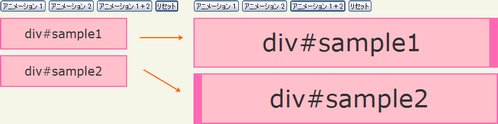 設置イメージ
<!DOCTYPE html PUBLIC "-//W3C//DTD XHTML 1.0 Transitional//EN" "http://www.w3.org/TR/xhtml1/DTD/xhtml1-transitional.dtd">
<html xmlns="http://www.w3.org/1999/xhtml" xml:lang="ja" lang="ja">
<head>
<meta http-equiv="Content-Type" content="text/html; charset=utf-8" />
<meta http-equiv="Content-Language" content="ja" />
<meta http-equiv="Content-Script-Type" content="text/javascript" />
<meta http-equiv="Content-Style-Type" content="text/css" />
<meta http-equiv="imagetoolbar" content="no" />
<title>エフェクト操作:カスタム:animate(params, options)の使用例 | jQuery</title>
<link rel="stylesheet" type="text/css" href="/content/lib/global.css" />
<script src="https://ajax.googleapis.com/ajax/libs/jquery/1.3.2/jquery.min.js"></script>
<script type="text/javascript">
$(function(){
/* 【アニメーション1】ボタンをクリックした時にアニメーション実行 */
$("#btn_sample1").click(function(){
$("#sample1").animate( { width:"500px" }, { queue:false, duration:3000 } )
.animate( { fontSize:"4em" }, 1500 )
.animate( { borderRightWidth:"15px" }, 1500);
});
/* 【アニメーション2】ボタンをクリックした時にアニメーション実行 */
$("#btn_sample2").click(function(){
$("#sample2").animate( { width:"500px"}, 1000 )
.animate( { fontSize:"4em" } , 1000 )
.animate( { borderLeftWidth:"15px" }, 1000);
});
/* 【アニメーション 1+2】ボタンをクリックした時に、【アニメーション2】ボタンをクリックし、両アニメーションを実行 */
$("#btn_both").click(function(){
$("#btn_sample1").add("#btn_sample2").click();
});
/* 【リセット】ボタンをクリックした時に、要素をアニメーション前の状態に戻す */
$("#btn_reset").click(function(){
$("#sample1").css({width:"", fontSize:"", borderWidth:""});
$("#sample2").css({width:"", fontSize:"", borderWidth:""});
});
});
</script>
<style type="text/css">
#sample1, #sample2 { background-color:pink; width:200px; text-align:center; border:2px solid hotpink; margin:10px 0; padding:10px; font-size:2em; }
</style>
</head>
<body>
<div id="wrap">
<h1>エフェクト操作:カスタム:animate(params, options)の使用例 | jQuery</h1>
<p>
【アニメーション1】ボタンをクリックすると、キューになっていないアニメーションがどのように動くかが分かります。
フォントサイズを大きくしている間にdiv要素の幅を90%に拡張し、フォントサイズの変更が完了すると、枠線のアニメーションが始まります。
</p>
<p>
【アニメーション2】ボタンをクリックすると、従来の連続したアニメーションを開始します。
各アニメーションは、要素上で、前のアニメーションが完了した時に、次のアニメーションが実行されます。
</p>
<!-- CODE -->
<button id="btn_sample1">アニメーション 1</button>
<button id="btn_sample2">アニメーション 2</button>
<button id="btn_both">アニメーション 1+2</button>
<button id="btn_reset">リセット</button>
<p id="sample1">div#sample1</p>
<p id="sample2">div#sample2</p>
<!-- / CODE -->
</div>
</body>
</html>
水平型アコーディオン
参照:jQuery Examples - Horizontal Accordion
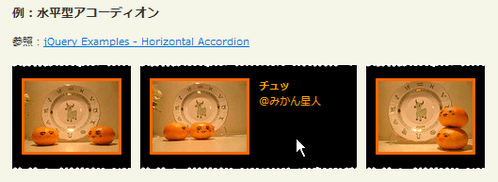 設置イメージ
<!DOCTYPE html PUBLIC "-//W3C//DTD XHTML 1.0 Transitional//EN" "http://www.w3.org/TR/xhtml1/DTD/xhtml1-transitional.dtd">
<html xmlns="http://www.w3.org/1999/xhtml" xml:lang="ja" lang="ja">
<head>
<meta http-equiv="Content-Type" content="text/html; charset=utf-8" />
<meta http-equiv="Content-Language" content="ja" />
<meta http-equiv="Content-Script-Type" content="text/javascript" />
<meta http-equiv="Content-Style-Type" content="text/css" />
<meta http-equiv="imagetoolbar" content="no" />
<title>エフェクト操作:カスタム:animate(params, options)の使用例 | jQuery</title>
<link rel="stylesheet" type="text/css" href="/content/lib/global.css" />
<script src="https://ajax.googleapis.com/ajax/libs/jquery/1.3.2/jquery.min.js"></script>
<script type="text/javascript">
$(function(){
lastBlock=$("#a1");
maxWidth=210;
minWidth=106;
$("ul li a").hover(
function(){
$(lastBlock).animate({width: minWidth+"px"}, { queue:false, duration:400 });
$(this).animate({width: maxWidth+"px"}, { queue:false, duration:400});
lastBlock=this;
}
);
});
</script>
<style type="text/css">
ul { list-style:none; margin:0; padding:0; }
ul li { list-style:none; float:left; padding:0 0 5px 0; display:block; margin-right:10px; background:#000 url("/content/img/ajax/line_btm.png") repeat-x bottom left; overflow:hidden; }
ul li a { margin:0; padding:15px 10px 10px 10px; display:block; overflow:hidden; height:82px; width:106px; color:orange; background:#000 url("/content/img/ajax/line_top.png") repeat-x 0 0; }
ul li img { position:absolute; border:3px solid #ff6600; }
ul li p { margin:0; padding:0; display:block; margin-left:116px; width:106px; }
#a1 { width:210px; }
</style>
</head>
<body>
<div id="wrap">
<h1>エフェクト操作:カスタム:animate(params, options)の使用例 | jQuery</h1>
<h2>例:水平型アコーディオン</h2>
<p>参照:<a href='http://designreviver.com/tutorials/jquery-examples-horizontal-accordion/'>jQuery Examples - Horizontal Accordion</a></p>
<!-- CODE -->
<div class="cf">
<ul>
<li>
<a id="a1">
<img src="http://farm4.static.flickr.com/3327/3190782567_01fd8855f0_t.jpg" />
<p><strong>出会い</strong><br>@みかん星人</p>
</a>
</li>
<li>
<a>
<img src="http://farm4.static.flickr.com/3336/3190782595_f789def132_t.jpg" />
<p><strong>チュッ</strong><br>@みかん星人</p>
</a>
</li>
<li>
<a>
<img src="http://farm4.static.flickr.com/3317/3191630438_f057b231a3_t.jpg" />
<p><strong>合体</strong><br>@みかん星人</p>
</a>
</li>
</ul>
</div>
<!-- / CODE -->
</div>
</body>
</html>
アニメーションメニュー
参照:Animated Menus Using jQuery
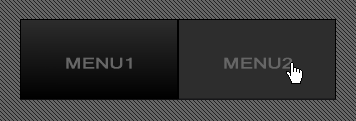 設置イメージ
<!DOCTYPE html PUBLIC "-//W3C//DTD XHTML 1.0 Transitional//EN" "http://www.w3.org/TR/xhtml1/DTD/xhtml1-transitional.dtd">
<html xmlns="http://www.w3.org/1999/xhtml" xml:lang="ja" lang="ja">
<head>
<meta http-equiv="Content-Type" content="text/html; charset=utf-8" />
<meta http-equiv="Content-Language" content="ja" />
<meta http-equiv="Content-Script-Type" content="text/javascript" />
<meta http-equiv="Content-Style-Type" content="text/css" />
<meta http-equiv="imagetoolbar" content="no" />
<title>エフェクト操作:カスタム:animate(params, options)の使用例 | jQuery</title>
<link rel="stylesheet" type="text/css" href="/content/lib/global.css" />
<script src="https://ajax.googleapis.com/ajax/libs/jquery/1.3.2/jquery.min.js"></script>
<script type="text/javascript">
$(function(){
$("ul#menu span").css("opacity","0");
$("ul#menu span").hover(function () {
$(this).stop().animate({opacity:1}, 'slow');
},
function () {
$(this).stop().animate({opacity:0}, 'slow');
});
});
</script>
<style type="text/css">
a:active { outline: none; } /* Firefox Dotted Outline Fix */
a:focus { -moz-outline-style: none; } /* Firefox Dotted Outline Fix */
ul#menu {
width:80%; height:102px;
background:#363636 url("/content/img/bg_stripe_dark.png") repeat;
list-style:none;
margin:0; padding:20px 0 0 20px;
}
ul#menu li {
float:left;
list-style:none;
margin:0; padding:0;
display:block;
width:158px; height:81px;
}
ul#menu li a {
background:transparent url("/content/img/ajax/sprite.png") no-repeat top left;
display:block;
width:158px; height:81px;
position:relative;
}
ul#menu li a.menu1 { }
ul#menu li a.menu2 { background-position:-158px 0; }
ul#menu li a span {
background:url("/content/img/ajax/sprite.png") no-repeat scroll bottom left;
display:block;
position:absolute;
top:0; left:0;
width:100%; height:100%;
z-index:100;
}
ul#menu li a span:hover { cursor:pointer; }
ul#menu li a.menu1 span { background-position:0px -81px; }
ul#menu li a.menu2 span { background-position:-158px -81px; }
</style>
</head>
<body>
<div id="wrap">
<h1>エフェクト操作:カスタム:animate(params, options)の使用例 | jQuery</h1>
<h2>例:アニメーションメニュー</h2>
<p>参照:<a href='http://www.shopdev.co.uk/blog/animated-menus-using-jquery/'>Animated Menus Using jQuery</a></p>
<!-- CODE -->
<ul id="menu">
<li><a href="#" class="meni1"><span></span></a></li>
<li><a href="#" class="menu2"><span></span></a></li>
</ul>
<!-- / CODE -->
</div>
</body>
</html>
ナビゲーション
参照:Fun With jQuery’s Animate() Function
 設置イメージ
<!DOCTYPE html PUBLIC "-//W3C//DTD XHTML 1.0 Transitional//EN" "http://www.w3.org/TR/xhtml1/DTD/xhtml1-transitional.dtd">
<html xmlns="http://www.w3.org/1999/xhtml" xml:lang="ja" lang="ja">
<head>
<meta http-equiv="Content-Type" content="text/html; charset=utf-8" />
<meta http-equiv="Content-Language" content="ja" />
<meta http-equiv="Content-Script-Type" content="text/javascript" />
<meta http-equiv="Content-Style-Type" content="text/css" />
<meta http-equiv="imagetoolbar" content="no" />
<title>エフェクト操作:カスタム:animate(params, options)の使用例 | jQuery</title>
<link rel="stylesheet" type="text/css" href="/content/lib/global.css" />
<script type="text/javascript" src="http://ajax.googleapis.com/ajax/libs/jquery/1.3.2/jquery.min.js"></script>
<script type="text/javascript" src="/content/lib/jquery/jquery.easing.1.3.js"></script>
<script type="text/javascript">
$(function(){
/* 例1 */
var navDuration = 150; //time in miliseconds
var navJumpHeight = "0.45em";
$('#nav1 li').hover(
function(){
$(this).animate({ top : "-="+navJumpHeight }, navDuration);
},
function() {
$(this).animate({ top : "15px" }, navDuration);
}
);
/* 例2 */
$('#nav_move').css({
width: $('#nav2 li:first a').width()+20,
height: $('#nav2 li:first a').height()+20
});
$('#nav2 li:first a').addClass('cur');
$('#nav2 a').click(function(){
var offset = $(this).offset();
var offsetBody = $('#wrap').offset(); //find the offset of the wrapping div
$('#nav_move').animate(
{
width: $(this).width()+20,
height: $(this).height()+20,
left: (offset.left - offsetBody.left)
},
{
duration: 350,
easing: 'easeInOutCirc'
}
);
$('.cur').removeClass('cur');
$(this).addClass('cur');
return false;
});
/* 例3 */
var fadeDuration = 150; //time in milliseconds
$('#list1 li a').hover(
function() {
$(this).animate({ paddingLeft: '30px' }, fadeDuration);
$(this).children('span').show().animate({ left: -5 }, fadeDuration);
},
function() {
$(this).animate({ paddingLeft: '15px' }, fadeDuration);
$(this).children('span').animate({ left: -35 }, fadeDuration).fadeOut(fadeDuration);
}
);
});
</script>
<style type="text/css">
body {
background:#fff;
}
ul,li {
margin:0; padding:0;
list-style:none;
}
/*********************** 例1 */
#nav1 {
position:relative;
height:4.5em;
overflow:hidden;
border-bottom:1px solid #eee;
padding:0 10px;
float:left;
}
#nav1 li {
position:relative;
float:left;
top:15px;
background:none;
}
#nav1 li a {
padding:.9em 1.1em;
position:relative;
float:left;
display:block;
background:url("/content/img/ajax/tab_body.gif") 0 0 no-repeat;
color:#333;
text-decoration:none;
text-transform:uppercase;
height:195px;
}
#nav1 li a span {
display:block;
position:absolute;
width:10px; height:195px;
background:url("/content/img/ajax/tab_r.gif") 0 0 no-repeat;
top:0; right:0;
}
#nav1 li a:hover,
#nav1 li a:hover span { background-position:0 -194px; color:#3f5f5a; }
#nav1 li a:active,
#nav1 li a:active span { background-position:0 -388px; color:#fff; }
/*********************** 例2 */
#nav2 {
position:relative;
margin:35px 0 35px 0;
float:left;
}
#nav2 li { background:none; }
#nav2 li, #nav2 li a { float:left; }
#nav2 a {
color:#492b23;
display:block;
margin:0 5px 0 0; padding:10px;
position:relative;
z-index:10;
outline:0;
border:0;
text-decoration:underline;
}
#nav_move {
position:absolute;
left:0;
background:#ecf6f5;
display:block;
z-index:1;
left:0;
}
#nav2 a.cur, #nav2 a:hover {
color:#3f5f5a;
text-decoration:none;
}
/*********************** 例3 */
#list1 {
width:400px;
border-top:1px solid #eee;
margin:35px 0 35px 15px;
float:left;
position:relative;
}
#list1 li {
border-bottom:1px solid #eee;
position:relative;
background:none;
float:none;
}
#list1 li a {
color:#492b23;
display:block;
padding:10px;
text-decoration:none;
border:0;
/* IE is the myspace of browsers! */
position:relative;
height:1%;
/* /IE */
}
#list1 li a:hover {
background:#ecf6f5;
color:#3f5f5a;
}
#list1 li a span {
position:absolute;
left:-35px; top:50%;
margin:-4px 0 -4px 10px;
width:24px; height:16px;
background:url("/content/img/icon/color/arrow_next.gif") 0 0 no-repeat;
display:none;
}
/*
In this example there is now IE6 specific Style Sheet but if there was
this hack would go there. Just for the record I do not reccomend using '* html' hack.
Done and done.
*/
* html #list1 li a span {
background:url("/content/img/icon/color/arrow_next.gif") 0 0 no-repeat;
}
.clear {
height:1px;
margin-bottom:10px;
overflow:hidden;
clear:both;
}
</style>
</head>
<body>
<div id="wrap">
<h1>エフェクト操作:カスタム:animate(params, options)の使用例 | jQuery</h1>
<p>参照:<a href='http://www.viget.com/inspire/fun-with-jquerys-animation-function/'>Fun With jQuery’s Animate() Function</a></p>
<!-- CODE -->
<h2>例1</h2>
<ul id="nav1">
<li><a href="#">Tab 1<span></span></a></li>
<li><a href="#">Tab Tab 2<span></span></a></li>
<li><a href="#">Tab Tab Tab 3<span></span></a></li>
</ul>
<div class="clear"></div>
<h2>例2</h2>
<ul id="nav2">
<li><a href="#">Link 1</a></li>
<li><a href="#">Link Link 2</a></li>
<li><a href="#">Link Link Link 3</a></li>
<span id="nav_move"></span>
</ul>
<div class="clear"></div>
<h2>例3</h2>
<ul id="list1">
<li><a href="#">Item 1<span></span></a></li>
<li><a href="#">Item Item 2<span></span></a></li>
<li><a href="#">Item Item Item 3<span></span></a></li>
</ul>
<div class="clear"></div>
<!-- / CODE -->
</div>
</body>
</html>
吹き出し
ナビゲーション右端の鳥アイコンにマウスオーバーすると、吹き出しをアニメーション表示。クリックすると、Twitterページに飛びます。
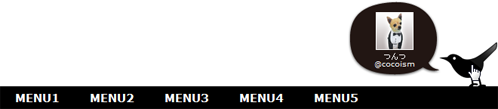 設置イメージ
<!DOCTYPE html PUBLIC "-//W3C//DTD XHTML 1.0 Transitional//EN" "http://www.w3.org/TR/xhtml1/DTD/xhtml1-transitional.dtd">
<html xmlns="http://www.w3.org/1999/xhtml" xml:lang="ja" lang="ja">
<head>
<meta http-equiv="Content-Type" content="text/html; charset=utf-8" />
<meta http-equiv="Content-Language" content="ja" />
<meta http-equiv="Content-Script-Type" content="text/javascript" />
<meta http-equiv="Content-Style-Type" content="text/css" />
<meta http-equiv="imagetoolbar" content="no" />
<title>エフェクト操作:カスタム:animate(params, options)の使用例 | jQuery</title>
<link rel="stylesheet" type="text/css" href="/content/lib/global.css" />
<script type="text/javascript" src="http://ajax.googleapis.com/ajax/libs/jquery/1.3.2/jquery.min.js"></script>
<script type="text/javascript" src="/content/lib/jquery/jquery.easing.1.3.js"></script>
<script type="text/javascript">
$(function(){
$("#icon").hover(function() {
$(this).prev("#tw").animate({opacity:"show", top:"-55"}, "fast");
},function() {
$(this).prev("#tw").animate({opacity:"hide", top:"-66"}, "fast");
});
});
</script>
<style type="text/css">
body {
background:#fff;
}
#gnav {
width:660px; height:89px;
position:relative;
margin:100px auto; padding:0;
}
#gnav ul {
list-style:none;
margin:0; padding:0;
position:absolute;
background:#000;
left:0; bottom:0;
width:100%; height:30px;
}
#gnav li {
display:inline;
line-height:30px;
font-size:15px;
font-weight:bold;
}
#gnav li a {
display:block;
margin:0 10px; padding:0 10px;
float:left;
text-decoration:none;
color:#fff;
}
#gnav li a:hover {
color:#ff6699;
}
#icon {
position:absolute;
top:0; right:0;
width:78px; height:69px;
background:transparent url("/content/img/ajax/tweet.png") no-repeat 0 0;
}
#tw {
display:none;
position:absolute;
top:-101px; left:462px;
width:122px; height:101px;
background:transparent url("/content/img/ajax/fuki.png") no-repeat 0 0;
z-index:9999;
font-size:10px;
text-align:center;
color:#fff;
}
#tw p {
margin:0; padding:13px;
line-height:1;
}
#tw img {
margin:3px; padding:0;
border:1px solid #fff;
}
</style>
</head>
<body>
<div id="wrap">
<h1>エフェクト操作:カスタム:animate(params, options)の使用例 | jQuery</h1>
<p>ナビゲーション右端の鳥アイコンにマウスオーバーすると、吹き出しをアニメーション表示。クリックすると、Twitterページに飛びます。</p>
<!-- CODE -->
<div id="gnav">
<ul>
<li><a href="#">MENU1</a></li>
<li><a href="#">MENU2</a></li>
<li><a href="#">MENU3</a></li>
<li><a href="#">MENU4</a></li>
<li><a href="#">MENU5</a></li>
</ul>
<div id="tw">
<p><a href="#"><img src="http://a2.twimg.com/profile_images/1162676686/taxid_normal.png" /></a><br>つんつ<br>@cocoism</p>
</div>
<a href="http://twitter.com/cocoism" id="icon"><img src="/content/img/ajax/tweet.png" /></a>
<br clear="all" />
</div>
<!-- / CODE -->
</div>
</body>
</html>
stop([clearQueue[, gotoEnd]])
現在動作中のアニメーションをすべて停止
2009/2/27
指定した要素上で動作中のアニメーションをすべて停止します。
ただし、いくつかのアニメーションが待機中の場合は、引数clearQueueにTRUEを指定しないと、それらのアニメーションがすぐに開始されてしまいます。 現在のアニメーションだけでなく、待機中のアニメーションも停止したい場合は、引数clearQueueにTRUEを指定する必要があります。
-
オプションの第1引数clearQueueには、待機中のアニメーションをクリアかするかどうかを真偽値で指定します。 TRUEを指定すると、待機中のアニメーションがすべてクリアされます。 FALSEを指定すると、現在動作中のアニメーションのみがクリアされるため、待機中のアニメーションがある場合は、残りのアニメーションが開始されます。
待機中のアニメーションとは、下記の例だと【再生】ボタンや【逆再生】ボタンを複数回クリックして、処理が待機中のアニメーションがあることを意味します。 clearQueueに「true」を指定することで、【停止】ボタンをクリックした時にこの待機中のアニメーションをすべてクリアし、効率的にアニメーションを停止することができます。
-
オプションの第2引数gotoEndには、現在動作中のアニメーションをすぐに終了するかどうかを真偽値で指定します。 すぐに終了する場合は、TRUEを指定します。 要素の表示・非表示で元のスタイルをリセットして、コールバック関数を呼ぶことを含みます。
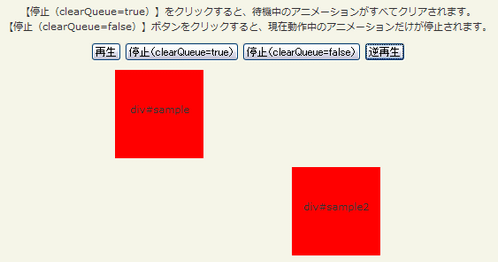 設置イメージ
<!DOCTYPE html PUBLIC "-//W3C//DTD XHTML 1.0 Transitional//EN" "http://www.w3.org/TR/xhtml1/DTD/xhtml1-transitional.dtd">
<html xmlns="http://www.w3.org/1999/xhtml" xml:lang="ja" lang="ja">
<head>
<meta http-equiv="Content-Type" content="text/html; charset=utf-8" />
<meta http-equiv="Content-Language" content="ja" />
<meta http-equiv="Content-Script-Type" content="text/javascript" />
<meta http-equiv="Content-Style-Type" content="text/css" />
<meta http-equiv="imagetoolbar" content="no" />
<title>エフェクト操作:カスタム:stop()の使用例 | jQuery</title>
<link rel="stylesheet" type="text/css" href="/content/lib/global.css" />
<script src="https://ajax.googleapis.com/ajax/libs/jquery/1.3.2/jquery.min.js"></script>
<script type="text/javascript">
$(function(){
/* 【再生】ボタンをクリックした時に、アニメーション開始 */
$("#btn_animate").click(function(){
$("#sample1").animate({left: '+=100px'}, 2000);
$("#sample2").animate({left: '-=100px'}, 2000);
});
/* 【停止】ボタンをクリックした時に、アニメーション停止 */
// Stop animation when button is clicked
$("#btn_stop_all").click(function(){
$(".sample").stop(true);
});
$("#btn_stop").click(function(){
$(".sample").stop(false);
});
/* 【逆再生】ボタンをクリックした時に、逆方向にアニメーションする */
$("#btn_back").click(function(){
$("#sample1").animate({left: '-=100px'}, 2000);
$("#sample2").animate({left: '+=100px'}, 2000);
});
});
</script>
<style type="text/css">
#wrap { text-align:center; }
.sample { margin:10px auto; width:100px; height:100px; background:red; position:relative; line-height:100px; text-align:center; }
</style>
</head>
<body>
<div id="wrap">
<h1>エフェクト操作:カスタム:stop()の使用例 | jQuery</h1>
<p>【停止(clearQueue=true)】をクリックすると、待機中のアニメーションがすべてクリアされます。<br>【停止(clearQueue=false)】ボタンをクリックすると、現在動作中のアニメーションだけが停止されます。</p>
<!-- CODE -->
<p>
<button id="btn_animate">再生</button>
<button id="btn_stop_all">停止(clearQueue=true)</button>
<button id="btn_stop">停止(clearQueue=false)</button>
<button id="btn_back">逆再生</button>
</p>
<p id="sample1" class="sample">div#sample</p>
<p id="sample2" class="sample">div#sample2</p>
<!-- / CODE -->
</div>
</body>
</html>

