jQuery APIリファレンスjQuery Core:データ

- data(name) ※v1.2.3~〔要素上に格納されたデータを取得〕
- data(name, value)〔名前をつけた場所に値を格納〕
- removeData(name)〔要素から指定した名前の格納データを削除 〕
- queue([name])〔最初の要素の関数の待ち行列の参照を返す〕
- queue([name,] callback)〔マッチした各要素の待ち行列の最後に実行する新しい関数を追加〕
- queue([name,] queue)〔マッチした各要素の待ち行列を新しい待ち行列で置換する〕
- dequeue([name])〔待ち行列の先頭から待機中の関数を取り出して実行〕
data(name) ※v1.2.3~
要素上に格納されたデータを取得
2009/2/27
要素上に格納されたデータを取得するのに使用します。 jQueryコレクションが多数の要素を参照する場合、戻り値は最初の要素を示します。
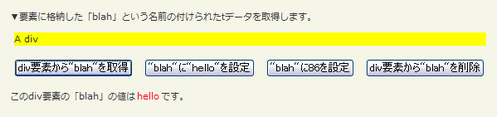
第1引数nameには、格納されたデータの名前を指定します。
<!DOCTYPE html PUBLIC "-//W3C//DTD XHTML 1.0 Transitional//EN" "http://www.w3.org/TR/xhtml1/DTD/xhtml1-transitional.dtd">
<html xmlns="http://www.w3.org/1999/xhtml" xml:lang="ja" lang="ja">
    <head>
        <meta http-equiv="Content-Type" content="text/html; charset=utf-8" />
        <meta http-equiv="Content-Language" content="ja" />
        <meta http-equiv="Content-Script-Type" content="text/javascript" />
        <meta http-equiv="Content-Style-Type" content="text/css" />
        <meta http-equiv="imagetoolbar" content="no" />
        <title>jQuery Core:データ:data()の使用例 | jQuery</title>
        <link rel="stylesheet" type="text/css" href="/content/lib/global.css" />
        <!-- JS -->
        <script src="https://ajax.googleapis.com/ajax/libs/jquery/1.3.2/jquery.min.js"></script>
        <script type="text/javascript">
            $(function(){
                $("button").click(function(e){
                    var value;
                    switch($("button").index(this)){
                        case 0:
                            value=$("#sample").data("blah");
                            break;
                        case 1:
                            $("#sample").data("blah", "hello");
                            value="格納しました";
                            break;
                        case 2:
                            $("#sample").data("blah", 86);
                            value="格納しました";
                            break;
                        case 3:
                            $("#sample").removeData("blah");
                            value="削除しました";
                            break;
                    }
                    $("span").text("" + value);
                });
            });
        </script>
        <style type="text/css">
            button { margin:5px; font-size:14px; }
            #sample { margin:5px; background:yellow; }
            #res { color:red; padding:0 2px; }
         </style>
    </head>
    <body>
        <div id="wrap">
            <h1>jQuery Core:データ:data()の使用例 | jQuery</h1>
            <p>▼要素に格納した「blah」という名前の付けられたtデータを取得します。</p>
<!-- CODE -->
            <div id="sample">A div</div>
            <p>
                <button>div要素から"blah"を取得</button>
                <button>"blah"に"hello"を設定</button>
                <button>"blah"に86を設定</button>
                <button>div要素から"blah"を削除</button>
            </p>
            <p>このdiv要素の「blah」の値は<span id="res">?</span>です。</p>
<!-- CODE / -->
        </div>
    </body>
</html>
data(name, value)
名前をつけた場所に値を格納
2009/2/27
名前をつけた場所に値を格納します。
jQueryコレクションが多数の要素を参照する場合、データ要素はそれらすべてに設定されます。 この関数は新しいexpandoを作成することなく、要素にデータを関連付けるのに便利です。 文字列に制限はなく、値にはどのような形式も指定可能です。
要素にイベントを関連付けるために使用してもよいですが、サポートされていません。
第1引数nameには、格納するデータの名前を指定します。
第2引数valueには、格納される値を指定します。
<!DOCTYPE html PUBLIC "-//W3C//DTD XHTML 1.0 Transitional//EN" "http://www.w3.org/TR/xhtml1/DTD/xhtml1-transitional.dtd">
<html xmlns="http://www.w3.org/1999/xhtml" xml:lang="ja" lang="ja">
    <head>
        <meta http-equiv="Content-Type" content="text/html; charset=utf-8" />
        <meta http-equiv="Content-Language" content="ja" />
        <meta http-equiv="Content-Script-Type" content="text/javascript" />
        <meta http-equiv="Content-Style-Type" content="text/css" />
        <meta http-equiv="imagetoolbar" content="no" />
        <title>jQuery Core:データ:data(name, value)の使用例 | jQuery</title>
        <link rel="stylesheet" type="text/css" href="/content/lib/global.css" />
        <!-- JS -->
        <script src="https://ajax.googleapis.com/ajax/libs/jquery/1.3.2/jquery.min.js"></script>
        <script type="text/javascript">
            $(function(){
                $("#sample").data("test", { first:16, last:"pizza!" });
                $("#sample strong:first").text($("#sample").data("test").first);
                $("#sample strong:last").text($("#sample").data("test").last);
            });
        </script>
        <style type="text/css">
            #sample { color:blue; }
            #sample strong { color:red; padding:0 2px; }
         </style>
    </head>
    <body>
        <div id="wrap">
            <h1>jQuery Core:データ:data(name, value)の使用例 | jQuery</h1>
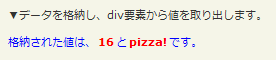
            <p>▼データを格納し、div要素から値を取り出します。</p>
<!-- CODE -->
            <p id="sample">格納された値は、<strong></strong>と<strong></strong>です。</p>
<!-- CODE / -->
        </div>
    </body>
</html>
removeData(name)
要素から指定した名前の格納データを削除
2009/2/27
要素から指定した名前の格納データを削除します。
これは$(...).data(name, value)の補助関数です。
第1引数nameには、削除する格納データの名前を指定します。
<!DOCTYPE html PUBLIC "-//W3C//DTD XHTML 1.0 Transitional//EN" "http://www.w3.org/TR/xhtml1/DTD/xhtml1-transitional.dtd">
<html xmlns="http://www.w3.org/1999/xhtml" xml:lang="ja" lang="ja">
    <head>
        <meta http-equiv="Content-Type" content="text/html; charset=utf-8" />
        <meta http-equiv="Content-Language" content="ja" />
        <meta http-equiv="Content-Script-Type" content="text/javascript" />
        <meta http-equiv="Content-Style-Type" content="text/css" />
        <meta http-equiv="imagetoolbar" content="no" />
        <title>jQuery Core:データ:removeData(name)の使用例 | jQuery</title>
        <link rel="stylesheet" type="text/css" href="/content/lib/global.css" />
        <!-- JS -->
        <script src="https://ajax.googleapis.com/ajax/libs/jquery/1.3.2/jquery.min.js"></script>
        <script type="text/javascript">
            $(function(){
                $("#sample strong:eq(0)").text("" + $("#sample div").data("test1"));
                /* 格納データ設定 */
                $("#sample div").data("test1", "値1");
                $("#sample div").data("test2", "値2");
                $("#sample strong:eq(1)").text("" + $("#sample div").data("test1"));
                /* 格納データから"test1"を削除 */
                $("#sample div").removeData("test1");
                $("#sample strong:eq(2)").text("" + $("#sample div").data("test1"));
                $("#sample strong:eq(3)").text("" + $("#sample div").data("test2"));
            });
        </script>
        <style type="text/css">
            #sample { color:blue; }
            #sample strong { color:red; }
         </style>
    </head>
    <body>
        <div id="wrap">
            <h1>jQuery Core:データ:removeData(name)の使用例 | jQuery</h1>
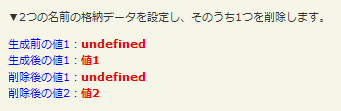
            <p>▼2つの名前の格納データを設定し、そのうち1つを削除します。</p>
<!-- CODE -->
            <div id="sample">
                <div>生成前の値1:<strong></strong></div>
                <div>生成後の値1:<strong></strong></div>
                <div>削除後の値1:<strong></strong></div>
                <div>削除後の値2:<strong></strong></div>
            </div>
<!-- CODE / -->
        </div>
    </body>
</html>
queue([name])
最初の要素の関数の待ち行列の参照を返す
2009/2/27
最初の要素の待ち行列(関数の配列)の参照を返します。
オプションの第1引数nameには、待ち行列(関数の配列)の名前を指定します(デフォルトは「fx」)。
 設置イメージ
<!DOCTYPE html PUBLIC "-//W3C//DTD XHTML 1.0 Transitional//EN" "http://www.w3.org/TR/xhtml1/DTD/xhtml1-transitional.dtd">
<html xmlns="http://www.w3.org/1999/xhtml" xml:lang="ja" lang="ja">
<head>
<meta http-equiv="Content-Type" content="text/html; charset=utf-8" />
<meta http-equiv="Content-Language" content="ja" />
<meta http-equiv="Content-Script-Type" content="text/javascript" />
<meta http-equiv="Content-Style-Type" content="text/css" />
<meta http-equiv="imagetoolbar" content="no" />
<title>jQuery Core:データ:queue()の使用例 | jQuery</title>
<link rel="stylesheet" type="text/css" href="/content/lib/global.css" />
<script src="https://ajax.googleapis.com/ajax/libs/jquery/1.3.2/jquery.min.js"></script>
<script type="text/javascript">
$(function(){
$("#btn_show").click(function(){
var n = $("#sample").queue("fx");
$("#res").text(n.length);
});
function runIt(){
$("#sample").show("slow");
$("#sample").animate({left:'+=200'},2000);
$("#sample").slideToggle(1000);
$("#sample").slideToggle("fast");
$("#sample").animate({left:'-=200'},1500);
$("#sample").hide("slow");
$("#sample").show(1200);
$("#sample").slideUp("normal", runIt);
}
runIt();
});
</script>
<style type="text/css">
strong { color:red; }
.ani { position:relative; width:400px; height:100px; }
#sample { margin:3px; width:40px; height:40px; position:absolute; left:0px; top:30px; background:green; display:none; }
</style>
</head>
<body>
<div id="wrap">
<h1>jQuery Core:データ:queue()の使用例 | jQuery</h1>
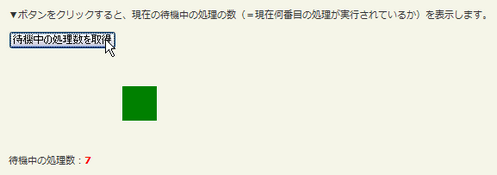
<p>▼ボタンをクリックすると、現在の待機中の処理の数(=現在何番目の処理が実行されているか)を表示します。</p>
<!-- CODE -->
<p><button id="btn_show">待機中の処理数を取得</button></p>
<div class="ani"><div id="sample"></div></div>
<p>待機中の処理数:<strong id="res"></strong></p>
<!-- / CODE -->
</div>
</body>
</html>
queue([name,] callback)
マッチした各要素の待ち行列の最後に実行する新しい関数を追加
2009/2/27
マッチした各要素の待ち行列(関数の配列)の終わりに、新しい関数を追加します。
追加した新しい関数は、待ち行列が終了した時に実行されます。
オプションの第1引数nameには、待ち行列の名前を指定します(デフォルトは「fx」)。
第2引数callbackには、待ち行列に追加する関数を指定します。
 設置イメージ
<!DOCTYPE html PUBLIC "-//W3C//DTD XHTML 1.0 Transitional//EN" "http://www.w3.org/TR/xhtml1/DTD/xhtml1-transitional.dtd">
<html xmlns="http://www.w3.org/1999/xhtml" xml:lang="ja" lang="ja">
<head>
<meta http-equiv="Content-Type" content="text/html; charset=utf-8" />
<meta http-equiv="Content-Language" content="ja" />
<meta http-equiv="Content-Script-Type" content="text/javascript" />
<meta http-equiv="Content-Style-Type" content="text/css" />
<meta http-equiv="imagetoolbar" content="no" />
<title>jQuery Core:データ:queue([name,] callback)の使用例 | jQuery</title>
<link rel="stylesheet" type="text/css" href="/content/lib/global.css" />
<script src="https://ajax.googleapis.com/ajax/libs/jquery/1.3.2/jquery.min.js"></script>
<script type="text/javascript">
$(function(){
$("#btn_show").click(function(){
$("#res").html("");
$("#sample").show("slow");
$("#sample").animate({left:'+=200'},2000);
/* 要素のキューが終了したら、新しい処理を追加して実行 */
$("#sample").queue(function(){
var txt=$("#res").html();
$("#res").html(txt+"要素の待機中の処理がすべて終了しました。要素にnewcolorクラスを追加する処理を新たに追加しました。<br>");
$(this).addClass("newcolor");
$(this).dequeue();
});
$("#sample").animate({left:'-=200'},500);
$("#sample").queue(function () {
var txt=$("#res").html();
$("#res").html(txt+"要素の待機中の処理がすべて終了しました。要素からnewcolorクラスを削除する処理を新たに追加しました。");
$(this).removeClass("newcolor");
$(this).dequeue();
});
$("#sample").slideUp();
});
});
</script>
<style type="text/css">
#res { color:red; height:3em; }
.ani { position:relative; width:400px; height:100px; }
#sample { margin:3px; width:100px; height:100px; line-height:100px; text-align:center; color:#fff; position:absolute; left:0px; top:0; background:red; display:none; }
#sample.newcolor { background:blue; }
</style>
</head>
<body>
<div id="wrap">
<h1>jQuery Core:データ:queue([name,] callback)の使用例 | jQuery</h1>
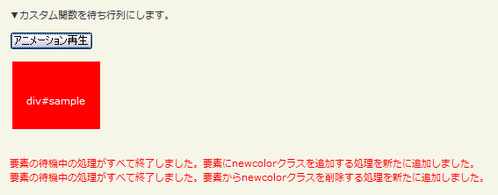
<p>▼カスタム関数を待ち行列にします。</p>
<!-- CODE -->
<p><button id="btn_show">アニメーション再生</button></p>
<div class="ani"><div id="sample">div#sample</div></div>
<p id="res"></p>
<!-- / CODE -->
</div>
</body>
</html>
queue([name,] queue)
マッチした各要素の待ち行列を新しい待ち行列で置換する
2009/2/27
マッチした各要素の待ち行列を、新しい待ち行列(関数の配列)で置換します。
-
オプションの第1引数nameには、待ち行列の名前を指定します(デフォルトは「fx」)。
-
第2引数queueには、すべての待ち行列をて置換する新しい待ち行列(関数の配列)を指定します。 この関数は、queue(callback)と同じパラメータと値を有します。
 設置イメージ
<!DOCTYPE html PUBLIC "-//W3C//DTD XHTML 1.0 Transitional//EN" "http://www.w3.org/TR/xhtml1/DTD/xhtml1-transitional.dtd">
<html xmlns="http://www.w3.org/1999/xhtml" xml:lang="ja" lang="ja">
<head>
<meta http-equiv="Content-Type" content="text/html; charset=utf-8" />
<meta http-equiv="Content-Language" content="ja" />
<meta http-equiv="Content-Script-Type" content="text/javascript" />
<meta http-equiv="Content-Style-Type" content="text/css" />
<meta http-equiv="imagetoolbar" content="no" />
<title>jQuery Core:データ:queue([name,] queue)の使用例 | jQuery</title>
<link rel="stylesheet" type="text/css" href="/content/lib/global.css" />
<script src="https://ajax.googleapis.com/ajax/libs/jquery/1.3.2/jquery.min.js"></script>
<script type="text/javascript">
$(function(){
$("#btn_start").click(function(){
$("#sample").show("slow");
$("#sample").animate({left:'+=200'},2000);
$("#sample").queue(function () {
$(this).addClass("newcolor");
$(this).dequeue();
});
$("#sample").animate({left:'-=200'},1500);
$("#sample").queue(function(){
$(this).removeClass("newcolor");
$(this).dequeue();
});
$("#sample").slideUp();
});
$("#btn_stop").click(function(){
$("#sample").queue("fx", []);
$("#sample").stop();
});
});
</script>
<style type="text/css">
#res { color:red; height:3em; }
.ani { position:relative; width:400px; height:100px; }
#sample { margin:3px; width:100px; height:100px; line-height:100px; text-align:center; color:#fff; position:absolute; left:0; top:0; background:red; display:none; }
#sample.newcolor { background:blue; }
</style>
</head>
<body>
<div id="wrap">
<h1>jQuery Core:データ:queue([name,] queue)の使用例 | jQuery</h1>
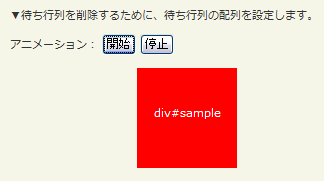
<p>▼待ち行列を削除するために、待ち行列の配列を設定します。</p>
<!-- CODE -->
<p>
アニメーション:
<button id="btn_start">開始</button>
<button id="btn_stop">停止</button>
</p>
<div class="ani"><div id="sample">div#sample</div></div>
<p id="res"></p>
<!-- / CODE -->
</div>
</body>
</html>
dequeue([name])
待ち行列の先頭から待機中の関数を取り出して実行
2009/2/27
待ち行列(関数の配列)の先頭から、待機中の関数を取り出して実行します。
オプションの第1引数nameには、待ち行列の名前を指定します(デフォルトは「fx」)。
 設置イメージ
<!DOCTYPE html PUBLIC "-//W3C//DTD XHTML 1.0 Transitional//EN" "http://www.w3.org/TR/xhtml1/DTD/xhtml1-transitional.dtd">
<html xmlns="http://www.w3.org/1999/xhtml" xml:lang="ja" lang="ja">
<head>
<meta http-equiv="Content-Type" content="text/html; charset=utf-8" />
<meta http-equiv="Content-Language" content="ja" />
<meta http-equiv="Content-Script-Type" content="text/javascript" />
<meta http-equiv="Content-Style-Type" content="text/css" />
<meta http-equiv="imagetoolbar" content="no" />
<title>jQuery Core:データ:dequeue([name])の使用例 | jQuery</title>
<link rel="stylesheet" type="text/css" href="/content/lib/global.css" />
<script src="https://ajax.googleapis.com/ajax/libs/jquery/1.3.2/jquery.min.js"></script>
<script type="text/javascript">
$(function(){
$("#btn_start").click(function(){
$("#sample").show("slow");
$("#sample").animate({left:'+=200'},2000);
$("#sample").animate({top:'0px'}, 600);
$("#sample").queue(function () {
$(this).toggleClass("red");
$(this).dequeue();
});
$("#sample").animate({left:'10px', top:'30px'},600);
});
});
</script>
<style type="text/css">
.ani { position:relative; width:400px; height:100px; }
#sample { margin:3px; width:100px; height:100px; line-height:100px; text-align:center; color:#fff; position:absolute; left:0; top:0; background:green; display:none; }
#sample.red { background:red; }
</style>
</head>
<body>
<div id="wrap">
<h1>jQuery Core:データ:dequeue([name])の使用例 | jQuery</h1>
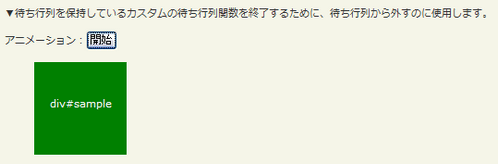
<p>▼待ち行列を保持しているカスタムの待ち行列関数を終了するために、待ち行列から外すのに使用します。
<!-- CODE -->
<p>アニメーション:<button id="btn_start">開始</button></p>
<div class="ani"><div id="sample">div#sample</div></div>
<!-- / CODE -->
</div>
</body>
</html>

