jQuery APIリファレンスDOM要素の属性:テキスト

text()
マッチした各要素のテキストコンテンツを結合して取得
2009/2/27
text() 戻り値:文字列
マッチした要素すべてのテキストコンテンツを結合した文字列を返します。
このメソッドは、HTMLとXHTMLドキュメント状で動作します。 input要素には使用できません。 inputフィールドの入力値を取得するには、テキストはval()を使用してください。
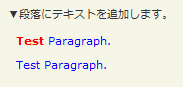
text()の使用例サンプルを見る
<!DOCTYPE html PUBLIC "-//W3C//DTD XHTML 1.0 Transitional//EN" "http://www.w3.org/TR/xhtml1/DTD/xhtml1-transitional.dtd">
<html xmlns="http://www.w3.org/1999/xhtml" xml:lang="ja" lang="ja">
    <head>
        <meta http-equiv="Content-Type" content="text/html; charset=utf-8" />
        <meta http-equiv="Content-Language" content="ja" />
        <meta http-equiv="Content-Script-Type" content="text/javascript" />
        <meta http-equiv="Content-Style-Type" content="text/css" />
        <meta http-equiv="imagetoolbar" content="no" />
        <title>DOM要素の属性(Attirbutes):テキスト(Text):text()の使用例 | jQuery</title>
        <link rel="stylesheet" type="text/css" href="/content/lib/global.css" />
        <!-- JS -->
        <script src="https://ajax.googleapis.com/ajax/libs/jquery/1.2.6/jquery.min.js"></script>
        <script type="text/javascript">
            $(function(){
                var str = $("#sample p:first").text();
                 $("#sample p:last").html(str);
            });
        </script>
        <style type="text/css">
            #sample p { color:blue; margin:8px; }
            #sample strong { color:red; }
        </style>
    </head>
    <body>
        <div id="wrap">
            <h1>DOM要素の属性(Attirbutes):テキスト(Text):text()の使用例 | jQuery</h1>
            <p>▼段落にテキストを追加します。</p>
<!-- CODE -->
            <div id="sample">
                <p><strong>Test</strong> Paragraph.</p>
                <p></p>
            </div>
<!-- CODE / -->
        </div>
    </body>
</html>
text(val)
マッチした要素すべてのテキストコンテンツを結合した文字列を取得
2009/2/27
text(val) 戻り値:jQuery
マッチした要素すべてにテキストコンテンツを設定します。
html()同様、HTMLをエスケープ(HTMLエンティティで「<」と「>」を置換)します。 input要素には使用できません。 inputフィールドの入力値を取得するには、テキストはval()を使用してください。
第1引数valには、要素のコンテンツに設定するテキストを指定します。
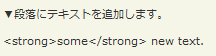
text(val)の使用例サンプルを見る
<!DOCTYPE html PUBLIC "-//W3C//DTD XHTML 1.0 Transitional//EN" "http://www.w3.org/TR/xhtml1/DTD/xhtml1-transitional.dtd">
<html xmlns="http://www.w3.org/1999/xhtml" xml:lang="ja" lang="ja">
    <head>
        <meta http-equiv="Content-Type" content="text/html; charset=utf-8" />
        <meta http-equiv="Content-Language" content="ja" />
        <meta http-equiv="Content-Script-Type" content="text/javascript" />
        <meta http-equiv="Content-Style-Type" content="text/css" />
        <meta http-equiv="imagetoolbar" content="no" />
        <title>DOM要素の属性(Attirbutes):テキスト(Text):text(val)の使用例 | jQuery</title>
        <link rel="stylesheet" type="text/css" href="/content/lib/global.css" />
        <!-- JS -->
        <script src="https://ajax.googleapis.com/ajax/libs/jquery/1.2.6/jquery.min.js"></script>
        <script type="text/javascript">
            $(function(){
               $("#sample").text("<strong>some</strong> new text.");
            });
        </script>
        <style type="text/css">
            .red { color:red; }
        </style>
    </head>
    <body>
        <div id="wrap">
            <h1>DOM要素の属性(Attirbutes):テキスト(Text):text(val)の使用例 | jQuery</h1>
            <p>▼段落にテキストを追加します。</p>
<!-- CODE -->
            <p id="sample">テストの段落</p>
<!-- CODE / -->
        </div>
    </body>
</html>

