jQuery APIリファレンスDOM要素の属性:HTML

html()
最初にマッチした要素のHTMLコンテンツを取得
2009/2/27
html() 戻り値:文字列
最初にマッチした要素のHTMLコンテンツ(インナーHTML)を取得します。
このプロパティは、XHTMLドキュメントでは利用できますが、XMLドキュメント上では利用できません。
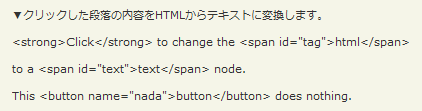
html()の使用例サンプルを見る
<!DOCTYPE html PUBLIC "-//W3C//DTD XHTML 1.0 Transitional//EN" "http://www.w3.org/TR/xhtml1/DTD/xhtml1-transitional.dtd">
<html xmlns="http://www.w3.org/1999/xhtml" xml:lang="ja" lang="ja">
    <head>
        <meta http-equiv="Content-Type" content="text/html; charset=utf-8" />
        <meta http-equiv="Content-Language" content="ja" />
        <meta http-equiv="Content-Script-Type" content="text/javascript" />
        <meta http-equiv="Content-Style-Type" content="text/css" />
        <meta http-equiv="imagetoolbar" content="no" />
        <title>DOM要素の属性(Attirbutes):HTML:html()の使用例 | jQuery</title>
        <link rel="stylesheet" type="text/css" href="/content/lib/global.css" />
        <!-- JS -->
        <script src="https://ajax.googleapis.com/ajax/libs/jquery/1.3.2/jquery.min.js"></script>
        <script type="text/javascript">
            $(function(){
                $("#sample p").click(function(){
                    var htmlStr=$(this).html();
                    $(this).text(htmlStr);
                });
            });
        </script>
        <style type="text/css">
            strong { text-decoration:underline; color:blue; }
        </style>
    </head>
    <body>
        <div id="wrap">
            <h1>DOM要素の属性(Attirbutes):HTML:html()の使用例 | jQuery</h1>
            <p>▼クリックした段落の内容をHTMLからテキストに変換します。</p>
<!-- CODE -->
            <div id="sample">
                <p><strong>Click</strong> to change the <span id="tag">html</span></p>
                <p>to a <span id="text">text</span> node.</p>
                <p>This <button name="nada">button</button> does nothing.</p>
            </div>
<!-- CODE / -->
        </div>
    </body>
</html>
html(val)
マッチした各要素にHTMLコンテンツを設定
2009/2/27
html(var) 戻り値:jQuery
マッチした各要素にHTMLコンテンツを設定します。
このプロパティは、XHTMLドキュメントでは利用できますが、XMLドキュメント上では利用できません。
第1引数valには、要素に設定するHTMLコンテンツを指定します。
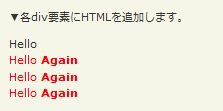
html(val)の使用例サンプルを見る
<!DOCTYPE html PUBLIC "-//W3C//DTD XHTML 1.0 Transitional//EN" "http://www.w3.org/TR/xhtml1/DTD/xhtml1-transitional.dtd">
<html xmlns="http://www.w3.org/1999/xhtml" xml:lang="ja" lang="ja">
    <head>
        <meta http-equiv="Content-Type" content="text/html; charset=utf-8" />
        <meta http-equiv="Content-Language" content="ja" />
        <meta http-equiv="Content-Script-Type" content="text/javascript" />
        <meta http-equiv="Content-Style-Type" content="text/css" />
        <meta http-equiv="imagetoolbar" content="no" />
        <title>DOM要素の属性(Attirbutes):HTML:html(val)の使用例 | jQuery</title>
        <link rel="stylesheet" type="text/css" href="/content/lib/global.css" />
        <!-- JS -->
        <script src="https://ajax.googleapis.com/ajax/libs/jquery/1.3.2/jquery.min.js"></script>
        <script type="text/javascript">
            $(function(){
               $("#sample div").html("<span class='red'>Hello <strong>Again</strong></span>");
            });
        </script>
        <style type="text/css">
            .red { color:red; }
        </style>
    </head>
    <body>
        <div id="wrap">
            <h1>DOM要素の属性(Attirbutes):HTML:html(val)の使用例 | jQuery</h1>
            <p>▼各div要素にHTMLを追加します。</p>
<!-- CODE -->
            <div id="sample">
                <span>Hello</span>
                <div></div>
                <div></div>
                <div></div>
            </div>
<!-- CODE / -->
        </div>
    </body>
</html>

