その他のJSライブラリ透過PNGをIE6に対応させる方法いろいろ

- iepngfix.js〔IE6以下への透過PNG対応〕
- alphafilter.js〔アルファ画像を透過するJSライブラリ〕
- DirectXのAlphaImageLoader使用〔IE 5.5+〕
- IE PNG Alpha Fix v1.0〔透過GIF、iepngfix.htc使用〕
- ie7.js使用
- jquery.pngFix.js〔IE 5.5とIE6で透過PNGを使えるようにする〕
- Tutorials:PNG Opacity Fix for IE6〔jQuery使用〕
- jQuery ifixpng plugins〔Jqueryプラグイン〕
iepngfix.js
IE6以下への透過PNG対応
2008/12/16
IE PNG Fix
IE7では透過PNG(24bit PNG)をサポートしていますが、IE6以下ではサポートしていないため、透過PNGの透過部分の背景がグレーっぽく表示されてしまいます。
そのバージョン6以下のIEに透過PNG対応させるjQueryプラグインです。 jQueryを使用しているため、ページ全体のimg要素に適用したり、img要素のsrc属性に指定した画像ファイルの拡張子が「.png」の画像にのみ適用したり、特定の要素に適用したりなど、どの範囲で適用するかの指定が簡単に実装できます。
<script type='text/javascript'>
/* ページ全体のimg要素に適用する場合 */
jQuery(function($) {
    $('img').pngfix();
});
</script>
<script type='text/javascript'>
/* 拡張子が「.png」の画像、特定のID名の要素にのみ適用する場合 */
jQuery(function($) {
    $('img[@src$=png], #image-one, #image-two').pngfix();
});
</script>
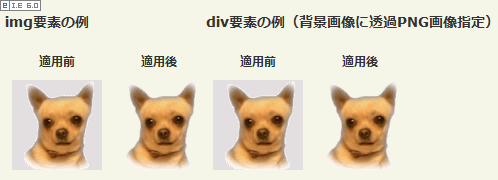 設置イメージ
<!DOCTYPE html PUBLIC "-//W3C//DTD XHTML 1.0 Transitional//EN" "http://www.w3.org/TR/xhtml1/DTD/xhtml1-transitional.dtd">
<html xmlns="http://www.w3.org/1999/xhtml" xml:lang="ja" lang="ja">
<head>
<meta http-equiv="Content-Type" content="text/html; charset=utf-8" />
<meta http-equiv="Content-Language" content="ja" />
<meta http-equiv="Content-Script-Type" content="text/javascript" />
<meta http-equiv="Content-Style-Type" content="text/css" />
<meta http-equiv="imagetoolbar" content="no" />
<title>IE PNG Fix | 設置サンプル</title>
<link rel="stylesheet" type="text/css" href="/content/lib/global.css" />
<!-- JS -->
<script src="https://ajax.googleapis.com/ajax/libs/jquery/1.2.6/jquery.min.js"></script>
<script type="text/javascript" src="/content/lib/jquery/jquerypngfix.js"></script>
<script type="text/javascript">
jQuery(function($) {
/* img要素のid名が「iepng」の画像にのみ適用 */
$('img#iepng, div#iepng_on').pngfix();
});
</script>
<!-- CSS -->
<style type="text/css">
div#iepng_off,
div#iepng_on {
background:transparent url("/content/img/dog_white.png") no-repeat 0 0;
width:90px; height:90px;
text-indent:-9999px;
}
</style>
</head>
<body>
<div id="wrap">
<h1><a href='http://plugins.jquery.com/project/iepngfix'>IE PNG Fix</a></h1>
<!-- CODE -->
<h2>img要素の例</h2>
<table>
<tr><th>適用前</th><th>適用後</th>
<tr>
<td><img src="/content/img/dog_white.png" alt="適用前" /></td>
<td><img src="/content/img/dog_white.png" alt="適用後" id="iepng" /></td>
</tr>
</table>
<h2>div要素の例(背景画像に透過PNG画像指定)</h2>
<table>
<tr><th>適用前</th><th>適用後</th>
<tr>
<td><div id="iepng_off">適用前</div></td>
<td><div id="iepng_on">適用前</div></td>
</tr>
</table>
</div>
<!-- / CODE -->
</body>
</html>
alphafilter.js
アルファ画像を透過するJSライブラリ
2008/12/16
アルファ画像を扱うalphafilter.jsライブラリ[to-R]
IE6では透過PNG(アルファ画像)がサポートされていないため、透過PNGの透過部分の背景が水色になってしまうIEのバグを解消してくれるJSライブラリです!
設置するには、「alphafilter.js」をHEAD要素内で外部JSとして読み込み、透過PNGを指定しているIMG要素に「class='alphafilter'」を指定します。 背景画像に透過PNGを指定している場合は、背景画像を指定している要素に「class='alphafilter'」を指定します。
 透過PNGの表示例
背景色のリピート未対応、他のIEフィルターと同時使用不可、ポジション指定のあるブロック要素ではうまく動作しないなど数点、既知の不具合があります。 他にもIMG要素をブロック要素内に入れると画像の高さが縮まって表示されてしまいました。 入れ子にできないのは痛いですが、、、面白いライブラリです。
<head>
  <script type="text/javascript" defer="defer" src="alphafilter.js"></script>
</head>
<body>
  <p><img src="./sample.png" class="alphafilter" alt="" /></p>
  <p class="alphafilter">テキスト</p>
</body>
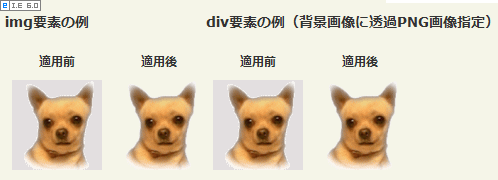 設置イメージ
<!DOCTYPE html PUBLIC "-//W3C//DTD XHTML 1.0 Transitional//EN" "http://www.w3.org/TR/xhtml1/DTD/xhtml1-transitional.dtd">
<html xmlns="http://www.w3.org/1999/xhtml" xml:lang="ja" lang="ja">
<head>
<meta http-equiv="Content-Type" content="text/html; charset=utf-8" />
<meta http-equiv="Content-Language" content="ja" />
<meta http-equiv="Content-Script-Type" content="text/javascript" />
<meta http-equiv="Content-Style-Type" content="text/css" />
<meta http-equiv="imagetoolbar" content="no" />
<title>alphafilter.js | 設置サンプル</title>
<link rel="stylesheet" type="text/css" href="/content/lib/global.css" />
<!-- JS -->
<script type="text/javascript" defer="defer" src="/content/jslib/alphafilter.js"></script>
<!-- CSS -->
<style type="text/css">
td {
/* td要素内でclass="alphafilter"を指定しているimg要素の一部が切り取られて表示される不具合を回避 */
width:90px; height:90px;
}
div#iepng_off,
div#iepng_on {
background:transparent url("/content/img/dog_white.png") no-repeat 0 0;
width:90px; height:90px;
text-indent:-9999px;
}
</style>
</head>
<body>
<div id="wrap">
<h1><a href='http://blog.webcreativepark.net/2007/02/01-233315.html'>alphafilter.js</a> | 設置サンプル</h1>
<!-- CODE -->
<h2>img要素の例</h2>
<table>
<tr><th>適用前</th><th>適用後</th>
<tr>
<td><img src="/content/img/dog_white.png" alt="適用前" /></td>
<td><img src="/content/img/dog_white.png" alt="適用後" class="alphafilter" /></td>
</tr>
</table>
<h2>div要素の例(背景画像に透過PNG画像指定)</h2>
<table>
<tr><th>適用前</th><th>適用後</th>
<tr>
<td><div id="iepng_off">適用前</div></td>
<td><div id="iepng_on" class="alphafilter">適用前</div></td>
</tr>
</table>
</div>
<!-- / CODE -->
</body>
</html>
DirectXのAlphaImageLoader使用
IE 5.5+
unknown
DirectXのAlphaImageLoaderを使用すれば、CSSのみで透過PNGをバージョン5.5以上のIEに対応させることができます。 ただし、画像ごとに個別に指定しなければならないので、画像数が多い場合は面倒です。
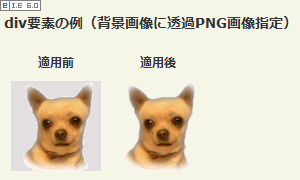 設置イメージ
<!DOCTYPE html PUBLIC "-//W3C//DTD XHTML 1.0 Transitional//EN" "http://www.w3.org/TR/xhtml1/DTD/xhtml1-transitional.dtd">
<html xmlns="http://www.w3.org/1999/xhtml" xml:lang="ja" lang="ja">
<head>
<meta http-equiv="Content-Type" content="text/html; charset=utf-8" />
<meta http-equiv="Content-Language" content="ja" />
<meta http-equiv="Content-Script-Type" content="text/javascript" />
<meta http-equiv="Content-Style-Type" content="text/css" />
<meta http-equiv="imagetoolbar" content="no" />
<title>IE PNG Fix | 設置サンプル</title>
<link rel="stylesheet" type="text/css" href="/content/lib/global.css" />
<!-- CSS -->
<style type="text/css">
div#iepng_off,
div#iepng_on {
background:transparent url("/content/img/dog_white.png") no-repeat 0 0;
width:90px; height:90px;
text-indent:-9999px;
}
/* IE6以下のブラウザに適用 */
* html body div#iepng_on {
background:none;
filter: progid:DXImageTransform.Microsoft.AlphaImageLoader(src="/content/img/dog_white.png", sizingMethod="scale");
}
</style>
</head>
<body>
<div id="wrap">
<h1><a href='http://plugins.jquery.com/project/iepngfix'>IE PNG Fix</a></h1>
<!-- CODE -->
<h2>div要素の例(背景画像に透過PNG画像指定)</h2>
<table>
<tr><th>適用前</th><th>適用後</th>
<tr>
<td><div id="iepng_off">適用前</div></td>
<td><div id="iepng_on">適用前</div></td>
</tr>
</table>
</div>
<!-- / CODE -->
</body>
</html>
IE PNG Alpha Fix v1.0
透過GIF、iepngfix.htc使用
unknown
IE PNG Alpha Fix v1.0
blank.gif(透過GIF)を使用して透過PNGをIE6に対応させる方法が掲載されています。 CSSで、透過PNGに対応させたい要素に「iepngfix.htc」というファイルをbehaviorプロパティで指定します。
<style type='text/css'>
/* ページ全体のimg要素、div要素、input要素に適用 */
  img, div, input { behavior: url('js/iepngfix.htc') }
</style>
<style type='text/css'>
/* img要素のid名が「iepng」の画像にのみ適用 */
  img#iepng { behavior: url('js/iepngfix.htc') }
</style>
blank.gif(透過GIF)の場所は、iepngfix.htcの15行目にある変数blankImgで指定します。
15行目:if (typeof blankImg == 'undefined') var blankImg = 'js/blank.gif';
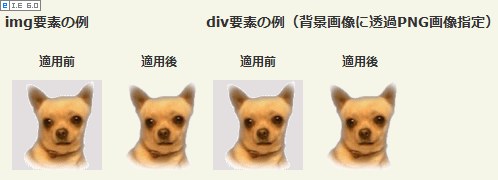 設置イメージ
<!DOCTYPE html PUBLIC "-//W3C//DTD XHTML 1.0 Transitional//EN" "http://www.w3.org/TR/xhtml1/DTD/xhtml1-transitional.dtd">
<html xmlns="http://www.w3.org/1999/xhtml" xml:lang="ja" lang="ja">
<head>
<meta http-equiv="Content-Type" content="text/html; charset=utf-8" />
<meta http-equiv="Content-Language" content="ja" />
<meta http-equiv="Content-Script-Type" content="text/javascript" />
<meta http-equiv="Content-Style-Type" content="text/css" />
<meta http-equiv="imagetoolbar" content="no" />
<title>IE PNG Alpha Fix v1.0 | 設置サンプル</title>
<link rel="stylesheet" type="text/css" href="/content/lib/global.css" />
<!-- CSS -->
<style type="text/css">
/* img要素のid名が「iepng」の画像に適用 */
img#iepng { behavior:url("/content/jslib/iepngfix.htc") }
div#iepng_off,
div#iepng_on {
background:transparent url("/content/img/dog_white.png") no-repeat 0 0;
width:90px; height:90px;
text-indent:-9999px;
}
/* div要素のid名が「iepng_on」に適用 */
div#iepng_on { behavior: url("/content/jslib/iepngfix.htc") }
</style>
</head>
<body>
<div id="wrap">
<h1><a href='http://www.twinhelix.com/css/iepngfix/'>IE PNG Alpha Fix v1.0</a> | 設置サンプル</h1>
<!-- CODE -->
<h2>img要素の例</h2>
<table>
<tr><th>適用前</th><th>適用後</th>
<tr>
<td><img src="/content/img/dog_white.png" alt="適用前" /></td>
<td><img src="/content/img/dog_white.png" alt="適用後" id="iepng" /></td>
</tr>
</table>
<h2>div要素の例(背景画像に透過PNG画像指定)</h2>
<table>
<tr><th>適用前</th><th>適用後</th>
<tr>
<td><div id="iepng_off">適用前</div></td>
<td><div id="iepng_on">適用前</div></td>
</tr>
</table>
<!-- / CODE -->
</div>
</body>
</html>
ie7.js使用
unknown
ie7-js - Google Code
透過したい画像のファイル名が「hoge.png」の場合は、「hoge-trans.png」というようにファイル名の末尾に「-trans」をつける必要があります。
IE7.jsは、IEのバージョンが7未満の場合のみ読み込むように条件付きコメント<!--[if lt IE 7]> ~ <![endif]-->を使用します。
<head>
<!--[if lt IE 7]>
<script type="text/javascript" src="/content/jslib/IE7.js" charset="utf-8"></script>
<![endif]-->
<style type="text/css">
    /* div要素の例(背景画像に透過PNG画像指定) */
    div#iepng_on {
      background:url("/content/img/dog_white-trans.png");
      width:90px; height:90px;
      text-indent:-9999px;
    }
</style>
</head>
<body>
    <!-- img要素の場合 -->
    <img src="/content/img/dog_white-trans.png" alt="" />
    <!-- div要素の場合(背景画像に透過PNG画像指定) -->
    <div id="iepng_on">透過PNG</div>
</body>
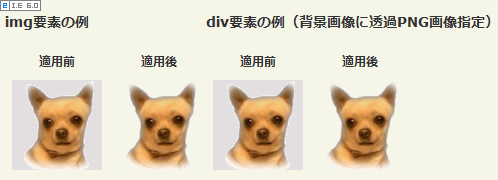 設置イメージ
<!DOCTYPE html PUBLIC "-//W3C//DTD XHTML 1.0 Transitional//EN" "http://www.w3.org/TR/xhtml1/DTD/xhtml1-transitional.dtd">
<html xmlns="http://www.w3.org/1999/xhtml" xml:lang="ja" lang="ja">
<head>
<meta http-equiv="Content-Type" content="text/html; charset=utf-8" />
<meta http-equiv="Content-Language" content="ja" />
<meta http-equiv="Content-Script-Type" content="text/javascript" />
<meta http-equiv="Content-Style-Type" content="text/css" />
<meta http-equiv="imagetoolbar" content="no" />
<title>ie7.js | 設置サンプル</title>
<link rel="stylesheet" type="text/css" href="/content/lib/global.css" />
<!-- JS -->
<!--[if lt IE 7]>
<script type="text/javascript" src="/content/jslib/IE7.js"></script>
<![endif]-->
<!-- CSS -->
<style type="text/css">
/* div要素の例(背景画像に透過PNG画像指定) */
div#iepng_off {
background:url("/content/img/dog_white.png");
width:90px; height:90px;
text-indent:-9999px;
}
div#iepng_on {
background:url("/content/img/dog_white-trans.png");
width:90px; height:90px;
text-indent:-9999px;
}
/* td要素内にimgを配置した場合の不具合対応 */
td img { width:90px; height:90px; }
</style>
</head>
<body>
<div id="wrap">
<h1><a href='http://code.google.com/p/ie7-js/'>ie7-js - Google Code</a> | 設置サンプル</h1>
<!-- CODE -->
<h2>img要素の例</h2>
<table>
<tr><th>適用前</th><th>適用後</th></tr>
<tr>
<td><img src="/content/img/dog_white.png" alt="透過PNG" /></td>
<td><img src="/content/img/dog_white-trans.png" alt="透過PNG" /></td>
</tr>
</table>
<h2>div要素の例(背景画像に透過PNG画像指定)</h2>
<table>
<tr><th>適用前</th><th>適用後</th></tr>
<tr>
<td><div id="iepng_off">透過PNG</div></td>
<td><div id="iepng_on">透過PNG</div></td>
</tr>
</table>
<!-- / CODE -->
</div>
</body>
</html>
jquery.pngFix.js
IE 5.5とIE6で透過PNGを使えるようにする
2009/2/23
jquery.pngFix.js
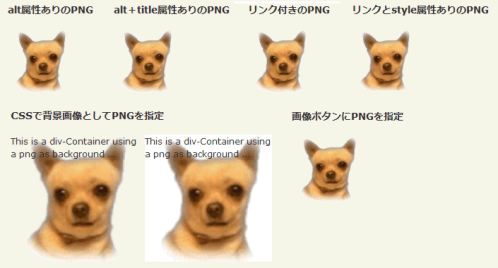
IE5.5、IE6に透過PNGを対応させるjQueryプラグイン。
対象となる要素を$('#wrap').pngFix( );のように指定するだけで簡単に実装できます。
要素の背景画像に指定している透過PNGにも適用されます。
ただしIE6だと、背景画像のrepeatが効かず、背景画像を指定した要素サイズに拡大されて表示されてしまいます。
 設置イメージ
<!DOCTYPE html PUBLIC "-//W3C//DTD XHTML 1.0 Transitional//EN" "http://www.w3.org/TR/xhtml1/DTD/xhtml1-transitional.dtd">
<html xmlns="http://www.w3.org/1999/xhtml" xml:lang="ja" lang="ja">
<head>
<meta http-equiv="Content-Type" content="text/html; charset=utf-8" />
<meta http-equiv="Content-Language" content="ja" />
<meta http-equiv="Content-Script-Type" content="text/javascript" />
<meta http-equiv="Content-Style-Type" content="text/css" />
<meta http-equiv="imagetoolbar" content="no" />
<title>jquery.pngFix.js | 設置サンプル</title>
<link rel="stylesheet" type="text/css" href="/content/lib/global.css" />
<!-- JS -->
<script src="https://ajax.googleapis.com/ajax/libs/jquery/1.2.6/jquery.min.js"></script>
<script type="text/javascript" src="/content/lib/jquery/jquery.pngFix.js"></script>
<script type="text/javascript">
$(function(){
$('#wrap').pngFix( );
});
</script>
</head>
<body>
<div id="wrap">
<h1><a href='http://jquery.andreaseberhard.de/pngFix/'>jquery.pngFix.js</a> | 設置サンプル</h1>
<!-- CODE -->
<h2>alt属性ありのPNG</h2>
<p><img src="/content/img/dog_white.png" alt="適用後" /></p>
<h2>alt+title属性ありのPNG</h2>
<p><img src="/content/img/dog_white.png" alt="適用前" title="This is the title-Text" /></p>
<h2>リンク付きのPNG</h2>
<p><a href="#" onclick="alert('click!');return false;"><img src="/content/img/dog_white.png" alt="適用前" title="This is the title-Text" /></a></p>
<h2>リンクとstyle属性ありのPNG</h2>
<p><a href="#" onclick="alert('click!');return false;"><img src="/content/img/dog_white.png" alt="適用前" title="This is the title-Text" /></a></p>
<h2>CSSで背景画像としてPNGを指定</h2>
<div class="cf">
<div style="float:left;width:180px;height:180px;background:transparent url(/content/img/dog_white.png) repeat 0 0;">
This is a div-Container using a png as background ...
</div>
<div style="float:left;width:180px;height:180px;margin:0 0 0 10px;background:#fff url(/content/img/dog_white.png) repeat 0 0;">
This is a div-Container using a png as background ...
</div>
<div style="clear:both;"></div>
</div>
<h2>画像ボタンにPNGを指定</h2>
<form>
<input type="image" src="/content/img/dog_white.png" width="90" height="90" />
</form>
<!-- / CODE -->
</div>
</body>
</html>
Tutorials:PNG Opacity Fix for IE6
jQuery使用
unknown
PNG Opacity Fix for IE6
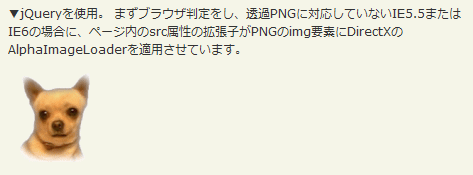
jQueryを使用。 まずブラウザ判定をし、透過PNGに対応していないIE5.5またはIE6の場合に、ページ内のsrc属性の拡張子がPNGのimg要素にDirectXのAlphaImageLoaderを適用させる方法が掲載されています。
 設置イメージ
<!DOCTYPE html PUBLIC "-//W3C//DTD XHTML 1.0 Transitional//EN" "http://www.w3.org/TR/xhtml1/DTD/xhtml1-transitional.dtd">
<html xmlns="http://www.w3.org/1999/xhtml" xml:lang="ja" lang="ja">
<head>
<meta http-equiv="Content-Type" content="text/html; charset=utf-8" />
<meta http-equiv="Content-Language" content="ja" />
<meta http-equiv="Content-Script-Type" content="text/javascript" />
<meta http-equiv="Content-Style-Type" content="text/css" />
<meta http-equiv="imagetoolbar" content="no" />
<title>IE PNG Fix | 設置サンプル</title>
<link rel="stylesheet" type="text/css" href="/content/lib/global.css" />
<!-- JS -->
<script src="https://ajax.googleapis.com/ajax/libs/jquery/1.3.2/jquery.min.js"></script>
<script type="text/javascript">
/* 置換する透過GIF画像 */
var blank=new Image();
blank.src='/content/img/blank.gif';
$(function() {
/* IE5.5、IE6かどうか判定 */
var badBrowser=(/MSIE ((5\.5)|6)/.test(navigator.userAgent) && navigator.platform == "Win32");
if (badBrowser){
/* img要素のsrc属性の値で拡張子PNGのimg要素に対して透過PNGを対応させる */
$('img[src$=.png]').each(function() {
if (!this.complete) {
this.onload=function(){ fixPng(this) };
}else{
fixPng(this);
}
});
}
});
function fixPng(png) {
/* PNG画像のパスを取得 */
var src = png.src;
/* 幅と高さを設定 */
if (!png.style.width) { png.style.width = $(png).width(); }
if (!png.style.height) { png.style.height = $(png).height(); }
/* 透過GIF画像に置換 */
png.src = blank.src;
/* フィルター設定(オリジナル画像表示) */
png.runtimeStyle.filter="progid:DXImageTransform.Microsoft.AlphaImageLoader(src='"+src+"',sizingMethod='scale')";
}
</script>
</head>
<body>
<div id="wrap">
<h1><a href='http://docs.jquery.com/Tutorials:PNG_Opacity_Fix_for_IE6'>PNG Opacity Fix for IE6</a> | 設置サンプル</h1>
<p>▼jQueryを使用。 まずブラウザ判定をし、透過PNGに対応していないIE5.5またはIE6の場合に、ページ内のsrc属性の拡張子がPNGのimg要素にDirectXのAlphaImageLoaderを適用させています。</p>
<!-- CODE -->
<p><img src="/content/img/dog_white.png" alt="" /></p>
<!-- / CODE -->
</body>
</html>
jQuery ifixpng plugins
Jqueryプラグイン
unknown
jQuery.ifixpng.js
透過PNGに対応していないIE5.5またはIE6の場合に、指定した要素を透過PNGに対応させるjQueryプラグイン。
// apply to all png images
$('img[@src$=.png]').ifixpng();

// apply to all png images and to div#logo
$('img[@src$=.png], div#logo').ifixpng();

// apply to div#logo, undo fix, then apply the fix again
$('img[@src$=.png], div#logo').ifixpng().iunfixpng().ifixpng();

// apply to div#logo2, modify css property and add click event
$('div#logo2').ifixpng().css({cursor:'pointer'}).click(function(){ alert('ifixpng is cool!'); });
設置イメージ<!DOCTYPE html PUBLIC "-//W3C//DTD XHTML 1.0 Transitional//EN" "http://www.w3.org/TR/xhtml1/DTD/xhtml1-transitional.dtd">
<html xmlns="http://www.w3.org/1999/xhtml" xml:lang="ja" lang="ja">
<head>
<meta http-equiv="Content-Type" content="text/html; charset=utf-8" />
<meta http-equiv="Content-Language" content="ja" />
<meta http-equiv="Content-Script-Type" content="text/javascript" />
<meta http-equiv="Content-Style-Type" content="text/css" />
<meta http-equiv="imagetoolbar" content="no" />
<title>IE PNG Fix | 設置サンプル</title>
<link rel="stylesheet" type="text/css" href="/content/lib/global.css" />
<!-- JS -->
<script src="https://ajax.googleapis.com/ajax/libs/jquery/1.3.2/jquery.min.js"></script>
<script type="text/javascript">
/* 置換する透過GIF画像 */
var blank=new Image();
blank.src='/content/img/blank.gif';
$(function() {
/* IE5.5、IE6かどうか判定 */
var badBrowser=(/MSIE ((5\.5)|6)/.test(navigator.userAgent) && navigator.platform == "Win32");
if (badBrowser){
/* img要素のsrc属性の値で拡張子PNGのimg要素に対して透過PNGを対応させる */
$('img[src$=.png]').each(function() {
if (!this.complete) {
this.onload=function(){ fixPng(this) };
}else{
fixPng(this);
}
});
}
});
function fixPng(png) {
/* PNG画像のパスを取得 */
var src = png.src;
/* 幅と高さを設定 */
if (!png.style.width) { png.style.width = $(png).width(); }
if (!png.style.height) { png.style.height = $(png).height(); }
/* 透過GIF画像に置換 */
png.src = blank.src;
/* フィルター設定(オリジナル画像表示) */
png.runtimeStyle.filter="progid:DXImageTransform.Microsoft.AlphaImageLoader(src='"+src+"',sizingMethod='scale')";
}
</script>
</head>
<body>
<div id="wrap">
<h1><a href='http://docs.jquery.com/Tutorials:PNG_Opacity_Fix_for_IE6'>PNG Opacity Fix for IE6</a> | 設置サンプル</h1>
<p>▼jQueryを使用。 まずブラウザ判定をし、透過PNGに対応していないIE5.5またはIE6の場合に、ページ内のsrc属性の拡張子がPNGのimg要素にDirectXのAlphaImageLoaderを適用させています。</p>
<!-- CODE -->
<p><img src="/content/img/dog_white.png" alt="" /></p>
<!-- / CODE -->
</body>
</html>

