frameオブジェクトフレーム/フレームセット

- フレームの書き方
- フレームの分割方法
- フレームを指定して印刷
- フレームリンクされたら、トップページへ飛ばす
- 複数のフレームを同時に変更〔フレーム数取得、フレーム名取得、フレームのURL取得〕
- 他のフレームを操作
- ウィンドウ内のフレーム数を取得〔window.length〕
- Frameset/frameオブジェックト一覧
- フレームセットの分割方法を取得・設定〔cols/rowsメソッド〕
- 親フレーム(frameset)の分割方法を取得・設定〔cols/rowsプロパティ〕
- フレームの枠線の表示・非表示を取得・設定〔frameBorderプロパティ〕
- フレームをHTMLオブジェクトとして返す〔contentDocumentプロパティ ※IE未対応〕
- フレーム文書が定義されている文書のURLを取得・設定〔longDescプロパティ〕
- フレームのリサイズを禁止〔noResizeプロパティ〕
- フレームのスクロールバーを表示・非表示〔scrollingプロパティ ※IE未対応〕
- フレーム内に読み込むページのURLを取得・設定〔srcプロパティ〕
フレームの書き方
unknown
親フレーム(frameset要素)内に子フレーム(frame要素)を記述します。
フレーム未対応のブラウザの代替テキストをnoframes要素に記述します。
フレームのデザインによって子フレームの数や親フレームの属性指定(rows、cols)が異なります。 2分割、3分割など、フレームの分割数は自由自在で、複雑なフレーム構造にすることも可能です。
複数分割するには、分割数に応じてrows(縦方向分割の割合)、cols(横方向分割の割合)のパーセント指定を カンマ区切りで追加します。
通常のWebページと違い、フレームを使う場合はbody要素を記述しません。
ただし、noframes要素の代替テキストはbody要素内に記述する必要があります。
フレームの書き方は間違って覚えている事が多いです。
間違っても表示されますが、正しいフレームの書き方を覚えておきましょう。
<!DOCTYPE html PUBLIC "-//W3C//DTD XHTML 1.0 Frameset//EN" "http://www.w3.org/TR/xhtml1/DTD/xhtml1-frameset.dtd">
<html xmlns="http://www.w3.org/1999/xhtml" xml:lang="ja" lang="ja">
    <head>
        <title>フレームの書き方</title>
    </head>
    <frameset cols='50%,50%'>
        <frame src="left.html" />
        <frame src="right.html" />
        <!-- フレーム未対応のユーザーには、代替テキストが表示される -->
        <noframes>
            <body>
                <p>フレーム対応のブラウザでご覧下さい。</p>
            </body>
        </noframes>
    </frameset>
</html>
フレームの分割方法
unknown
左右分割
cols (横方向分割の割合)をパーセント(%)指定します。
※'30%,*'の「*」は残りを表します。 '30%,70%'と指定したのと同じ意味合いです。
<frameset cols='30%,*'>
    <frame src='left.html'>
    <frame src='right.html'>
</frameset>
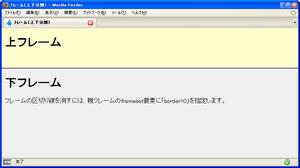 左右分割
左右分割<!DOCTYPE html PUBLIC "-//W3C//DTD XHTML 1.0 Frameset//EN" "http://www.w3.org/TR/xhtml1/DTD/xhtml1-frameset.dtd">
<html xmlns="http://www.w3.org/1999/xhtml" xml:lang="ja" lang="ja">
<head>
<meta http-equiv="Content-Type" content="text/html; charset=utf-8" />
<meta http-equiv="Content-Language" content="ja" />
<title>フレーム(左右分割)</title>
</head>
<frameset cols="30%,*">
<frame src="left.html" /><!-- フレーム左側に表示するファイルを指定 -->
<frame src="right.html" /><!-- フレーム右側に表示するファイルを指定 -->
<noframes>
<body>
<p>フレーム対応のブラウザでご覧下さい。</p>
</body>
</noframes>
</frameset>
</html>
上下分割
rows (縦方向分割の割合)をパーセント(%)指定します。
※'30%,*'の「*」は残りを表します。 '30%,70%'と指定したのと同じ意味合いです。
<frameset rows='30%,*'>
    <frame src="left.html">
    <frame src="right.html">
</frameset>
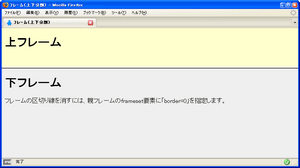 上下分割
上下分割<!DOCTYPE html PUBLIC "-//W3C//DTD XHTML 1.0 Frameset//EN" "http://www.w3.org/TR/xhtml1/DTD/xhtml1-frameset.dtd">
<html xmlns="http://www.w3.org/1999/xhtml" xml:lang="ja" lang="ja">
<head>
<meta http-equiv="Content-Type" content="text/html; charset=utf-8" />
<meta http-equiv="Content-Language" content="ja" />
<title>フレーム(上下分割)</title>
</head>
<frameset rows="30%,*">
<frame src="./up.html" /><!-- フレーム左側に表示するファイルを指定 -->
<frame src="./down.html" /><!-- フレーム右側に表示するファイルを指定 -->
<noframes>
<body>
<p>フレーム対応のブラウザでご覧下さい。</p>
</body>
</noframes>
</frameset>
</html>
フレームを指定して印刷
unknown
フレームに名前を付けるには、子フレーム(frame要素)のname属性を指定します。 以下の例では、左フレームに「L」、右フレームに「R」という名前を付けています。 フレームを印刷するには、印刷したいフレームにフォーカスを当ててから、印刷処理を実行します。
<frameset cols='30%,*'>
	<frame src='left.html' name='L'>
	<frame src='right.html' name='R'>
</frameset>
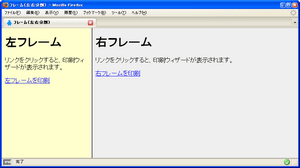
<!DOCTYPE html PUBLIC "-//W3C//DTD XHTML 1.0 Frameset//EN" "http://www.w3.org/TR/xhtml1/DTD/xhtml1-frameset.dtd">
<html xmlns="http://www.w3.org/1999/xhtml" xml:lang="ja" lang="ja">
    <head>
        <meta http-equiv="Content-Type" content="text/html; charset=utf-8" />
        <meta http-equiv="Content-Language" content="ja" />
        <title>フレーム(左右分割)</title>
    </head>
    <frameset cols="30%,*">
        <frame src="./left.html" id="L" name="L" /><!-- フレーム左側に表示するファイルを指定 -->
        <frame src="./right.html" id="R" name="R" /><!-- フレーム右側に表示するファイルを指定 -->
        <noframes>
            <body>
                <p>フレーム対応のブラウザでご覧下さい。</p>
            </body>
        </noframes>
    </frameset>
</html>
<!DOCTYPE html PUBLIC "-//W3C//DTD XHTML 1.0 Transitional//EN" "http://www.w3.org/TR/xhtml1/DTD/xhtml1-transitional.dtd">
<html xmlns="http://www.w3.org/1999/xhtml" xml:lang="ja" lang="ja">
    <head>
        <meta http-equiv="Content-Type" content="text/html; charset=utf-8" />
        <meta http-equiv="Content-Language" content="ja" />
        <meta http-equiv="Content-Script-Type" content="text/javascript" />
        <meta http-equiv="Content-Style-Type" content="text/css" />
        <title>left.html</title>
        <script type="text/javascript">
            function framePrint() {
                /* 右フレーム(R)にフォーカスを当てる */
                parent.R.focus();
                /* 右フレームを印刷 */
                parent.R.print();
            }
        </script>
        <style type="text/css">
            body { background-color:#ffffcc; }
        </style>
    </head>
    <body>
        <h1>左フレーム</h1>
        <p>リンクをクリックすると、印刷ウィザードが表示されます。</p>
        <p><a href="javascript:framePrint()">左フレームを印刷</a></p>
    </body>
</html>
<!DOCTYPE html PUBLIC "-//W3C//DTD XHTML 1.0 Transitional//EN" "http://www.w3.org/TR/xhtml1/DTD/xhtml1-transitional.dtd">
<html xmlns="http://www.w3.org/1999/xhtml" xml:lang="ja" lang="ja">
    <head>
        <meta http-equiv="Content-Type" content="text/html; charset=utf-8" />
        <meta http-equiv="Content-Language" content="ja" />
        <meta http-equiv="Content-Script-Type" content="text/javascript" />
        <meta http-equiv="Content-Style-Type" content="text/css" />
        <title>right.html</title>
        <script type="text/javascript">
            function framePrint() {
                /* 左フレーム(L)にフォーカスを当てる */
                parent.L.focus();
                /* 左フレームを印刷 */
                parent.L.print();
            }
        </script>
        <style type="text/css">
            body { background-color:#eee; }
        </style>
    </head>
    <body>
        <h1>右フレーム</h1>
        <p>リンクをクリックすると、印刷ウィザードが表示されます。</p>
        <p><a href="javascript:framePrint()">右フレームを印刷</a></p>
    </body>
</html>
フレームリンクされたら、トップページへ飛ばす
unknown
子フレーム(frame要素)のsrc属性にトップページのURLを指定することも可能ですが、JavaScriptで制御するには、以下の例のようにwindow.top.location.hrefを子フレーム内に記述します。
アクセスされたURLがフレームのトップページでない場合に、自動的にフレームのトップページを表示するため、フレームリンク対策(子フレームにリンクを貼られること)になります。
<!-- 子フレーム内に記述 -->
<script type="text/javascript">
    var frametop = "フレームのトップページのURL";
    /* アクセスされたページがフレームのトップページでない場合 */
    if(window.top.location.herf != frametop){
        /* 強制的にフレームのトップページを表示する */
        window.top.location.href = frametop;
    }
</script>
複数のフレームを同時に変更
フレーム数取得、フレーム名取得、フレームのURL取得
unknown
parent.frames[フレーム名].location = URL
parent.frames.length
parent.フレーム名.name
parent.frames[フレーム名].name
親フレームの場合はparentプロパティ、フレームトップの場合はtopプロパティ、現在のフレームの場合はselfプロパティを使用します。
複数のフレームを同時に変更
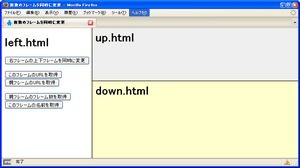
<!DOCTYPE html PUBLIC "-//W3C//DTD XHTML 1.0 Frameset//EN" "http://www.w3.org/TR/xhtml1/DTD/xhtml1-frameset.dtd">
<html xmlns="http://www.w3.org/1999/xhtml" xml:lang="ja" lang="ja">
    <head>
        <meta http-equiv="Content-Type" content="text/html; charset=utf-8" />
        <meta http-equiv="Content-Script-Type" content="text/javascript" />
        <title>複数のフレームを同時に変更</title>
    </head>
    <frameset cols='30%,70%' frameborder="1">
        <frame name='left' src='/module/include/js/frame/frameChange/left.html' />
        <frameset rows='40%,60%'>
            <frame name='up' src='/module/include/js/frame/frameChange/up.html' />
            <frame name='down' src='/module/include/js/frame/frameChange/down.html' />
        </frameset>
        <noframes>
            <body>
                <p>フレーム対応のブラウザでご覧下さい。</p>
            </body>
        </noframes>
    </frameset>
</html>
<!DOCTYPE html PUBLIC "-//W3C//DTD XHTML 1.0 Transitional//EN" "http://www.w3.org/TR/xhtml1/DTD/xhtml1-transitional.dtd">
<html xmlns="http://www.w3.org/1999/xhtml" xml:lang="ja" lang="ja">
    <head>
        <meta http-equiv="Content-Type" content="text/html; charset=utf-8" />
        <meta http-equiv="Content-Script-Type" content="text/javascript" />
        <title>left.html</title>
        <script type="text/javascript">
            /* 複数のフレームを同時に変更 */
            function chgFrame(){
                /* 上フレームに表示するURLを指定 */
                parent.up.location="http://www.yahoo.co.jp";
                /* 下フレームに表示するURLを指定 */
                parent.down.location="http://www.google.co.jp";
            }
            /* フレームのURLを取得 */
            function getLocation(frameName){
                alert(parent.frames[frameName].location);
            }
            /* 親フレームのフレーム数を取得 */
            function getFrameLength(){
                alert("フレーム数 = "+parent.frames.length);
            }
            /* フレーム名を取得 */
            function getFrameName(){
                alert("現在のフレーム名 = "+self.frames.name+"\n\n親フレーム名 = "+parent.frames.name);
            }
        </script>
    </head>
    <body>
        <h1>left.html</h1>
        <p>
            <input type='button' value='右フレームの上下フレームを同時に変更' onClick='chgFrame()' />
        </p>
        <p>
            <input type='button' value='このフレームのURLを取得' onClick='getLocation("left")' /><br>
            <input type='button' value='親フレームのURLを取得' onClick='getLocation("top")' />
        </p>
        <p>
            <input type='button' value='親フレームのフレーム数を取得' onClick='getFrameLength()' />
            <input type='button' value='このフレームの名前を取得' onClick='getFrameName("left")' />
        </p>
    </body>
</html>
他のフレームを操作
unknown
parent.フレーム名.document.bgColor = 色
parent.フレーム名.location = URL
[parent | top | self].[フレーム名].[プロパティ | メソッド]と記述すると、現在のフレーム以外のフレームのプロパティを変更したり、表示するURLを変更できます。
他のフレームを操作
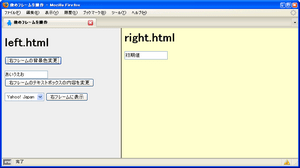
<!DOCTYPE html PUBLIC "-//W3C//DTD XHTML 1.0 Frameset//EN" "http://www.w3.org/TR/xhtml1/DTD/xhtml1-frameset.dtd">
<html xmlns="http://www.w3.org/1999/xhtml" xml:lang="ja" lang="ja">
    <head>
        <meta http-equiv="Content-Type" content="text/html; charset=utf-8" />
        <meta http-equiv="Content-Script-Type" content="text/javascript" />
        <title>他のフレームを操作</title>
    </head>
    <frameset cols="40%,60%">
        <frame name="left" src="/module/include/js/frame/frameOther/left.html" />
        <frame name="right" src="/module/include/js/frame/frameOther/right.html" />
        <noframes>
            <body>
                <p>フレーム対応のブラウザでご覧下さい。</p>
            </body>
        </noframes>
    </frameset>
</html>
<!DOCTYPE html PUBLIC "-//W3C//DTD XHTML 1.0 Transitional//EN" "http://www.w3.org/TR/xhtml1/DTD/xhtml1-transitional.dtd">
<html xmlns="http://www.w3.org/1999/xhtml" xml:lang="ja" lang="ja">
    <head>
        <meta http-equiv="Content-Type" content="text/html; charset=utf-8" />
        <meta http-equiv="Content-Script-Type" content="text/javascript" />
        <title>left.html</title>
        <script type="text/javascript">
            /* 指定したフレームの背景色を変更 */
            function chgBgColor(frameName){
                var color=new Array("#ffffcc","#ffffff");
                if(parent.frames[frameName].document.bgColor==color[0]){
                    parent.frames[frameName].document.bgColor=color[1];
                }else{
                    parent.frames[frameName].document.bgColor=color[0];
                }
            }
            /* 選択したページを右フレームに表示 */
            function chgFrameURL(){
                url=document.form1.sel.options[document.form1.sel.selectedIndex].value;
                parent.right.location=url;
            }
            /* 指定した文字列を右フレームのテキストに表示 */
            function chgText(){
                str=document.form1.txt.value;
                parent.right.document.form2.txt.value=str;
            }
        </script>
    </head>
    <body style="background-color:#eee;">
        <h1>left.html</h1>
        <form action="#" name="form1">
            <p>
                <input type="button" value="右フレームの背景色変更" onClick="chgBgColor('right')" />
            </p>
            <p>
                <input type="text" value="あいうえお" name="txt" />
                <input type="button" value="右フレームのテキストボックスの内容を変更" onClick="chgText()" />
            </p>
            <select name="sel">
                <option value="http://www.yahoo.co.jp">Yahoo! Japan</option>
                <option value="http://www.google.co.jp">Google</option>
            </select>
            <input type="button" value="右フレームに表示" onClick="chgFrameURL()" />
        </form>
    </body>
</html>
ウィンドウ内のフレーム数を取得
window.length
unknown
lengthプロパティは、現在のウィンドウ内にあるフレーム数を返します。 フレームを使用していないページの場合は、0が返ります。
<script type="text/javascript">
    document.write("現在のページ内にあるフレーム数: <em>"+window.length+"<\/em>");
</script>
Frameset/frameオブジェックト一覧
unknown
| プロパティ | 説明 |
|---|---|
| contentDocument | HTMLオブジェクトとしてフレームを返す |
| frameBorder | フレームの枠線の表示・非表示を取得・設定 |
| longDesc | フレーム文書が定義されている文書のURLを取得・設定 |
| noResize | リサイズを許可するかの取得・設定 |
| scrolling | フレームのスクロールバーを取得・設定 |
| src | フレーム内に読み込むページのURLを取得・設定 |
フレームセットの分割方法を取得・設定
cols/rowsメソッド
unknown
フレームセットオブジェクト.rows = 行数
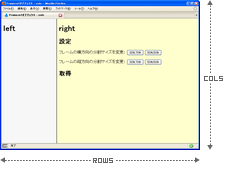
colsプロパティは、親フレーム(frameset要素)のcols属性の値をを取得・設定します。 rowsプロパティは、親フレーム(frameset要素)のrows属性の値をを取得・設定します。
第1引数にyesを指定した場合、フレームのスクロールバーの設定が有効になります。 noを指定した場合、フレームのスクロールバーの設定が無効になります。
フレームセットのcols属性・rows属性の値を取得・設定
<!DOCTYPE html PUBLIC "-//W3C//DTD XHTML 1.0 Frameset//EN" "http://www.w3.org/TR/xhtml1/DTD/xhtml1-frameset.dtd">
<html xmlns="http://www.w3.org/1999/xhtml" xml:lang="ja" lang="ja">
    <head>
        <meta http-equiv="Content-Type" content="text/html; charset=utf-8" />
        <title>Framesetオブジェクト : cols</title>
    </head>
    <frameset id="pFrame" cols="50%,50%">
        <frame src="/module/include/js/frame/frameset_cols/left.html" id="leftFrame" />
        <frame src="/module/include/js/frame/frameset_cols/right.html" id="rightFrame" />
        <noframes>
            <body>
                <p>フレーム対応のブラウザでご覧ください。</p>
            </body>
        </noframes>
    </frameset>
</html>
<!DOCTYPE html PUBLIC "-//W3C//DTD XHTML 1.0 Transitional//EN" "http://www.w3.org/TR/xhtml1/DTD/xhtml1-transitional.dtd">
<html xmlns="http://www.w3.org/1999/xhtml" xml:lang="ja" lang="ja">
    <head>
        <meta http-equiv="Content-Type" content="text/html; charset=utf-8" />
        <meta http-equiv="Content-Script-Type" content="text/javascript" />
        <title>right</title>
    </head>
    <body style="background-color:#ffffcc;">
        <h1>right</h1>
        <h2>設定</h2>
        <form action="#">
            <p>
                フレームの横方向の分割サイズを変更:
                <input type="button" value="30%,70%" onclick="fChgFrameCols('30%,70%')" />
                <input type="button" value="50%,50%" onclick="fChgFrameCols('50%,50%')" />
            </p>
            <p>
                フレームの縦方向の分割サイズを変更:
                <input type="button" value="30%,70%" onclick="fChgFrameRows('30%,70%')" />
                <input type="button" value="50%,50%" onclick="fChgFrameRows('50%,50%')" />
            </p>
        </form>
        <script type="text/javascript">
            /* フレームセットのcols属性変更 */
            function fChgFrameCols(presize){
                parent.document.getElementById("pFrame").rows="";
                parent.document.getElementById("pFrame").cols=presize;
                fGetFrameCR();
            }
            /* フレームセットのrows属性変更 */
            function fChgFrameRows(presize){
                parent.document.getElementById("pFrame").cols="";
                parent.document.getElementById("pFrame").rows=presize;
                fGetFrameCR();
            }
        </script>
        <h2>取得</h2>
        <p id="resGetFrameCR"></p>
        <script type="text/javascript">
            function fGetFrameCR(){
                /* フレームセットオブジェクト */
                var parentObj=parent.document.getElementById("pFrame");
                var s="";
                /* フレームセットのcols属性(列)を取得 */
                s+="cols: "+((parentObj.cols) ? parentObj.cols : "")+"<br \/>";
                /* フレームセットのrows属性(行)を取得 */
                s+="rows: "+((parentObj.rows) ? parentObj.rows : "")+"<br \/>";
                document.getElementById("resGetFrameCR").innerHTML=s;
            }
        </script>
    </body>
</html>
親フレーム(frameset)の分割方法を取得・設定
cols/rowsプロパティ
unknown
フレームオブジェクト.rows = 列1[, 列2, … ]
colsプロパティは、親フレーム(frameset要素)のcols属性を取得・設定します。 rowsプロパティは、親フレーム(frameset要素)のrows属性を取得・設定します。 フレームのサイズは、ピクセルまたはパーセンテージで指定します。 分割する場合は、カンマ区切りで指定します。
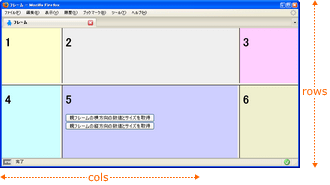
親フレームのサイズを取得
<!DOCTYPE html PUBLIC "-//W3C//DTD XHTML 1.0 Frameset//EN" "http://www.w3.org/TR/xhtml1/DTD/xhtml1-frameset.dtd">
<html xmlns="http://www.w3.org/1999/xhtml" xml:lang="ja" lang="ja">
    <head>
        <title>フレーム</title>
    </head>
    <frameset cols='20%,60%,20%' rows='20%,80%' id="main">
        <frame src="/module/include/js/frame/colsrows/1.html" />
        <frame src="/module/include/js/frame/colsrows/2.html" />
        <frame src="/module/include/js/frame/colsrows/3.html" />
        <frame src="/module/include/js/frame/colsrows/4.html" />
        <frame src="/module/include/js/frame/colsrows/5.html" />
        <frame src="/module/include/js/frame/colsrows/6.html" />
        <noframes>
            <body>
                <p>フレーム対応のブラウザでご覧下さい。</p>
            </body>
        </noframes>
    </frameset>
</html>
<!DOCTYPE html PUBLIC "-//W3C//DTD XHTML 1.0 Transitional//EN" "http://www.w3.org/TR/xhtml1/DTD/xhtml1-transitional.dtd">
<html xmlns="http://www.w3.org/1999/xhtml" xml:lang="ja" lang="ja">
    <head>
        <title>5.html</title>
        <script type="text/javascript">
            function fGetCols(){
                alert("cols="+parent.document.getElementById("main").cols);
            }
            function fGetRows(){
                alert("rows="+parent.document.getElementById("main").rows);
            }
        </script>
    </head>
    <body style="background-color:#ccccff;">
        <h1>5</h1>
        <form action="#">
            <input type="button" value="親フレームの横方向の数値とサイズを取得" onclick="fGetCols()" /><br>
            <input type="button" value="親フレームの縦方向の数値とサイズを取得" onclick="fGetRows()" />
        </form>
    </body>
</html>
フレームの枠線の表示・非表示を取得・設定
frameBorderプロパティ
unknown
frameBorderプロパティは、フレームの枠線を取得・設定します。 IE、Firefox共に対応しています。 取得・設定の動作で値はきちんと反映されるのですが、表示がうまくいかないようです。 ウィンドウをリサイズすると反映されたりとか。。。
<!DOCTYPE html PUBLIC "-//W3C//DTD XHTML 1.0 Frameset//EN" "http://www.w3.org/TR/xhtml1/DTD/xhtml1-frameset.dtd">
<html xmlns="http://www.w3.org/1999/xhtml" xml:lang="ja" lang="ja">
    <head>
        <meta http-equiv="Content-Type" content="text/html; charset=utf-8" />
        <meta http-equiv="Content-Script-Type" content="text/javascript" />
        <title>フレームの枠線を取得・設定</title>
    </head>
    <frameset cols='20%,80%' id="main">
        <frame src="/module/include/js/frame/frameBorder/left.html" frameborder="1" id="leftFrame" />
        <frame src="/module/include/js/frame/frameBorder/right.html" frameborder="0" id="rightFrame" />
        <noframes>
            <body>
                <p>フレーム対応のブラウザでご覧下さい。</p>
            </body>
        </noframes>
    </frameset>
<html>
<!DOCTYPE html PUBLIC "-//W3C//DTD XHTML 1.0 Transitional//EN" "http://www.w3.org/TR/xhtml1/DTD/xhtml1-transitional.dtd">
<html xmlns="http://www.w3.org/1999/xhtml" xml:lang="ja" lang="ja">
    <head>
        <meta http-equiv="Content-Type" content="text/html; charset=utf-8" />
        <meta http-equiv="Content-Script-Type" content="text/javascript" />
        <title>right.html</title>
        <script type="text/javascript">
            function fSetFrameBorder(frameID,flag){
                var obj=parent.document.getElementById(frameID);
                obj.frameBorder=flag;
                if(flag==1){
                    obj.borderColor="orange";

                }else{
                    obj.borderColor="";
                }
                var s="frameID: "+frameID+"<br \/>frameBorder: "+obj.frameBorder+"<br \/>borderColor: "+obj.borderColor+"<br \/>";
                document.getElementById("resGetFrameBorder").innerHTML=s;
            }
            function fGetFrameBorder(frameID){
                var obj=parent.document.getElementById(frameID);
                var fb=obj.frameBorder;
                var s="frameID: "+frameID+"<br \/>frameBorder: "+fb+"<br \/>borderColor: "+obj.borderColor+"<br \/>";
                document.getElementById("resGetFrameBorder").innerHTML=s;
            }
        </script>
    </head>
    <body style="background-color:#eee;">
        <h1>right</h1>
        <p>
            <input type="button" onclick="fSetFrameBorder('leftFrame',0)" value="左フレームの枠線をとる" />
            <input type="button" onclick="fSetFrameBorder('rightFrame',0)" value="右フレームに枠線をとる" />
        </p>
        <p>
            <input type="button" onclick="fSetFrameBorder('leftFrame',1)" value="左フレームに枠線をつける" />
            <input type="button" onclick="fSetFrameBorder('rightFrame',1)" value="右フレームに枠線をつける" />
        </p>
        <p>
            <input type="button" onclick="fGetFrameBorder('leftFrame')" value="左フレームの枠線設定を取得" />
            <input type="button" onclick="fGetFrameBorder('rightFrame')" value="右フレームの枠線設定を取得" />
        </p>
        <p id="resGetFrameBorder"></p>
    </body>
</html>
フレームをHTMLオブジェクトとして返す
contentDocumentプロパティ ※IE未対応
unknown
指定したフレームの文書をHTMLオブジェクトとして返します。
左フレームの文書タイプを取得
<!DOCTYPE html PUBLIC "-//W3C//DTD XHTML 1.0 Frameset//EN" "http://www.w3.org/TR/xhtml1/DTD/xhtml1-frameset.dtd">
<html xmlns="http://www.w3.org/1999/xhtml" xml:lang="ja" lang="ja">
<head>
<meta http-equiv="Content-Type" content="text/html; charset=utf-8" />
<title>JavaScript » Frame » フレームの文書タイプを取得 : PHP & JavaScript Room</title>
</head>
<frameset cols='20%,80%' id="main">
<frame src="/module/include/js/frame/contentDocument/left.html" id="leftFrame" />
<frame src="/module/include/js/frame/contentDocument/right.html" id="rightFrame" />
<noframes>
<body>
<p>フレーム対応のブラウザでご覧下さい。</p>
</body>
</noframes>
</frameset>
</html>
<!DOCTYPE html PUBLIC "-//W3C//DTD XHTML 1.0 Transitional//EN" "http://www.w3.org/TR/xhtml1/DTD/xhtml1-transitional.dtd">
<html xmlns="http://www.w3.org/1999/xhtml" xml:lang="ja" lang="ja">
    <head>
        <meta http-equiv="Content-Type" content="text/html; charset=utf-8" />
        <meta http-equiv="Content-Script-Type" content="text/javascript" />
        <title>right.html</title>
        <script type="text/javascript">
            function fGetContentDocument(){
                var s="";
                if(navigator.userAgent.indexOf("MSIE")>-1){
                    s="IEでframeオブジェクトの<strong>contentDocumentプロパティ<\/strong>はサポートされていません。Firefoxなど他のブラウザでご覧ください。"
                }else{
                    var obj=parent.document.getElementById("leftFrame");
                    var contDoc=obj.contentDocument;
                    s=contDoc.documentElement.tagName;
                }
                document.getElementById("resGetContentDocument").innerHTML=s;
            }
        </script>
    </head>
    <body style="background-color:#eee;">
        <h1>right</h1>
        <form action="#">
            <input type="button" onclick="fGetContentDocument()" value="左フレームの文書タイプを取得" />
            <p id="resGetContentDocument"></p>
        </form>
    </body>
</html>
フレーム文書が定義されている文書のURLを取得・設定
longDescプロパティ
unknown
longDescプロパティは、フレーム文書が定義されている文書のURLを取得・設定します。
相対パスで指定する場合、以下のようにIEとFirefoxでは同じページにも限らずパス指定が異なるようなので、絶対パス(http://~)で指定しましょう。
IE: ./longdesc.html
FF: ./include/js/frame/longdesc/longdesc.html
<!DOCTYPE html PUBLIC "-//W3C//DTD XHTML 1.0 Frameset//EN" "http://www.w3.org/TR/xhtml1/DTD/xhtml1-frameset.dtd">
<html xmlns="http://www.w3.org/1999/xhtml" xml:lang="ja" lang="ja">
<head>
<meta http-equiv="Content-Type" content="text/html; charset=utf-8" />
<title>JavaScript » Frame » フレーム文書で定義されているURLを取得 : PHP & JavaScript Room</title>
</head>
<frameset cols='20%,80%' id="main">
<frame src="/module/include/js/frame/longdesc/longdesc.html" longdesc="http://phpjavascriptroom.com/include/js/frame/longdesc/longdesc.html" id="leftFrame" />
<frame src="/module/include/js/frame/longdesc/right.html" id="rightFrame" />
<noframes>
<body>
<p>フレーム対応のブラウザでご覧下さい。</p>
</body>
</noframes>
</frameset>
</html>
<!DOCTYPE html PUBLIC "-//W3C//DTD XHTML 1.0 Transitional//EN" "http://www.w3.org/TR/xhtml1/DTD/xhtml1-transitional.dtd">
<html xmlns="http://www.w3.org/1999/xhtml" xml:lang="ja" lang="ja">
<head>
<meta http-equiv="Content-Type" content="text/html; charset=utf-8" />
<meta http-equiv="Content-Script-Type" content="text/javascript" />
<title>right.html</title>
</head>
<body style="background-color:#eee;">
<h1>right</h1>
<script type="text/javascript">
var obj=parent.document.getElementById("leftFrame");
document.write("<p>» <a href='"+obj.longDesc+"'>このフレームの定義はコチラ<\/a><\/p>");
</script>
</body>
</html>
フレームのリサイズを禁止
noResizeプロパティ
unknown
noResizeプロパティはフレームのリサイズの許可・不許可を取得・設定します。 第1引数にTRUEの指定した場合は、フレームのリサイズができなくなります。 FALSEを指定した場合は、フレームのリサイズが許可されます。
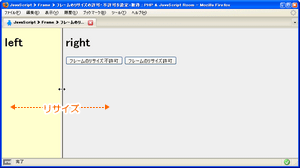
<!DOCTYPE html PUBLIC "-//W3C//DTD XHTML 1.0 Frameset//EN" "http://www.w3.org/TR/xhtml1/DTD/xhtml1-frameset.dtd">
<html xmlns="http://www.w3.org/1999/xhtml" xml:lang="ja" lang="ja">
<head>
<meta http-equiv="Content-Type" content="text/html; charset=utf-8" />
<title>JavaScript » Frame » フレームのリサイズの許可・不許可を設定・取得 : PHP & JavaScript Room</title>
</head>
<frameset cols='20%,80%' id="main">
<frame src="/module/include/js/frame/noResize/left.html" id="leftFrame" />
<frame src="/module/include/js/frame/noResize/right.html" id="rightFrame" />
<noframes>
<body>
<p>フレーム対応のブラウザでご覧下さい。</p>
</body>
</noframes>
</frameset>
</html>
<!DOCTYPE html PUBLIC "-//W3C//DTD XHTML 1.0 Transitional//EN" "http://www.w3.org/TR/xhtml1/DTD/xhtml1-transitional.dtd">
<html xmlns="http://www.w3.org/1999/xhtml" xml:lang="ja" lang="ja">
    <head>
        <meta http-equiv="Content-Type" content="text/html; charset=utf-8" />
        <meta http-equiv="Content-Script-Type" content="text/javascript" />
        <title>right.html</title>
        <script type="text/javascript">
            function fSetNoResize(bool){
                parent.document.getElementById("leftFrame").noResize=bool;
                parent.document.getElementById("rightFrame").noResize=bool;
            }
        </script>
    </head>
    <body style="background-color:#eee;">
        <h1>right</h1>
        <form action="#">
            <input type="button" value="フレームのリサイズ不許可" onclick="fSetNoResize(true)" />
            <input type="button" value="フレームのリサイズ許可" onclick="fSetNoResize(false)" />
        </form>
    </body>
</html>
フレームのスクロールバーを表示・非表示
scrollingプロパティ ※IE未対応
unknown
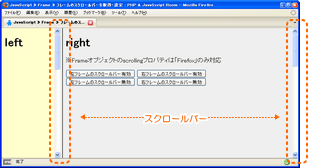
scrollingプロパティは、フレームのスクロールバーを取得・設定します。
第1引数にyesを指定した場合、フレームのスクロールバーの設定が有効になります。 noを指定した場合、フレームのスクロールバーの設定が無効になります。
<!DOCTYPE html PUBLIC "-//W3C//DTD XHTML 1.0 Frameset//EN" "http://www.w3.org/TR/xhtml1/DTD/xhtml1-frameset.dtd">
<html xmlns="http://www.w3.org/1999/xhtml" xml:lang="ja" lang="ja">
<head>
<meta http-equiv="Content-Type" content="text/html; charset=utf-8" />
<title>JavaScript » Frame » フレームのスクロールバーを取得・設定 : PHP & JavaScript Room</title>
</head>
<frameset cols='20%,80%' id="main">
<frame src="/module/include/js/frame/scrolling/left.html" id="leftFrame" />
<frame src="/module/include/js/frame/scrolling/right.html" id="rightFrame" />
<noframes>
<body>
<p>フレーム対応のブラウザでご覧下さい。</p>
</body>
</noframes>
</frameset>
</html>
<!DOCTYPE html PUBLIC "-//W3C//DTD XHTML 1.0 Transitional//EN" "http://www.w3.org/TR/xhtml1/DTD/xhtml1-transitional.dtd">
<html xmlns="http://www.w3.org/1999/xhtml" xml:lang="ja" lang="ja">
    <head>
        <meta http-equiv="Content-Type" content="text/html; charset=utf-8" />
        <meta http-equiv="Content-Script-Type" content="text/javascript" />
        <title>right.html</title>
        <script type="text/javascript">
            function fFrameScrolling(frameID,flag){
                parent.document.getElementById(frameID).scrolling=flag;
                document.getElementById("resFrameScrolling").innerHTML=frameID+"のスクロールバー:"+parent.document.getElementById(frameID).scrolling+"<br \/>";
            }
        </script>
    </head>
    <body style="background-color:#eee;">
        <h1>right</h1>
        <p>※Frameオブジェクトのscrollingプロパティは「Firefox」のみ対応</p>
        <form action="#">
            <input type="button" value="左フレームのスクロールバー有効" onclick="fFrameScrolling('leftFrame','yes')" />
            <input type="button" value="右フレームのスクロールバー有効" onclick="fFrameScrolling('rightFrame','yes')" />
            <br>
            <input type="button" value="左フレームのスクロールバー無効" onclick="fFrameScrolling('leftFrame','no')" />
            <input type="button" value="右フレームのスクロールバー無効" onclick="fFrameScrolling('rightFrame','no')" />
        </form>
        <p id="resFrameScrolling"></p>
        <br><br><br><br><br><br><br><br><br><br><br><br><br><br><br><br><br><br><br><br><br><br><br><br><br><br><br><br><br><br><br><br><br><br><br><br><br><br><br><br><br><br><br><br><br><br><br><br><br><br><br><br><br><br>
    </body>
</html>
フレーム内に読み込むページのURLを取得・設定
srcプロパティ
unknown
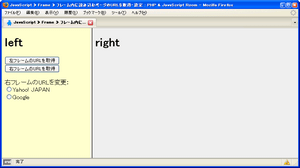
srcプロパティはフレームのsrc属性に指定したURL(フレーム内に表示するページのURL)を取得・設定します。 Firefoxでは、src属性に相対パスを指定している場合も取得される値は絶対パス(URL)になります。
<!DOCTYPE html PUBLIC "-//W3C//DTD XHTML 1.0 Frameset//EN" "http://www.w3.org/TR/xhtml1/DTD/xhtml1-frameset.dtd">
<html xmlns="http://www.w3.org/1999/xhtml" xml:lang="ja" lang="ja">
<head>
<meta http-equiv="Content-Type" content="text/html; charset=utf-8" />
<title>JavaScript » Frame » フレーム内に読み込むページのURLを取得・設定 : PHP & JavaScript Room</title>
</head>
<frameset cols='30%,70%' id="main">
<frame src="/module/include/js/frame/frameSrc/left.html" id="leftFrame" />
<frame src="/module/include/js/frame/frameSrc/right.html" id="rightFrame" />
<noframes>
<body>
<p>フレーム対応のブラウザでご覧下さい。</p>
</body>
</noframes>
</frameset>
</html>
<!DOCTYPE html PUBLIC "-//W3C//DTD XHTML 1.0 Transitional//EN" "http://www.w3.org/TR/xhtml1/DTD/xhtml1-transitional.dtd">
<html xmlns="http://www.w3.org/1999/xhtml" xml:lang="ja" lang="ja">
    <head>
        <meta http-equiv="Content-Type" content="text/html; charset=utf-8" />
        <title>right.html</title>
    </head>
    <body style="background-color:#eee;">
        <h1>right</h1>
    </body>
</html>

