facebook関連Facebokページの情報やRSSフィードを取得してHTML出力
- FacebookページのウォールのRSSフィードを取得して可変グリッドでHTML出力〔Google Ajax Feed API使用〕
- Facebookページの基本情報をJSON形式で取得してHTML出力〔Facebook Graph API使用(認証なしのもの)〕
- Facebookに投稿した写真情報をJSON形式で取得してHTML出力〔Facebook Graph API使用(認証なしのもの)〕
FacebookページのウォールのRSSフィードを取得して可変グリッドでHTML出力
Google Ajax Feed API使用
2011/5/22
http://www.facebook.com/feeds/page.php?id=FacebookページID&format=rss20
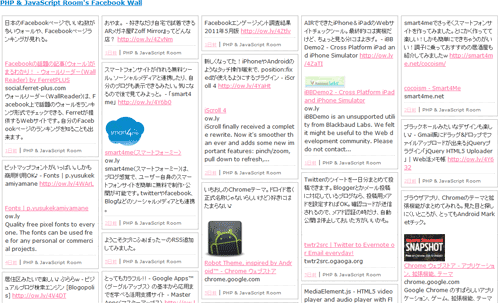
FacebookページのウォールのRSS(XMLファイル)を取得して、最近投稿された内容を可変グリットでHTML出力するサンプルです。
JavaScriptでは外部ドメインにあるXMLファイルを取得できないので、それを解消するためにここではGoogle Ajax Feed APIを使用し、ウォールRSSフィードを取得しました。
可変グリット表示には、jQueryプラグイン「jquery.vgrid.js」(MIT License)を使用しています。ブロック要素を雑誌・新聞風のレイアウトに配置するためのプラグインで、ウィンドウサイズを変えると、要素が自動的にウィンドウサイズに合わせて並び変わります。
設置サンプル
例)http://www.facebook.com/feeds/page.php?id=153659178017982&format=rss20
<!DOCTYPE html PUBLIC "-//W3C//DTD XHTML 1.0 Transitional//EN" "http://www.w3.org/TR/xhtml1/DTD/xhtml1-transitional.dtd">
<html xmlns="http://www.w3.org/1999/xhtml" xml:lang="ja" lang="ja">
    <head>
        <meta http-equiv="Content-Type" content="text/html; charset=utf-8" />
        <meta http-equiv="Content-Language" content="ja" />
        <meta http-equiv="Content-Script-Type" content="text/javascript" />
        <meta http-equiv="Content-Style-Type" content="text/css" />
        <meta http-equiv="imagetoolbar" content="no" />
        <title>設置サンプル</title>
        <link rel="stylesheet" type="text/css" href="/content/lib/global.css" />
        <script type="text/javascript" src="https://ajax.googleapis.com/ajax/libs/jquery/1.5.2/jquery.min.js"></script>
        <script type="text/javascript" src="/content/lib/jquery/jquery.vgrid.0.1.6.min.js"></script>
        <script type="text/javascript" src="/content/lib/jquery/jquery.easing.1.3.js"></script>
        <!-- JS -->
        <script type="text/javascript">
            function formatString(str){
                str = str.replace(/((ftp|http|https?):\/\/([-\w\.]+)+(:\d+)?(\/([\w/_\.]*(\?\S+)?)?)?)/gm,'<a href="$1" target="_blank">$1</a>');
                return str;
            }
            function relativeTime(pastTime){
                var origStamp = Date.parse(pastTime);
                var curDate = new Date();
                var currentStamp = curDate.getTime();
                var difference = parseInt((currentStamp - origStamp)/1000);
                if(difference < 0) return false;
                if(difference <= 5)                return "いまさっき";
                if(difference <= 20)            return "数秒前";
                if(difference <= 60)            return "1分以内";
                if(difference < 3600)            return parseInt(difference/60)+" 分前";
                if(difference <= 1.5*3600)         return "約1時間前";
                if(difference < 23.5*3600)        return Math.round(difference/3600)+" 時間前";
                if(difference < 1.5*24*3600)    return "1日前";
                var dateArr = pastTime.split(' ');
                return (parseInt(difference / 86400)).toString() + '日前';
            }
            $(function(){
            });
        </script>
        <style type="text/css">
#grid-content {
    list-style-type: none;
    margin:0; padding:0;
    overflow:hidden;
}
#grid-content li {
    list-style-type: none;
    width:200px;
    border:1px dotted #ccc;
    outline:1px solid #ccc;
    background:#fff;
    margin:5px;
    padding:5px;
    word-break:break-all;
    box-sizing:content-box;
}
#grid-content li a {
    color:#ff6699;
}
#grid-content li div {
    margin:0 0 5px 0; padding:0 0 5px 0;
    overflow:hidden;
    border-bottom:1px dotted #ccc;
}
#grid-content li span {
    font-size:80%;
    color:#666;
}
#grid-content li span a {
    color:pink;
}
        </style>
    </head>
    <body>
        <div id="wrap">
            <h1>設置サンプル</h1>
            <p>例:Google APIでFacebookページのウォールのRSSを取得してHTML出力するサンプルです。<br>可変グリット表示は、<a href="http://blog.xlune.com/2009/09/jqueryvgrid.html">jquery.vgrid.js</a>を使用しています。ウィンドウサイズを変えると要素が自動的に並びます。</p>
<!-- CODE -->
<h2 id="title"></h2>
<ul id="grid-content"></ul>
<script type="text/javascript" src="http://www.google.com/jsapi?key=ABQIAAAAvABrzCnRluKK0Cj97fTMThTNR7aHVSEFb0WbViWwc6F-_w9PjBSogZu_7UgOTbx25ka46X-fnGmyvw"></script>
<script type="text/javascript">
    google.load("feeds", "1");
    function initialize(){
        init("http://www.facebook.com/feeds/page.php?id=153659178017982&format=rss20","grid-content","20"); // CNET Japan
    }
    function init(feedurl,obj,feedmax) {
        var feed = new google.feeds.Feed(feedurl);
        feed.setNumEntries(feedmax);
        feed.setResultFormat(google.feeds.Feed.XML_FORMAT);
        feed.load(function(result) {
            var container = document.getElementById(obj);
            var mypage=result.xmlDocument.getElementsByTagName("link")[0].firstChild.nodeValue;
            $("#title").html("<a href='"+mypage+"pjroom/'>"+result.xmlDocument.getElementsByTagName("title")[0].firstChild.nodeValue+"</a>");
            if (!result.error) {
                var items = result.xmlDocument.getElementsByTagName("item");
                var s="";
                for (var i = 0; i < items.length; i++) {
                    var title="";
                    var link="";
                    var pubDate="";
                    var desc="";
                    var author="";
                    //タイトル
                    if(items[i].getElementsByTagName("title")[0].firstChild) {
                        title=items[i].getElementsByTagName("title")[0].firstChild.nodeValue;
                    }
                    //パーマリンク
                    if(items[i].getElementsByTagName("link")[0].firstChild) {
                        link=mypage+items[i].getElementsByTagName("link")[0].firstChild.nodeValue;
                    }
                    //投稿日時
                    if(items[i].getElementsByTagName("pubDate")[0].firstChild) {
                        pubDate=items[i].getElementsByTagName("pubDate")[0].firstChild.nodeValue;
                    }
                    //投稿内容
                    if(items[i].getElementsByTagName("description")[0].firstChild) {
                        desc=items[i].getElementsByTagName("description")[0].firstChild.nodeValue;
                    }
                    //投稿者
                    if(items[i].getElementsByTagName("author")[0].firstChild) {
                        author=items[i].getElementsByTagName("author")[0].firstChild.nodeValue;
                    }
                    if(title!=""){
                        s+="<li>";
                        s+="<div>"+desc+"</div>";
                        s+="<span><a href='"+link+"'>"+relativeTime(pubDate)+"</a></span> | ";
                        s+="<span>"+author+"</span>";
                        s+="</li>";
                    }
                }
                $("#grid-content").html(s).vgrid({
                    easeing: "easeOutQuint",
                    useLoadImageEvent: true,
                    time: 400,
                    delay: 20,
                    fadeIn: {
                        time: 500,
                        delay: 50
                    }
                });
            }
        });
    }
    $(function(){
        google.setOnLoadCallback(initialize);
    });
</script>
<!-- / CODE -->
        </div>
    </body>
</html>
Facebookページの基本情報をJSON形式で取得してHTML出力
Facebook Graph API使用(認証なしのもの)
2011/5/22
Graph APIを使用して、Facebookページの基本情報をJSON形式で取得して、HTML出力するサンプルです。 アイコン画像には、CSS3d.net - CSS3 Ribbon Generatorで作成したCSS3リボンを乗せてみました。
Facebookのソーシャルグラフ内の人、ページ、写真、動画、イベントなどのオブジェクトはユニークなIDを持っているため、いずれも下記の形式で情報を取得可能です。
https://graph.facebook.com/FacebookページID
取得サンプル(JSON)
Facebookページはカテゴリによって登録する情報は異なりますが、「慈善活動またはコミュニティ」から作成した場合は、指定したFacebookページの名前、ユーザー名(pjroom)、ウェブサイトのURL、アイコン画像、所属カテゴリ、いいね!数、説明文などが取得できます。
参照:Core Concepts › Graph API › Page
{
   "id": "153659178017982",
   "name": "PHP & JavaScript Room",
   "picture": "http://profile.ak.fbcdn.net/hprofile-ak-snc4/162000_153659178017982_2823224_s.jpg",
   "link": "https://www.facebook.com/pjroom",
   "category": "Personal website",
   "likes": 250,
   "website": "http://phpjavascriptroom.com/",
   "username": "pjroom",
   "description": "PHP\u3001JavaScript\u3001Ajax\u3001HTML/XHTML\u3001CSS\u3001Web\u30da\u30fc\u30b8\u57cb\u3081\u8fbc\u307f\u306b\u3088\u308b\u97f3\u58f0\u30fb\u52d5\u753b\u306e\u30b9\u30c8\u30ea\u30fc\u30e0\u914d\u4fe1\u65b9\u6cd5\u306a\u3069\u3001Web\u30b5\u30a4\u30c8\u5236\u4f5c\u306b\u5f79\u7acb\u3064\u5b9f\u7528\u7684\u306a\u30d7\u30ed\u30b0\u30e9\u30df\u30f3\u30b0\u30fb\u30c6\u30af\u30cb\u30c3\u30af\u3092\u89e3\u8aac\u3057\u3066\u3044\u307e\u3059\u3002\n\n\u2605\u65b0\u7740\u60c5\u5831\u306f\u300cNews\u300d\u30bf\u30d6\u304b\u3089\u3069\u3046\u305e\u266a\n\n\u26052011/1/27\u3088\u308a\u3001\u300cPHP&JavaScript Room\u300d\u306eURL\u304c\u3001\u65b0URL\u300chttp://phpjavascriptroom.com/\u300d\u306b\u79fb\u8ee2\u3057\u307e\u3057\u305f\u3002\n\n\u65e7\u30b5\u30a4\u30c8\u304b\u3089\u306f\u30ea\u30c0\u30a4\u30ec\u30af\u30c8\u3067\u5f53\u30b5\u30a4\u30c8\u306e\u8a72\u5f53\u30da\u30fc\u30b8\u306b\u98db\u3076\u3088\u3046\u306b\u3057\u3066\u3044\u307e\u3059\u304c\u3001\u3082\u3057\u304b\u3059\u308b\u3068\u30ea\u30f3\u30af\u5207\u308c\u306b\u306a\u3063\u3066\u3044\u308b\u30da\u30fc\u30b8\u304c\u3042\u308b\u304b\u3082\u3057\u308c\u307e\u305b\u3093\u3002 \u30d6\u30c3\u30af\u30de\u30fc\u30af\u3055\u308c\u3066\u3044\u308b\u65b9\u306f\u304a\u624b\u6570\u3067\u3059\u304c\u65b0URL\u306b\u5909\u66f4\u304f\u3060\u3055\u3044\u3002\n\n\u3053\u308c\u304b\u3089\u3082\u3088\u308d\u3057\u304f\u304a\u9858\u3044\u81f4\u3057\u307e\u3059\u3002"
}
設置サンプル

<!DOCTYPE html PUBLIC "-//W3C//DTD XHTML 1.0 Transitional//EN" "http://www.w3.org/TR/xhtml1/DTD/xhtml1-transitional.dtd">
<html xmlns="http://www.w3.org/1999/xhtml" xml:lang="ja" lang="ja">
    <head>
        <meta http-equiv="Content-Type" content="text/html; charset=utf-8" />
        <meta http-equiv="Content-Language" content="ja" />
        <meta http-equiv="Content-Script-Type" content="text/javascript" />
        <meta http-equiv="Content-Style-Type" content="text/css" />
        <meta http-equiv="imagetoolbar" content="no" />
        <title>設置サンプル</title>
        <link rel="stylesheet" type="text/css" href="/content/lib/global.css" />
        <script type="text/javascript" src="http://ajax.googleapis.com/ajax/libs/jquery/1.5.2/jquery.min.js"></script>
        <script type="text/javascript" src="/content/lib/jquery/jquery.jsonp.js"></script>
        <!-- JS -->
        <script type="text/javascript">
            $(function(){
                var url="https://graph.facebook.com/153659178017982&callback={callback}";
                $.getJSONP(url, function(json){
                    var s="";
                    //s+=json.id;
                    //s+=json.username;
                    s+="<dl>";
                    //リンク、画像
                    s+="<dt><img src='"+json.picture+"' />";
                    s+="<div class='ribbon-wrapper'>";
                    s+="<div class='ribbon-front'>facebook page</div>";
                    s+="<div class='ribbon-edge-topleft'></div>";
                    s+="<div class='ribbon-edge-topright'></div>";
                    s+="<div class='ribbon-edge-bottomleft'></div>";
                    s+="<div class='ribbon-edge-bottomright'></div>";
                    s+="<div class='ribbon-back-left'></div>";
                    s+="<div class='ribbon-back-right'></div>";
                    s+="</div></dt>";
                    s+="<dd>";
                    //ページ名
                    s+="<div class='title'><a href='"+json.link+"'>"+json.name+"</a></div>";
                    //ウェブサイト、カテゴリ
                    s+="<p>WEBSITE: <a href='"+json.website+"'>"+json.website+"</a><br>CATEGORY: "+json.category+"</p>";
                    //いいね!数
                    s+="<p><strong>"+json.likes+"</strong>人が「いいね!」と言っています。</p>";
                    //説明文
                    s+="</dd></dl>";
                    s+="<div class='desc'>"+formatString(json.description)+"</div>";
                    $("#graph").append(s);
                });
            });
            // リンク内につぶやきを含むURLに変更
            function formatString(str){
                str = str.replace(/((ftp|http|https?):\/\/([-\w\.]+)+(:\d+)?(\/([\w/_\.]*(\?\S+)?)?)?)/gm,'<a href="$1" target="_blank">$1</a>');
                return str;
            }
        </script>
        <style type="text/css">
            #graph {
                position:reltaive;
                margin:0; padding:0;
                border:1px solid #ccc;
                width:500px;
            }
            #graph dl {
                margin:2px 2px 0 2px; padding:10px 10px 0 10px;
                border:1px dotted #ccc;
                border-bottom:none;
                overflow:hidden;
                position:reltaive;
            }
            #graph dt {
                margin:0; padding:0;
                width:120px; height:120px;
                float:left;
                clear:both;
                position:absolute;
            }
            #graph dd {
                margin:0 0 0 120px; padding:0;
            }
            #graph dd strong {
                font-weight:bold;
                font-size:140%;
            }
            #graph div.title {
                font-weight:bold;
                font-size:120%;
            }
            #graph div.desc {
                margin:0 2px 2px 2px; padding:15px;
                border:1px dotted #ccc;
                background:#eee;
                border-top:0;
            }
            #graph .info {
                position:absolute;
                background:#3B5998;
                display:block;
                z-index:9999;
                color:#fff;
                font-weight:bold;
            }
            /* ribbon style */
            .ribbon-wrapper {
                position:absolute;
                width:110px; height:20px;
                top:50px; left:0px;
            }
            .ribbon-front {
                background-color:#3B5998;
                width:110px; height:20px;
                position:relative;
                left:-5px; top:0px;
                z-index:2;
                color:#fff;
                text-align:center;
                line-height:20px;
                font-size:10px;
            }
            .ribbon-front,
            .ribbon-back-left,
            .ribbon-back-right {
                -moz-box-shadow:0px 0px 4px rgba(0,0,0,0.55);
                -khtml-box-shadow:0px 0px 4px rgba(0,0,0,0.55);
                -webkit-box-shadow:0px 0px 4px rgba(0,0,0,0.55);
                -o-box-shadow:0px 0px 4px rgba(0,0,0,0.55);
            }
            .ribbon-edge-topleft,
            .ribbon-edge-topright,
            .ribbon-edge-bottomleft,
            .ribbon-edge-bottomright {
                position:absolute;
                z-index:1;
                border-style:solid;
                width:0; height:0;
            }
            .ribbon-edge-topleft,
            .ribbon-edge-topright {
            }
            .ribbon-edge-topleft,
            .ribbon-edge-bottomleft {
                left:-5px;
                border-color:transparent #5e7bb6 transparent transparent;
            }
            .ribbon-edge-topleft {
                top:-5px;
                border-width:5px 5px 0 0;
            }
            .ribbon-edge-bottomleft {
                border-width:0 5px 0px 0;
            }
            .ribbon-edge-topright,
            .ribbon-edge-bottomright {
                left:100px;
                border-color:transparent transparent transparent #5e7bb6;
            }
            .ribbon-edge-topright {
                top:-5px;
                border-width:5px 0 0 5px;
            }
            .ribbon-edge-bottomright {
                border-width:0 0 0px 5px;
            }
        </style>
    </head>
    <body>
        <div id="wrap">
            <h1>設置サンプル</h1>
            <p>例)Facebookページの基本情報をJSON形式で取得して、HTML出力。</p>
            <p>アイコン画像についているCSS3リボンは、<a href="http://www.css3d.net/ribbon-generator/">CSS3d.net - CSS3 Ribbon Generator</a>で作成したものを当てはめました。</p>
<!-- CODE -->
            <div id="graph"></div>
<!-- / CODE -->
        </div>
    </body>
</html>
Facebookに投稿した写真情報をJSON形式で取得してHTML出力
Facebook Graph API使用(認証なしのもの)
2011/5/22
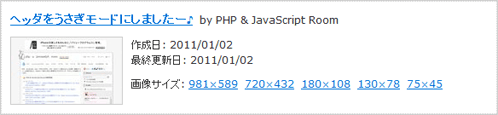
Graph APIを使用して、Facebookに投稿した特定の写真情報をJSON形式で取得して、HTML出力するサンプルです。
Facebookのソーシャルグラフ内の人、ページ、写真、動画、イベントなどのオブジェクトはユニークなIDを持っているため、いずれも下記の形式で情報を取得可能です。
https://graph.facebook.com/写真ID
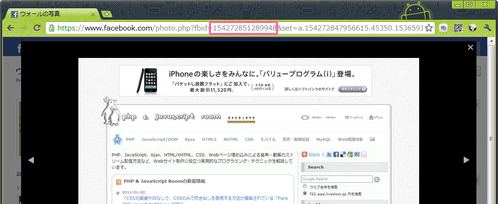
※写真IDは、写真ページにアクセスした時に、URLの末尾についている「fbid」パラメータの値になります。
取得サンプル(JSON)
指定した写真のタイトル、パーマリンク、サムネイル、作成日、最終更新日、画像サイズ毎のURLなどが取得できます。
参照:Core Concepts › Graph API › Photo
{
   "id": "154272851289948",
   "from": {
      "name": "PHP & JavaScript Room",
      "category": "Personal website",
      "id": "153659178017982"
   },
   "name": "\u30d8\u30c3\u30c0\u3092\u3046\u3055\u304e\u30e2\u30fc\u30c9\u306b\u3057\u307e\u3057\u305f\u30fc\u266a",
   "picture": "http://photos-b.ak.fbcdn.net/hphotos-ak-snc4/36255_154272851289948_153659178017982_326886_2811909_s.jpg",
   "source": "http://a2.sphotos.ak.fbcdn.net/hphotos-ak-snc4/36255_154272851289948_153659178017982_326886_2811909_n.jpg",
   "height": 432,
   "width": 720,
   "images": [
      {
         "height": 589,
         "width": 981,
         "source": "http://hphotos-snc4.fbcdn.net/132859_154272851289948_153659178017982_326886_2811909_o.jpg"
      },
      {
         "height": 432,
         "width": 720,
         "source": "http://a2.sphotos.ak.fbcdn.net/hphotos-ak-snc4/36255_154272851289948_153659178017982_326886_2811909_n.jpg"
      },
      {
         "height": 108,
         "width": 180,
         "source": "http://photos-b.ak.fbcdn.net/hphotos-ak-snc4/36255_154272851289948_153659178017982_326886_2811909_a.jpg"
      },
      {
         "height": 78,
         "width": 130,
         "source": "http://photos-b.ak.fbcdn.net/hphotos-ak-snc4/36255_154272851289948_153659178017982_326886_2811909_s.jpg"
      },
      {
         "height": 45,
         "width": 75,
         "source": "http://photos-b.ak.fbcdn.net/hphotos-ak-snc4/36255_154272851289948_153659178017982_326886_2811909_t.jpg"
      }
   ],
   "link": "http://www.facebook.com/photo.php?pid=326886&id=153659178017982",
   "icon": "http://static.ak.fbcdn.net/rsrc.php/v1/yz/r/StEh3RhPvjk.gif",
   "created_time": "2011-01-02T06:47:30+0000",
   "position": 1,
   "updated_time": "2011-01-02T06:47:31+0000"
}
設置サンプル
<!DOCTYPE html PUBLIC "-//W3C//DTD XHTML 1.0 Transitional//EN" "http://www.w3.org/TR/xhtml1/DTD/xhtml1-transitional.dtd">
<html xmlns="http://www.w3.org/1999/xhtml" xml:lang="ja" lang="ja">
    <head>
        <meta http-equiv="Content-Type" content="text/html; charset=utf-8" />
        <meta http-equiv="Content-Language" content="ja" />
        <meta http-equiv="Content-Script-Type" content="text/javascript" />
        <meta http-equiv="Content-Style-Type" content="text/css" />
        <meta http-equiv="imagetoolbar" content="no" />
        <title>設置サンプル</title>
        <link rel="stylesheet" type="text/css" href="/content/lib/global.css" />
        <script type="text/javascript" src="http://ajax.googleapis.com/ajax/libs/jquery/1.5.2/jquery.min.js"></script>
        <script type="text/javascript" src="/content/lib/jquery/jquery.jsonp.js"></script>
        <!-- JS -->
        <script type="text/javascript">
            $(function(){
                var url="https://graph.facebook.com/154272851289948&callback={callback}";
                $.getJSONP(url, function(json){
                    var s="";
                    //タイトル、パーマリンク
                    s+="<div class='title'><a href='"+json.link+"'>"+json.name+"</a><span> by "+json.from.name+"</span></div>";
                    s+="<div class='cf'>";
                    //サムネイル
                    s+="<img src='"+json.picture+"' class='thumb' />";
                    //作成日、最終更新日
                    s+="作成日: "+relativeTime(json.created_time)+"<br>";
                    s+="最終更新日: "+relativeTime(json.updated_time)+"<br>";
                    s+="</p><p>";
                    //画像サイズ展開
                    s+="画像サイズ: ";
                    for(var i=0; i<json.images.length; i++){
                        s+="<a href='"+json.images[i].source+"' target='_blank'>"+json.images[i].width+"×"+json.images[i].height+"</a> ";
                    }
                    s+="</p></div>";
                    $("#graph").append(s);
                });
            });
            function relativeTime(pastTime){
                var dd = new Date(pastTime);
                var yy = dd.getYear();
                var mm = dd.getMonth() + 1;
                var dd = dd.getDate();
                if (yy < 2000) { yy += 1900; }
                if (mm < 10) { mm = "0" + mm; }
                if (dd < 10) { dd = "0" + dd; }
                return yy + "/" + mm + "/" + dd;
            }
        </script>
        <style type="text/css">
            #graph {
                position:reltaive;
                margin:0; padding:10px;
                border:1px dotted #ccc;
                outline:1px solid #ccc;
                width:560px;
            }
            #graph .thumb {
                float:left;
                display:block;
                border:1px solid #ccc;
                margin:0 10px 0 0; padding:0;
            }
            #graph img {
                max-width:100%;
            }
            #graph p {
                margin:10px 0; padding:0;
            }
            #graph div.title {
                font-weight:bold;
                font-size:120%;
                margin:0 0 10px 0; padding:0;
            }
            #graph div.title span {
                font-size:80%;
                font-weight:normal;
            }
        </style>
    </head>
    <body>
        <div id="wrap">
            <h1>設置サンプル</h1>
            <p>例)Facebookに投稿した写真情報をJSON形式で取得して、HTML出力。</p>
<!-- CODE -->
            <div id="graph"></div>
<!-- / CODE -->
        </div>
    </body>
</html>