jQuery APIリファレンススタイル操作:位置決め
- offset()〔最初にマッチした要素の現在の位置を取得〕
- position()〔親要素からの相対位置を取得〕
- scrollTop()〔上からのスクロール位置を取得〕
- scrollTop(val)〔指定した要素まで下方向へからスクロール〕
- scrollLeft()〔左からのスクロール位置を設定〕
- scrollLeft(val)〔指定した要素まで右方向へスクロール〕
offset()
最初にマッチした要素の現在の位置を取得
2009/2/27
offset() 戻り値:オブジェクト{top, left}
最初にマッチした要素の現在のドキュメントにおける表示位置を取得します。
上からの表示位置(top)と左からの表示位置(left)を含むオブジェクトを返します。
このメソッドは表示されている要素でのみ動作します。
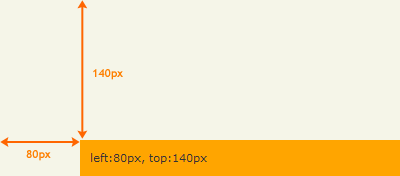 設置イメージ
offset()の使用例サンプルを見る
<!DOCTYPE html PUBLIC "-//W3C//DTD XHTML 1.0 Transitional//EN" "http://www.w3.org/TR/xhtml1/DTD/xhtml1-transitional.dtd">
<html xmlns="http://www.w3.org/1999/xhtml" xml:lang="ja" lang="ja">
    <head>
        <meta http-equiv="Content-Type" content="text/html; charset=utf-8" />
        <meta http-equiv="Content-Language" content="ja" />
        <meta http-equiv="Content-Script-Type" content="text/javascript" />
        <meta http-equiv="Content-Style-Type" content="text/css" />
        <meta http-equiv="imagetoolbar" content="no" />
        <title>スタイル操作:位置決め:offset()の使用例 | jQuery</title>
        <link rel="stylesheet" type="text/css" href="/content/lib/global.css" />
        <script src="https://ajax.googleapis.com/ajax/libs/jquery/1.3.2/jquery.min.js"></script>
        <script type="text/javascript">
            $(function(){
                var elem=$("#sample:last");
                var offset=elem.offset();
                elem.html("left:"+offset.left+"px, top:"+offset.top+"px");
            });
        </script>
        <style type="text/css">
            #wrap { margin:100px 60px; }
        </style>
    </head>
    <body>
        <div id="wrap">
            <h1>スタイル操作:位置決め:offset()の使用例 | jQuery</h1>
            <p>▼2つ目のp要素の位置を取得します。</p>
<!-- CODE -->
            <div id="sample" style="background:orange; padding:10px;"></div>
<!-- / CODE -->
        </div>
    </body>
</html>
position()
親要素からの相対位置を取得
2009/2/27
position() 戻り値:オブジェクト{top, left}
現在の要素の親要素からの相対位置(上からの位置、左からの位置)を取得します。
上からの表示位置(top)と左からの表示位置(left)を含むオブジェクトを返します。 位置を正確に計算するために、margin、border、paddingには必ずピクセル値を使用してください。 このメソッドは表示されている要素でのみ動作します。
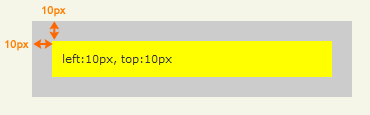 設置イメージ
css()の使用例サンプルを見る
<!DOCTYPE html PUBLIC "-//W3C//DTD XHTML 1.0 Transitional//EN" "http://www.w3.org/TR/xhtml1/DTD/xhtml1-transitional.dtd">
<html xmlns="http://www.w3.org/1999/xhtml" xml:lang="ja" lang="ja">
    <head>
        <meta http-equiv="Content-Type" content="text/html; charset=utf-8" />
        <meta http-equiv="Content-Language" content="ja" />
        <meta http-equiv="Content-Script-Type" content="text/javascript" />
        <meta http-equiv="Content-Style-Type" content="text/css" />
        <meta http-equiv="imagetoolbar" content="no" />
        <title>スタイル操作:位置決め:position()の使用例 | jQuery</title>
        <link rel="stylesheet" type="text/css" href="/content/lib/global.css" />
        <script src="https://ajax.googleapis.com/ajax/libs/jquery/1.3.2/jquery.min.js"></script>
        <script type="text/javascript">
            $(function(){
                var p=$("#parent p");
                var position = p.position();
                $("#parent p").text("left:"+position.left+"px, top:"+position.top+"px");
            });
        </script>
        <style type="text/css">
            #parent   { margin:0; padding:10px; background:#ccc;  position:relative; width:300px; }
            #parent p { margin:10px;  padding:10px; background:yellow; }
        </style>
    </head>
    <body>
        <div id="wrap">
            <h1>スタイル操作:位置決め:position()の使用例 | jQuery</h1>
            <p>▼親要素からの相対位置を取得します。
<!-- CODE -->
            <div id="parent"><p>div#child</p></div>
<!-- / CODE -->
        </div>
    </body>
</html>
scrollTop()
上からのスクロール位置を取得
2009/2/27
scrollTop() 戻り値:整数
最初にマッチした要素の上からのスクロール位置を取得します。
このメソッドは、表示・非表示にしている要素の両方で動作します。
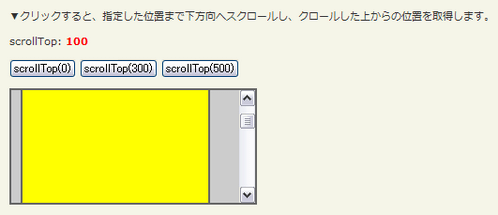 設置イメージ
scrollTop()、scrollTop(val)の使用例サンプルを見る
<!DOCTYPE html PUBLIC "-//W3C//DTD XHTML 1.0 Transitional//EN" "http://www.w3.org/TR/xhtml1/DTD/xhtml1-transitional.dtd">
<html xmlns="http://www.w3.org/1999/xhtml" xml:lang="ja" lang="ja">
    <head>
        <meta http-equiv="Content-Type" content="text/html; charset=utf-8" />
        <meta http-equiv="Content-Language" content="ja" />
        <meta http-equiv="Content-Script-Type" content="text/javascript" />
        <meta http-equiv="Content-Style-Type" content="text/css" />
        <meta http-equiv="imagetoolbar" content="no" />
        <title>スタイル操作:位置決め:scrollTop()、scrollTop(val)の使用例 | jQuery</title>
        <link rel="stylesheet" type="text/css" href="/content/lib/global.css" />
        <script src="https://ajax.googleapis.com/ajax/libs/jquery/1.3.2/jquery.min.js"></script>
        <script type="text/javascript">
            $(function(){
                var p=$("#sample");
                p.scrollTop(100);
                res();
                $("#btn0").click(function(){
                    p.scrollTop(0);
                    res();
                });
                $("#btn300").click(function(){
                    p.scrollTop(300);
                    res();
                });
                $("#btn500").click(function(){
                    p.scrollTop(500);
                    res();
                });
                function res(){
                    $("#res").html("scrollTop: <strong>"+p.scrollTop()+"</strong>");
                }
            });
        </script>
        <style type="text/css">
            #sample {
                background:#ccc;
                margin:0; padding:10px;
                position:relative;
                width:240px; height:100px;
                overflow:auto;
                border:2px solid #666;
            }
            #sample p {
                margin:0; padding:10px;
                width:80%; height:1000px;
                background:yellow;
                border:2px solid #666;
            }
            strong { color:red; }
        </style>
    </head>
    <body>
        <div id="wrap">
            <h1>スタイル操作:位置決め:scrollTop()、scrollTop(val)の使用例 | jQuery</h1>
            <p>▼クリックすると、指定した位置まで下方向へスクロールし、クロールした上からの位置を取得します。</p>
<!-- CODE -->
            <p id="res"></p>
            <p>
                <button id="btn0">scrollTop(0)</button>
                <button id="btn300">scrollTop(300)</button>
                <button id="btn500">scrollTop(500)</button>
            </p>
            <div id="sample"><p>#sample p</p></div>
<!-- / CODE -->
        </div>
    </body>
</html>
scrollTop(val)
指定した要素まで下方向へからスクロール
2009/2/27
scrollTop(val) 戻り値:jQuery
マッチした要素すべてをを、指定した位置まで下方向へスクロールします。
このメソッドは、表示・非表示にしている要素の両方で動作します。
第1引数valには、スクロールしたい位置(top)を数値で指定します。
設置イメージscrollTop()、scrollTop(val)の使用例サンプルを見る
<!DOCTYPE html PUBLIC "-//W3C//DTD XHTML 1.0 Transitional//EN" "http://www.w3.org/TR/xhtml1/DTD/xhtml1-transitional.dtd">
<html xmlns="http://www.w3.org/1999/xhtml" xml:lang="ja" lang="ja">
    <head>
        <meta http-equiv="Content-Type" content="text/html; charset=utf-8" />
        <meta http-equiv="Content-Language" content="ja" />
        <meta http-equiv="Content-Script-Type" content="text/javascript" />
        <meta http-equiv="Content-Style-Type" content="text/css" />
        <meta http-equiv="imagetoolbar" content="no" />
        <title>スタイル操作:位置決め:scrollTop()、scrollTop(val)の使用例 | jQuery</title>
        <link rel="stylesheet" type="text/css" href="/content/lib/global.css" />
        <script src="https://ajax.googleapis.com/ajax/libs/jquery/1.3.2/jquery.min.js"></script>
        <script type="text/javascript">
            $(function(){
                var p=$("#sample");
                p.scrollTop(100);
                res();
                $("#btn0").click(function(){
                    p.scrollTop(0);
                    res();
                });
                $("#btn300").click(function(){
                    p.scrollTop(300);
                    res();
                });
                $("#btn500").click(function(){
                    p.scrollTop(500);
                    res();
                });
                function res(){
                    $("#res").html("scrollTop: <strong>"+p.scrollTop()+"</strong>");
                }
            });
        </script>
        <style type="text/css">
            #sample {
                background:#ccc;
                margin:0; padding:10px;
                position:relative;
                width:240px; height:100px;
                overflow:auto;
                border:2px solid #666;
            }
            #sample p {
                margin:0; padding:10px;
                width:80%; height:1000px;
                background:yellow;
                border:2px solid #666;
            }
            strong { color:red; }
        </style>
    </head>
    <body>
        <div id="wrap">
            <h1>スタイル操作:位置決め:scrollTop()、scrollTop(val)の使用例 | jQuery</h1>
            <p>▼クリックすると、指定した位置まで下方向へスクロールし、クロールした上からの位置を取得します。</p>
<!-- CODE -->
            <p id="res"></p>
            <p>
                <button id="btn0">scrollTop(0)</button>
                <button id="btn300">scrollTop(300)</button>
                <button id="btn500">scrollTop(500)</button>
            </p>
            <div id="sample"><p>#sample p</p></div>
<!-- / CODE -->
        </div>
    </body>
</html>
scrollLeft()
左からのスクロール位置を設定
2009/2/27
scrollLeft() 戻り値:整数
scrollLeft()メソッドは、最初にマッチした要素の左からのスクロール位置を取得します。 このメソッドは、非表示にしている要素に対しても動作します。
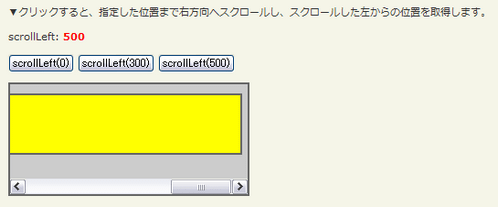 設置イメージ
scrollLeft()、scrollLeft(val)の使用例サンプルを見る
<!DOCTYPE html PUBLIC "-//W3C//DTD XHTML 1.0 Transitional//EN" "http://www.w3.org/TR/xhtml1/DTD/xhtml1-transitional.dtd">
<html xmlns="http://www.w3.org/1999/xhtml" xml:lang="ja" lang="ja">
    <head>
        <meta http-equiv="Content-Type" content="text/html; charset=utf-8" />
        <meta http-equiv="Content-Language" content="ja" />
        <meta http-equiv="Content-Script-Type" content="text/javascript" />
        <meta http-equiv="Content-Style-Type" content="text/css" />
        <meta http-equiv="imagetoolbar" content="no" />
        <title>スタイル操作:位置決め:scrollLeft()、scrollLeft(val)の使用例 | jQuery</title>
        <link rel="stylesheet" type="text/css" href="/content/lib/global.css" />
        <script src="https://ajax.googleapis.com/ajax/libs/jquery/1.3.2/jquery.min.js"></script>
        <script type="text/javascript">
            $(function(){
                var p=$("#sample");
                p.scrollLeft(100);
                res();
                $("#btn0").click(function(){
                    p.scrollLeft(0);
                    res();
                });
                $("#btn300").click(function(){
                    p.scrollLeft(300);
                    res();
                });
                $("#btn500").click(function(){
                    p.scrollLeft(500);
                    res();
                });
                function res(){
                    $("#res").html("scrollLeft: <strong>"+p.scrollLeft()+"</strong>");
                }
            });
        </script>
        <style type="text/css">
            #sample {
                background:#ccc;
                margin:0; padding:10px;
                position:relative;
                width:240px; height:100px;
                overflow:auto;
                border:2px solid #666;
            }
            #sample p {
                margin:0; padding:10px;
                width:720px; height:4em;
                background:yellow;
                border:2px solid #666;
            }
            strong { color:red; }
        </style>
    </head>
    <body>
        <div id="wrap">
            <h1>スタイル操作:位置決め:scrollLeft()、scrollLeft(val)の使用例 | jQuery</h1>
            <p>▼クリックすると、指定した位置まで右方向へスクロールし、スクロールした左からの位置を取得します。</p>
<!-- CODE -->
            <p id="res"></p>
            <p>
                <button id="btn0">scrollLeft(0)</button>
                <button id="btn300">scrollLeft(300)</button>
                <button id="btn500">scrollLeft(500)</button>
            </p>
            <div id="sample"><p>#sample p</p></div>
<!-- / CODE -->
        </div>
    </body>
</html>
scrollLeft(val)
指定した要素まで右方向へスクロール
2009/2/27
scrollLeft(val) 戻り値:jQuery
マッチした要素すべてを、指定した位置まで右方向へスクロールします。
このメソッドは、表示・非表示にしている要素の両方で動作します。
第1引数valには、スクロールしたい位置(left)を数値で指定します。
設置イメージscrollLeft()、scrollLeft(val)の使用例サンプルを見る
<!DOCTYPE html PUBLIC "-//W3C//DTD XHTML 1.0 Transitional//EN" "http://www.w3.org/TR/xhtml1/DTD/xhtml1-transitional.dtd">
<html xmlns="http://www.w3.org/1999/xhtml" xml:lang="ja" lang="ja">
    <head>
        <meta http-equiv="Content-Type" content="text/html; charset=utf-8" />
        <meta http-equiv="Content-Language" content="ja" />
        <meta http-equiv="Content-Script-Type" content="text/javascript" />
        <meta http-equiv="Content-Style-Type" content="text/css" />
        <meta http-equiv="imagetoolbar" content="no" />
        <title>スタイル操作:位置決め:scrollLeft()、scrollLeft(val)の使用例 | jQuery</title>
        <link rel="stylesheet" type="text/css" href="/content/lib/global.css" />
        <script src="https://ajax.googleapis.com/ajax/libs/jquery/1.3.2/jquery.min.js"></script>
        <script type="text/javascript">
            $(function(){
                var p=$("#sample");
                p.scrollLeft(100);
                res();
                $("#btn0").click(function(){
                    p.scrollLeft(0);
                    res();
                });
                $("#btn300").click(function(){
                    p.scrollLeft(300);
                    res();
                });
                $("#btn500").click(function(){
                    p.scrollLeft(500);
                    res();
                });
                function res(){
                    $("#res").html("scrollLeft: <strong>"+p.scrollLeft()+"</strong>");
                }
            });
        </script>
        <style type="text/css">
            #sample {
                background:#ccc;
                margin:0; padding:10px;
                position:relative;
                width:240px; height:100px;
                overflow:auto;
                border:2px solid #666;
            }
            #sample p {
                margin:0; padding:10px;
                width:720px; height:4em;
                background:yellow;
                border:2px solid #666;
            }
            strong { color:red; }
        </style>
    </head>
    <body>
        <div id="wrap">
            <h1>スタイル操作:位置決め:scrollLeft()、scrollLeft(val)の使用例 | jQuery</h1>
            <p>▼クリックすると、指定した位置まで右方向へスクロールし、スクロールした左からの位置を取得します。</p>
<!-- CODE -->
            <p id="res"></p>
            <p>
                <button id="btn0">scrollLeft(0)</button>
                <button id="btn300">scrollLeft(300)</button>
                <button id="btn500">scrollLeft(500)</button>
            </p>
            <div id="sample"><p>#sample p</p></div>
<!-- / CODE -->
        </div>
    </body>
</html>